1
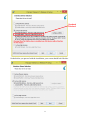
At the end of the installation, you will be prompted to restart your computer.
After restarting your computer, connect the two USB cables of Goniometer G1.1 to your
computer and launch the CAB Analyzer software by double clicking the shortcut that says “Drop
Imaging” on your desktop.
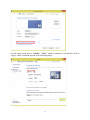
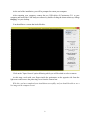
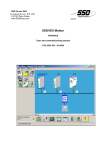
You should have a screen that looks like this:
Click on the "Open Camera" option following which you will be asked to select a camera.
At this stage, reach with your fingers inside the goniometer on the opposite side from the
light source and remove the protecting cover from the camera lens.
With this, you have completed your installation successfully, and you should be able to see a
live image on the computer screen.
5