1
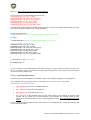
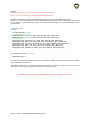
Basics Keystroke basics Introduction You can write your own configuration files without the T.A.R.G.E.T graphical user interface (GUI). To do so, we will use our own programming language, which is usually called “script”. This language follows on directly from a document written by Dr. James “Nutty” Hallows: this document provided a complete overhaul of what a device programming language might be. With the HOTAS Cougar, Thrustmaster pushed the level of controller programmability to new levels. The basic structure of that script was well-suited to mid-core users, and its features generally satisfied everyone. Over time, however, some advanced coders began to feel frustrated and that the basic structure limited their creativity. This new programming language provides a solution for these users. This new language is very powerful. You can achieve the same objectives in different ways, by creating your own functions and linking them to certain external languages... there are almost no limits to what you can do. To make it accessible to everybody, we have included many new functions which provide users with more possibilities than with the HOTAS Cougar. These new functions also provide a good way to discover and learn how to use the script. Most of this manual will be dedicated to describing these functions, as a reference guide. The document then provides examples of using advanced programming. We recommend that you learn the functions provided first. If you are new to programmable controllers, we suggest that you learn to use the T.A.R.G.E.T graphical user interface (GUI) first. This experience will really help you when you start to learn the script. The best way to learn the script is just to practice. While it may seem heavy-going to begin with, you will soon find it simple; in fact, the learning curve is very quick. Reading this manual will give you an overall understanding of the new script; however, practicing the script is the only way to really learn and understand it. This document gives you all the tools you need to get started. First things to understand T.A.R.G.E.T isn’t just a simple graphical user interface – it is also a powerful driver that is able to simulate other physical devices such as a mouse, keyboard or joystick. These devices allow us to simulate all the inputs we need to manage simulator software. All of the human action on the physical controllers will be merged into one single virtual device, and then sent to the flight simulator software. This virtual device may be a combination of several Thrustmaster controllers: Stick + Throttle Stick + Throttle + MFDs, etc. Here is what happens when you launch a configuration: The physical controllers are disconnected (virtually). A virtual controller is connected. You may then launch your flight simulator software. Advantages of this system: Different USB devices can interact directly. Configuration is easier in the flight simulator control panel, with just one ID to manage. Management is simplified, with one program for all devices. Compatibility with older software is increased. 2/60 - T.A.R.G.E.T Script Editor Basics User Manual v1.5










![[User manual (English) - v1.6] 1.7 MB](http://vs1.manualzilla.com/store/data/005855357_1-51a3ddd110ebec5d1eef2b5791ba3868-150x150.png)