1
Quick start guide
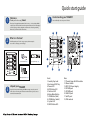
Disk Installation
5
If your system was purchased with capacity, please skip this section and
immediately go to next section. If your system was purchased without disks,
install each disk into the provided disk trays and fasten using the supplied
hdd screws. Do not use
!! any other mounting screws other than the ones provided
with your system. System or disk damage may occur if using non-approved
mounting hardware.
!
7
Connecting Your TAU401
Your TAU401 can be connected to a Mac or Windows-based workstations through
a choice of small computer interface connections such as FW400, FW800, High!
speed USB2.0 and eSATA.
Hard Disk
Figure 8.
Disk Tray
Figure 1.
Figure 2.
Disk tray - Bottom view
Insert Disk Module
6
After fastening each disk, insert the disk trays in the open disk bay on your
system. For added security your system is equipped with locking
disk bays to prevent !accidental or malicious disk removal.
Gently “press” tray handle to insert HDD
Figure 7.
Do not connect two ports at the same time. Doing so may
cause your TAU401 to function incorrectly. Always select
one interface port at atime.