1
PROFIBUS USER MANUAL
Leine & Linde AB
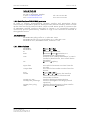
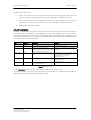
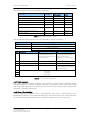
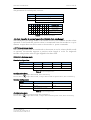
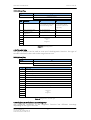
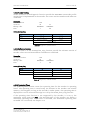
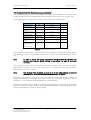
DDLM_Slave_Diag
Octet
7
Bits
7
6
5–0
Data
0
0
xxh
Set to 00.
Length including header
Extended diagnosis
Table 15 Diagnostic header
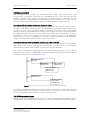
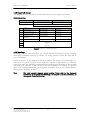
4.6.2 Alarms
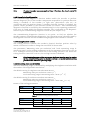
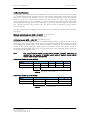
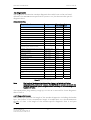
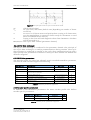
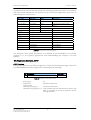
Alarm is generated by the encoder when failure occurs which effects the position
value. Octet 8 in the diagnostic function (DDLM_Slave_Diag) indicates the status of
the alarms. Additional alarms for device class 2 are added in the diagnostic octet 17.
If an alarm is given, the Ext_Diag bit and the Stat_Diag bit in the diagnostic function
are set to high and remain high until the alarm is reset and the encoder can provide a
correct position value. Alarms can be reset (deleted) when all encoder parameters are
within the specified value ranges and the position value is correct.
Note:
Not every encoder supports every alarm. For encoders of class 2 the diagnostic
information "supported alarms" (see Chapter 0) makes it possible to find out
which individual alarm bits are supported.
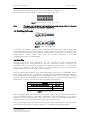
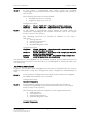
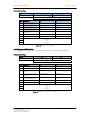
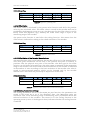
DDLM_Slave_Diag
Octet
8
Bits
7–0
Alarms
Bits
Definition
0
Position error
No
Yes
1
Voltage supply error
No
Yes
2
Current is too high
No
Yes
3
Commissioning
di
ti
Memory error
OK
Error
No
Yes
4
5
6
7
=0
=1
Currently
not
assigned
Table 16 Alarms
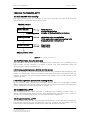
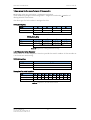
4.6.3 Operating Status
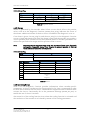
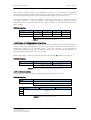
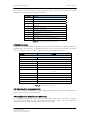
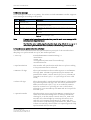
Octet 9 in the diagnostic function provides information about encoder-specific
parameters. A class 2 encoder sets the functionality bit for class 2 commands in order
to show the DP master that all class 2 commands are supported. The DP master must
activate the class 2 functionality bit in the parameter message (DDLM_Set_Prm) to
enable the use of class 2 functions.
The status bit of the scaling function is set when the scaling function is activated and
the resolution of the encoder is calculated by means of the scaling parameters.
Part Id: 634814-01
Document Id: 634814 Ver. 01
Publication date: 2008-02-05
21