1
SYSTEM SETUP
Rating Level Setup (CONTINUED)
6
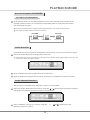
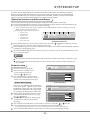
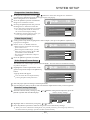
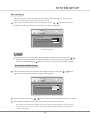
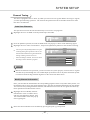
To change the password, please highlight the "New" in the above figure and press the
[SELECT] button. Now the TV screen will display:
New Password
New password
OK
Confirm password
Cancel
7
Select the "New password" by the cursor buttons and input the new password by number buttons.
8
Select the "Confirm password" by the cursor buttons and input this password again by
number buttons.
The input password in the "New password " must accord with that in the "Confirm password".
9
Highlight the "OK" by cursor buttons and then press the [SELECT] button.
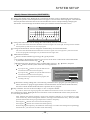
After setting the rating level, when playing the disc with the rating level higher than what you
have set, you must input the password.
If you forget the password, you may input the super password.
Digital Audio Output Setup
1
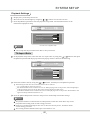
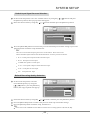
This unit has digital audio output jacks. So you can enjoy the higher quality audio with an
amplifier with digital audio decoders.
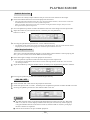
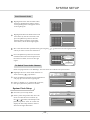
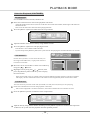
Access the playback setup menu. Select the item "Digital audio output" by the [ ], [ ]
buttons, and then press the [SELECT] button. A pop-up menu will pop up:
GNRL
GNRL
PLAY
PLAY
PLAY
REC
REC
LANGTUNERTUNER
CLOCK CLOCK
LANG
Playback Setup
2
3
TV aspect ratio
Pan Scan
Rating level
OFF
Digital audio output
RAW
Closed captions
RAW
OFF
LPCM
Analog audio output
5.1CH
Select the proper value by the [ ], [ ] buttons and then press the [SELECT] button.
Press the [RETURN] button to return to the previous menu and proceed other settings.
Analog Audio Output Setup
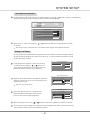
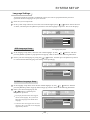
This setting is used to select an analog audio output format between the 2CH analog mix audio
output and the Dolby 5.1 CH analog output.
1
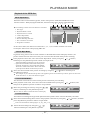
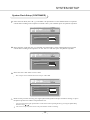
Select the "Analog audio output" item by the [
], [
] buttons, and then press the [SELECT]
button. A pop-up list will appear:
2
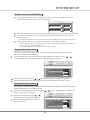
Select the desired value by the [
], [
]
GNRL
GNRL
PLAY
PLAY
PLAY
REC
REC
LANGTUNERTUNER
CLOCK CLOCK
LANG
buttons then press the [SELECT] button.
3
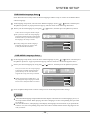
Press the [RETURN] button to return to
Playback Setup
the previous menu.
TV aspect ratio
Pan Scan
Rating level
OFF
Digital audio output
RAW
Closed captions
OFF
Analog audio output
5.1CH
2CH
5.1CH
42