1
2. Locate the part within the stock
3. Setup the tools needed
4. Cut out the part
This sounds obvious, but if the appropriate controls are not at hand for each step, CNC
operation becomes inconvenient.
The first four pages of the screen set support the “Four Steps”.
Step 1 - Load G-Code:
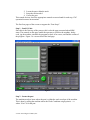
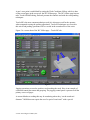
Since this is the first step of the process, this is also the page presented when MSM
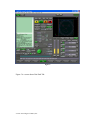
starts. The controls on this page enable the operator to reference the machine, load gcode, jog the machine, simulate the program to check it for errors, and find the extents of
the program. Figure 1 is a screen shot of the load page.
Figure 1
Step 2 - Locate the part
The machine needs to know where the part is within the work envelope of the machine.
This is done by telling the machine where the Work Coordinate origin point is – i.e.
where “Zero” is for the part.
© 2011-2012 Calypso Ventures, Inc.