1
Using the Radlink GPS in a
Posterior Approach THA Procedure
Continued
7
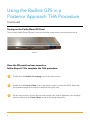
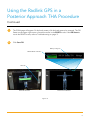
The SCAN page will appear. On the body avatar, click the body part to be scanned. The DR
Status on the upper right corner of screen must be in the READY mode. If the DR Status is
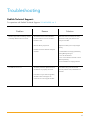
not in the READY mode, refer to Troubleshooting on page 11.
8
Click Start DR.
Battery Charge %
READY Mode indicator
Start DR
Vieworks DR Panel
Perkin Elmer DR Panel
Figure 10
6