1
Using the Radlink GPS in a
Posterior Approach THA Procedure
Note: Your GPS system has been provided with either a Vieworks DR Panel or a Perkin Elmer DR Panel.
Follow the steps below to turn on the panel. Then proceed to steps 4-13 to complete the case.
Turning on the Vieworks DR Panel
1
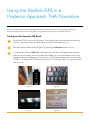
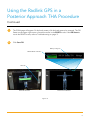
Once the GPS is on, turn on the DR panel. Press and hold the power button until the panel
turns on. The green, amber, and blue lights must all be illuminated. (Figure 5)
2
Check the battery status of the DR panel by pressing the Windows button. (Figure 6)
3
On the task bar, click the FMC icon. The battery level will then be displayed at the bottom
of the window. If battery level is low, replace the battery. It is recommended to have a fully
charged battery at the beginning of a case. (Figure 7) The battery charge shows in increments
of 25%. (i.e. a battery with 75% charge will show as 75). Leave the FMC icon open during the
case. (Figure 8)
Figure 5
Figure 6
Figure 7
Figure 8
4