1
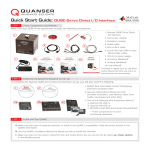
STEP 5 Testing the QUBE-Servo
Follow the procedure below to test your QUBE-Servo experiment.
A
B
Make sure your PC
is powered ON.
On the Resources DVD (supplied with the QUARC package), locate the
Quick Start folder: Rotary\QUBE-Servo\Quick Start. Copy the Quick
Start folder to your local hard drive.
Note: Browse online for the latest QUBE-Servo resources at
www. quanser.com/courseware
C
E
G
Open the Simulink model file (.mdl) found under
the Quick Start folder on your hard drive.
F
Click on the Build Model
button on the Simulink
model toolbar.
Double-click on the HIL Initialize block and
choose the board that is installed on your
system (e.g. qube_servo_usb).
Once the model code
has been compiled,
click on the Connect
To Target button.
Click on the Run button to start the QUARC real-time model.
H
The scopes should look similar to those shown here.
Servo Angle (deg)
I
D
Motor Voltage (V)
The measured servo angle (in purple) should be
tracking the desired angle (in yellow) in the Servo
Angle (deg) scope. The motor voltage is displayed
in the Motor Voltage (V) scope. If not, consult the
Troubleshooting section at the end of this guide.
Click on the Simulink Stop button to stop the running model