1
1575H112 Ed.02
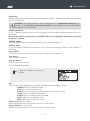
Description:
It allows a name with up to 10 characters to be entered in order to describe the input ( Cold Room 1, Fruit, Ext.
probe, etc.), using the built-in text editor.
Display units (Only 4-20mA)
Define the units to be displayed using the built-in text editor.
Offset
It allows a possible reading error in the probe to be corrected. This may be very useful when it cannot be put into
the most suitable place.
Enable alarm
It allows the maximum and minimum alarms to be activated. Select one of the following options:
No: The alarms are disabled.
Minimum: Only the minimum value reached alarm is enabled.
Maximum: Only the maximum value reached alarm is enabled.
Minimum and Maximum: The maximum and minimum value reached alarms are enabled.
Max. alarm level
Defines the maximum value from which the alarm will be activated.
Min. alarm level
Defines the minimum value at which the alarm will be activated.
Alarm delay
It configures the delay time from when the maximum or minimum value is reached until the alarm is activated (in
minutes).
Alarm output
It configures the behaviour of the alarm output:
No output: The alarm is only displayed on screen.
Buzzer only: The alarm is displayed on the screen and it activates an acoustic signal.
Relay only: The alarm is displayed on the screen and it activates the maximum or minimum alarm relay.
Buzzer & Relay: The alarm is displayed on the screen, it activates an acoustic signal and activates the
maximum or minimum alarm relay.
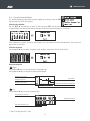
5.4.- Text editor
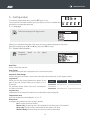
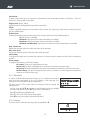
In order to facilitate the interpretation of data, you can customise the names of
each input with a description of up to 10 characters. If the input type is 420mA, you will also be able to edit the display units.
The lower section of the screen shows the changes carried out during the
editing process.
- Use the arrow keys P, O, N and Q to scroll through the various available
characters and options and the SET key to confirm the selection.
- Select 9 to delete the highlighted text.
- Select L or K to scroll within the text being edited.
- Select 8 to save your changes and exit the edit menu.
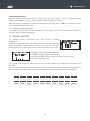
5.5- Contrast
Set the screen's contrast level by pressing keys P and O.
50
16