1
1575H112 Ed.02
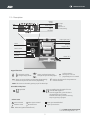
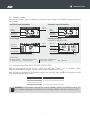
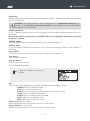
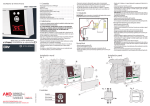
1.3.- Description
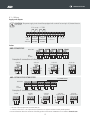
Battery
status
Full charge
Charging
Date
Alarm status*
Defective or not
connected (blinking)
Time
Day of
the week
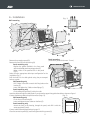
Paper input lever**
Paper feed key**
Print/
fast print/
stop print key**
Screen
Search arrows
Escape key
Help key
Printer lid**
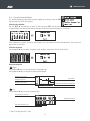
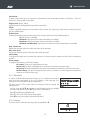
Keypad functions
Vertical scrolling/Change value.
Changes the input to be displayed.
ESC Allows you to exit without saving changes (Programming).
Returns to the previous menu or exits programming.
¿
Horizontal scrolling.
Changes display modes
SET
Confirms selection.
Pressing it for 5 sec. the
programming menu is accessed.
Displays the help text for the parameter or
function selected.
NOTE: The alarms are silenced by pressing any of the above keys.
On models with printer.
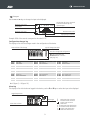
Paper feed
On standby, prints the graph of the last
calendar week logged.***
From the logger menu, prints the data or
the graph shown on the screen.
From the alarm menu, prints the alarm log.
Stops any printing in progress.
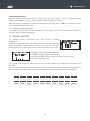
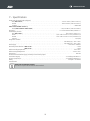
*Alarm status
Err
Alarm activated
Alarm signal activated
Alarm signal muted/disabled
Maximum alarm
Minimum alarm
Digital input activation
Probe error (open/crossed/off-scale)
** Only AKO-15742/15752/15782
*** If the recording interval is 15'.
5