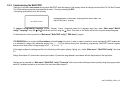
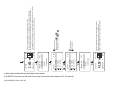
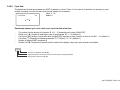
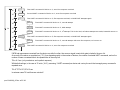
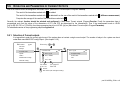
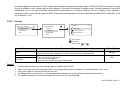
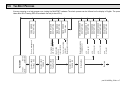
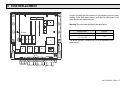
1
USER’S AND PROGRAMMING MANUAL v.01._ _ Manufacturer: NIVELCO Process Control Co. 1043 Budapest, Dugonics u. 11. Phone: 889-0100 ♦ Fax: 889-0200 e-mail: [email protected] ♦ www.nivelco.com prw1101a0600p_05.doc ♦ 1 / 89 prw1101a0600p_05.doc ♦ 2 / 89 TABLE OF CONTENTS 1. INTRODUCTION.............................................................................................. 5 1.1. THE HART SYSTEM .................................................................................. 6 1.1.1. 1.1.2. The Communication ............................................................................................6 The structure of the system.................................................................................6 1.1.2.1 Point-to-point connection........................................................................7 1.1.2.2 Multipoint connection (Multidrop). Multiple slaves connected in parallel.8 1.1.3. Properties of HART-capable devices..................................................................9 1.1.4. HART Command set ..........................................................................................9 1.1.4.1 Universal commands ............................................................................10 1.1.4.2 General commands ..............................................................................11 1.1.4.3 Device –specific commands.................................................................11 2. TECHNICAL DATA........................................................................................ 12 2.1. ACCESSORIES ......................................................................................... 13 3. ORDER CODE ............................................................................................... 13 3.1. DIMENSIONS ........................................................................................... 14 3.2. CONDITIONS OF USE OF THE EX UNITS ....................................................... 15 4. ELECTRICAL CONNECTION ....................................................................... 16 4.1. ARRANGEMENT OF THE CABLE TERMINALS ............................................... 16 4.2. WIRING................................................................................................... 17 4.2.1. Transmitter connection (wiring).........................................................................17 4.2.1.1 Wiring of 2-wire units (transmitters)......................................................17 4.2.1.2 Wiring of 4-wire units (transmitters with separate power supply) ........18 4.2.1.3 Wiring of Combined Systems (containing both 2- and 4-wire transmitters) ........................................................19 4.2.2. Wiring of Universal Interface Modules (UIM-s; order code: PJK-100)..............20 5. PROGRAMMING OF MultiCONT.................................................................. 21 5.1. STEPS OF PROGRAMMING......................................................................... 22 5.1.1. 5.1.2. 5.1.3. 5.1.4. 5.1.5. Scrolling and selecting menu items ..................................................................23 Activation (of devices, relays and current outputs) selection (of language and operation mode)....................................................................24 Assignment of outputs (relay and current) to the device .................................25 Entering parameter values ................................................................................26 Editing character variables................................................................................27 5.2. 5.2.1. Steps of Commissioning a MultiCONT Network ...............................................27 Preparation of the Transmitters and the Universal Interface Modules. ............28 5.2.1.1 Preparation of the Transmitters............................................................28 5.2.1.2 Preparing of the Universal Interface Modules ......................................28 5.2.2. Wiring ............................................................................................................28 5.2.3. Commissioning the MultiCONT.........................................................................29 5.3. MAIN MENU ..............................................................................................30 5.4. MULTICONT CONFIGURATION...................................................................31 5.4.1. 5.4.2. 5.4.3. DEV detect: .......................................................................................................32 EXT detect:........................................................................................................37 Display ............................................................................................................37 5.4.3.1 Source...................................................................................................38 5.4.3.2 Rounding ..............................................................................................39 5.4.3.3 Stepping................................................................................................39 5.4.4. List display.........................................................................................................40 5.4.5. User Display: .....................................................................................................41 5.4.5.1 Editing the user display ........................................................................41 5.4.5.2 The various user displays.....................................................................42 5.4.6. HART ............................................................................................................43 5.4.6.1 Short TAG.............................................................................................43 5.4.6.2 Short Address .......................................................................................44 5.4.6.3 Message ...............................................................................................44 5.4.6.4 Description............................................................................................44 5.4.6.5 Date ......................................................................................................45 5.4.6.6 Command Set.......................................................................................45 5.4.6.7 Retrial count..........................................................................................48 5.4.6.8 Cycle count ...........................................................................................48 5.4.6.9 Cycle time: ............................................................................................49 5.4.6.10 Test .................................................................................................51 5.4.6.11 Statistics................................................................................................52 5.4.7. USER RS485 ....................................................................................................52 5.4.8. Secret code .......................................................................................................53 5.4.9. Language ..........................................................................................................54 5.4.10. Background lighting...........................................................................................54 5.4.11. Report: ............................................................................................................55 5.4.12. Prog CS ............................................................................................................55 prw1101a0600p_05.doc ♦ 3 / 89 5.5. PROGRAMMING DEVICES.......................................................................... 56 5.6. REMOTE PROGRAMMING .......................................................................... 57 5.6.1. Editing the linearisation table ............................................................................59 5.7. RELAY CONFIGURATION........................................................................... 60 5.7.1. 5.7.2. 5.7.3. Relay Selection .................................................................................................60 Properties of the selected relay ........................................................................61 Relay programming...........................................................................................62 5.7.3.1 Source selection ...................................................................................62 5.7.3.2 Function ................................................................................................62 5.7.3.3 Configuring parameters........................................................................65 5.7.3.4 Inversion ...............................................................................................66 5.7.3.5 Deleting TOT ........................................................................................66 5.7.3.6 Refreshing TOT ....................................................................................67 5.7.3.7 Testing ..................................................................................................67 9.4. ADDITIONAL INFORMATION ........................................................................83 9.4.1. 9.4.2. 9.4.3. 9.4.4. 9.4.5. 9.4.6. 9.4.7. Problems that may occur during remote programming: ...................................83 MultiCONT transmits the parameters without examining them, and the testing is done by the device. ..............................................................83 Use of Second HART Master ( Hand-Held or HART modem + Eview program ) ............................................83 Upon exiting remote programming, the unit tests to see if the transmitter really exited the remote programming mode ....................................................83 When a transmitter does not respond, then „Response” error is entered into the table, but upon termination of the error (the device responds), this entry is automatically cleared from the table (and does not need to be acknowledged).........................................................83 Upon exiting the menu, MultiCONT immediately saves the modifications.......83 The error list is cleared when the device is put off ...........................................83 5.8. OPERATION AND PARAMETERS OF CURRENT OUTPUTS .............................. 69 5.8.1. 5.8.2. 5.8.3. Selection of Current outputs .............................................................................69 Properties of the selected Current Output ........................................................70 Current Output programming ............................................................................70 5.8.3.1 Source selection ...................................................................................70 5.8.3.2 Function ................................................................................................71 5.8.3.3 Parameter configuration .......................................................................72 5.8.3.4 Testing ..................................................................................................72 5.9. THE BOOT PROCESS ............................................................................... 73 5.10. MEASUREMENT MODES ........................................................................... 75 6. ERROR CODES............................................................................................. 76 7. HARDWARE PROTECTION OF SETTINGS ................................................ 78 8. FUSE REPLACEMENT ................................................................................. 79 9. SERVICING.................................................................................................... 80 9.1. BOX MESSAGES:..................................................................................... 80 9.2. OTHER MESSAGES:................................................................................. 81 9.3. TROUBLESHOOTING ................................................................................. 82 9.3.1. It is impossible to enter the „Main menu”/”Relays” or „Main menu”/„Current outputs” menu: ......................82 9.3.2. It is impossible to enter the „Main menu”/”Devices” menu: ..............................82 9.3.3. A „Please wait” message appears upon selecting „DEV detect”.....................82 The result of „DEV detect” is the „No device” message .................................................82 9.3.5. The unit does not start up when switched on ...................................................82 9.3.6. The „Response” error entry is too frequent.......................................................82 prw1101a0600p_05.doc ♦ 4 / 89 Appendix 1. ManufacturerID codes of HART-capable devices................... 84 Appendix 2 The menu system of the MultiCONT PRW-100 ........................ 85 Appendix 3 Relay programming .................................................................... 87 Appendix 4 Current output programming..................................................... 88 Appendix 5 Measurement mode .................................................................... 89 Thank you for choosing a NIVELCO instrument. We are sure that you will be satisfied throughout its use! 1. INTRODUCTION The MULTICONT unit is a universal interface between Nivelco’s HART-capable intelligent level transmitters and the other elements of the process control system like the PC-s , PLC-s, displays and the actuators. Besides its role as an interface, the MultiCONT ensures the powering of the 2-wire transmitters while being capable of complex control tasks. The MultiCONT units support communication with a maximum of 15 ordinary or 2 Ex certified Nivelco’s HART-capable 2- and / or 4-wire transmitters. Should a system contain more transmitters than one MultiCONT can handle, further MultiCONT units can be wired in series via an RS485 line. Remote programming of the transmitters and downloading of the parameters and measured data is possible using the MultiCONT. The various outputs such as 4 … 20 mA, relays and digital outputs can be controlled using measured values and new values calculated from the measured values. Large DOT matrix LCD panel facilitate a wide variety of display functions including tank content visualisation. The type and number of outputs of the basic unit can be expanded with external (relay and/or current output) PJK-100 type Universal Interface Modules. The total number of relays included in the Multicont and in the modules must not be more than 64, while that of the analog outputs (4…20 mA outputs) can be maximum 16. A further restriction is that there can be a maximum of 32 Universal Interface Modules. Explosion proof certified versions of the MultiCONT should be installed outside the hazardous area. prw1101a0600p_05.doc ♦ 5 / 89 1.1. THE HART SYSTEM The HART (Highway Addressable Remote Transducer – bus addressable field devices) is a digital communication protocol developed by ROSEMOUNT for industrial measurement applications. A digital signal of small amplitude is placed on the widely used standard 4…20mA output current, and due to its symmetric sinusoidal nature and its small amplitude, it does not affect the accuracy of the output current. Since no extra cable is needed for signal transfer, the already existing cable can be used to realize the transfer. The identification, programming and querying of the transmitters can be done using this communication. Iout [mA] This diagram shows the output signal of a 4…20mA transmitter (device) and the superimposed HART signal, which is essentially a ±0.5 mA modulation of the output current.. 20 mA 4 mA t 1 0 Io + 0,5 mA Io Io – 0,5 mA The enlarged picture shows that we are dealing with frequency modulation, and logical „1” is assigned to 1200 Hz, while „0” is assigned to 2200 Hz. This is called FSK modulation. The communication is realized with systematic series of impulses above described. 1.1.1. The Communication The HART communication is basically a master-slave type, which means that the transmitter – slave – only sends a response when the master (of which there can only be one in the system) sends a query. The master can be a Hand-held Communicator, a PC with a HART modem or a universal interface, in this case, a MultiCONT (naturally, only one can be active). The communication uses standard commands (see chapter 1.1.3) 1.1.2. The structure of the system The system must contain a 230..1000 Ω resistor to guarantee that the HART signal of small amplitude will not load the power supply of unknown output impedance. prw1101a0600p_05.doc ♦ 6 / 89 1.1.2.1 Point-to-point connection When a master (communicator or HART modem with PC or MultiCONT) and a slave are alone in a system, we talk of a point-to-point connection MultiCONT +Us Tx I+ L+ I– L– 255 Ω SH Universal interface RS485 In this case the flowing current is the output current of the transmitters, so if permitted by the loop voltage, even a local indicator can be included into the loop. Essentially, the minimal voltage specified in the manual must remain on the terminals of the transmitters. Since the speed of transfer is 1200bit/sec, communication is slow, because the master queries and the slave responds. This can be speeded up if the querying is left out, and the slave responds continuously every given period of time until the master stops the transfer in the break between 2 data transmissions. This is called “burst mode”. prw1101a0600p_05.doc ♦ 7 / 89 1.1.2.2 Multipoint connection (Multidrop). Multiple slaves connected in parallel. HART’s addressing system can handle 15 devices whereby they are wired in parallel. In this case, the current is the sum of the currents of all the devices in the loop, which is not of informative value. So in this case, the output current of the transmitters should be set to multidrop mode, which means a constant current of 4mA. This automatically happens when the polling address is set between 1..15. (if the polling address is 0, then we should have only one transmitter with 4…20mA output, if the polling address is 1…15, then we will have a constant 4mA). There is a deviation possibility for transmitters whose output current can be programmed to an arbitrary value exceptions, however, in this case, the minimal voltage drop on the terminal of the transmitters must be the minimum specified voltage, otherwise the transmitter(s) will not be able to work (measure or respond) Tx 1 Tx 2 MultiCONT Tx 3 .... Tx 15 +Us I+ L+ I– L– 255 Ω SH Universal interface RS485 In a Multidrop system, the „burst mode” does not work prw1101a0600p_05.doc ♦ 8 / 89 1.1.3. Properties of HART-capable devices These are programmed into the unit during manufacture, some can be configured using a HART MASTER, other cannot (they can be reconfigured only by the manufacturer) Short TAG Short address Message Descriptor Date Factory ID Device type ID Device ID SW version ( Software version ): HW version ( Hardware version ): 8 character device ID. Can be reconfigured. Used to differentiate the 0…15 devices. There can’t be 2 identical „short addresses” in one system. Can be reconfigured A max 32-character arbitrary comment that can be assigned to the device and is generally operation-related. Can be reconfigured A max 16-character arbitrary comment that can be assigned to the device and is generally material-related. Can be reconfigured Date. Can be assigned to the device. Can be reconfigured Factory ID. For Nivelco devices this: 151, cannot be reconfigured Device type ID, cannot be reconfigured The manufacturer’s electronic production number, cannot be reconfigured The Factory ID, the Device Type ID and the Device ID together form the “Long Address”. Software version of the device (see device manual) Hardware version of the device (see device manual) Apart from this, they provide the specification of the HART version according to which the device’s commands work 1.1.4. HART Command set We have seen how to build up a HART system. Using the HART commands, we can decide what the devices should do. Naturally, an ultrasonic transmitter needs commands different from those of a temperature transmitter or maybe a valve, so quite a large number of commands are needed. Every command has a one-byte identifier. The 31st command is enables expansion, and in this case the next 2 bytes form the code of a command (0…65535). HART commands can be divided in to 3 classes: • universal commands 0..30 • general commands 32..121 • device-specific commands 128..253 In all cases, the commands contain an address (this can be short, long address, TAG), which determines the corresponding device. Two devices with the same addresses cannot be connected together. prw1101a0600p_05.doc ♦ 9 / 89 1.1.4.1 Universal commands These are commands understood by all devices, and to which all devices give the same reply. 0. Read unique identifier the addressed device provides the following in it’s reply: – Manufacturer’s code (provided by the HART foundation, see appendix) – Product code (provided by manufacturer, see chapter 5.2.1.1) – Universal command table code ( HART 5 ) – Device ID – Software version – Hardware version – Device status 1. Read primary variable This reads the digital value (Primary Value) that the transmitter sends to the 4…20 mA output. The dimension (unit) also belongs to the numeric value. 2. Read output current in mA and in % 3. Read output current and four dynamic variables The primary, secondary, tertiary and quaternary variables are transmitted. The secondary, tertiary and quaternary variables are specified in the manual of the given device. 6. Modify (short) polling address (Write polling address) If there is more than one device in the loop (multidrop), each device must have a different address. In this case, the address should be configured before connecting the device to avoid errors caused by devices with the same addresses replying at the same time. 11. Read unique device identifier associated with tag Devices are queried based on their short TAG and not based on their addresses. As a result, there must not be more than one device with exactly the same short TAG. prw1101a0600p_05.doc ♦ 10 / 89 12. Read device message (Read message) This reads the 32 character message stored int he non-volatile memory of the device (e.g. T18 35% HCL TANK) 13. Reads 8 character short TAG, 16 character descriptor and date (Read tag, descriptor, date) 14. Read PV sensor information 15. Read output information 16. Read final assembly (serial) number 17. Writes 32 character message (Write message) 18. Write 8 character short TAG, 16 character descriptor and date (Write tag, descriptor, date) 19. Write final assembly number 1.1.4.2 General commands These commands do not need to be understood by all devices. If not understood, nothing happpens, however, if understood, then it must be interpreted according to the standard. Many such commands exist, with the most important ones being: − − − − − − − − − 34: damping (writing settling time) 35: measurement range (writing of upper and lower limits, and/or dimension) 36: Upper limit now! (sets the upper limit – 20 mA) 37: Lower limit now! (sets the lower limit – 4 mA) 40: setting constant current output (can be very useful during testing) 41: Device self-test, sends back the result. 42: Master reset (setting factory default) 50: Reading assignment status of the primary variable (PV), the secondary variable (SV), the tertiary variable (TV) and the quaternary variable (QV). This can not always be read unambiguously, in most cases it can be found in the manual of the device. 109: Switching „Burst” mode on and off. 1.1.4.3 Device –specific commands These commands are specified by the manufacturer. A description of the commands can be found in the device manual. prw1101a0600p_05.doc ♦ 11 / 89 2. TECHNICAL DATA TYPE P Outputs Transmitter Power Supply Display Analogue Relay RS 485 interface HART Connecting cables TÍPUS P Power Supply, Relays, analogue 4 … 20 mA RS 485 interface HART line Number of powered transmitters Power supply / Power consumption / max. power supply Fuse Housing material Mounting Ambient Temperature Ingress protection Ex marking P C, P D, P W P H Intrinsically safe output limitation data Electrical protection Mass prw1101a0600p_05.doc ♦ 12 / 89 -1 - 30 V DC / 60 mA (For Ex Version: 25 V DC / 22 mA) 128 x 64 dot-matrix Max. 2 galvanically isolated 4 … 20 mA outputs, max load of 500 ohm, with over-voltage protection Max. 4 SPDT, 250 V AC, AC1, 5 A Galvanically isolated, HART protocol Output signal level: 0.5 ±0.1 Vpp trapezoid 1200 / 2200 Hz Minimum level of Input signal: 50 mVpp Inbuilt sensor resistance: 255 ohm. -1 - 0.5 … 2.5 mm2 wire cross-section Shielded, twisted cable pair with a cross section of 0.5 … 2.5 mm2 Below1500 m shielded, twisted cable pair with a min.cross section of ∅0.5mm Above 1500 m shielded, twisted cable pair, with a min. cross section of ∅0.8mm max. resistance : 75 ohm, max.capacitance : 200 nF Max. 15 non-Ex (max. 4 Ex) transmitters 85 … 255 V AC 50 … 60 Hz / 12 VA / 255 Veff 11.4 … 28 V AC 50 … 60 Hz / 12 VA / 28 Veff 11.4 … 40 V DC / 11 W / 40 V DC 85 … 255 V AC 50 … 60 Hz T400 mA 11.4 … 28 V AC 50 … 60 Hz és 11,4 … 40 V DC T1A Polycarbonate (PC) Wall mounted -20 °C … +50 °C -30 °C … +50 °C IP 65 II (1) G [EEx ia] IIB Uo = 30 V Io = 140 mA Po = 1 W Lo = 4 mH Co = 200 nF Class I / III 0,9 kg 2.1. ACCESSORIES • • Certificate of Warranty User’s and Programming manual • • Declaration of Conformity 2 universal cable gland sealings 3. ORDER CODE MultiCONT EXPANSION Standard * Non Expandable CODE ENCLOSURE IP 65 wall enclosure W E IP 65 wall enclosure + transparent cover C IP 65 wall enclosure + loackable transparent cover IP 65 wall enclosure + loackable transparent cover + heating * ** CODE R D P INPUT – 1 CODE POWER SUPPLY CODE 1 HART unit 2 HART units 4 HART units 8 HART units 1 2 4 8 Display only 1 relay 2 relay 3 relay 0 1 2 3 85 … 255 V AC 24 V AC / DC 85 … 255 V AC Ex 24 V AC / DC Ex 1 2 5 6 15 HART units M 4 relay 4 1 relay + 1 4…20 mA Analogue output 5 2 relays + 1 4…20 mA Analogue output 6 3 relays + 1 4…20 mA Analogue output 7 4 relays + 1 4…20 mA Analogue output 8 4 relays + 2 4…20 mA Analogue output 9 RS 485 interface RS 485 + 1 4…20 mA A B H** KÓD – OUTPUT Ex: EEx ia The order code of an Ex version should end in „Ex”. The system can be expanded using Relay, Analogue and Combined Modules. Under development prw1101a0600p_05.doc ♦ 13 / 89 3.1. DIMENSIONS B 166 B C A Pg9 or M16 B Pg11 or M20 C Pg11, Pg13.5 or M20 A B 193 B C 75.5 R 2.5 A Pg9 or M16 B Pg11 or M20 C Pg11, Pg13.5 or M20 ∅ 10 P W P C, P D, P H R ESC T P W prw1101a0600p_05.doc ♦ 14 / 89 ARRANGEMENT OF MOUNTING HOLES R OK IrDA IrDA 10 R2 .7 160 160 112 A 107 89.5 75.5 T P C, P D, P H 3.2. CONDITIONS OF USE OF THE EX UNITS • • • • • • The units should be mounted outside the hazardous zone! Device should be protected against direct sunshine! The power supply and ambient temperature values must not exceed those specified in the Technical data! Transmitters installed in hazardous areas must only be connected to the L+ and L- terminals The housing of the transmitter must be grounded! The transmitters must be connected using shielded, twisted cable pairs! prw1101a0600p_05.doc ♦ 15 / 89 4. ELECTRICAL CONNECTION 4.1. ARRANGEMENT OF THE CABLE TERMINALS MAINS 1 RELAY 1 85 ... 255V AC 11.4 ... 40V DC 11.4 ... 28V AC 2 3 4 5 7 CURRENT OUT 1 RELAY 3 6 8 10 9 11 13 12 14 16 15 17 18 19 (+) ( - ) RELAY 2 RELAY 4 CURRENT OUT 2 USER RS485 A B COM 20 21 DEVICES L + L- SH 22 23 24 25 A B COM MODULE RS485 26 27 28 After loosening and removing screws fastening the cover the cables can be connected. The same cable should not be used for AC and DC as well for SELV and mains voltage. For wiring of the transmitters shielded, twisted cable pair (STP) should be used with the length depending on the number of connected units and the electrical properties of cable. RS485 interface: A: TRD+ B: TRD– COM: shielding Cabel Capacitance (pF / m) 95 160 225 Number of Transmitters 65 1 2800 2000 1300 1000 5 2500 1800 1100 900 10 2200 1600 1000 800 15 1850 1400 900 700 Shielding of the connecting cable between the transmitter and the controller should be grounded at one end, connected either to the internal or external part of the earthing screw. Intrinsically safe (Ex) transmitters should be connected through the terminals L+, L– to the controller. These points are galvanically isolated from the other parts of the electronics. The output current, voltage and power are constrained power supply for the Ex transmitter is current-, voltage- and power-limited. prw1101a0600p_05.doc ♦ 16 / 89 4.2. WIRING 4.2.1. Transmitter connection (wiring) Before wiring, please check: if the units (order codes) are HART-capable, the value of the loop current and also if there are two or more units with the same “Short address”. (See 5.2. Steps of commissioning) 4.2.1.1 Wiring of 2-wire units (transmitters) Tx 1 Shielded twisted cable pair Tx 2 MultiCONT Tx 3 +Us Tx N I+ L+ I– L– 250 Ω SH Shielding grounded at the MultiCONT Universal interface In non-Ex versions only RS485 prw1101a0600p_05.doc ♦ 17 / 89 4.2.1.2 Wiring of 4-wire units (transmitters with separate power supply) Tx 1 Shielded twisted cable pair Tx 2 MultiCONT Tx 3 I+ L– I– SH 250 Ω Universal interface Tx 15 85...255 VAC 11,4...28 VAC 11,4...40 VDC prw1101a0600p_05.doc ♦ 18 / 89 RS485 Shielding grounded at the MultiCONT 4.2.1.3 Wiring of Combined Systems (containing both 2- and 4-wire transmitters) Tx 1 Shielded twisted cable pair Shielding grounded at MultiCONT Tx 2 Tx 3 MultiCONT +Us Tx N I+ L+ I– L– I+ SH 250 Ω I– Universal interface 85...255 VAC 11,4...28 VAC 11,4...40 VDC RS485 Tx 1 Shielded twisted cable pair Tx M prw1101a0600p_05.doc ♦ 19 / 89 4.2.2. Wiring of Universal Interface Modules (UIM-s; order code: PJK-100) Connection with shielded twisted pair cable, shielding is grounded at one point, at the MultiCONT. R The terminal resistor is connected to the two farthest points of the cable. (TB and B terminals are connected in PJK 100; and on the MultiCONT the K2 terminal resistor, located next to the terminals, is switched on.) IrDA T Module RS485 A B COM K2: terminal resistor ON OFF K2 24VDC TB B A 24VDC TB B A 24VDC TB B A PJK-102 PJK-120 PJK-111 relay module 4-20 mA module relay + 4-20 mA module The most important rule is that the data transfer line has to be closed at both ends with a resistor, at points farthest from each other. The value of the terminal resistor depends ont he wave impedance of the connecting cable. The interface contains a 120 Ω terminal resistor, so please use a cable with appropriate impedance. A configuration, whereby there aren’t 2 terminal resistors, or where the 2 terminal resistors are not at the farthest points from each other is a bad configuration. In such cases, especially if the data transfer cable is too long, data transfer errors are likely occur. The Universal Interface Modules should be connected one after another on a cable pair. Star-shaped topology is forbidden. The maximum length of the cable 1000m, but in this case a cable with shielded, twisted pair of wires (STP, Shilded Twisted Pair) must be used. The capacitance of the cable should be less than 100 pF/m. The Universal Interface Modules connected to a system must each be given different addresses (0…31), see 5.2.1.2. prw1101a0600p_05.doc ♦ 20 / 89 5. PROGRAMMING OF MultiCONT During programming the following can be performed: − Automatic detection of devices (transmitters) connected to the MultiCONT, and putting them into the list of devices. Devices not on the list are part of the system but are unable to communicate with the MultiCONT (see 5.2.3 Main menu / MultiCONT config / DEV detect). − Activation, inactivation of devices (transmitters) (See 5.2.3 Main menu / Devices).Theoretically all devices in the system should be working. (whether in the list or not). Devices in the list automatically become active. Inactivation can be used to temporarily disable devices from the system. − Activation, inactivation of relays and current outputs (see Attachment 3 and 4) − Relays and current generators of the MultiCONT should also be activated (see Attachment 3 and 4) Assignment of the MultiCONT outputs (relays, current outputs) to devices (transmitters) − Formation of functional values (difference of 2 measured values, sum or average of 2 or more measured values) − Remote programming of devices, although it is practical to program the devices in the laboratory before installation and wiring. (parameters of the transmitters e.g. P01, P02, etc. will be used in this Manual in the same way as described in the Installation and User’s Manual) − Programming of MultiCONT outputs (Relay and current output parameters of the MultiCONT will be identified as RP1, RP2, RP3 and CR1, CR2, CR3 respectively). The programming of systems involving the MultiCONT universal interface assumes a sound knowledge of both the HART standard and the programming of the connected devices. During programming full scale of operation such as polling of devices, functioning of the relays and current outputs will be maintained. Modifications will be automatically saved upon returning back to measurement mode. If the MultiCONT is left in Programming Mode, it will automatically return to measurement 5 minutes after the last key was pressed (modifications will be saved!). prw1101a0600p_05.doc ♦ 21 / 89 5.1. STEPS OF PROGRAMMING Programming can be done using the 6 programming keys with the help of the 128x64 point graphic screen. There are three different kinds of images − − Measurement / operation images (marked with − programming and: capital letters in the upper right corner configuration (Appendix 5): images M Measurement, see 5.10 Measurement mode Bargraph image (output range) U User image, see 5.4 MultiCONT configuration R Relay assignment table C Current output assignment table E Error list, see 6. Error codes Box messages / warnings indicate steps taken by the unit or those to be performed: Name of the menu Selected menu point Scanning HART line Device: 3 Main menu 05 Devices Relays Current generators Number of menu table No further menu points Further menu points down the line Further menu points up and down the line Further menu points up the line HART logical error Click OK See a summary of the programming below. A complete menu system is in Appendix 2. The relevant menu item and the valueor character to be edited appears in a highlighted form. and are used to select options within the menu. The buttons are repetitive i.e. steadily pressing the button results in continuous stepping (the menu repeats at the end). Programming mode can be entered and a menu item can be selected by pressing The and and exited by pressing . buttons are used for editing parameters with numbers or text, selection of local values or for character positioning and for selection in some sub-menus (e.g. Relay functions). Repeating function keys and are used for scrolling numbers and characters when editing parameters with numbers or text. (These two buttons are dual-functional - steady pressing results in continuous stepping up-down and in jumping to the beginning at the end). Use to acknowledge (quit) error messages (deletion of the error list). prw1101a0600p_05.doc ♦ 22 / 89 5.1.1. Scrolling and selecting menu items The various measuring modes (M, B, U, R, C, E) can be selected using and and the Main menu can be entered and left respectively. and (repetitive functioning i.e. steady pressing results in continuous stepping and in jumping to the The desired menu item can be selected using beginning at the end). 1: SE300-1 M 3.125 m 2: Errors: 2 Main menu 605 Devices Relays Current outs : : Default config Restart 123456789ABDCDE F R R1 R2 R3 Relays 01: R_IN_1 02: R_IN_2 03: R_IN_3 6 18 Error report 6E 01: SE300-1: Reply 02: SE300-2: Sensor 01: R_IN_1 Programming Info Short TAG ID 6 19 prw1101a0600p_05.doc ♦ 23 / 89 5.1.2. Activation (of devices, relays and current outputs) selection (of language and operation mode) Devices on the list may be active ( ) or inactive ( ). Only active devices will be queried. Active relays and current outputs would operate according to their configuration, inactive relays are de-energized while inactive current outputs remain 0 mA. Relays 01: R_IN_1 02: R_IN_2 03: R_IN_3 : or 6 18 Relays 01: R_IN_1 02: R_IN_2 03: R_IN_3 : or No active relay. Use and / or 6 18 R_IN_1 is active to switch between active and inactive relay states. Selection of the various modes (Relay mode, current output mode, language, etc.) is done similarly. Language German French Hungarian 5 43 After selection, the chosen language is automatically activated. prw1101a0600p_05.doc ♦ 24 / 89 Language English German French 6 43 or Language English German French 6 43 5.1.3. Assignment of outputs (relay and current) to the device During configuration, the relays and current outputs should be assigned to the field devices and to their variables (PV, SV, TV, QV): - Value has a positive sign (for summation) Value has a negative sign (for differential measurement) Values form devices marked this way will be averaged The above settings can be changed using and . Assignment of device SE380-1 to the relay R_IN_1 in the MultiCONT should be performed as below: 01: R_IN_1 Program Info Short : TAG ID Source 1: SE380-1 2: SE380-2 3: :SE360-1 : 19 Programming Source Function Parameter : : 21 20 Relay R_IN_1 is controlled by the difference of the measured values of SE380-1 and SE380-2 Source 1: SE380-1 2: SE380-2 3: :SE360-1 : 21 Source 1: SE380-1 2: SE380-2 3: :SE360-1 : Source 1: SE380-1 2: SE380-2 3: :SE360-1 : 21 21 PV SV TV QV 6 57 Relay R_IN_1 is controlled by the average of the measured values of SE380-1, SE380-2 and SE360-1 Important: If there are more than one devices (sources) assigned to a relay (difference or average) then those devices should be programmed to measure the same parameter (DIST, LEV, ...) in the same engineering unit (m, ft, inch, ...) Otherwise we would receive an error message (Program). See 5.7, 5.8 and 6. prw1101a0600p_05.doc ♦ 25 / 89 5.1.4. Entering parameter values Parameters have signs and absolute values. Positioning the cursor to the sign and digits can be done using and are for modifying the value of either the sign or the digit. Switching between the (+) and (-) signs Parameter 23 RP1 = + 0000.000 RP2 = 0.000 RP3 = 0 Parameter 23 RP1 = – 0000.000 RP2 = 0.000 RP3 = 0 Changing cursor position Parameter 23 RP1 = + 0000.000 RP2 = 0.000 RP3 = 0 Parameter 23 RP1 = + 0000.000 RP2 = 0.000 RP3 = 0 Modifying the value of the digit (no carry-over) Parameter 23 RP1 = + 0000.000 RP2 = 0.000 RP3 = 0 can be used to quit without saving. To save the parameters, press prw1101a0600p_05.doc ♦ 26 / 89 after RP3. Parameter 23 RP1 = + 0010.000 RP2 = 0.000 RP3 = 0 . 5.1.5. Editing character variables Scrolling order of staves: ABCDEFGHIJKLMNOPQRSTUVWXYZ [ \ ] ^ _ ! ” # $ % & ’ ( ) * + , - . / 0123456789 : ; < = > ? @ The character being edited is displayed in INVERTED mode. Short TAG 09 ST300-12 Short TAG 09 ST301-12 5.2. STEPS OF COMMISSIONING A MULTICONT NETWORK Steps of commissioning: • • • • • • Preparing transmitters and Universal Interface Modules. (see chapter 5.2.1) Transmitters should be given a unique „Short address”. If there are multiple transmitters, then the addres should not be zero! Placement of devices in the loop into the device list. See chapter 5.2.3 Configuration of the state of the transmitters. Devices (transmitters) placed in the device list during the detection process automatically become active i.e. the MultiCONT queries them constantly. This can be avoided by setting their state to be inactive (see chapter 5.2.3) Detecting Universal Interface Modules: The detected modules (relays, current outputs) become inactive, meaning that MultiCONT does not control them. Relay configuration: The relay should be assigned to one or more transmitters (sources), the mode of operation (function) should be specified, the switching points should be configured (parameters RP1…RP3), and then it should finally be activated. See chapter 5.7. Current output configuration: Similar to the relay configuration, see chapter 5.8. prw1101a0600p_05.doc ♦ 27 / 89 5.2.1. Preparation of the Transmitters and the Universal Interface Modules. 5.2.1.1 Preparation of the Transmitters During this process, under laboratory conditions it is recommended to cross-check the “Short address” (P19 or P13, see table to the right) and the configuration of the current outputs of the transmitters. The loop current of the ordinary MultiCONT (non-Ex) is max. 60 mA, and is max. 22 mA for the Ex certified version. If the loop current exceeds this value the voltage at the terminals of the transmitters will be too low for the transmitters to start to work. In networks with more than one field device the short addresses of the units should be set between 1 … 15 and then the current of the transmitters will be automatically limited to 4mA. This value can be overwritten in the constant current output configuration parameter (Parameter P08, see table to the right). The point is that the loop current must not exceed the given limits. A further condition of proper operation is that 2 or more devices cannot have the same “Short Addresses”. data for NIVELCO made devices DEVICE TYPE EchoTREK 4 wire EchoTREK 2 wire EasyTREK NIVOCAP „SHORT ADDRESS” CONSTANT CURR. PARAMETER DEVICE TYPE ID DEFAULT „SHORT TAG” 1 3, 4 2 5 NIVOTRACK 6 NIVOPRESS UNICONT 21 22, 23 XXXXXX where xxxxxx is the order or type code of the transmitter e.g.: STA380 DB500 PDF400 20 TB500 P19 P08 P13 THERMOCONT 5.2.1.2 Preparing of the Universal Interface Modules The Multicont can be expanded by a maximum of 32 Universal Interface Modules. They can be differentiated from each other using their „Short Addresses”. Two or more modules with the same address must not be in one system. Configuration is possible using the row of DIP switches that can be found on the top of the modules (0…31). ADDR. 1 2 4 8 16 ON Example for setting the address: 4+8=12, this is the „Short Address” of the module. OFF 5.2.2. Wiring Wiring has to be done according to the previous instructions (See chapters 2. Technical Data and 4.1 Arrangement of cable terminals) prw1101a0600p_05.doc ♦ 28 / 89 5.2.3. Commissioning the MultiCONT Switching on initiates a test process, during which MultiCONT tests the integrity of the memory where its settings are stored (See 5.9 The Boot Process) This 50 sec lasting process can be accelerated (to about. 10 sec) by pressing key ESC If everything goes perfectly, then the following No HART device message appears on the screen, implying that the device table - the object of the query - is empty. To choose a programming Language (English, German, French, Hungarian) select the Language menu item under ”Main menu”/”MultiCONT config”/”Lanquage” using the ↑ and ↓ buttons and confirm it using the → button. From here on, the device will function using the selected language. To detect devices in the loop select the ”Main menu”/”MultiCONT config”/” DEV detect” program. IT IS ESSENTIAL not to confuse the Short address with the List-tag of the units. In order to make is possible to search and identify HART-capable devices, it is necessary to assign short addresses ranging from 1 …. 15 to the devices during their (laboratory) programming. MultiCONT however registers the devices on the basis of the List-tags ranging from 1, … 8, 9, A, B, … F. At this stage configure the settings specific to the functioning of the system (display, lighting, etc.) under “Main menu” / “MultiCONT config”. See chapter 5.4. Relays (See chapter 5.7) and current outputs (see chapter 5.8) should be programmed in accordance with the requirements of the application. Settings can be protected via “Main menu”/“MultiCONT config”/”Password” with a secret code (software protection) and by using the program protection switch K1 (hardware protection) on the back of the front board (see chapter 7). prw1101a0600p_05.doc ♦ 29 / 89 5.3. MAIN MENU The Main menu can always be accessed from measurement mode by pressing OK. Main menu 6 01 Devices Relays Current outs Inputs UIM-s MultiCONT conf. Default config Restart The structure of the menu (Appendix 2) prw1101a0600p_05.doc ♦ 30 / 89 Setting features of devices (see chapter 5.5) Programming relay mode of operation and parameters (see chapter 5.7) Programming current generator mode of operation and parameters (see chapter 5.8) External modules Programming of parameters affecting operation (see chapter 5.4) Reset to default. Clears device list, relay and current output parameters, assignments and resets the parameters of "MultiCONT conf." Does not clear the switching number and work time. The steps in 5.2.3 have to be repeated (MultiCONT comissioning). Simulate repowering ( RESET ) 5.4. MULTICONT CONFIGURATION The selected menu item appears in inverted mode on the display, and is marked in grey in this manual. Main menu 05 Devices Relays Current outs Inputs UIM-s MultiCONT config Default config. Restart MultiCONT conf. 6 35 DEV detect EXT detect Sorting Main display List display User display Trend HART USER RS485 LOG Password Language Backlight Clock Report Prog CS Select menu items using and buttons Enter by pressing prw1101a0600p_05.doc ♦ 31 / 89 prw1101a0600p_05.doc ♦ 32 / 89 635 Deetect DEV 37 - - - - > SAVE < - - - 1: SPA-440 (01) 2: SEA-360 (07) Scanning HART line Device: N "OK" MultiCONT conf. DEV detect EXT detdct "OK" Main menu 605 Inputs UIM-s MultiCONT config "OK" No HART device M List of detected devices (Short TAG) Short address in brackets M No device found (device list will remain empty, see next page) No HART device Same address MultiCONT found devices with the same long address. This is an error state and detection stops. Return to MultiCONT config by clicking OK Message appears (see next page) and detection starts "OK" N=0...15 5.4.1. DEV detect: Queries the transmitters via HART line from 0 to 15, and lists them with 1…9, A, B, C, D, E, F tag. MultiCONT detects devices by means of the Short address (that is why two or more devices must not have the same Short address) After detection however, query will be performed using the Long address that consists of the following three parts. − − − Manufacturer’s ID: (See APPENDIX 1. At the end of the Manual (for Nivelco products it is:151) Device type ID: (See table under 5.2.1.1 Preparation of transmitters) Device ID: number generated during production (0…16777215) When detection stops with the „Same Long address” error message there are two ways to identify the devices with the same Long address − − Devices should be removed one by one until DEV detect program can run to completion Obviously the address one of those devices remained in the loop is the same as the address of the unit last removed. Then reconnecting the devices one by one again, after detection, the Factory ID, Device Type ID, and Device ID can be read in from the “Main menu”/”Devices” menu item (See chapter 5.5 programming devices) The Long addresses of the transmitters can be read using the Eview configuration software (preset to work with Short Addresses) provided with HART capable devices Since the Long address can not be modified please send such a unit back to the manufacturer, or call our Export Department for help. Question: what happens if the MultiCONT does not find all the devices? 1. 2. One of the transmitters is not HART-capable. Check the transmitter type on the name plate. There are more devices in the system than the given MultiCONT can handle (..this depends on the type, see chapter 3 Order Code). The number of devices that can be handled can be read in the “Main menu”/”MultiCONT config”/”Report”/”Devices” menu item (See chapter 5.4.). The interpretation of this 0nn/0mm number format is the following: “nn” is the number of devices listed and “mm” is the number of devices that can be handled (this depends on the type code, chapter 3 Order Code). In such a case where it detects more than “mm” devices, these will not be displayed in the list. 3. Faulty device. Dismount the unit and check it in the workshop. 4. Faulty wiring connection 5. The terminal voltage of the unit is small, check the configuration of the current outputs of the transmitters (See chapter 5.2.1.1 preparation of transmitters) 6. The device does not respond Is there any voltage between terminals L+ and SH? If no, then the output is faulty If there is voltage between terminals L+ and SH, then check if the terminals L+ and SH are short-circuited or if there is an open-circuit between the terminals L+ and L-. Then, the next steps will be adding the device to the list, and setting the device. prw1101a0600p_05.doc ♦ 33 / 89 Searching result may be the following: No HART device Press OK DEV detect 37 1: ST-300 (01) 2: SEA-360 (- -) - - - - > SAVE < - - - 3: SEA-360 (07) 4: SPA-380 (08) No device was found in the loop. The devices above the --- SAVE--- line are the ones included in the list. This list is empty if the unit is either newly manufactured or if reset („Mainmenu”/”Default”). The units under this line are not int he list, but have responded to a query. The „Short Address” (Polling Address) appears in brackets. Whereby a unit in the list responds, the „Short Address” will appear in brackets, otherwise a (--) will appear instead. Upon selecting any unit that has responded (either above or below the line) an pressing „OK”, the „Short Tag” can be changed. MultiCONT only handles units above the line. prw1101a0600p_05.doc ♦ 34 / 89 Reorganising the list can be done in the following manner: − − − Select the unit using „↑” and „↓” Press to move the unit to the end of the list at the other side of the line Selecting the SAVE line saves the list above the SAVE line. DEV detect 37 1: ST-300 (01) 2: SEA-360 (- -) - - - - > SAVE < - - - 3: SEA-360 (07) 4: SPA-380 (08) 2: SEA-360 ST300 38 „Short TAG” can be changed DEV detect 37 1: ST-300 (01) 2: SEA-360 (- -) - - - - > SAVE < - - - 3: SEA-360 (07) 4: SPA-380 (08) DEV detect 37 1: ST-300 (01) - - - - > SAVE < - - - 2: SEA-360 (07) 3: SPA-380 (08) 4: SEA-360 (- -) List saved Press OK Saving the list above the ----> SAVE <---- line The units in the saved list automatically become active!! prw1101a0600p_05.doc ♦ 35 / 89 In ideal cases, the detection process takes a few seconds. If the HART line is noisy, and the retrial count is big, then this time can increase to 25…40 seconds. prw1101a0600p_05.doc ♦ 36 / 89 A 6 06 6 06 2006.04.04 41.18 2: SE300 "ESC" A m3 11:46 VOL 2 M Main menu 6 05 Devices Relays Current outs "ESC" Devices 01: ST300 02: SE300 03: ST–HCL or Devices 01: ST300 02: SE300 03: ST–HCL "OK" Main menu 6 01 Devices Relays Current outs "OK" 2006.04.04 11:46 LEV 1 M 2.452 m 1: ST300 or Upon re-entering measuring mode the measured values of the inactive device are not shown on the display and states of assigned relays and current outputs do not change. Inactive device Active device Device is active Select the device with and and deactivate it by pressing Once back in measurment mode the measured values of the devices found during detection are displayed one after another on the display. For the meanings of the captions on the display see 5.10 (Measurement mode) If the measured data of a given device are not needed temporarily, no need to delete it from the list, it is enough to inactivate it in the following manner. 5.4.2. EXT detect: For detection of, external expansion (Relays, Current Output, or Combined) modules If available The query process is similar to that of the EXT detect mode, the only difference being that the modules that get into the list remain in an inactive state. (See 5.2.3 Commisioning the MultiCONT) 5.4.3. Display The display consists of 3 parts: „Main field”, „List field” és „State field” See 5.10 . Amongst these, the „Main field” and „List field” can be freely selected for each device. The quantity to be displayed and the rounding of the decimal part can be set in the „Main image”. This is where to configure the stepping of the results of the transmitters on the display. prw1101a0600p_05.doc ♦ 37 / 89 5.4.3.1 Source The quantity to be displayed in the “Main image” can be selected independently for each transmitter. Cross-check your selection in “Main menu”/”MultiCONT config.”/”HART”/”CommandSet”, to confirm the selection of the appropriate command containing the desired quantity. Main display Source Rounding : Step 55 Source 1: SE380 2: SE360 3: :SP380 : x: ST340 56 2: SE360 PV SV TV QV Current Level Level% TOT1 TOT2 Status 6 42 * We can only talk about the output current, as a display quantity, if there is only one device in the system, And if the „Short Address” is zero, i.e., if the current output is not constant. prw1101a0600p_05.doc ♦ 38 / 89 Primary Value Secondary Value Tertiary Value Quaternary Value Current out of the transmitter* Level Level in % TOT1 and TOT2 Totalizer Values during flow measurement Status of the device 5.4.3.2 Rounding The MultiCONT by default rounds to 4 decimal places i.e., the quantity is displayed with precision of 4 decimals. The rounding is for the main image quantity only. Main display Source Rounding Step : 55 Rounding 1: SE380 2: SE360 3: :S P380 : x: ST340 70 SE360 x.xxxx x.xxx x.xx x.x 59 5.4.3.3 Stepping Stepping is related to the display only. The query of the transmitters and the control of the relays and current outputs functions constantly in the background, depending on the cycle time ( „Main menu”/”MultiCONT config.”/”HART”/”Cycle time”) Main display Source Rounding Step : 55 Step 48 Manual Auto step 5s : step 10s Auto Polled manual stepping of the devices on the display using automatic stepping at 2 different speeds and refreshes the display after quering the device prw1101a0600p_05.doc ♦ 39 / 89 5.4.4. List display Max. three quantities can be selected. List display Source Rounding Step : 60 Source 1: SE380 2: SE360 3: :SP380 : x: ST340 61 2: SE360 PV SV TV QV Current Level Level% TOT1 TOT2 Status 6 62 * We can only talk about the output current, as a display quantity, if there is only one device in the system, And if the „Short Address” is zero, i.e., if the current output is not constant. prw1101a0600p_05.doc ♦ 40 / 89 Primary Value Secondary Value Tertiary Value Quaternary Value Current out of the transmitter* Level Level in % TOT1 and TOT2 Totalizer Values during flow measurement Status of the device 5.4.5. User Display: In measuring mode (See chapter 5.10) the user can select a display format besides the display showing the measured data and this can be seen in the user display. We will receive an error message in the use’s image if: Only one device is selected to display double, difference or average. In the case of difference or average display for given transmitters, the values or dimensions are different. 5.4.5.1 Editing the user display User display Type : 63 Type Multiple Difference Average 6 51 Multiple 1: SPA-441 2: SEA-380 3: :S PA-360 52 SPA-441 PV SV TV QV 65 Difference 1: SPA-441 2: SEA-380 3: :SPA-360 52 SPA-441 PV SV TV QV 65 Average 1: SPA-441 2: SEA-380 3: :SPA-360 4: SPA-380 52 SPA-441 PV SV TV QV 65 prw1101a0600p_05.doc ♦ 41 / 89 5.4.5.2 The various user displays – Multiple 1: SPA-441 LEV U SV= 12.45 m 3: SPA-360 VOL Bargraph / Output range SV= 125.3 m3 – Difference 1: SPA-360 LEV U +PV= 12.45 m 3: SPA-441 LEV -PV= 15.32 m –2.87 m – difference of SPA-360 and SPA-441 Average List number of devices whose average value is calculated by MultiCONT U A: 134 3: SPA-380 LEV PV= 15.32 m 3.19 m prw1101a0600p_05.doc ♦ 42 / 89 The measurment results of the selected devices can be stepped using and the calculated average 5.4.6. HART In this menu, it is possible to configure MultiCONT properties, the settings related to the transmitter query and also to choose the HART commands which the MultiCONT uses to communicate with the devices. This is also where it is possible to test the HART line and view the statistics. HART Short TAG Short address Message Description Date Command set Retrial count Cycle count Cycle time Debug Statistics 68 MultiCONT properties Device query speed, in case of an error, the retrial count and error display delay hardware test of the HART line Number of transmitted requests and received responses 5.4.6.1 Short TAG Arbitrary 8-character identifier Short TAG 54 P-100 prw1101a0600p_05.doc ♦ 43 / 89 5.4.6.2 Short Address If multiple MultiCONT-s are to be connected to a single system via RS485, then this address differentiates them. Short address 54 00 5.4.6.3 Message An arbitrary message (usually related to the operation, and max 32 characters) can be assigned to a device. To Switch rows use „OK” and „ESC”. Message 54 MULTICONT PROCESS CONTROLLER 5.4.6.4 Description An arbitrary text that can be assigned to a device ( max 16 characters ) Description MULTICONT P-100 prw1101a0600p_05.doc ♦ 44 / 89 54 5.4.6.5 Date The date assigned to the MultiCONT Date 54 1900.00.00. 5.4.6.6 Command Set Command set 1: SE360 2: ST380 3: :SE380 66 3: SE380 COM1 COM2 : COM3 NIV128 NIV129 NIV149 67 The communication between the MultiCONT and the devices is via different commands. The MultiCONT sends a command containing the address of the device, which responds in accordance with the standards. Some of the commands are universal, while others are device-specific. The appropriate commands have to be chosen based on the data required to control the display, relays, and current outputs. If multiple commands are selected, then the refresh time increases (display, relay, and output current modification, see 5.4.3.8) MultiCONT uses the following commands to communicate with the devices. COM1: query of primary quantities/values COM2: the output current in mA-ben and in % (output range) COM3: the primary, secondary, tertiary and quaternary values These commands can be interpreted by any device belonging to any manufacturer. prw1101a0600p_05.doc ♦ 45 / 89 The commands below can only be interpreted by Nivelco products: NIV128: device specific command optimalized for DIST, LEV, VOL measurements NIV129: device specific command optimalized for DIST, LEV, FLOW, TOT1, TOT2 measurements, TOT1 és TOT2 in float format NIV149: device specific command optimalized for LEV, FLOW, TOT1, TOT2 measurements, TOT1 és TOT2 in integer format The table below shows the contents of the responses of Nivelco-manufactured devices to given commands: COM3: 03 Universal HART command EchoTREK 4-wire. EasyTREK EchoTREK 2-wire. EasyTREK NIVOTRACK NIVOCAP P01 PV SV TV QV PV SV TV QV PV SV TV QV PV SV TV QV 0 1 2 3 4 5 DIST LEV LE% VOL VO% FLO LEV LEV LEV LEV LEV LEV DIST DIST DIST DIST DIST DIST Temp Temp Temp Temp Temp Temp DIST LEV LE% VOL VO% FLO Temp DIST LEV LEV LEV LEV Temp DIST DIST DIST DIST Temp Temp Temp Temp DIST LEV LE% VOL VO% - Temp DIST LEV LEV LEV - Temp DIST DIST DIST - Temp Temp Temp - % LEV LE% VOL VO% - % LEV LEV LEV - % % % - - PV SV TV QV NIVOPRESS UNICONT THERMOCONT P10 PV SV TV QV PV SV TV QV PV SV TV QV 0 1 2 3 P* P* LEV LEV P* P* - - Prog** Prog** Prog** Prog** Ibe Ibe Ibe Ibe - - Temp Temp - - - - * P: pressure ** Prog: the value calculated by the device from the input current ( Ibe ). During configuration, it is necessary to set the value ( pl. 4 mA=0 m3, 20mA = 125 m3 ) coresponding to the incoming 4…20mA ( Ibe ) prw1101a0600p_05.doc ♦ 46 / 89 NIV128: NIVELCO device specific commands optimized for VOL measurement EchoTREK 4-wire. EasyTREK P01 PV Base 0 1 2 3 4 5 DIST LEV LE% VOL VO% FLO LEV LEV LEV LEV LEV LEV EchoTREK 2-wire. EasyTREK 3. Pos. 4. Pos SR* SR SR SR SR SR Curr. Curr. Curr. Curr. Curr. Curr. PV Base DIST LEV LE% VOL VO% FLO LEV LEV LEV LEV LEV LEV NIVOTRACK 3. Pos. 4. Pos SR SR SR SR SR SR Curr. Curr. Curr. Curr. Curr. Curr. PV Base DIST LEV LE% VOL VO% - LEV LEV LEV LEV LEV - NIVOCAP 3. Pos. 4. Pos SR SR SR SR SR - Curr. Curr. Curr. Curr. Curr. - PV Base % LEV LE% VOL VO% - LEV LEV LEV LEV LEV - 3. Pos. 4. Pos. 0 0 0 0 0 - Curr. Curr. Curr. Curr. Curr. - * SR (sensor range): Value of the difference in level between the „Maximum range” ( H=P04 ) and the „Minimum range” (dead zone-near blocking) in % (empty tank: DIST=H ⇒ 0%, full tank: DIST=”Minimum range” ⇒ 100% ). The bargraph is necessary for display. NIV129: NIVELCO device specific commands optimized for FLOW measurement (TOT1 and TOT2 in float format) EchoTREK 4-wire EasyTREK P01 PV Base 3. Pos. 4. Pos 0 1 2 3 4 5 DIST LEV LE% VOL VO% FLO LEV LEV LEV LEV LEV LEV TOT1 TOT1 TOT1 TOT1 TOT1 TOT1 TOT2 TOT2 TOT2 TOT2 TOT2 TOT2 EchoTREK 2-wire EasyTREK PV Base 3. Pos. 4. Pos DIST LEV LE% VOL VO% FLO LEV LEV LEV LEV LEV LEV TOT1 TOT1 TOT1 TOT1 TOT1 TOT1 TOT2 TOT2 TOT2 TOT2 TOT2 TOT2 NIVOTRACK PV Base DIST LEV LE% VOL VO% - LEV LEV LEV LEV LEV - NIVOCAP 3. Pos. 4. Pos 0 0 0 0 0 - 0 0 0 0 0 - PV Base % LEV LE% VOL VO% - LEV LEV LEV LEV LEV - 3. Pos. 4. Pos 0 0 0 0 0 - 0 0 0 0 0 - prw1101a0600p_05.doc ♦ 47 / 89 NIV149: NIVELCO device specific commands optimized for FLOW measurement ( TOT1 and TOT2 integer part ) EchoTREK 4-wire EasyTREK EchoTREK 2-wire EasyTREK P01 PV Base 3. Pos. 4. Pos 0 1 2 3 4 5 DIST LEV LE% VOL VO% FLO LEV LEV LEV LEV LEV LEV TOT1 TOT1 TOT1 TOT1 TOT1 TOT1 TOT2 TOT2 TOT2 TOT2 TOT2 TOT2 NIVOTRACK PV Base 3. Pos. 4. Pos DIST LEV LE% VOL VO% FLO LEV LEV LEV LEV LEV LEV TOT1 TOT1 TOT1 TOT1 TOT1 TOT1 TOT2 TOT2 TOT2 TOT2 TOT2 TOT2 PV Base DIST LEV LE% VOL VO% - LEV LEV LEV LEV LEV - NIVOCAP 3. Pos. 4. Pos 0 0 0 0 0 - 0 0 0 0 0 - PV Base % LEV LE% VOL VO% - LEV LEV LEV LEV LEV - 5.4.6.7 Retrial count This variable determines the numberof times to repeat the HART command in case of a bad response for each device Value: 3…10 Retrial count 54 Default: 3 03 5.4.6.8 Cycle count This determines the number of error cycles permitted before assuming an error and inclusion in the error list. The entry in the error list is deleted if communication is successful in the following cycle Value: 1…10 Cycle count 54 Default: 3 03 prw1101a0600p_05.doc ♦ 48 / 89 3. Pos. 4. Pos 0 0 0 0 0 - 0 0 0 0 0 - 5.4.6.9 Cycle time: This determines the time lapse between two HART commands, in units of 100ms. If in the case of a transmitter it is necessary to send multiple commands, then this time also show the time between the commands. Value: 5…50 Cycle time 54 Default: 5 05 Relationship between cycle count, retrial count, cycle time and refresh time - The number of active devices in the system: X X=1…15, depending on the type of MultiCONT Retrial count ( N ): Number of repetitions in case of bad response, N= 3…10 ( default=3 ) Cycle count ( M ): Number of cycles after which the MultiCONT assumes an error (inclusion int he error list) M=1…10 ( default=3 ) Cycle time ( T ): Elapsed time between commands TC=T*100[ms]. T=5…50 ( default=5 ) Number of selected HART commands: P Refresh time TK: The period of time after which the states of the display, relays and current outputs are refreshed. Exp-n Number of attempts n = 1...N Selected HART command number for the given device p = 1...P Device list number x = 1...X prw1101a0600p_05.doc ♦ 49 / 89 TC TC TC E11-1 First HART command of device no. 1, error-free response received E12-1 Second HART command of device no. 1, error-free response received E21-1 First HART command of device no. 2, first response was bad, so MultiCONT attempts again TC TK TC TC TC E31-1 First HART command of device no. 2, second attempt E21-3 First HART command of device no. 2, third attempt E21-N First HART command of device no. 2, N attempt. This is also bad, no further attempts are made, instead it moves on. EX1-1 th First HART command of device no. 3, first response was bad, so MultiCONT attempts again E31-2 TC TC E21-2 First HART command of device no. 3, second attempt with error-free response, so it moves on First HART command of device no. X, error-free response received If N*M bad responses are received from the device one after the other, then an error signal is sent which gets included int he error list. As a result of the above, a complete turn ( TK ) thus depends greatly on the number of devices, the number of selected HART commands, and on the number of times a command has to be repeated due to the noisy line TKmin=0.5 sec ( only one device, and a perfect response ) With default settings, in the case of 15 units ( X=15 ), assuming 1 HART command per device and a noisy line such that averagely every command is repeated once: TK= X*TC*2=15*0,5*2=15 sec In extreme cases TK could become minutes!! prw1101a0600p_05.doc ♦ 50 / 89 5.4.6.10 Test It is possible to test the HART line. Debug Force Listen 45 Force None 1200 Hz (1) 2200 Hz (0) 49 Listen 50 RxD = 2200 Hz (0) CD = No (0) Listen 50 RxD = 2200 Hz (0) CD = Yes (1) It is possible to send a continuous HART signal to the output. Select using and RxD = reception Constantly monitors the line and displays results if it senses anything CD = Carrier detect, constantly "1" or toggling if the line is noisy. In such a case the device may not respond (see Device's HART test function) prw1101a0600p_05.doc ♦ 51 / 89 5.4.6.11 Statistics For each device in the list, the number sent HART comands (TX) and the received responses (RX) is noted. When a device is inactive, its statistics do not change. These data are lost when the MultiCONT is put off. In ideal cases, the values TX and RX are the same. It is acceptable for the number of received responses to be greater than 95% of the number of sent commands. If the deviation is big, then it is recomended to check whether the cable shielding is grounded or the quality of the grounding. Statistics 1: SE-360 TX = 4598 RX = 4572 2: ST-380 TX = 2569 RX = 2568 : X: ST-380 TX = 2569 RX = 2568 69 5.4.7. USER RS485 The MultiCONT User RS485 interface allows serial data transfer to the central process controller computer or to a PLC. The following can be queried from MULTICONT through the communication line: system properties (MULTICONT configuration, relays, current generators, transmitters, errors, number of Universal Interface Modules, etc) error list device assignment to relays or current generators configuration of relays and current generators output values of the devices The MULTICONT units have separate addresses so they can be connected into a system (max. 30 MULTICONTs). 2 communication protocols are available: MODBUS RTU (default) - HART 5 prw1101a0600p_05.doc ♦ 52 / 89 USER RS485 80 MODBUS prot. HART prot. 5.4.8. Secret code The viewing and modification of MultiCONT settings can be protected witha secret code differing from 00000000. If there is a password, the following symbol appears left of the menu identifier, and flashes after being unlocked. The password remains temporarily unlocked untill after returning to the measuring process. Password protected MultiCONT Password Unlock Modify Scope "Password" is 00000000, no restriction No Code Press OK 44 Unlock The "Password" is not 00000000, To enter and modify a password is needed 00000000 Unlock please Press OK Password modification permission is denied thus unable to modify "password" Go back to Unlock menu Modify If "Password" is unlocked the key flashes, if there was no password, there is no key "Password" can be deleted by typing 00000000 00000000 Scope All Modify 46 No access Access to view parameters but not to modify prw1101a0600p_05.doc ♦ 53 / 89 5.4.9. Language This is where to select the language used during measurement and programming. The selected language will be switched to immediately. Language English German French Hungarian 43 Default: english select using and 5.4.10. Background lighting The background lighting of the display can be modified here. Backlight High Low Auto prw1101a0600p_05.doc ♦ 54 / 89 36 In auto mode, pressing any button sets the backlight to "high". 10 s after the last button was pressed, the backlight turns off 5.4.11. Report: This provides information about the system structure. This displays the number of devices (transmitters), relays, current outputs, and modules int he system, and also the number that can be handled. Binding is when a relay or current output is assigned to a device. Report 6 53 002/015 Devices: 000/032 UIM-s 004/064 Relays: Current outs: 002/016 000/000 Inputs: NO U485: YES M485: 005/100 Bindings: PEC1M9 Type: 01 SW type: 01.00 SW version: B9718160 Serial: 2005/11/15 Date: 6/18/59 Working: 224 Power cnt: 18°C Temp min.: 22°C Temperature: 35°C Temp max.: 2 devices (transmitters) in the loop, max. 15 No. of Universal Interface Modules (PJK-100) No. of relays (64 = sum of internal and external relays) No. of current outputs Other inputs RS485 user interface RS485 module interface (needed for UIM functioning) No. of bindings Type of MultiCONT Software type of MultiCONT Software version of MultiCONT Serial no. of MultiCONT processor Date of MultiCONT software update MultiCONT work time (days/hrs/mins) No. of MultiCONT "power-on"s MultiCONT min. temperature MultiCONT actual temperature MultiCONT max. temperature 5.4.12. Prog CS When exiting the menu the device prepares a Frame Check Sequence from the settings (EXCLUSIVE-OR relation of bytes) Prog CS 81 129 prw1101a0600p_05.doc ♦ 55 / 89 prw1101a0600p_05.doc ♦ 56 / 89 6 06 6 05 Programming the device and querying parameters see: chapter 5.6. To query and modify the Short TAG use and after press Short address* (1...15), used during detection will search for the device this address Secret code* not need for modification Modify with care, modification not recommended Arbitrary text assigned to the device (usually related to operation, max 32 char) Arbitrary text assigned to the device (usually related to the material, max 16 char) Date assigned to the device Factory setting = 0 Factory ID, for NIVELCO devices = 151 Device type ID, see chapter 5.2.1.1 Software version of the transmitter (see manual) Hardware version of the transmitter (see amnual) Manufacturer's electronic serial number Factory setting = 0 Factory setting = 0 Device selection with and buttons, then press to query and modify parameters. Device is active Device is not active, but can be programmed as if it were active * The configuration parameter of the „short address” and „secret code” differs for each device (See installation and programming manual of the given device). Date: Final ass. number Factory ID Device type ID SW version HW version Device ID Major revision Device revision Description Message Short address Short TAG Device: SG300 607 Remote programming "OK" Devices 01: ST300 02: SE300 03: SG300 "OK" Main menu Devices Relays Current outs 5.5. PROGRAMMING DEVICES 6 06 Factory defaults Clear TOT1 Clear TOT2 Linear table Echo Parameters App. parameters Secret unlock Secret mod. Remote programming 6 08 "OK" Device: SG300 607 Remote programming Short TAG Short address "OK" Devices 01: ST300 02: SE300 03: SG300 "OK" Press OK The device is in PROG mode, remote programming is not allowed. Quit programming mode or wait for automatic exiting of PROG mode HART protection (max. 30 min) *, **, *** See next page for explanation Entering or changeing the "Password". To change an existing code the old one should be unlocked!! * Parameter for NIVELCO instruments for selecting the unit to be used (Metric: m, cm, US: ft, inch) Querying and modifying the parameters of the device. ** If the device is password protected parameters are only readable. * Editing the linearisation table (see chapter 5.6.1.) Draws the Echo-map for ultrasonic transmitters***. (returns with "unknown DEV/comm" error for devices whose this is not defined) Clears TOT1 for with flow measurement function devices Clears TOT2 for with flow measurement function devices (only if sevice code of the device is known) Return to default settings. "key" shows that the device configuration is protected by a "Password" (see programming manual of the device) Unlocking the "Password" "OK" 5.6. REMOTE PROGRAMMING Select the device to be programmed as described above. prw1101a0600p_05.doc ♦ 57 / 89 * If the access is denied the following message appears. Unlock please Press OK After entering a valid code press OK. ** Parameters entered during remote programming via MultiCONT will be sent without being checked to the device where the data is checked.in the event of bad parameter value, or if the given parameter is not defined in the given device, then the following message appears: HART logical error Press OK To correct the problem see the User’s Manual of the respective device (transmitter) *** Explanation of the Echo Map of ultrasonic transmitters after pressing button On enter: No. of echoes No. of selected echo (on enter 1), select with or Measured echo is blinking Echo 1.40 m 5 1 13 -3.2 dB Amplitude and distance of the measured (blinking) echo Echo .70 m 5 2 13 -3.2 dB The echo-map 0.70 m -17.5 dB Selected echo marking amplitude and distance 1.40 m -3.2 dB Note: the displayed data are at the moment of entry into the menu. The flashing echo is the one used by the transmitter to measure distance. To refresh the display press ESC then OK. prw1101a0600p_05.doc ♦ 58 / 89 Warning! Linear. table Lin. 01 (Lin. 02) (Lin. 03) "OK" 6 12 01.00 m 001256.00 m3/s Lin. 01 "OK" 08 6 12 01.00 m 0.00 m3/s Lin. 01 "OK" Linear. table (Lin. 01) (Lin. 02) (Lin. 03) "OK" Linear. table Remote programming If the brackets disappear, it shows that the given line is filled with data. Edit using and . The dimension of the data pairs is determined by the "Measuring mode" and "Measuring unit" parameters of the device. The left data of the data pairs can be editted in the first row, while the right data can be editted in the second row. 5.6.1. Editing the linearisation table For the transmitter to compute the measurement results using the linearisation table, linearisation has to be enabled in parameter P47 (See the Installation and Programming Manual of the given transmitter) prw1101a0600p_05.doc ♦ 59 / 89 5.7. RELAY CONFIGURATION First of all it is recommended to decide which relay is to be assigned to which device(s), and to which measured value (PV=primary value, SV=secondary value, …. ) in Main menu/Relays/ Program/Source. Relays can be assigned to one or more sources (difference, average). Secondly the relay function should be selected in Main menu/Relays/ Program/Function. Finally the parameters have to be specified in Main menu/Relays/Program/Parameter such that the dimensions of RP1 and RP2 are determined by the devices assigned to them. Thus if the chosen value is LEVEL [m] then the RPx parameters also have to be entered in LEVEL [m]. For overview see Menu system of the MultiCONT Attachment 3. The relay functions in detail are as below (default cursive in gray background). 5.7.1. Relay Selection It is impossible to enter the relay menu if the system does not contain a single relay. The number of relays in the system can be viewed under Main menu/MultiCONT config/ Report. (See chapter 5.4.9) Main menu 05 Devices Relays Current outs. Inputs UIM-s MultiCONT config. Default config Select using and Relays 01: R1_IN 02: R12 : 12: R12n List number of relay 18 Relay ID Short TAG Active Inactive, de-energised relay prw1101a0600p_05.doc ♦ 60 / 89 01: R1_IN Programming Short TAG Info 19 5.7.2. Properties of the selected relay The refreshing of “Cycle”, “Work hours”, “Input” and “Output” takes place continuously in the case of the internal relays. 01: R1_IN Programming Short TAG Info 19 Short TAG 25 R_IN_1 Info Cycle: Working: Input: Output: ID: Parent: Location: 74 1789 67 0.589 BE 9729718161 9728718160 Internal Number of state changes of the relay The energisation and release are each considered a different state Relay energisation time The value that the relay state was calculated from (if RP1...RP3 are known) Actual state of the relay Relay ID number In case of an internal relay, the MultiCONT's ID, if not then the module's ID Location of the relay (Internal=in MultiCONT, External=in an external module) prw1101a0600p_05.doc ♦ 61 / 89 5.7.3. Relay programming 5.7.3.1 Source selection One or more devices can be assigned to one relay. Relay: R1_IN Programming Short TAG Info 19 Programming Source Function Parameter Invert Clear TOT Update TOT Test Source 1: SE300 2: SC380 3: SP380 : n: ST-300-1 21 Not assigned Assigned with a "+" sign 57 1: SE300 PV SV TV QV Assigned with a "–" sign Assigned by averaging Modify using and In the above example, Relay R1_IN is controlled by the difference between the secondary values of SE300 and SP380. In the case of a single unit, the sign is indifferent, in fact, average might as well be selected. In the case of the selection of multiple devices, control depends on the result of the mathematical sum. If in the case of selected multiple devices the dimensions of the quantities are different, the unit will display an error message. Upon selelcting the quantity, confirm that the appropriate HART command has been seleceted for the device (See Main menu/MultiCONT config/HART / command set, see chapter 5.4.5.5) 5.7.3.2 Function Relay: R1_IN Programming Short TAG Info prw1101a0600p_05.doc ♦ 62 / 89 19 Programming Source Function Parameter Invert Clear TOT Update TOT Test Function Hyst. Alarm Alarm, K Window Window, D Error Pulse, F TOT 1 Alt., S Not selected Selected Select using and OPERATING MODE Hysterisis. (2-point control) Default: filling with energized relay: Inversion = OFF, above RP1 the relay will be de-energized below RP2 it will be energized Inverted operation: by interchanging RP1 and RP2 or by selecting Inversion = ON Main menu/Relays/Program/Invert If RP1 = RP2 then the upper alarm function is enabled FUNCTION PROG. PAR RP1 RP2 t RP1, RP2 Energised Relay De-energised Alarm Default: Inversion = OFF Below RP1 relay will be de-energized Inverted operation (relay will be energized below RP1) or by selecting Inversion = ON Hysterisis = 2.5% of RP1 If RP1 = 0 the relay will be constantly energized RP1 RP1 t Energised Relay De-energised Alarm K (with delayed switching) Default: Inversion = OFF below RP1 relay will be de-energized using delay in RP3 (Factory default t= 0 sec ) Delay can be set under RP3 in sec RP1 RP1, RP3 t Relay Window (window comparator) Default: Inversio n= OFF Between RP1 and RP2 relay will be energized Inverted operation (Between RP1 and RP2 relay will be de-energized) ...or by selecting Inversion = ON K K Energised K delay De-energised RP1 RP2 t RP1, RP2 Energised Relay De-energised prw1101a0600p_05.doc ♦ 63 / 89 Window D (comparator with delayed switching) Default: Inversion = OFF Between RP1and RP2 relay will be energized using delay in RP3 (Factory default t= 0 sec ) Inverted operation (Between RP1and RP2 relay will be de-energized ) …or by selecting Inversion = ON RP1 RP2 t K Relay Error Default: Inversion = OFF In case of error relay will be de-energized. RP3=0 for any error; RP3=n for error of code n Inverted operation (in case of error relay will be energized ) or by selecting Inversion =ON Impulse F TOT1 Default: Inversion = OFF 20 relay will be energized for appr. 200ms for each unit volume set in RP3 Operation can be inverted by selecting Inversion = ON 10 Programming error will be displayed if: – more than one device (transmitter) is marked as source …- RP3 = 0 Relay K K K K Energised Delay De-energised RP1, RP2, RP3 RP3 RP3=10 t RP3 Energised De-energised TOT1 Default: Inversion = OFF relay will be de-energized when TOT1 reaches value in RP1 Operation can be inverted by selecting Inversion = ON (relay will be energized) TOT1 20 RP1=20 t Energised Relé Relay De-energised prw1101a0600p_05.doc ♦ 64 / 89 RP1 Alt (optimized pump control) Default: Inversion = OFF More relays (max 8) can be assigned to one source (transmitter) and they are controlled such that the switching number will be the same for all of them. In this case the connected relays will be energized and deenergized one after the other irrespective of which relay’s conditions are fulfilled. As in the diagram, relays programmed in this manner operate in the following sequence for: Mode:Alt S 1 23 1 23 Energised 123 1 2 3 De-energised Mode: Hysterisis 3 32 2 21 Energised 123 3 2 2 De-energised RP1 R3 RP2 RP1 R2 RP1 RP2 R1 RP2 t Relay Relay Relay 123 1 1 2 3 2 1 3 23 Energised R3 De-energised Energised R2 De-energised Energised R1 De-energised Energised De-energised RP1, RP2 5.7.3.3 Configuring parameters Programming Source Function Parameter Invert Clear TOT Update TOT Test Parameter 23 RP1 = + 0003.45 RP2 = 12.45 RP3 = 0 Parameter to be edited Selection of digit position Modifying sign and number For RP1 steps back to "Programming" sub-menu, for RP2 and RP3 steps back to the previous parameter Accepts parameter change and steps to the next, pressing for RP3, values of RP1...RP3 are loaded to the memory and steps back to "Programming" sub-menu prw1101a0600p_05.doc ♦ 65 / 89 5.7.3.4 Inversion The operation of the relay can be inverted by switching on the inverter. Default: Off Invert On Off 26 Not selected Selected Select using and Selected choice gets applied immediately 5.7.3.5 Deleting TOT Quantity (TOT1 and TOT2) summation is done in the flow-measuring transmitters. In the MultiCONT it is possible to transmit the TOT2 in preset units in the form of relay impulses .In order to do this, the relay has to be switched to ‘Impulse F’ mode. In the ‘RP3’ parameter (belonging to the relay), specify the volume that will trigger 1 impulse (the length of 1 impulse is about 200 ms). There is a ‘PULSE’ and a ‘TOTAL’ variable for each relay programmed to work in ‘Impulse F’ mode. The ‘TOTAL’ variable of the relay goes after the ‘TOT2’ variable of the transmitter. The volume difference between the 2 variables, given in ‘RP3’ is put into the ‘PULSE’ variable. The value in the ‘PULSE’ variable is transmitted to the output of the relay. The ‘TOTAL’ and ‘PULSE’ relay variables get into the “non-forgetting” memory even in the event of a power failure, as a result of the (automatic) saving done every 6 minutes.The relay impulses that occur in the time lapse between the last save and the return of power get counted again after the power supply is put on. In order to avoid repeated counting, use a UPS. Example: Let the TOT2 value of the transmitter be 1000m3. Let the TOTAL value of the relay also be 1000m3. Let the PULSE value of the relay be 0. At the same time, assume the RP3 parameter of the relay to be 10m3. In this case, no impulses appear at the relay output, because the TOT2 value of the transmitter is the same as the TOTAL value of the relay. Based on the measurement of the transmitter the TOT2 value changes from 1000m3 to 1050m3, the change being 50m3. Also, based on the RP3 parameter of the relay (10m3 unit volume), 5 is added to the value of the PULSE variable, with the change being 5*10=50m3. The relay then counts 5 impulses. After this, the value of the relay’s PULSE becomes 0, while that of TOTAL becomes 1050m3 Once in this menu, pressing ’OK’ will delete the values of the relay’s ’TOTAL’ and ’PULSE’ variables. This results in the total volume in the transmitter’s ’TOT2’ variable to be counted to the output of the relay based on the unit set in the ’RP3’. The delete operation is followed by the window below:. Clearing TOT Press OK prw1101a0600p_05.doc ♦ 66 / 89 5.7.3.6 Refreshing TOT Once in the menu, pressing ’OK’ will copy the transmitter’s ’TOT2’ value into the relay’s ’TOTAL’ variable, and then delete the contents of the relay’s ’PULSE’. The transmitter and the MultiCONT become synchronised The update operation is followed by the window below. Updating TOT Press OK 5.7.3.7 Testing Relay operation can be tested as seen below. Test Not selected Selected Select using and Changing the selection will change the state of relay immediately 24 On Off Toggle In “toggle” mode, pressing or causes the state of the relay to switch. prw1101a0600p_05.doc ♦ 67 / 89 Note: 1. 2. 3. Parameter 0001.25 RP1 = RP2 = 12.45 RP3 = 0 23 To program the parameter select the relevant parameter in Main menu/Relays/Relay/Program/Parameter using the ↑↓ buttons, enter the value in between the pointers and click OK. Programming can only be completed by clicking OK after setting RP3 (even if it is zero or not applicable in the given function!) Inactive relays are de-energized (See: Main menu/Relays). More than one device can be assigned to any of the relays (Main menu/Relays/Program/Source) The result will be the mathematical combination of the sources. If the measurement mode or dimensions of devices are different MultiCONT will send error message Program (See 6. Errors, Error messages) The result of the transmitters marked with are added. The result of the transmitters marked with is deducted from the sum of the result of the transmitters marked with Computes the average of the results of the transmitters marked with The instrument indicates error if the dimension or the measurement mode of the transmitters are different. 4. If the Error function is selected no (source) assignment is required since errors of all active devices will be monitored. 5. Relay state will not be changed (HOLD) if its assigned source does not reply! 6. The device will indicate program error if: – There are multiple sources with different dimensions – „Impulse F” function is selected, and there are multiple sources or RP3=0 – „Alt S” function is selected, and more than 8 relays are assigned to one device or the sources are different (e.g.: PV for 1 relay, and SV for another) – The sources are ST, TV, and QV but the COM3 command is not selected For a detailed overview of the Programming see Appendix 3. prw1101a0600p_05.doc ♦ 68 / 89 5.8. OPERATION AND PARAMETERS OF CURRENT OUTPUTS First of all a device should be assigned to the current output, (Main menu / Current outputs / Program / Source). The result of the transmitters marked with are added. The result of the transmitters marked with is deducted from the sum of the result of the transmitters marked with . (difference measurement) Computes the average of the results of the transmitters marked with Secondly the relevant function should be selected and configured in Main menu/ Current outputs /Program/Function. Finally the parameters have to be programmed such that the values of the dimensions of CP1 and CP2 be determined by the transmitter(s). Thus if the measurement mode is LEVEL [m] (e.g. for SE-300 P01=x1 P00=00x), then the programming has to be in LEVEL [m] too (Main menu/ Current outputs /Program/Parameter). For a detailed overview of the programming steps see Appendix 4. 5.8.1. Selection of Current outputs It is impossible to enter the current output menu if the system does not contain a single current output. The number of relays in the system can be viewed under Main menu/MultiCONT config/ Report. (See chapter 5.4.9) Main menu 05 Devices Relays Current outs. Inputs UIM-s MultiCONT config. Default config Select using & Current outs. 01: C1_IN 02: C12MB : 12: C12n List number of curr. out 18 01: C1_IN Programming Short TAG Info 19 Curr. output ID Short TAG Active Not active (de-energised relay) prw1101a0600p_05.doc ♦ 69 / 89 5.8.2. Properties of the selected Current Output 01: C1_IN Programming Short TAG Info 19 Short TAG 34 C1_IN Info Input: Output: ID: Parent: Location: 34 0.589 12.45 mA 9729718161 9728718160 Internal The value that the output current was calculated from (if CP1...CP3 are known) Actual value of the output current ID of the current output For an internal curr.out., this is the MultiCONT's ID, for an external one, this is the module's ID Location of the curr. out. (Internal=in MultiCONT, external=in module) 5.8.3. Current Output programming 5.8.3.1 Source selection One or more devices can be assigned to a single current output 01: C1_IN Programming Short TAG Info 19 Programming Source Function Parameter Test Source 1: SE300 2: SC380 3: SP380 : n: ST-300-1 30 Not assigned Assigned with a "+" sign prw1101a0600p_05.doc ♦ 70 / 89 01: SE300 PV SV TV QV Assigned with a "–" sign Assigned by averaging Modify using and In the above example, current output C1_IN is controlled by the difference between the secondary values of SE300 and SP380. In the case of a single unit, the sign is indifferent; in fact, average might as well be selected. In the case of the selection of multiple devices, functioning depends on the result of the mathematical sum. If in the case of selected multiple devices the dimensions or the values are different, the unit will display an error message. Upon selecting the value, confirm that the appropriate HART command has been seleceted for the device (See Main menu/MultiCONT config/HART / command set, see chapter 5.4.5.5) 5.8.3.2 Function Curr. out.: C1_IN Programming Short TAG Info 28 Programming Source Function Parameter Test Function Variable Error 3.6 mA Error 22 mA Not selected Selected Select using FUNCTION Value Error 3.6mA Error 22mA 31 and DESCRIPTION OF OPERATION PROG.PAR. Operates according to the value selected in the „Source” menu item ( DIS, LEV, VOL, FLOW ) 4 mA belongs to the value of parameter CP1, while 20mA belongs to that of parameter CP2. CP3=0 error current for every error CP3=n error current for code „n” error For Error Codes ( see chapter 6.) If there is no error, the value of the output current is 4mA CP1,CP2 CP3 Remark: 1. 2. 3. 4. 5. The device will display an error if the selected mode is “variable” and CP1=CP2 Value of the output current will not change (HOLD), if the assigned device does not respond or or responds with an “Err xx” error! If the current output is not active the output will be 0 mA. If the Error function is selected, then no source assignment is required since errors of all active devices will be monitored. The modified parameters can only be saved when the cursor is on CP3 by pressing OK. prw1101a0600p_05.doc ♦ 71 / 89 5.8.3.3 Parameter configuration Parameter 32 + 0003.45 CP1 = CP2 = 12.45 CP3 = 0 Programming Source Function Parameter Test Parameter to be edited Selection of digit position Sign and number modification from CP1: steps back to "Programming" sub-menu, from CP2: and CP3 steps back to the previous parameter Accepts parameter change and steps to the next row. Pressing when CP3 is highlighted, loads the values of CP1...CP3 into the memory and steps back to "Programming" sub-menu 5.8.3.4 Testing The current output can be tested in steps of 1µA. Upon changing the numbers, the output changes immediately, and it is not necessary to press OK. Test 33 12.125 prw1101a0600p_05.doc ♦ 72 / 89 Selecting the digit position Sign and number modification No errors Init variables System check FLASH OK System check Testing FLASH System check CODE OK System check Testing CODE 01.01.00 2005/11/08 MultiCONT Version: Date: CURRENT ERROR RESTARTING error in curr. out. list RELAY ERROR RESTARTING ROUTE ERROR RESTARTING error in bindings list error in relay list DEVICE ERROR RESTARTING VARIABLE ERROR RESTARTING error in device list Messages depending on detected error: FLASH ERROR PAGE: nnnn FLASH ERROR RESTARTING If bad FLASH and error is uncorrectable If error is correctable, correction, Message and continuation NONE FLASH RESTARTING CODE ERROR RESTARTING If no FLASH, message and the unit restarts On error, message and then unit restarts 5.9. THE BOOT PROCESS At every powering on a test program runs, testing the MultiCONT hardware The whole process can be followed on the display in English. The procedure takes about 50s. Pressing ESC will accelerate the test (to about 25 s). prw1101a0600p_05.doc ♦ 73 / 89 In case of FLASH error the unit will restart repeatedly because the unit is faulty. Please send the unit back to the manufacturer. A working unit will query the devices stored in the device list and enter measurement mode. After this, it will operate according to the settings configured in Main menu / MultiCONT config (chapter 5.4), See 5.10 Measurement Mode, Appendix 5) 1: - - - - - - - - DIST 1 M – –– There is no response from device with List TAG 1. (there is no result to display) Error “Reply” appears in the error list. (See 6. Error codes) Errors: 1 2: SE300-11 DIST 1 M 3.125 m 2006.04.10 prw1101a0600p_05.doc ♦ 74 / 89 A The result of the device with List TAG 2. is on the display. Device with List TAG 1. is being querried. (See 5.10 Measurement mode) 14:26 5.10. MEASUREMENT MODES After the boot test the MultiCONT will automatically enter the Measurement Mode / standard display image. Measurement values will be queried and displayed in accordance with the contents of the device list read from the memory and the settings in Main menu / MultiCONT config. / Display mode. Maximum 5 data per device can be displayed simultaneously on the display (1 main image – see 5.5.3 - and 4 on the list image – see 5.4.4) together with dimensions and abbreviations (DIST, LEV, VOL, FLOW, PV, SV, TV, QV, TOT1, TOT2, E). In the upper row we can see the device identifier (Short TAG), List Tag (1,…9,A.,...F) and the device actually communicating with the MultiCONT. When the device communicates via RS485, the „*”flashes. There are two bargraphs on the display. One is the „sensor range” (only for Nivelco transmitters), and this constitutes the transmitter’s measurement range (the tank level between the maximum and minimum measuring distance). The other is the „output range” that constitutes the 4-20mA range of the transmitter. number of queried device n=number device ID (flashes) of the device (short TAG) in the list op. mode RS 485 communication 1...9, A...F menu display ID n: SE300-11 FLOW 2 PV Main display l/s M 5.486 m List display (max 4 rows) Status field (no errors) Status field (on error) SV: 0.852 m LEV: 0,514 m TOT1: 1542 m3 TOT2: 1.25 E7 m3 2006.04.11 A 06:41 Variable (PV, SV, TV, QV) Bargraph/sensor range Bargraph/output range Actual date and time A = absolute time R = relative time Errors: 4 No. of error logs Acknowledge, (erase) with Err11 Code of the device error or "Locked" message if program protecting switch is on In this mode, it is possible to view the „Bargraph display”, the „User display” (Range, Double, Difference, Average see Mainmenu / MultiCONT config / user’s image - chapter 5.4) selected by the user, the relay-device and current output-device assignments, and also the error list, using See Appendix 5 and for selection. After the termination of a possible error, the display keeps on displaying the error until the error is acknowledged by pressing the ESC button. The query of the devices, the control of the relays and the current outputs and the servicing of the RS485 all happen continuously during programming. The MultiCONT automatically returns to measurement mode 5 minutes after the last button was pressed. It also records and saves the number of switchings and worktime of the relays every 6 minutes. The 6 minutes commence after the automatic exit. prw1101a0600p_05.doc ♦ 75 / 89 6. ERROR CODES In the event of an error, the felirat “errors” (see Measurement mode, appendix 5) immediately appears irrespective of which device the error is connected to. Errors occurring during operation will be collected in the E (Error) table where the error identifier message can be viewed. Errors E 01: SE300-11 : Response 02: ST300-11 : Program 03: SP300-11 : Err9 “Sensor” and “Reply” error message swill automatically erased from the list upon termination of the error. Other errors entries will remain in the table until acknowledgement by pressing ESC. Thus for instance if a relay or current generator set for function “Error”, it will indicate the error even after termination of the error until the error is acknowledged as above. ERROR CODE MESSAGE 1 2 3 Init Reply Sensor Device does not reply after switching-on* Device with normal operation does not respond ** Sensor failure on the device *** ERROR DESCRIPTION 4 Device Other device Error (See chart next page) 5 Program 6 Save Error occurred during programming of relay or current generator **** Error occurred in the course of saving to memory CORRECTION Check wiring of device Check wiring of device Check device (transmitter) Check programming of device ( See relevant Install and Prog. Manual), and measurement conditions Check programming If this happens repeatedly,send device to the manufacturer. * An active device on the list does not reply after switching-on. Possible reasons: the system was modified before switching on (device was disconnected, the wiring changed, etc.) device failed to reach operation conditions during the boot process (and is not yet able to measure) thus this error message appears (e.g. in solid applications, STD-300 transmitters may not respond until the amplification reaches operation conditions). ** A device that had been working perfectly suddenly stops responding. Possible reasons: the device has become bad broken cable noisy HART line (See Main menu/MultiCONT config/HART test) prw1101a0600p_05.doc ♦ 76 / 89 *** A special error message belongs to sensor faults. This error can appear in the case of ultrasonic transmitters due to the breakdown of the transducer or during a dusty filling process, when if there is a display, a NoEcho message is displayed. In the case of magnetostrictive transmitters, this error can be due to the cracking of the magnet disc, or a break in the magnetostrictive wire. 1: SE300-12 DIST M SENSERR 2 Errors: 1 Err00 Device responds but there is no valid result because of sensor error. **** Programming error will be caused: assignment of more than one source with different dimensions to a relay or current output An appropriate value (PV, SV, etc) is assigned to a current output and CP1=CP2 (see 5.8 Operation and parameters of current outputs) assignment of flow value (Impulse F) to a relay and there is more than one source (see 5.7 Relay configuration) assignment of flow value (Impulse F) to a relay and RP3=0 (see 5.7 Relay configuration) more than 8 relays with „Alt S” function are assigned to to a transmitter different variables are selected in the case of a relay with „Alt R” function The source is SV, TV or QV, but the COM3 HART command is not selected. prw1101a0600p_05.doc ♦ 77 / 89 7. HARDWARE PROTECTION OF SETTINGS For access, loosen the nuts fastening the front panel. The program protection switch in its ON position will prevent modification of parameters affecting operation such as: S1 IC2 ON OFF Program protection switch prw1101a0600p_05.doc ♦ 78 / 89 - relay parameters current output parameters activation of devices remote programming denying access to the Service menu denying permission to run DEV detect, EXT detect under MultiCONT config The switch does not prevent modifications that do not influence the operation of the MultiCONT (such as language, backlight, user image, etc) 8. FUSE REPLACEMENT PRW10A02-A + In order to change the fuse loosen four nuts fastening the front panel, carefully tilt the front panel forward, such that the cable band is not under tension and replace the fuse. RS485 Warning! Only use fuses specified in the table below: B1 fuse POWER SUPPLY FUSE B1 85…255 V AC 50…60Hz 11,4…28 V AC 50…60Hz 11,4…40 V DC T400mA T1A The device contains 1 network fuse. Its value depends on the power supply. prw1101a0600p_05.doc ♦ 79 / 89 9. SERVICING 9.1. BOX MESSAGES: No. 1 2 4 5 6 7 8 9 10* 11* 12* 13 14 15 16 18 19 20 23 24 25 26 28 30 Box Message Explanation No CODE! Secret code is not set In manual prg! Alredy unlocked! Unlock, please! HART error! TOT1 cleared! TOT2 cleared! HART no reply HART comm. error HART logical error HART write protect Unknown dev/comm Parameter saved Save error Device added Unknown param. Default loaded PSW cleared FLASH error Same address! No HART device Load error No comp. Device HART:Parse error The transmitter is under manual programming No code in the trasnmitter ( i.e. 00000000 ) Secret code needed for modification (see.”Main menu/”MultiCONT config.”/”password”) Communication error Value of TOT1 deleted Value of TOT2 deleted During programming the device does not respond, or bad data Error in HART message (parity, framing, overflow, …) Other logical error in HART message The parameter cannot be written The address (Long address) in the HART message is not found in the list Successful save of the parameter Error in writing to FLASH memory The selected device in the „Device detect” menu has been included into the list. Unknown parameter during device detection Loading of Factory default ( depending on type ) was successful. Secret code is deleted FLASH error at boot Multiple same Long address found during DEV detect In the „Device detect” menu, searched for devices with „Short addr.” between 0..15 but did not find any Error when reading from FLASH memory Device is not NIVELCO compatible The received data are not applicable prw1101a0600p_05.doc ♦ 80 / 89 No. Box Message Explanation 31 32 33 34 35 36 37 38 39 40 41 42 43 HART:Invalid sel. HART:Too large HART:Too small HART:Few data HART:Device spec. HART:Acces restr. HART:Busy HART:Comm. not. imp. Please wait! TOT cleared TOT updated No in RP mode Stick in RP mode The received HART command is unknown to the MultiCONT The received HART command is longer than standard The received HART command is shorter than standard Bad parameter sent during remote programming The received HART command is unknown to the MultiCONT DEV detect cannot run due to periodic disturbance on the HART line, which causes continuous error! TOT deleted during relay progamming ( Impulse F ) TOT updated during relay progamming ( Impulse F ) Device could not enter „Remote programming” (RP) mode during programming Unsuccessful exit after remote programming of device 9.2. OTHER MESSAGES: No. Message Explanation 1 Scanning HART line 2 Logical error 3 4 5 6 7 8 No user screen No active device No HART device Locked No current output No relay output Displayed during device detection Displayed instead of user’s image, if difference or average is selected, but there is only one active device Displayed if the dimensions of the results of the selected devices are different In „Main menu”/”MultiCONT config.”/”User display” „None” is selected Displayed during measurement or instead of user’s image, when there is no avtive device The unit’s device list is empty ( run „DEV detect” The hardware switch is on ( the program cannot be modified) Displayed in the position of the „current output assignment” image, if there is no current output in the system Displayed in the position of the „Relay assignment” image, if there is no relay in the system prw1101a0600p_05.doc ♦ 81 / 89 9.3. TROUBLESHOOTING 9.3.1. It is impossible to enter the „Main menu”/”Relays” or „Main menu”/„Current outputs” menu: There is no relay or current output in the unit. Check the number of relays and/or current generators in „Main menu”/”Multicont config.”/”report” menu. 9.3.2. It is impossible to enter the „Main menu”/”Devices” menu: The device list is empty. (there are neither inactive, nor active devices in the system, in measurement mode a „No HART Device” message appears on the display.) 9.3.3. A „Please wait” message appears upon selecting „DEV detect” The HART line is so noisy, that there is no communication, and every command is bad. The only way to exit this state is by putting the unit off and on again. Enter „Main menu”/”MultiCONT config..”/”HART”/”Debug”/”Listen” and check if the CD is „0”. While it it continuously 1, communication between MultiCONT and the transmitters is not possible. Check the shielding of the cable and the cable route. 9.3.4. The result of „DEV detect” is the „No device” message DEVICES L+ L- SH The MultiCONT did not detect any device that responded. − If there are multiple devices in the loop, check for short-circuits or open-circuits. There is a short-circuit if there is voltage between L+ and SH, but between L+ and L- the voltage is 0. – The line is open-circuited (cut) if there is no voltage between L- és SH, because there is no voltage drop on the sensing resistor ( Rfi=255Ω ) connected between these 2 points, whereas the loop current should never be 0. − Check the terminal voltage at the devices (transmitters). If the terminal voltage is small, it might be due to bad wiring (big intermediate resistance) or big loop current, resulting on a big voltage drop on the sensing resistor. Connect the devices in to the loop one by one, checking the „Short address” and the constant current parameter (see: chapter on preparation of transmitters) − Confirm that the device is HART capable (Type, nameplate) 9.3.5. The unit does not start up when switched on It restarts repeatedly ( see: chapter 5.9.) − This can be due to bad FLASH ( the non-volatile memory in the unit ) − Or a bad RS485 card ( types P__-1_A and P__-1_B ), because this is tested at boot, and does not continue in case of an error. Request help from our Export department. 9.3.6. The „Response” error entry is too frequent The line is noisy, check the grounding of the cable shielding. If the cable is not shielded, replace it with a shielded cable. The reliability of the communication can be checked under the „Main menu”/”MultiCONT config.”/”Hart”/”Statistics” menu, where Tx is the number of transmitted requests,and Rx is the number of correct responses. prw1101a0600p_05.doc ♦ 82 / 89 9.4. ADDITIONAL INFORMATION 9.4.1. Problems that may occur during remote programming: In the case of integer type parameters, Multicont displays all the four digits even if the case of a given transmitter only one digit is meaningful. For example: PRW : P12 Error state 14 SE-300: P12: 2 0002 SE-300 only tests the value of digit „a” value( see Manual), and does not display an error if we write 1002-t. It even stores this value. It does not indicate any operational error, but upon reading this parameter from SE-300 we receive 1002 which does not have any meaning according to the manual!!!! 9.4.2. MultiCONT transmits the parameters without examining them, and the testing is done by the device. In the event of an error, if the device does not accept it, then a “HART logical error” box message appears on the display. 9.4.3. Use of Second HART Master ( Hand-Held or HART modem + Eview program ) Normally, there can only be one master in HART systems. Since the MultiCONT is a master, other masters can only be used if if the status of every device is set to inactive, i.e. the MultiCONT is in listen mode. (see „Main menu”/”devices”) After this, the other master can be connected to the L- and SH terminals (with a 255 Ohm sensing resistor inside) 9.4.4. Upon exiting remote programming, the unit tests to see if the transmitter really exited the remote programming mode (During remote programming „RP” appears on the display of the transmitter). If this is not successful, then the „Stuck in RP mode” box message keeps us informed. In this case, it is not possible to manually enter programming mode!! 9.4.5. When a transmitter does not respond, then „Response” error is entered into the table, but upon termination of the error (the device responds), this entry is automatically cleared from the table (and does not need to be acknowledged). This is also true for „Szensor” error ( noEcho, etc ) The states of the relays and current outputs are not refreshed during this process!!! 9.4.6. Upon exiting the menu, MultiCONT immediately saves the modifications. However, there are events that need to be saved, and this happens every 6 minutes. These include: − Work time and number of state changes of relays − The number of times the MultiCONT was switched on (see: „Main menu”/”MultiCONT config.”/”Report”/”Power count”) − The relevant internal variables, if the function of any relay is „Impulse F”, i.e. RP3 sends a unit pulse to the output, (TOTAL and PULSE, see: „Main menu”/”Relays”/”Programming”/”deleting TOT”) 9.4.7. The error list is cleared when the device is put off prw1101a0600p_05.doc ♦ 83 / 89 APPENDIX 1. MANUFACTURER IDENTIFICATION CODES OF HART-CAPABLE DEVICES: 1 2 3 4 5 6 7 8 9 10 11 12 13 14 15 16 17 18 19 20 21 22 23 24 25 26 27 28 29 30 31 32 33 34 35 36 37 "Acromag", "Allen Bradley", "Ametek", "Analog Devices", "Elsag Bailey", "Beckman", "Bell Microsensor", "Bourns", "Bristol Babcock", "Brooks Instrument", "Chessel", "Combustion Engineering", "Daniel Industries", "Delta", "Dieterich Standard", "Dohrmann", "Endress & Hauser", "Elsag Bailey", "Fisher Controls", "Foxboro", "Fuji", "ABB Automation", "Honeywell", "ITT Barton", "Kay Ray/Sensall", "ABB Automation", "Leeds & Northrup", "Leslie", "M-System Co.", "Measurex", "Micro Motion", "Moore Industries", "Moore Products", "Ohkura Electric", "Paine", "Rochester Instrument Systems", "Ronan", prw1101a0600p_05.doc ♦ 84 / 89 38 39 40 41 42 43 44 45 46 47 48 49 50 51 52 53 54 55 56 57 58 59 60 61 62 63 64 65 66 67 68 69 70 71 72 73 74 "Rosemount", "Peek Measurement", "Schlumberger", "Sensall", "Siemens", "Weed", "Toshiba", "Transmation", "Rosemount Analytic", "Metso Automation", "Flowserve", "Varec", "Viatran", "Delta/Weed", "Westinghouse", "Xomox", "Yamatake", "Yokogawa", "Nuovo Pignone" "Promac", "Exac Corporation", "Meggitt Mobrey", "Arcom Control System", "Princo", "Smar", "Foxboro Eckardt", "Measurement Technology", "Applied System Technologies", "Samson", "Sparling Instrumnets", "Fireye", "Krohne", "Betz", "Druck", "SOR", "Elcon Instruments", "EMCO", 75 76 77 78 79 80 81 82 83 84 85 86 87 88 89 90 91 92 93 94 95 96 97 98 99 100 101 102 103 104 105 106 107 108 109 110 111 "Termiflex Corporation", "VAF Instruments", "Westlock Controls", "Dexelbrook", "Saab Tank Control", "K-TEK", "Flowdata", "Draeger", "Raytek", "Siemens Milltronics PI", "BTG", "Magnetrol", "Metso Automation", "Milltronics", "HELIOS", "Anderson Instrument Company", "INOR", "ROBERTSHAW", "PEPPERL+FUCHS", "ACCUTECH", "Flow Measurement", "KAMSTRUP", "Knick", "VEGA", "MTS Systems Corp.", "Oval", "Masoneilan-Dresser", "BESTA", "Ohmart", "Harold Beck and Sons", "Rittmeyer Instrumentation", "Rossel Messtechnik", "WIKA", "Bopp & Reuther Heinrichs", "PR Electronics", "Jordan Controls", "Valcom s.r.l.", 112 113 114 115 116 117 118 119 120 121 122 123 124 125 126 127 128 129 130 131 132 133 134 135 136 137 138 "US ELECTRIC MOTORS", "Apparatebau Hundsbach", "Dynisco", "Spriano", "Direct Measurement", "Klay Instruments", "Action Instruments", "MMG Automatiky DTR", "Buerkert Fluid Control Systems", "AALIANT Process Mgt", "POUNDS INSTRUMENT", "ZAP S.A. Ostrow Wielkopolski", "GLI", "Fisher-Rosemount Performance Technologies", "Paper Machine Components", "LABOM", "Danfoss", "Turbo", "TOKYO KEISO", "SMC", "Status Instruments", "Huakong", "Duon Systems", "Vortek Instruments, LLC", "AG Crosby", "Action Instruments", "Keystone Controls", 139 140 141 142 143 144 145 146 147 148 149 150 151 152 153 154 155 156 157 158 159 160 161 162 163 164 165 166 "Thermo Electric Co.", "ISE-Magtech", "Rueger", "Mettler Toledo", "Det-Tronics", "TN Technologies", "DeZURIK", "Phase Dynamics", "WELLTECH SHANGHAI", "ENRAF", "4tech ASA", "Brand Instruments", "NIVELCO", "Camille Bauer", "Metran", "Milton Roy Co.", "PMV", "Turck", "Panametrics", "Stahl", "Analytical Technology Inc.", "Fieldbus International", "BERTHOLD", "InterCorr", "China BRICONTE Co Ltd", "Electron Machine", "Sierra Instruments", "Fluid Components Intl", prw1101a0600p_03.doc 2007. november 28. Nivelco reserves the right to change technical data without notice. APPENDIX 2. THE MENU SYSTEM OF THE MULTICONT P-100 Main display Bargraph display 1: SE300 LEV 2 M 12345 B 1.234 m SV= 12.45m LEV=25.12m 2006.04.04 A 10:44 User display Relay assignment 1:SE300 LEV 1.234m 2:SPA-300 LEV 12.45m U Measuring mode Enter Menu: Exit Menu: OK ESC 1234567 - ---------- - - ----------- R01 R02 R03 R 4-20mA assignment Error report 1234567 ------------- Error report E 01:SE300 :Reply 02:SP300 :Program C C01 C02 Returns to measuring mode if no key is pressed within 5s button button n: SE300 FLOW M 1.234 l/s TOT1=124567 TOT2=985762 Errors: 3 ESC Remote programming of the parameters of the device shows that programming of the device is locked by a password OK Devices 606 1: SE380 2: ST360 . . 15: SC300 Main menu 6 01 Devices Relays Current outs Inputs UIM-s MuliCONT conf. Default config Restart Relays 618 01: R_IN_1 02: Rxxx . . nn: Rxxx 1:SE300 607 Remote program Short TAG Polling address Message Descriptor Date Final ass. number Factory ID Device type ID SW version HW version Device ID Major revision Device revision 01:R_IN_3 Program Short TAG Info 619 UIM-s 01: EXT_I/O 02: EXT_I/O Buttons: Step between menus 620 25 4R_IN_3 3 Info 74 Cycle: 1785 Working: 586 Input: 0.39 Output: ON ID: 9729718161 Parent: 9728718160 Location: Internal 01:C_IN_1 Programming Short TAG Info OK Program Source Function Parameter Invert Clear TOT Update TOT Test Short TAG Current outs 27 01: C_IN_1 02: Cyy . . nn: Cyy ESC Remote program. 608 Secret unlock Secret mod. App. parameters Parameters Linear. table Echo Clear TOT1 Clear TOT2 Default 28 75 Program Source Function Parameter Test 629 Short TAG 34 4C_IN_1 3 ESC OK Step inside menus Activate Legend: Not active Active, during assignment, relay is energised Source assigned with positive sign Source assigned with negative sign Source assigned to be averaged 01: EXT_I/O List Short TAG Info 76 Info 64 Input: 1.42 Output 12.458mA ID: 9729718161 Parent: 9728718160 Location: Internal Parameter 611 P01 Meas mode P02 Unit P03 Round P19 Polling addr. P20 Damping Source 1: SE380 2: ST360 n: ST330 21 Function Hyst. Alarm Alarm.D Window Window.DD Error Pulse,F TOT1 Alt..S 622 1:SE380 PV SV TV QV 57 Parameter 2 3 RP1 =40001.253 RP2 = 12.45 RP3 = 0 Source 1: SE380 2: ST360 n: ST330 30 Function Variable Error 3.6mA Error 22mA 31 1:SE380 PV SV TV QV 58 Parameter 32 CP1 =40001.253 CP2 = 12.45 CP3 = 0 List 79 01: REL_O_S1 (01) 02: REL_O_S2 (02) prw1101a0600p_05.doc ♦ 85 / 89 APPENDIX 2. THE MENU SYSTEM OF THE MULTICONT P-100 (CONT.) Detected DEV 37 1:SE300 (01) 2:SP360 (- -) -- SAVE----3:SCA380 (08) 4:STD330 (12) Detected EXT 39 1:REL_O_S1 (01) 2:CUR_O_S2 (- -) -- SAVE----3:REL_O_S1 (08) MultiCONT conf. 35 DEV detect EXT detect Sorting Main display List display User display Trend display HART USER RS485 LOG Password Language Backlight Clock Report Prog CS Sorting Devices Relays Current outs Inputs UIM-s 41 2:SP360 4SP360 3 1:REL_O_S1 40 4REL_O_S13 Main display Source Round Step List display Source 55 60 Round 1: SE380 2: ST360 3: ST330 56 70 1:SE380 No x.xxx x.xx x.x Step 648 Manual Auto step 5s Auto step 10s Polled 61 44 User display Type 63 Language 43 English German French Hungarian Backlight High Low Auto 36 Clock Date Time 72 Report 53 Devices : 002/015 Exts: 000/032 Relays: 004/064 Currents: 002/016 Inputs : 000/000 U485: YES M485: NO Bindings: 012/100 Type : PRC1M9 SW type : 01 SW version: 01.00 Serial No: 123456 Date : 2005/01/13 Working: 6/8/29 Power cnt: 125 Temp. min: 13°C Temperature: 25°C Temp. max: 38°C prw1101a0600p_05.doc ♦ 86 / 89 Source 1: SE380 2: ST360 3: ST330 Source 1: SE380 2: ST360 3: ST330 USER RS485 80 HART Prot MODBUS prot. Password Unlock Modify Scope 1:SE380 PV SV TV QV Current Percent Level Level % 38 HART 68 Short TAG Polling address Message Descriptor Date Command set Retrial count Cycle count Cycle time Debug Statistic Type 51 Multiple Difference Average Short TAG P-100 54 Command set 1: SE380 2: ST360 3: ST330 Debug Force Listen 66 42 659 1:SE380 PV SV TV QV Current Percent Level Level % TOT1 TOT2 Status 62 Multiple 1:SE380 2:ST360 3:ST330 4:SE380 52 1:SE380 PV SV TV QV 57 Difference 1:SE380 2:ST360 3:ST330 4:SE380 52 1:SE380 PV SV TV QV 57 Average 1:SE380 2:ST360 3:ST330 4:SE380 52 1:SE380 PV SV TV QV 57 SE380 COM 1 COM 2 COM 3 NIV 128 NIV 129 67 45 Force 49 No 1200Hz ( 1) 22000Hz ( 0 ) 1:SE380 69 Tx = 123 Rx = 122 ERR= 1 Listen 50 RxD=2200Hz (0) CD =No Relay ID Short TAG Active Not active (relay de-energised) List number of relay Relays 01: R1_IN 02: R12 : 12: R12n 18 Note: Relay cycle and worktime are saved every 6 mins. Main menu 05 Devices Relays Current outs. Inputs UIM-s MultiCONT config. Default config. Restart 19 buttons Cancel OK Change using 02: R12 Programming Short TAG Info 25 20 Info 74 Cycle: 2307 Working: 47 Input: 0.245 Output: OFF ID: 9729718162 Parent: 9729718172 Location: Internal R132-HCL Short TAG Programming Source Function Parameter : Invert Clear TOT Update TOT Test 24 26 Invert On Off Test On Off Toggle 23 22 21 Parameter RP1 = 0003.45 RP2 = 12.45 RP3 = 0 Function Hyst Alarm Alarm, K Window Window, D Error Pulse, F TOT Alt..S Source 1: SE300 2: SC380 : n: ST300-1 buttons Not selected Selected Select using buttons State of relay changes immediately after selection Not selected Selected Select using buttons Selected choice applies immediately Parameter to be changed Selection of digit position Sign and number modification From RP1: exits to "Programming" menu, from RP2 and RP3: steps back to the previous parameter Accepts parameter change and moves on. Pressing when RP3 is highlighted: loads RP1..RP3 to the memory, and steps back to "Programming" menu. Save with "Main menu" / "Save" Not selected Selected Select using No sign assigned Assigned with a "+" sign Assigned with a "–" sign Assigned to be averaged Modify using buttons SE300 PV SV TV QV APPENDIX 3. RELAY PROGRAMMING prw1101a0600p_05.doc ♦ 87 / 89 prw1101a0600p_05.doc ♦ 88 / 89 Curr. out ID Short TAG 27 Active Not active (output current = 0 mA) List number of curr. out Current outs. 01: C1_IN 02: C2_IN : 12: C2n Setting will only load in memory that controls operation. Memory content will be cleared upon reboot Save by pressing in "Main menu" / "Save" Warning! Main menu 05 Devices Relays Current outs. Inputs UIM-s MultiCONT config. Default config. Restart 28 buttons Cancel OK Modify with 02: C_IN_2 Programming Short TAG Info 34 buttons 29 Info 64 Input: 0.458 Output: 14.56mA ID: 972A718162 Parent: 972A718160 Location: Internal R132-HCL Short TAG Not selected Selected Select using Program Source Function Parameter : Test 30 Test 18.565 Parameter CP1 = 0003.45 CP2 = 12.45 CP3:= 0 Function Variable Error 3.6 mA Error 22 mA 33 32 31 No sign assigned Assigned with a "+" sign Assigned with a "–" sign Assigned to be averaged Modify using buttons Source 1: SE300 2: SC380 : n: ST300-1 58 Type using buttons While typing the output changes From CP1: exits to "Programming" menu, from CP2 and CP3: steps back to the previous parameter Accepts parameter change and moves on, pressing when CP3 is highlighted: loads CP1..CP3 to the memory and steps back to "Programming" menu. Save with "Main menu" / "Save" Parameter to be changed Selection of digit position Modify sign and number PV = primary value SV = secondary value TV = tertiary value QV = quaternary value See: 5.4.6.6 Command set 1: SE300 PV SV TV QV APPENDIX 4. CURRENT OUTPUT PROGRAMMING List display Line no. of the device in the list No. of error logs. Delete by pressing Errors: 2 M bargraph 0% Error code of the device (see chapter 6. Error codes) "Locked" message, if program protection switch is ON (see chapter 7.) Err11 LEV: 0.514 m TOT1: 1542.5 m3 TOT2: 1.25 E7 m3 5.486 m FLOW n: SE300-11 menu ID RS 485 communication mode A device ID (Short TAG) max. 8 char. 2006.04.25 09:48 31.25 m3 DIS: 8.25 m LEV: 7.36 m Temp: 25.4 °C 100% 1 2 3 4 M 1: SE300-11 VOL Bargraph display Standard display image B Main menu 6 05 Devices Relays Current outs. Inputs UIM-s MultiCONT config. Default config. Restart Double Difference Average 1: SPA-441 LEV PV=2.456m 2: SEA-341 VOL PV=23.45m3 User display U Enter "Main menu" by pressing Exir "Main menu" by pressing Not assigned Assigned (de-energised) Assigned (energised) Scroll using and buttons List no. of relay 123456789A BDCDEF6R R01 R02 R03 R04 Relay assignment list number of the device Not assigned Assigned List no. of curr. out 123456789ABDCDE F6C C01 C02 4-20 mA assignment 6E Set Program Reply Device Program Save Device Delete errors by pressing Scroll using errors: see chapter 6. Error type Device ID List no. of error Error list 01: SE300-11: 02: ST300 : 03: ST380 : 04: SE360 : 05: SC360 : 06: STD330 : 07: SCD330 : Error list APPENDIX 5. MEASUREMENT MODE prw1101a0600p_05.doc ♦ 89 / 89