1
User’s Manual
AW900mT
Continued from Page 2
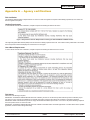
SUs that have not yet received a network key boot up in “key exchange mode” and wait to receive a key. SUs that have received a
network key will boot up for 5 seconds in “key exchange mode” and will look to see if a new AP is present. If a new AP is present, then
the SU exchanges keys with the AP, otherwise the SU begins normal operation after the 5 seconds.
APs that have not yet issued network keys boot up in “key exchange mode” until they have issued network keys to at least 1 SU. Once
the AP has issued keys it will only boot up for 5 seconds in “key exchange mode.” If a SU is present during the 5 seconds, then the
AP will issue new keys to the SU and will then remain in “key exchange mode,” waiting for more SUs to be attached. Once all new
SUs have been attached, the AP must be power cycled. The AP will boot up and will enter normal operation after 5 seconds of “key
exchange mode.”
Advanced operation
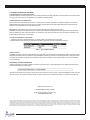
Please call AvaLAN technical support at (650) 384-0000 if the system topology requires:
— More than 16 subscriber units per access point for roaming/mobility applications
— Multiple access points that use the same network key for roaming/mobility
n
— Low packet loss rates when using broadcast or multicast Ethernet packets
n
n
NOTE: Broadcast and multicast packets (example: DHCP, UDP) are sent once and may experience losses at extended range. Unicast
packets (example: HTTP, TCP) are sent using advanced error correction and retransmission techniques to ensure delivery.
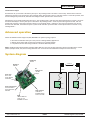
System diagram
LED Display
16 LEDs
1.536 Mb/sec
DIP Switch
8 Pin DIP
Up to 50 miles
RF
RPSMA Female
+21 dBm
output
Power Jack
P5/2.1 mm
Center Positive
4.5-48 VDC
Antenna
Antenna
RF
AW900mT
AW900mT
Power
Power over Ethernet
Lines 4/5 Positive
Lines 7/8 Ground
9-48 VDC
DATA
10BaseT Ethernet
Lines 1/2/3/6
AutoMDIX correction
www.avalanwireless.com
Power Terminal
12-24 VAC or
6-48 VDC Polarity
is auto corrected
PAGE 3
RF
Ethernet 10BaseT
Power
Ethernet 10BaseT
Technical support :: (650) 384.0000