1
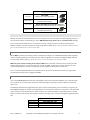
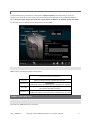
Adjusting Configs On-The-Fly ........................................................................................................................................................................... 26 Entering/Exiting Mode ................................................................................................................................................................................. 26 Adjusting Hip Sensitivity ............................................................................................................................................................................... 27 Adjusting ADS Sensitivity ............................................................................................................................................................................ 27 Binding Buttons ............................................................................................................................................................................................... 27 Wireless Nav Setup ............................................................................................................................................................................................ 28 Firmware Updates .................................................................................................................................................................................................... 28 Restoring Factory Defaults ............................................................................................................................................................................. 29 Troubleshooting ......................................................................................................................................................................................................... 29 Community Forum ............................................................................................................................................................................................... 29 Common Issues .................................................................................................................................................................................................... 29 THE ADVANTAGE OF X IM4 Next-generation console input adapter Game on your Xbox One, PlayStation 4, Xbox 360, or PlayStation 3 using your favorite PC gaming-grade hardware Unsurpassed in-game 1-to-1 feel thanks to advanced Smart Translator technology Simple wireless configuration using your smartphone or PC (Bluetooth adapter required) Supports both desktop and living room gaming styles Real-time feedback to guide you to your optimal settings Firmware upgradable Active community forum SMART TRANSLATORS Through Smart Translators, XIM4 is able to provide unparalleled mouse precision unachievable by any other gaming adapter available. The problem is simple: when the mouse moves, equivalent reticle movement on the screen should occur (i.e. 1-to-1 movement). This is the obvious result that all PC-gamers expect. But, before the creation of Smart Translators, was not possible on consoles. Every console shooter has its own unique aiming system that governs how the game controls and feels to the gamer. Every game is different as they all have different stick dead-zones and geometries, variable sensitivity and acceleration regions, asymmetric sensitivity, non-linear movement, and more. XIM4’s Smart Translators is the only comprehensive solution for the entire look mechanic problem. HARDWARE SETUP XIM4 adapts your PC gaming hardware for use on your Xbox One, PlayStation 4, Xbox 360 or PlayStation 3. For the most recent and complete list of supported mice, keyboards, joysticks, gameboards, headsets, phones, tablets, and computers, please refer to the XIM4 Hardware Compatibility List (http://xim4.com/hardware). CONTROLLER It is required that your console’s controller be connected wired to your XIM4 at all times. The wireless controller that comes with your console will become a wired controller by simply connecting a standard USB cable (with exception of Xbox 360 which requires an official wired Xbox 360 controller). For best results, it is recommended that you use genuine Xbox or PlayStation controllers and quality certified USB cables. http://XIM4.com Copyright © 2014 XIM Technologies, Inc. All rights reserved. 3