1
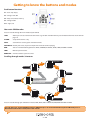
SPEED: Displays a straightforward view of your current speed, in either mph or kmh.
HRM: Displays your current heartbeat, using information from your HRM, if in use.
CALORIE: Displays the number of calories you are burning per hour.
User Tip: Calorie burn can only be calculated if your SR250 knows your height, weight and age, so please enter this information
in the settings section of your SR250, or by using the included PC companion software. This user information needs to be set
before you begin any training sessions, otherwise an accurate calorie burn cannot be calculated.
TIME: Displays the time.
Setting RUN mode sub-views
You can set your SR250 to display different combinations of information. You can set it to display either 2 lines of information, or
3 lines of information, at the same time. Plus, you can change the combination of data you want to be displayed, and the order in
which you want that data displayed.
For example, you can set your SR250 to display PACE and DISTANCE over two lines, or you can set it to display CHRONO, PACE and
DISTANCE over 3 lines.
Follow these instructions to select whether your RUN data is displayed over 2 lines or 3 lines.
●●
When in RUN mode, press and hold S11. Your SR250 will display HOLD SET, then SET and AUTO LAP will flash. Use S1 or S5 to scroll
through the different user settings until you see VIEW, then press S3 to select.
●●
Press S1 or S5 to switch between 3 rows or 2 rows, and press S3 to confirm.
●●
Press S7 to return to the last used Mode i.e. RUN, TIME etc.
Data view over 2 lines
You can select which two pieces of data you want displayed on your SR250 at any time during a training session. You do this by using
the S3 button in two different ways.
●●
Launch RUN mode in the normal way, and press S1 to start your training session.
●●
To change the data type displayed on line 1, press and hold S3 until the data type changes. Keep pressing and holding S3 to
choose between SPEED, HRM (if connected), CALORIE, TIME (clock), CHRONO, DISTANCE or PACE.
●●
Press S3 briefly to change the data type displayed on line 2. Keep pressing S3 to choose between SPEED, HRM (if connected)
CALORIE, TIME (clock), CHRONO, DISTANCE or PACE. Each time you press S3, the data type displayed will appear briefly to confirm
your selection.
●●
You can change the data displayed on either line by pressing S3, briefly, or pressing and holding S3 at any time during your
training session.
Data view over 3 lines
If you want to have 3 lines of data displayed, the chronograph information will always be displayed on the top line. You can then
choose what information you want displayed on lines 2 and 3.
●●
Launch RUN mode in the normal way, and press S1 to start your training session.
●●
Press S3, briefly, to change the data type displayed on line 2. Keep pressing S3 to choose between SPEED, HRM (if connected),
CALORIE, TIME (clock), CHRONO, DISTANCE or PACE. Each time you press S3, the data type displayed will appear briefly to confirm
your selection.
●●
To change the data type displayed on line 3, press and hold S3 until the data type changes. Keep pressing and holding S3 to
choose between SPEED, HRM (if connected), CALORIE, TIME (clock), CHRONO, DISTANCE or PACE
●●
You can change the data displayed on either line by pressing S3, briefly, or pressing and holding S3 at any time during your
training session.
5 • UK