1
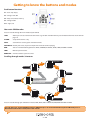
HRM mode functions
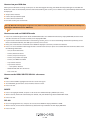
Inserting a battery
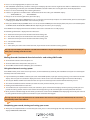
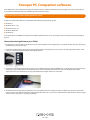
You will find the battery cover on the rear of the HRM (see illustration). Use a small coin
to turn the battery cover to the ‘open’ position, and remove it. Insert a good quality
CR2032 battery with the + side facing upwards. Replace the battery cover, and turn it to
the ‘closed’ position.
Please use coin to twist and
open battery cover and
insert CR2032 3V battery
How to set up and pair your SR250 with the Heart Rate Monitor (HRM)
Once the HRM battery has been installed, your HRM belt is on standby and ready to send data to your SR250. Follow these
instructions to set up and use your HRM belt.
●●
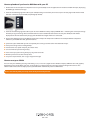
Push one tab on the strap through the slot in the HRM transmitter.
●●
Wet both electrodes with a damp cloth on the back of the HRM belt. This will help create a strong electrical connection between
your chest and the HRM transmitter.
●●
Wrap the HRM belt around your rib cage just below the pectoral muscles, and attach the other end of the strap to the HRM
transmitter. The elastic strap should be adjusted so it is snug enough not to move during use, but not so tight as to restrict your
breathing.
●●
To link your HRM belt to your SR250, press S7 to go to HRM mode, then press and hold S11 to enter HRM SET mode. Select HRM
LINK, and press S3 to confirm.
●●
If your SR250 pairs successfully with the HRM, LINK FILE will be displayed on the screen. Your heart rate information will now be
displayed on your SR250.
User Tip: If your heart rate data does not appear on your SR250, or if you see erratic data, follow the tips below. If the problem
persists, you may have to pair the HRM belt again.
Useful HRM tips
●●
Make sure the HRM belt fits snugly to your body.
●●
Re-apply water or electrode gel to the HRM belt electrodes.
●●
Clean the electrodes to remove contamination that may interfere with heart rate signals.
●●
Wear a cotton shirt or, if possible, wet your cotton shirt. Synthetic fabric that rubs with your skin may create static electricity and
interfere with the heart rate signal.
●●
Move away from strong electromagnetic fields and other wireless sensors which can interfere with your heart rate sensor. Possible
sources of wireless interference may include high-voltage power lines, electric motors, microwave ovens, cordless phones and
wireless LAN or access points.
9 • UK