1
System Mode
System Mode is an advanced feature of the PEG that can be used to re-assign the functionality of jacks, and change
operation in general. It is only present in firmware version 3 and later. Each channel (red/blue) has an independent system
mode, that is, changes made on one channel will have no effect on the other channel.
To enter System Mode:
• Hold the PING button down for 5 seconds (after 2 seconds the tap clock will clear, keep holding it down!)
All the lights except Bi-Polar will flash:
◦ Version 4.1 and 4.2: four quick flashes (100ms), then one long flash (500ms)
◦ Version 4.0: four quick flashes (100ms each)
◦ Version 3: five very rapid flashes (50ms each)
• Release the PING button.
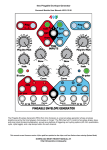
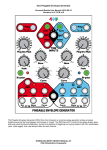
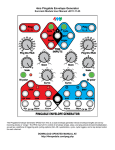
• Tap the PING button a few times and notice how one light comes on at a time. This indicates which feature you are
editing. Keep tapping PING to see that you can edit EOR (Half-R on blue channel), EOF, ENV, or PING, or EOR+EOF.
(Note: "ENV" refers to the white LED next to the Bi-Polar button and above the ENV jack
• When a feature is selected, pressing the Cycle button will switch between settings:
OFF = Cycle light off
DIM FLICKER = Cycle light blinking slowly and dimly (not an option for all parameters)
ON = Cycle light on
BRIGHT BLINK = Cycle light blinking quickly and brightly (not an option for all parameters)
◦ EOR (red) or Half-R (blue): Selects EOR/Half-Rise and Gate/Trigger
▪ OFF: jack will output End-of-Rise Gates (factory setting for Red channel)
▪ DIM FLICKER: jack will output End-of-Rise Triggers
▪ ON: jack will output Half-Rise Gates (factory setting for Blue channel)
▪ BRIGHT BLINK: jack will output Half-Rise Triggers
◦ EOF: Selects EOF/TapClock and Gate/Trigger
▪ OFF: jack will output End-of-Fall Gates (factory setting)
▪ DIM FLICKER: jack will output End-of-Fall triggers
▪ ON: jack will output the Tap Tempo Clock (TTC) Gates. See section on Tap Tempo Clock Output
▪ BRIGHT BLINK: jack will output Tap Tempo Clock (TTC) triggers.
◦ ENV: Selects Skew limiting
▪ OFF: No skew limiting (fastest rise time 10us, fastest fall 200us) (factory setting)
▪ ON: Skew limiting enabled (fastest rise or fall time 6.5ms) See Skew section in manual
◦ PING: Selects Free Running external ping clock
▪ OFF: Ping clock keeps running regardless of whether the external clock has stopped (factory setting)
▪ ON: Ping clock will stop if the external clock stops. If Tap Tempo Clock is also enabled (gate or trigger), then
the PEG will automatically start using the Tap Tempo Clock
◦ EOF+EOR (both lights on): Select A-S-R or A-R mode for Async jack
▪ OFF: ASR mode (Attack-Sustain-Release). Holding a gate high on the Async jack will cause the envelope to
hold (sustain) until the gate is released
▪ ON: AR mode (Attack-Release). A gate on the Async jack will be ignored, and the envelope will attack and
immediate release (no sustain/hold). The is identical to converting a gate to a trigger before running it into the
Async jack
•
•
When you are satisfied with your new settings, press and hold PING for two seconds. All the lights will flash a few
times again. Now you are back to normal operation.
System Mode settings are saved in EEPROM memory, so they will be "remembered" after powering down.
Why would I want to change my system settings?
• Triggers vs. Gates:
Many modules respond differently to gates and triggers. If you are patching EOR/EOF/etc into a standard ADSR
module, you can omit the sustain portion by using triggers. Or, patching from the EOR/EOF jacks into the Async jack,
a gate might give you a sustain portion, but a trigger will avoid that.
•
EOF vs. Tap Tempo Clock (TTC):
Usually you will enable this if you want to use the PEG as a master clock. Another reason might be to sync both
channels together.
•
Skew Limiting: See also Skew section
You may want to enable this if you are hearing lots of popping when running into a fast-responding VCA and/or
modulating the Skew to its extremes. Note that the exponential and log curves can cause clicking, as they are (by their
nature) fast-changing envelope shapes. These shapes are typically used with a linear VCA, as exponential VCAs
often want to see linear curves. With slower-responding resonant modules (such as a low-pass gate), the expo/log
curves and non-limited skew shapes can be especially delicious....
Change Log:
v4.2: Fixed "Clear Ping on Hold" minor bug fixes, widened "x1" snap area
v4.1: Fixed "Free-running Ping" bug, added Async ASR/AR system mode
v4.0: Fixed glitching envelopes, major bug fixes
v3.0: Added System Modes, tightened timing tracking
Page 12