1
Your first P.E.G. Patch: a Basic Walkthrough
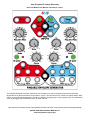
Step 1: Prepare the PEG
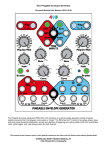
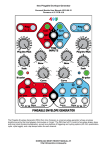
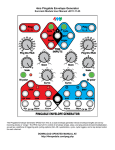
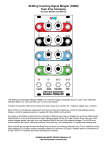
• Unplug all cables from the PEG, turn the Div/Mult, Skew, and Curve knobs to center (12 o'clock), turn Scale all the
way up, and make sure the Cycle and Bi-polar are off (not lit up). Plug the "ENV" jack on the red channel into
something you want to modulate — perhaps a filter, or the pitch of an oscillator.
Step 2: Set your Ping time
Before the PEG can generate an envelope, you need to supply a Ping time. The Ping time is the basic reference that
determines the timing of the envelope.
•
•
Tap the red channel Ping button two or three times, about a second between taps. It's easier to see what's going on
with a slow envelope. The white Ping button should be flashing at the tempo you tapped. If you gave a third tap, the
time between the taps will be averaged (unless the third tap occurs more than 50% different than the timing period of
the first two taps)
You also could run an external clock into the red Ping jack (when a gate is received on the Ping jack, the internal tap
tempo clock is stopped).
Step 3: Provide a trigger source
Like any envelope module, the PEG will produce an envelope when it receives a trigger. Also, like many
envelope modules, it can be set to self-trigger so that it'll cycle without any external trigger.
•
•
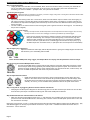
Press the red channel Cycle button (it will light up green). Notice the white LED above the
ENV jack starts flashing. The envelope is now running freely, in time with the ping clock.
Adjust the other module(s) you are running the PEG into so you can hear the modulation.
You also could turn Cycle off and run a manual trigger into the QNT or Async jack (e.g. try
the Gate output from a Pressure Points, or perhaps a slow clock output from an RCD/SCM)
Step 4: Adjust your output level
• Adjust the Scale knob and/or play with the Bi-polar button to get a good voltage range that works well
with whatever you're modulating with the PEG.
That's the basic PEG patch: Ping, Trigger, and Output. Now we can play with the parameters of the envelope.
Step 5: Set up your Division/Multiplication amount
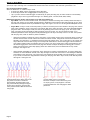
• Turn the Ping Div/Mult knob to various settings and watch the Ping button flash faster and slower. Notice
how the tempo doesn't change gradually, but instead jumps from speed to speed. This is because each
speed is an integer multiple or division of the original tempo (e.g. three times as fast, or half as slow). You
also can modulate this parameter with the Div CV jack at the bottom.
Step 6: Adjust Skew and Curve
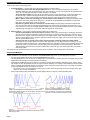
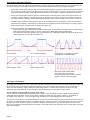
• Fiddle with the Skew and Curve knobs to get an envelope shape you like. Notice the curve
shapes in the center section of the knob are all symmetrical (same rise and fall shape), while
the shapes at the start and end of the knob's range are asymmetrical (different curves for rise
and fall). Of course, you can modulate these parameters with the CV jacks at the bottom.
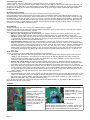
Step 7: Play with it! Try triggering the blue channel with the red channel
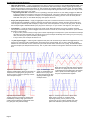
• Now plug the red EOF (end-of-fall) jack into the blue Ping jack. Turn the blue channel Cycle button On. Run the blue
channel "ENV" jack output to modulate something else. Set Scale and Bi-polar as desired.
Step 8: Modulate the blue channel with the red channel
• Make sure the blue Ping Div/Mult knob is set to "=", and patch the red "+5V ENV" jack into the blue channel's Div CV
jack. Set the red channel Div/Mult knob to something slow. The blue channel should speed up/slow down in time with
the red channel's envelope.
Keep going, play with the "T" jack, try clocking both channels the same and hitting different triggers into the QNT jacks... play
with off-time triggers into the Async jack while the channel is in Cycle mode... modulate each channel with the other, or
themselves... etc etc! Have fun!
Page 3