1
3. Product Parts and Peripheral Device Connection
3.1. Name of Parts and Function
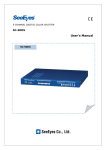
3.1.1. SC-40DQH Front Side
①
②
③
④
⑤
⑥
⑦
⑧
Buttons
Functions
① MENU
Press this button to display the “SETUP MENU”. With this button, you can
enter to the sub menu, confirm the setting value in the menu mode and
cancel the alarm ring manually.
② DUAL
Press this button to display the video signals of Ch # 1 and Ch # 2 in
vertical dual split mode. If you press again this button, it displays the
video signals of Ch # 3 and Ch # 4 in vertical dual split mode.
Press this button for 2 secs. and you can playback the recorded video at
the VCR. And if you press the single button of each channel in PLAY
mode, you can scale double up the video of the channel selected.
③ AUTO
Press this button to display the videos in full screen in auto sequence at
the set-up DWELL TIME of each channel.
If you press this button again, the button LED will light and it will
activate the „Motion Detect Sequence Mode‟ displaying automatically the
video of the camera at which a motion is detected. This function is very
useful when you want to surveil the camera only with motion. When
there is any motion with the alarm on, it sounds a short alert ring.
To return to the Sequence mode, simply press this button again.
④ QUAD
Press this button to start the quad display.
If you press this button again, it will enter to the Freeze mode, the
button LED will light, and all 4 channels‟ video will be freeze. If you press
the SINGLE (channel select) button, the video of the channel selected is
freeze and if you press once again the SINGLE button, it cancels the
freeze video. To cancel the video freeze and to return to quad mode,
press this button again.
In Setup menu mode, it exits from the menu.
⑤ ~ ⑧
SINGLE
DISPLAY
Press these buttons to select the channel from CH1, CH2, CH3 and CH4
in a clockwise direction from the button #6. In the Menu mode, you can
use these buttons as up, down, right and left direction buttons, or to
change the value setting. The selected channel is displayed in full screen
at quad or sequence mode.
3