1
Calibrating Motor Current Readings
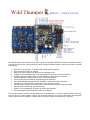
The controller uses 2 15A slow blow fuses to protect the “H” bridges. These fuses double as current “shunt”
resistors allowing the processor to monitor the current drawn by the motors and protect them from
dangerously high stall currents.
The sample software will shut a motor down if a safe current level is exceeded. This should also protect the
fuse. If a fuse does blow then an indicator LED near the fuse will light up and the software will register a
current level much higher than normal stall currents even at low PWM levels.
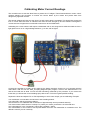
Calibrating the current sensors will require a Multimeter with a 10A range and a stable test load such as a
light globe from a car or a high wattage resistor e.g. 10 ohm, 5W or higher.
Connect the controller to a battery or DC supply by the battery terminals. Connect to your computer with the
USB cable. Load and run the “Wild_Thumper_Diagnostic.pde” program. Click on the “Serial Monitor” icon
and set the baud rate to 9600. You will see the load being measured by the processor. If you remove the
fuses then you will see the current readings jump above 700. This is the highest possible reading.
Replace the fuses and adjust VR1 or VR2 depending on which motor output you are calibrating. Example:
Your multimeter is connected to the left motor and is reading 940mA.
You adjust VR1 until the processor reads 47.
The left motor is now calibrated with a resolution of approximately 20mA (47x20mA=940mA).
Your motors have a stall current of 12Amps. To protect you motors you decide 11A is the safe limit.
Set “Leftmaxamps” in the “Constants.h” tab to 550 (11000mA / 20mA).
Set “overloadtime” to the number of mS required before the motor can restart after an overload occurs. The
default is 100mS (1/10 of a second).