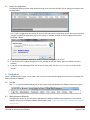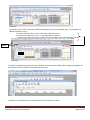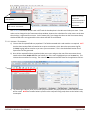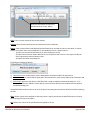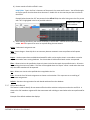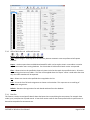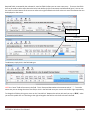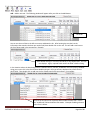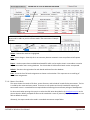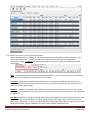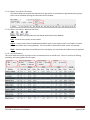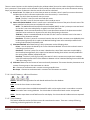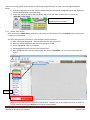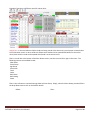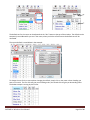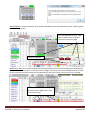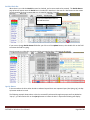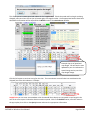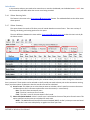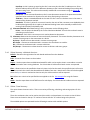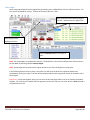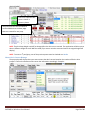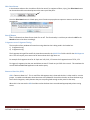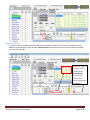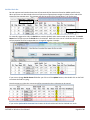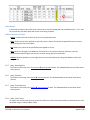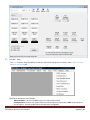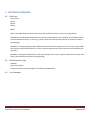
1
USA Water Ski WSTIMS for WINDOWS User Manual V1.4 February 2011 Revised Base Line 1 Table of Contents 2 3 4 5 Install and Update the Application ................................................................................................................................. 5 2.1 Before Installing: System Requirements ............................................................................................................. 5 2.2 To Install or Upgrade ............................................................................................................................................ 6 2.3 Application Updates................................................................................................................................................ 8 2.4 News Regarding WSTIMS for Windows .................................................................................................................. 9 Open the Application and Get Started.......................................................................................................................... 10 3.1 Locate WSTIMS for Windows on your Computer ............................................................................................. 10 3.2 Launch the Application ......................................................................................................................................... 11 Navigation: .................................................................................................................................................................... 11 4.1 Tool Bar ................................................................................................................................................................. 11 4.2 Moving between Windows ................................................................................................................................... 11 4.3 Viewing Lists.......................................................................................................................................................... 13 4.4 Common Buttons, Icons and Features.................................................................................................................. 13 4.5 Hot Keys/Short Cuts.............................................................................................................................................. 15 The Tool Bar Selections. ................................................................................................................................................ 15 5.1 Tool Bar: File........................................................................................................................................................ 15 5.2 Tool Bar: Administration .................................................................................................................................... 15 5.2.1 Tournament List ............................................................................................................................................ 15 5.2.2 Member List .................................................................................................................................................. 19 5.2.2.1 Member List - Additional functions available ............................................................................................... 20 5.2.3 Member Import............................................................................................................................................. 23 5.2.4 Member Import: formats for importing data .............................................................................................. 24 5.3 Tool Bar: Tournament ........................................................................................................................................... 28 5.3.1 Registration ................................................................................................................................................... 28 5.3.2 Registration: Additional functions available ................................................................................................. 28 5.3.3 Running Order............................................................................................................................................... 32 5.3.4 Running Order: Additional Functions............................................................................................................ 33 5.3.5 Official Work Assignment.............................................................................................................................. 34 5.3.6 Official Work Assignments: additional functions.......................................................................................... 35 5.3.7 Official Work Record ..................................................................................................................................... 36 WSTIMS for Windows User Manual Page 2 of 86 5.3.8 Official Work Record: additional functions.................................................................................................. 37 5.3.9 Boat Use ........................................................................................................................................................ 37 5.3.10 Boat Use: additional functions...................................................................................................................... 39 5.3.11 Master Score Book ........................................................................................................................................ 40 5.3.12 Master Score Book: Points Calculation Method .......................................................................................... 41 5.3.13 Master Score Book: Placement .................................................................................................................... 42 5.3.14 Master Score Book: additional functions..................................................................................................... 42 5.3.15 Overall Summary........................................................................................................................................... 42 5.3.16 Overall Summary: additional functions........................................................................................................ 43 5.3.17 Team Summary ............................................................................................................................................. 43 5.3.18 Tournament Package Build ........................................................................................................................... 44 5.4 Tool Bar: Slalom .................................................................................................................................................... 49 5.4.1 Slalom: Score Entry Navigation..................................................................................................................... 49 5.4.2 Slalom: Skier Roster ...................................................................................................................................... 50 5.4.3 Slalom: Reference Information ..................................................................................................................... 54 5.4.4 Slalom: Use 5 Judges..................................................................................................................................... 54 5.4.5 Slalom: Active Scoring Window (Score a Skier) ............................................................................................ 55 5.4.6 Slalom: Running Order .................................................................................................................................. 61 5.4.7 Slalom: Summary .......................................................................................................................................... 61 5.4.8 Slalom Summary: additional functions ........................................................................................................ 62 5.4.9 Slalom: Team Summary................................................................................................................................ 62 5.5 Tool Bar: Trick ....................................................................................................................................................... 63 5.5.1 Trick: Trick Calculator Navigation................................................................................................................. 63 5.5.2 Trick: Skier Roster ......................................................................................................................................... 64 5.5.3 Trick: Trick Calculator (Score a Skier) ........................................................................................................... 68 5.5.4 Trick: Running Order ..................................................................................................................................... 72 5.5.5 Trick: Summary ............................................................................................................................................. 72 5.5.6 Trick: Team Summary.................................................................................................................................... 72 5.6 Tool Bar: Jump ...................................................................................................................................................... 72 5.6.1 Jump: Jump Score Entry Navigation.............................................................................................................. 73 5.6.2 Jump: Skier Roster......................................................................................................................................... 74 5.6.3 Jump: Reference Information ....................................................................................................................... 76 WSTIMS for Windows User Manual Page 3 of 86 6 5.6.4 Jump: Jump Score Entry (Score a Skier) ....................................................................................................... 76 5.6.5 Jump: Running Order .................................................................................................................................... 83 5.6.6 Jump: Summary............................................................................................................................................. 83 5.6.7 Jump: Team Summary................................................................................................................................... 83 5.6.8 Jump: Meter Setup....................................................................................................................................... 83 5.7 Tool Bar: Tools...................................................................................................................................................... 84 5.8 Tool Bar: Window................................................................................................................................................. 85 5.9 Tool Bar: Help........................................................................................................................................................ 85 SECTIONS TO BE BUILT:................................................................................................................................................. 86 6.1 Definitions:............................................................................................................................................................ 86 6.2 Quick Reference Guide: ........................................................................................................................................ 86 6.3 Error Messages:..................................................................................................................................................... 86 WSTIMS for Windows User Manual Page 4 of 86 2 Install and Update the Application 2.1 Before Installing: System Requirements The following system requirements are based on Microsoft specifications for the Microsoft .NET Framework 3.5 which is a core component of the application. Application can be installed on either a PC or a MAC. Supported Operating Systems Windows 7 Windows 7 64 bit Windows XP (Microsoft doesn’t specify a particular service pack requirement) Windows Vista (Microsoft doesn’t specify a particular service pack requirement) Windows Vista 64 bit Microsoft Windows Server 2003 Windows Server 2008 Hardware Requirements Minimum: 400 MHz CPU, 96 MB RAM, 800x600 256-color display Recommended: 1.0 GHz or higher CPU, 256 MB or more RAM, 1024x768 high-color 32-bit display Up to 500 MB of hard disk space may be required (disk space requirements vary widely depending on what is already installed, typically the requirement for just this application is between 25 and 50 MG) DPI Scale setting of 96 (typical default) should be used rather than 120 or higher to avoid truncation issues on the screens (Control panel - Display - Settings – Advanced OR Control Panel – Personalized) For a MAC o Run on an INTEL processor o Leopard 10.5 or Snow Leopard mandatory for 64bit) 10.6 Operating System for Mac and Bootcamp o A valid copy of windows XP, VISTA(32 or 64 bit), 7(32 or 64 bit) o If running Windows 7 64bit it is recommend installing 8GB ram otherwise 32 bit will run fine on 1 GB ram. An advantage for Windows 7 64bit is it can share the Mac files. Third Party Components for generating output files Another external component, a PDF Writer, is also recommended because it will make post tournament HQ reporting significantly easier. There are many freeware products that can be used for this purpose. All these products are small and install very easily. These products are extremely simple to use and are used just like a standard print driver. Use the standard print function, the only difference is that when presented with your printer selections simply pick the PDF writer product and your print output will allow you to specify a file and location to write your output to a file. Suggested products are: CutePDF http://www.cutepdf.com PrimoPDF http://www.primopdf.com/ WSTIMS for Windows User Manual Page 5 of 86 Additional information for Mac Users: - For Mac's running an INTEL processor. There is a product called Bootcamp, from Apple that runs on the Leopard and Snow Leopard operating systems. It allows you to set up a partition to run Windows XP, Vista 32 or 64. - For Mac’s running Windows 7, Snow Leopard operating system will be needed. Bootcamp permits you to boot the computer either in Mac or Windows. - There is also a product called VMware Ver 2 or 3(64bit), which will allow you to run Mac and Windows at the same time. Note – a valid copy of the Windows Op system will be needed as well. Reference website: TigerDirect.com NOTE: One issue using VMware or Bootcamp on a MacBook laptop is that the built in keyboard maps differently than a standard Windows keyboard so it can be confusing to non Mac users. NOTE: For Mac’s using 64bit, you will not be able to run the “original” WSTIMS program (DOS version). 2.2 To Install or Upgrade Helpful Hint: Before you install or upgrade; be familiar with your folder structure. There are many different ways to file information on computers, and here is a recommended way to organize your scorer’s information, which will include the WSTIMS for Windows database (per tournament) and the Tournament Packages that are produced once a tournament has concluded: • • • • Create folder in “My Documents” named “WSTIMS for WINDOWS” with a sub folder named “Dbase” or “Database”. This will contain the SDF files. Adding the Calendar Year or the Sanction Number to the file names can make them more manageable and easier for trouble shooting as well. Also in My Documents, create folder where you will want to keep all of the information for each tournament using the sanction number and name of the tournament. You can also use sub folders within each tournament for the Tournament Package reports and Zip file. This puts everything in one place and is easy to find quickly for each calendar year. It’s the user’s choice – these are just recommendations. For initial installs, or upgrades, use the following direct link to install the application is as follows: By selecting this link: http://www.awsaeast.com/scoring/publish.htm Or through the AWSA East Home Page, under Section Menu on the left hand side of the page: Initial installs can take some time depending on your system setup and internet connection. For an average broadband/DSL connection the install plan on between 30-60 minutes. Once you have launched the install process a new window will display. Follow the instructions on the screen. WSTIMS for Windows User Manual Page 6 of 86 Click on Install button. Click on the Run button, on the next message box to initiate the install. There will be status messages that display throughout the installation, example is below: Key instructions to follow during the install: a) Click 'Yes' to keep your current database b) Click 'No' to load the database supplied with the application to “myDataDirectory” c) If you click 'No', select a location and supply a file name in the file open dialog to follow d) The database supplied with the application will be copied to your selected location During the initial installation, the application downloads a default database that can be saved to any location on your computer (example: c:\documents\WISTIMS for Windows\database). The first time it will want to copy the database to the specified location. Subsequently it will ask this question in the event you want a refreshed database but the general response should be to click “Yes” and keep the existing database. NOTE: In the event that the new version includes changes in the tables that drive the application (ie. Changes in the database) the install process will automatically perform the changes to the tables. WSTIMS for Windows User Manual Page 7 of 86 2.3 Application Updates Once you have installed the application on your computer you will be prompted to install new updates. This means that if you are logged into the internet at the time you launch the application AND there is a new version of the application available you will receive a pop up message box asking if you want to install the updates. The following popup will display: Click on the OK button to update the application immediately, otherwise click on SKIP. If you opt to SKIP the update, then the update window will not display again until there is another new version. The update will take anywhere from 5 - 10 minutes, again depending on your system set up and internet connection. After you click OK, then the application will begin to update: Once it’s updated, you will be asked about the location where your database is being stored. The typical response to the below message box is YES to retain the current location and database. WSTIMS for Windows User Manual Page 8 of 86 NOTE: In the instance where you choose to update the database, be sure to select the file name of a previously scored tournment the data will be overlayed. So it is best to save the new database with a new file name. Lastly, if you choose Yes (retain existing database) and there are actual database changes. Your database will be upgraded without disturbing the existing data (scores). 2.4 News Regarding WSTIMS for Windows Leverage the Eastern Region Water Ski website for current updates on WSTIMS for WINDOWS. This will include documents that outline what has changed in the application as well as a technical reference guide. Use the link on the right hand side of the home page: Content of main page changes regularly, however the link to WSTIMS for Windows will be found on the right hand side of the page in the Section Menu. Once you have clicked on the link noted above, then you will be presented with a current debrief regarding the windows version of WSTIMS. WSTIMS for Windows User Manual Page 9 of 86 As of Feb 2011 the AWSA board has approved WSTIMS for Windows for any tournament. 3 Open the Application and Get Started 3.1 Locate WSTIMS for Windows on your Computer Locate WSTIMS for Windows icon on your computers desktop, or go to your start up menu and locate the application in your application list: a) From Desk Top: b) From Start Up Menu: WSTIMS for Windows User Manual Page 10 of 86 3.2 Launch the Application The following will display after either Double clicking on the icon form the Desk Top or making the selection from the Start Menu: NOTE if you are logged into the internet at the time that you open the application you will also receive a pop-up message to update the application when a new version is available. Example of the message box that will be presented is below. a) If you choose to update the application, simply follow the messages on the screen. b) If you choose NOT to update the application the message box will not display again until another version is available. c) If you wish to take advantage of the new version at a later time, see the Install and Upgrade section of this manual. 4 Navigation: This is a ‘windows based’ system so that means you can use your key board alongside the mouse to move between the different functions/modules. 4.1 Tool Bar The Tool Bar (noted by red box below), this is where most navigation between the different functions will occur. 4.2 Moving between Windows The application allows for easy maneuvering between the different modules of the application. In the below example there are three different modules (aka windows) open: Registration, Official Work Assignments, Slalom Scoring Entry. WSTIMS for Windows User Manual Page 11 of 86 By clicking on the ‘header’ section of the different windows you can move between them. To manipulate the different windows you can: - To close a window click on the “X” in the upper right hand corner - To minimize/or hide click on the “-“ in the upper right hand corner - To maximize/or make your primary window click on the “box” in the upper right hand corner Header Example of a window being made the primary window, in this example the Official Work Assignment window has been selected and now shows in the forefront of the screen: Example of a sub-window that is now maximized to take up the entire screen: WSTIMS for Windows User Manual Page 12 of 86 Header now displays the window name The Window selection from your tool bar can be used to see the other open windows and also allows you to jump to another window. The window that has a check box is the current active window (the one in front or that is maximized): 4.3 Viewing Lists When viewing a list (i.e. list of members, list of officials), there will be a counter at the top of the window that will tell you what row/record you are on out of the total number or records. Example, the first row is highlighted resulting in the counter presenting that you have selected the first record out of a total of 52: 4.4 Common Buttons, Icons and Features For many of the windows you will see common ICONs at the top. The functions are typically the same. These items are repeated throughout this manual; the below is a quick list of the various options. Note that not all windows will have all the same ICONS. Example of an Icon Bar: WSTIMS for Windows User Manual Page 13 of 86 Common Functions: Copy: Only found on the Tournament List window. This is an alternate way to create a new tournament to score. This icon needs to be used in concert with the “Add” icon and allows you to copy an existing tournament on your personal database and assign it a new sanction id. After the copy all attributes are available for update. Refresh: Refreshes the data being seen in the active window with the most current data in the database. Print: Prints the data as seen in the active window. This function will open a dialog box that allows you to select a printer and to preview the information. Export: This function exports all the data used for the active window. The primary purpose of this feature is to allow the data to be transported and imported into WSTIMS for Windows on another computer. The data is exported in a tab delimitated format that can also be easily imported into Microsoft Excel. Any nuisances are noted in the various sections within the manual. Export List: Only found on the Official Work Record window. Generates a text file of the registered member list, official ratings and tournament assignments. Filter: Allows criteria to be specified to show only items in the list that match the specified criteria. All entries not matching the criteria are hidden. Sort: Allows sort criteria to be specified that are applied to the list. Save: Writes any changes to the database. Generally this is not necessary because automatic saves are performed at frequent logical intervals such as when moving within the application. Add: Adds a record. Different requirements are needed based on the function being used. These differences are noted in the various sections within the manual. Edit: Allows for changes to be made to the information on the window. Insert: Only found on the Member List window. Provides an “input screen”, so that the user can enter attributes for a new member. Delete: Allows user to delete row that the cursor is on. Different requirements are needed based on the function being used. These differences are noted in the various sections within the manual. Remove: Deletes a record. Different requirements are needed based on the function being used. These differences are noted in the various sections within the manual. Remove All: Only found on the Member List window. Deletes all the members in the member list. NOTE: This will not delete any scores entered for any member. Once a skier has been registered in a tournament the member record is no longer required to be on the list. Alert: There is not an undo button. Run Order: Exports the running order data (as seen in the various windows) to a tab delimitated text file. HTML: Exports the data found on a specific window to an HTML format. WSTIMS for Windows User Manual Page 14 of 86 4.5 Hot Keys/Short Cuts Alt Tab – will allow you to move between WSTIMS and other applications on your computer Ctrl Tab – will allow you to move between the windows within WSTIMS 5 The Tool Bar Selections. 5.1 Tool Bar: File File, is used to close an existing tournament or exit WSTIMS for Windows completely. There are two options, Close and Exit. The application will prompt you to save pending changes upon closing. 5.2 Tool Bar: Administration Administration, is used to maintain your tournament packages/lists (i.e. June tournament from September Tournament), member lists as well as import your tournament rosters via the Member Import function. 5.2.1 Tournament List The Tournament List is used to view existing tournaments you have scored from your personal database, enter new tournaments to be scored, activate a tournament for scoring and to produce the chief officials paperwork when the tournament is completed (i.e. Tech info, Rule Exceptions, Officials Contact Information etc.). NOTE: Only one tournament can be scored at a time. HOWEVER, several rounds can be scored at the same time for the same tournament. The list of available tournaments is shown on the left and the tournament attributes for the currently active row from the list shows on the right. Required attributes for scoring a tournament are indicated by a red asterisk. WSTIMS for Windows User Manual Page 15 of 86 Displays the list of tournament in your database Right side of the screen shows your “active” tournament Buttons can be used to enter the tournament details at any time during the tournament. The Handicap information default ratio is: 95% and the handicap base is the M1 record value per event. These values can be changed on the Tournament Setup window; however the calculation for a skier occurs at the time that the skier is registered for an event. So this means that if you change the values on the Tournament Setup window AFTER skiers are registered the skier values will NOT be recalculated. 5.2.1.1 Activate a Tournament a) Ensure that all required fields are populated. The fields annotated with a red asterisks are required. NOTE that the Data Location field will need to be set prior to activation; this is where the tournament log file (YYXNNN-log.log) will be saved to as you score your tournament. This is also the default location for all export files that are generated. b) Once all the required fields are populated, take your cursor and go to the row of the tournament that is needs to be started, double click the row activate it or if the row is highlighted you can hit enter key. This initiates the tournament for scoring. The name of the active tournament shows in the application title bar. c) The following will display once you activate your tournament, this pop-up box will confirm where the data will be saved. NOTE the location below is specific to the computer being used, where as the below is only an example: WSTIMS for Windows User Manual Page 16 of 86 d) The tournament level details required for headquarter and end of tournament reporting are input using the “Event Tech Info”, “Rule Exceptions”, and “Chief Official Contact Info” buttons shown at the bottom of the window. This information can be entered at any time and is not required to start tournament scoring. 5.2.1.2 Tournament List: Additional functions available: Copy: An alternate way to create a new tournament to score. This icon needs to be used in concert with the “Add” icon and allows you to copy an existing tournament on your personal database and assign it a new sanction id. After the copy all attributes are available for update. Follow these steps to copy a tournament: a) Click on the “Add” icon b) Enter the new tournament sanction number c) Click on the “Copy” icon and a new pop-up window will display d) Find and click on the tournament you want to make the copy from e) Click on the “Copy” button WSTIMS for Windows User Manual Page 17 of 86 Select the tournament to copy from, and then click the “Copy” button Print: Prints a screen capture of the current window. Refresh: Retrieves the tournament list and attributes from the database Export: Used to export data to tab delimited texted file which can be used to view in a text editor or used to import into another users scoring database. On this window there are 2 export options: 1) Export the tournament attributes for all items showing in the list; 2) Exports the entire tournament data for the currently active row in the list. This export includes all event registrations and tournament scores. 3) Exports the Performance data file. The following window will display: a) Tournament List is used to export just the demographic information about the tournament. b) Tournament Data is used to export registration, associated scores, jump meter/video setup information and other key data. c) Performance generates the data in a WPS file which is used to update the National Ranking List. NOTE: there will be a function added at a later date to create a file that will be used to update the International and World Ranking lists. The default folder location that was set up at the time of activating the tournament will be used when exporting the files. Filter: Allows criteria to be specified to show only items in the list that match the specified criteria. All entries not matching the criteria are hidden Sort: Allows sort criteria to be specified that are applied to the list. WSTIMS for Windows User Manual Page 18 of 86 Save: Writes any changes to the database. Generally this is not necessary because automatic saves are performed at frequent logical intervals such as when moving from one tournament to another in the list. Remove: Deletes the tournament indicated by the current active row on the list. A warning will be issued if you are attempting to delete a tournament that has any entered scores. You will be given the opportunity to cancel the request if scores are detected. Add: Provides a new input form to enter attributes for a new tournament. [Sanction Id] is a 6 character string provided by AWSA Headquarters and has the following format YYR### YY = 2 position year R = Region ### = 3 digit number 5.2.2 Member List The Member List is used to view existing members that have been entered or imported to your personal database. This feature allows you to efficiently manage member data by either changing information or adding new members on the fly. Note members must be entered on this list to be registered for a tournament. This window has two windows. The first section (the main window) contains a list of members with key attributes; a second window will display after double clicking, or clicking on the Edit button, on a specific member’s row in the “main window”. Main Window *personal information blocked WSTIMS for Windows User Manual Page 19 of 86 Details display after ‘double clicking” on specific row. Data can now be changed. NOTE: at a later time this window will be updated to show additional attributes for a given participant (i.e. official’s ratings). 5.2.2.1 Member List - Additional functions available: Refresh – Will refresh the list from the database. Edit – Place cursor on member record you would like to change and click on the Edit button. The details that can be changed will be displayed. Use the Save/Cancel buttons accordingly. Insert – Provides an input window to enter information for a new member. NOTE: The AWSA or Federation member number is the primary key for a member and duplicates are not allowed. If a member’s number is not available a temporary number in the format 000000## can be used in order to load up a member in the member list (the requirement is that the number must be unique and do not use 01-10). The best way to enter the numbers is to start with 10 and work up to 99. WSTIMS for Windows User Manual Page 20 of 86 Delete – Deletes the member indicated by the current active row on the list. Alert – you will not be asked “to confirm your action” before actually deleting the record. NOTE: This will not delete any scores entered for the member. Once a skier has been registered in a tournament the member record is no longer required to be on the list. However it is a good idea to have this information for reference purposes. Save – Saves changes. Generally this is not necessary because automatic saves are performed at frequent intervals. Export – Used to export data to tab delimited texted file which can be used to view in a text editor or to import into another users scoring database. Window will display so that you can choose where the file should be saved. Choose your folder and file name, then click Save button. Filter – Allows criteria to be specified to show only items in the list that match the specified criteria. All entries not matching the criteria are hidden. Example of adding a filter below: WSTIMS for Windows User Manual Page 21 of 86 Sort – Allows sort criteria to be specified that are applied to the list. This is initiated by click on the Sort icon and selecting information from drop down box: NOTE: you can also sort the columns by single clicking on a specific column header; this will allow you to change the sort from ascending to descending. Example: List is defaulted in ascending order by Last Name – WSTIMS for Windows User Manual Page 22 of 86 Results if you double click on the Member ID column, sort will change to be ascending order by Member ID: Double Click on any column heading to sort Remove All – Deletes all members. Note: This will not delete any scores entered for any member. Once a skier has been registered in a tournament the member record is no longer required to be on the list. 5.2.3 Member Import Membership data can be loaded via the Member Import function. The same registration templates used for the original WSTIMS application (DOS version) can be used for WSTIMS for Windows. Alternately members can be manually entered as seen in section 4.2.2. There are 25 attributes available for a member but only 8 are required (indicated by a red asterisk). A skier’s age division is determined by their “ski year” age which is dictated by their age on 12/31 of the tournaments ski year. Basically the first 2 positions of the tournament sanction id indicate the ski year to be used for this calculation. NOTE that a date of birth can be used to determine a ski year age and the appropriate age division but it is not required as the ski year age can be manually input. Based on the ski year age the age division dropdown validation list will show available entries that can be selected. Alert: The import file must always be a tab delimited text file. Before the import starts a dialog will give you the opportunity to delete all existing member data on the database. This is not necessary, and is only offered to keep the number of members to a manageable level. NOTE: Removing the member data will not remove any scores or information associated with any previous tournaments. WSTIMS for Windows User Manual Page 23 of 86 If you do not delete the current member data; then the new data will be added to the database. Specifically: a) existing member records will be updated, b) new records will be added, c) member information that is already in the database but not on the import file will remain unchanged. Once you have determined if you want to delete the existing membership or not, you will be prompted for location of the import file. This will be consistent regardless of what mechanism you choose to import. 5.2.4 Member Import: formats for importing data a) Standard – 2009/2010 AWSA registration template. All features currently performed in the registration templates are supported during the import process. Members will be registered in the active tournament if an event column has a value. If the value in either of the event columns or the age division column is equal to “OF” for official than the member will be registered in the active tournament but not in the specified event. This is used for non participating members acted as officials. Chief and assistant chief officials can be indicated in the “officials” column as is currently supported. Values in the ranking list columns are also loaded to the database. Values in the import will be added to the database or will update records that already exist on the database. Examples of the “instruction” tab and one of the registration tabs: WSTIMS for Windows User Manual Page 24 of 86 b) Pre-tournament registration. Same as above but this is the new for 2009 format supporting online registration. Examples of the “instruction” tab and one of the registration tabs: WSTIMS for Windows User Manual Page 25 of 86 c) Collegiate - AWSA collegiate registration template. Same as number 1 but in the collegiate format. Note that there are separate import functions for Team A and Team B. WSTIMS for Windows User Manual Page 26 of 86 d) WSTIMS for Windows format – This is a tab delimited text file which is formatted by the export feature that is available on most windows in the application. WSTIMS for Windows User Manual Page 27 of 86 5.3 Tool Bar: Tournament The Tournament is where you will start confirm/change skier registration generate running orders, maintain work assignments, as well as generate the final tournament reports. The reports can be generated as paper or an electronic file. 5.3.1 Registration This feature is used to view and manage registrations, event participation (i.e. Officials). The window shows all registered members, both skiers and officials, the events each skier is participating in, the assigned event management group for each skier in each event, and the administrative status for each member. NOTE: Skiers and officials must be registered for a tournament to participate in an event or be assigned as an official. Members registered for the tournament can then be registered for an active tournament event by clicking on the appropriate checkbox. The member’s age division will be used as the default event group for the skier. This can be changed at any point before or after running the event to any 6 character value. Event groups are simply a way to manage events for running order and placement purposes. Alert: A member will not be exported into the Performance Data File at the end of the tournament if the Ready Ski box is not checked off. This box indicates that the skier is a AWSA member, and the Performance Data File is used to update the national ranking lists. Alert: A member can be removed from an event by simply clicking off the appropriate checkbox. A warning will be issued if you are attempting to remove a member from an event where the skier has entered scores. You will be given the opportunity to cancel the request if scores are detected. 5.3.2 Registration: Additional functions available WSTIMS for Windows User Manual Page 28 of 86 Refresh – Retrieves the registration list and related attributes from the database Export – Used to export data to tab delimited texted file which can be used to view in a text editor or used to import into another users scoring database. For this window all visible tournament registrations and event Registrations can be exported. As data is exported pop-up boxes will display so that you can confirm that the correct number of rows are being created in the export file. Sort – Allows sort criteria to be specified and applied to the list. This will become your default sort for this window. Select the column that you would like to be your default sort, and then select your sort mode. Save the settings, the result will be a custom default sort for this window. Filter – Allows criteria to be specified to show only items in the list that match the specified criteria. All entries not matching the criteria are hidden. This filter is also applied when the “Export” action is used and at that time only the visible members will be exported. Save – Saves changes. Generally this is not necessary because automatic saves are performed at frequent intervals. Remove – Used to remove a member from all events and from the tournament. The action is performed on the member indicated by the current active row on the list. Alert: A warning will be issued if you are attempting to delete a member that has any entered scores. This will allow you the opportunity to cancel the request if scores are detected for any event. The warning message will display for each event that the skier has scores. WSTIMS for Windows User Manual Page 29 of 86 Add – Opens a dialog to search for available members by membership number, last name, first name, or state of residence. The search by last name and first name is performed by finding members that start with the supplied characters, meaning that it is not necessary to spell the full name the function will ‘pattern’ match using a minimal number of letters. All possible results will be returned. Example: “Go” used in the last name field, resulting in: The search is performed on the members as shown in the Administration / Member List window (see Member List under the Administration section of this manual). This means that a member must exist in this view before they can be added to the tournament. Usability tricks: the search is initiated by either tabbing away from an available textbox after entering one or more characters or clicking on the “Search” button will initiate the search if at least one textbox has characters. Use the “Add” button to register the member that is highlighted in the list. WSTIMS for Windows User Manual Page 30 of 86 Double click on row of member that needs to be added. Click on Add button. NOTE: The “Division” selection box will display all divisions that the skier is eligible for based on age. It is possible to add a skier to the tournament in more than one division (e.g. M2 and OM). It is also possible in a multi round tournament for a skier to ski in an event in more than one division (e.g. OM slalom in round 1 and M2 slalom in round 2). Dialogue box in the “Add Member” window will change to show response that a member was added. New window will display for that member. Fill in the required fields (indicated by RED asterisk) and click the Save Button. Adding multiple members at one time, can be accomplished by: a) clicking on the row header to the right of the member id b) using CTRL click to select additional members Highlighted rows illustrate the rows selected using the “Ctrl” / “CLICK” feature. WSTIMS for Windows User Manual Page 31 of 86 The Member Registration window will display starting with the last member you selected, update the required fields, click on the Save button; then the next member will display. This process will repeat until all the members you selected have been saved. The dialogue box will show the total number of members added. Using the Add button will register all selected members for the active tournament. NOTE: The number of selected members added and the number of already registered members will be displayed in the message area just below the row of action buttons. NOTE: Registering members for event participation is done after closing this dialog window. 5.3.3 Running Order This feature is used to establish running orders for all active tournament events, modify some of the attributes about the skier (e.g. event group, running order, team, etc). HCAP base and Handicap values can also be modified on this window. Go to the Registration function to change the skier’s division (example: move from M1 to OM). For non-collegiate tournaments the default sort order for all events is “Event Group”, “Run Order”, “Ranking Score”, and “Skier Name”. The order can be changed using the “Sort” function (see below) and / or by modifying a skier’s run order (Order column). The sort order set in this window will carry over to become the skier order for each event scoring window. For collegiate tournaments the default sort order for all events is “Age Group”, “Run Order”, “Ranking Score”, “Skier Name”. This list can be printed. The skier class is defaulted from tournament classification upon registration. A skier can be assigned any class that is considered “Less Than” the tournament class. This means that a skier cannot be assigned a class R if the tournament sanctioned is a class C; however they can be assigned a class C if the tournament is sanctioned as a class R. NOTE: the WSTIMS for Windows User Manual Page 32 of 86 tournament class for a skier can be set during the registration import process as well. This can be done when using the “Pre Tournament Registration” format. Refer to the Administration – Import section of this manual. The handicap base and handicap values are defaulted from the Tournament is set up and can be modified on this screen. See the Tournament Setup section of this manual for how to enter the initial values. The default value for the ratio is: 95% and the handicap base is the M1 record value per event. These values can be changed on the Tournament Setup window; however the calculation for a skier occurs at the time that the skier is registered for an event. So this means that if you change the values on the Tournament Setup window AFTER skiers are registered the skier values will NOT be recalculated. In order to change the values you will need to change them for the individual skiers here on the Running Order window. There are radio buttons that can be used to switch between Slalom, Trick and Jump. See Red Box below: Example of moving from Slalom to Jump: 5.3.4 Running Order: Additional Functions Print – Prints the running orders for posting and for the judges. Refresh – Retrieves the registration list and related attributes from the database WSTIMS for Windows User Manual Page 33 of 86 Export – Used to export data to tab delimited texted file which can be used to view in a text editor or used to import into another users scoring database. As data is exported pop-up boxes will display so that you can confirm that the correct number of rows are being created in the export file. Run Order – Used to export the data to a file that is specific file format to conform to the DOS WSTIMS application, meaning this function replicates the file format created by the DOS version of the application. Filter – Allows criteria to be specified to show only items in the list that match the specified criteria. All entries not matching the criteria are hidden. This filter is also applied when the “Export” action is used and at that time only the visible members will be exported. Sort – Allows sort criteria to be specified and applied to the list. This will become your default sort for this window. Select the column that you would like to be your default sort, and then select your sort mode. Save the settings, the result will be a custom default sort for this window. Save – Saves changes. Generally this is not necessary because automatic saves are performed at frequent intervals. 5.3.5 Official Work Assignment This window is used to record official work assignments. Each assignment is made by event, event group, and assignment. When the assignment is made the start time will default to the current time but this can be edit to reflect the actual time if this entry is being added in preparation of an event or after the fact. The end time is an optional field but can be used for audit purposes. The member assigned to the work position is done by clicking in the official column which will show the tournament member list. Double click or position on the member and hit enter to have the desired member assigned to the current work position. All assignments made in this window will be recorded for use by the official credit export and the official work report. Only members registered for the tournament can be assigned to a work position. A non skiing member can be added in the tournament registration window. WSTIMS for Windows User Manual Page 34 of 86 Note that indication of chief official, assistant chiefs, and appointed officials are marked using the Official Work Record window. Default Window: 5.3.6 Official Work Assignments: additional functions Add – Adds a new row to the bottom of the gird to add a new work assignment. The row will default the event and event group to the same values as the previous row. a) Select an event, see Red Box below. NOTE that if you do not then you will receive an error message stating that you must select an event before proceeding. b) Click on Add button. Select the event group: Event Group Selection The start time for the official’s defaults to the current time under the assumption that officials are being added as the event is going on which is the ideal. c) Use drop down to view Assignments WSTIMS for Windows User Manual Page 35 of 86 d) Pattern match to find the official’s name Helpful hint: Type in the first 3 characters of the person’s last name and hit enter. You will be brought to the first person that has those three characters. Double click on the row that you want to select as the official. Example below shows that “All” was entered in the Official field; then after hitting enter the first person with “All” is highlighted in the list of possible selections. Helpful Hint is noted on the window. e) After selecting the official, your results will display in the window. Continue until all your officials are added. NOTE this process can occur at anytime during the tournament. Delete – Delete work assignment row. Save – Saves changes. Generally this is not necessary because automatic saves are performed at frequent intervals. Export – Used to export data to tab delimited texted file which can be used to view in a text editor or used to import into another users scoring database. For this window all visible official work entries are exported. Filter – Allows criteria to be specified to show only items in the list that match the specified criteria. All entries not matching the criteria are hidden. This filter is also applied when the “Export” action is used and at that time only the visible members will be exported. Sort – Allows sort criteria to be specified that are applied to the list. Print – Prints the list of all work assignments as shown on the window. This report acts as an audit log of tournament assignments. Refresh – Retrieves the registration list and related attributes from the database. 5.3.7 Official Work Record This feature is used to identify all tournament officials and the activities each person worked as an official. It shows a list of all members registered for the tournament with a dialog to record what tasks were performed for credit. Example of the default window that displays: WSTIMS for Windows User Manual Page 36 of 86 5.3.8 Official Work Record: additional functions Save – Saves changes. Generally this is not necessary because automatic saves are performed at frequent intervals. Export – Used to export data to tab delimited texted file which can be used to view in a text editor or used to import into another users scoring database. For this window all visible official work entries are exported. Filter – Allows criteria to be specified to show only items in the list that match the specified criteria. All entries not matching the criteria are hidden. This filter is also applied when the “Export” action is used and at that time only the visible members will be exported. Sort – Allows sort criteria to be specified that are applied to the list. Print – Prints the list of all work assignments as shown on the window. This report acts as an audit log of tournament assignments. Refresh – Retrieves the registration list and related attributes from the database. 5.3.9 Boat Use This feature is used to record specific details about the boats that are used during the tournament, for example: boat model, year, brand/version of speed control. A boat shall receive credit for the events pulled unless its performance is deemed unacceptable for tournament use. WSTIMS for Windows User Manual Page 37 of 86 Required fields, annotated by the red asterisk, must be filled in before you can save a new entry. There are also fields that can be used to collect notes about the boat, both before (pre) the tournament and afterwards (post). You can use the scroll bar at the bottom of the screen to move to the right and back to the left as there is more information than can be displayed on the screen. Required Fields Scroll Bar (Is highlighted when activated) To add notes, simply click in the field and type: NOTE the “notes” field will truncate in the field. This is illustrated above where the sentence ends in “…”. To see the entire text you can change the size of the field, or click in the field and move your cursor to the left or right respectively. To change the field size, bring your cursor on the “vertical line” between the column title until you see a “”; when you see this symbol click on it and drag to the right to lengthen the field or to the left to shorten the field. WSTIMS for Windows User Manual Page 38 of 86 5.3.10 Boat Use: additional functions Add – Adds a new row. The following window will appear after you click on the Add button: Scroll Bar You can use the scroll bar to the left to move up and down the list. After locating the row that has the information that matches the boat you need to add, then double click on the row. This will add a new boat to the list of boats used in the tournament. Example: After double clicking on “Correct Craft 196 w/ or w/o Hydro-Gate”, the new row displays. Again, required fields need to be filled in before saving. In the situation where the boat being used isn’t found in the list, use the “undefined” row in the pop-up window. Using your cursor click in the field for Boat Model and type in the type of boat, duplicate this process for the other fields. Then double click to add it to the list of boats used in the tournament. For example: Scroll to the end of the list of possible boat models to select from. Click in the “undefined” field and add the information. Example of adding a boat to select from is below. WSTIMS for Windows User Manual Page 39 of 86 Once the new boat is added to the selection list, you can double click on the boat model to add it to your list of boats used in the tournament. Example is below. Delete – Deletes the row that is highlighted. Save – Saves changes. Generally this is not necessary because automatic saves are performed at frequent intervals. Export – Used to export data to tab delimited texted file which can be used to view in a text editor or used to import into another users scoring database. For this window all visible official work entries are exported. Refresh – Retrieves the registration list and related attributes from the database. Print – Prints the list of all work assignments as shown on the window. This report acts as an audit log of tournament assignments. 5.3.11 Master Score Book This report shows the results of all skiers, across all events, and includes all rounds for the tournament. The list is sorted by skier name and event round. There are no sort options and is only intended for reporting all tournament scores in a standard format required when submitting the tournament package to Headquarters. For best results when printing this report is to select the PDF writer described in the installation section as the printer selection. When prompted the file must be saved with a name of [sanction]SB.pdf (the application is not able to default the name). Ultimately, the report needs to be saved in a standard tournament output folder. WSTIMS for Windows User Manual Page 40 of 86 5.3.12 Master Score Book: Points Calculation Method Use the following options can be used to specify how the points are calculated for each event based on the tournament being scored. A selection needs to be made before final documents are created for the tournament package. The default for AWSA and collegiate tournaments is NOPS, and 1000 Base for IWWF tournaments. NOPS – The AWSA National Overall Performance Standard (NOPS). A skier’s points per event are based on the skier’s raw score multiplied by an age division factor per event. Placement – Placement is a method used to determine an overall score by awarding a skier 10 points per placement position times the number of skiers in an event (e.g. the first place skier receives 100 points for an event with 10 skiers participating). 1000 Base – 1000 Base is generally used in IWWF tournaments where the highest score for an event is given 1000 overall points and the overall points for a skier is equal to 1000 times the ratio of the skier score divided by the high score. Base Ratio - Base Ratio is a handicap method where a skiers overall points for an event is equal to 100 times the ration of the skiers score divided by the national ranking average. Meaning the skier’s points for an event is based on the ratio of their raw event score divided by their handicap base (generally this is equal to the National Ranking Score unless manually modified in the running order window) multiplied by 100. WSTIMS for Windows User Manual Page 41 of 86 5.3.13 Master Score Book: Placement This feature allows you to group the information by age division or combination of age division/event groups, which can be used when printing the information on the window. 5.3.14 Master Score Book: additional functions Refresh – Retrieves the registration list and related attributes from the database. Print – Prints the list as shown on the window. Export – Used to export data to tab delimited texted file which can be used to view in a text editor or used to import into another users scoring database. For this window all visible official work entries are exported. HTML – Used to export data to an HTML format for web display. For this window all visible entries are exported. 5.3.15 Overall Summary This report shows the results of all skiers across all events based on an overall score. There are a variety of filtering, calculating, and sorting options for this report. WSTIMS for Windows User Manual Page 42 of 86 There are several sections on this window (noted by the red boxes above) that can be used to change the information that is presented. These options can be selected on the fly and do not need to be set prior to the tournament starting. Simply use these options to determine how the overall scores will be calculated. a) Scores to use: This allows you to select how you want to calculate a skier’s overall score across the events and determine a skier’s tournament placement across the events (i.e. overall score). Best –The skier’s best tournament score per event. Round –The skier’s score for each round and each event. Final – The skier’s score for the tournament’s final round per event. b) Points Calculation Method: A skier’s overall score is calculated as the sum of the points for each event. This option specifies how the points are calculated for each event. NOPS – The AWSA National Overall Performance Standard (NOPS). A skier’s points per event are based on the skier’s raw score multiplied by an age division factor per event. Placement – Points are award based on a skier’s event placement context of the placement method specified. Points are based on 10 points for each skier participating in the event. 1000 Base – Points are awarded based on the ratio of a skier’s score to the best score in the event in context of the placement method. Base Ratio - The skier’s points for an event is based on the ratio of their raw event score divided by their handicap base (generally this is equal to the National Ranking Score unless manually modified in the running order window) multiplied by 100. c) Placement Method: When determining a skier’s placement use the following value: Points – Use the points calculated by the “Points Calculation Method” for each skier and each event in calculating an overall score. Base Ratio – The skier’s points for an event is based on the ratio of their raw event score divided by their handicap base (generally this is equal to the National Ranking Score unless manually modified in the running order window) multiplied by 100. Handicap - The skier’s points for an event is the total of a skier’s raw event score plus their handicap value (the handicap value is 95% of the difference between a skier’s National Ranking Score and the M1 / W1 open rating score). d) Placement: Determines the context of event and overall placements. This means whether placements are in context of event groups or the tournament as a whole. Div – Placements are determined in context to event groups/divisions. No Groups – Placements are determined in context to the tournament as a whole. 5.3.16 Overall Summary: additional functions Refresh – Retrieves the registration list and related attributes from the database. Print – Prints the list as shown on the window. Export – Used to export data to tab delimited texted file which can be used to view in a text editor or used to import into another users scoring database. For this window all visible official work entries are exported. HTML – Used to export data to an HTML format for web display. For this window all visible entries are exported. 5.3.17 Team Summary This feature shows the results of all skiers across all events based on teams. There are a variety of filtering, calculating, and sorting options for this report. WSTIMS for Windows User Manual Page 43 of 86 There also are buttons that can be used to view skiers within a selected team or to return to view all skiers. Team scores are based on the top “X” number of scores with the “X” number being set by the user. The available options are separated into the following 4 sections with available options: There is also a button; this allows you to view overall team results. Example of the additional information that can be seen when you view team results: To change the screen back to show the skiers down the right hand side, simply click on Hide Team Results button. The sections on this window (noted by the red boxes above) that can be used to change the information that is presented. These options are the same as seen in Tournament Overall Summary section; the only exception is that you cannot calculate overall scores by round. 5.3.18 Tournament Package Build Use this function to generate the required reports and files for Headquarters (HQ). WSTIMS for Windows User Manual Page 44 of 86 There is a series of buttons; each will launch a pop-up window to produce the appropriate artifact (all items can also be produced from the Tournament main menu). Each artifact should be saved to the same folder on your computer. After all artifacts have been produced use the Tournament Package button to generate a zip file which will be saved in the same folder as the artifacts. This is the zip file that is to be emailed to HQ and your regional seeding representative. NOTE: A key component to producing all the required reports as files is to have installed the PDF Writer as described in the System Requirements section of this document. Alert: There is a reconciliation process that is triggered when you initiate the Tournament Package Process, this reconciliation process checks for any incomplete skier scores, skier scores with errors or skiers marked as not ready. This check can result in a warning message if there are issues that are identified. This same check will occur when the Performance Data File is requested. Example of the pop up window: Example of generating the files: WSTIMS for Windows User Manual Page 45 of 86 Click on “Performance Data File”, and the following pop-up window will display. Confirm the file name and location to save the artifact. Click on the Save button to save the file. As you save the files, pop-up message boxes will display with the number of rows/records being saved. This is for audit purposes. Click OK button to continue. Example: Run All Reports: will create all reports and you will be prompted through each artifact. Performance Data (required): This feature is used to export tournament results to the standard Water Ski Performance “.wsp” file that is used to update the National Ranking List. This is a HQ required file and must be saved with a name of [sanction][class].wsp. The application will default to this name when creating the file. It should be saved in a standard tournament output folder. Boat Times (required): creates a separate PDF file containing the boat times for Slalom, Trick and Jump. NOTE that a CSV or TXT file can also be generated. Score Book (required): This feature is used to export tournament score book to the HTML format, “.htm” and standard score file format, “.sbk”. - must be saved with a name of [sanction]_ScoreBook.htm - must be saved with the same of [sanction].sbk These are HQ required files the application will default the file names. Files should be saved in a standard tournament output folder. Chief Judge Report (duplicate): This is a view only report intended to duplicate the HQ required document. The best method for printing this report is to select the PDF writer described in the System Requirements section as the printer selection. When prompted the file must be saved with a name of [sanction]CJ.pdf (the application is WSTIMS for Windows User Manual Page 46 of 86 not able to default the name). It should be saved in a standard tournament output folder. NOTE that a CSV or TXT file can also be generated. The data used for this report is generated by data that is input and managed in other windows of the application. Most of the data should be input or modified in the Tournament List tournament edit window. The “Event Tech Info”, “Rule Exceptions”, and “Chief Official Contact Info” buttons should be used to manage the bulk of the information for this report. Example of generating the report: Click on the Print button to save the file: WSTIMS for Windows User Manual Page 47 of 86 Official Credit File (required): This feature is used to export the official’s work record to the standard official’s credit file. This is a required HQ file and is used to update each official’s work history. It must be saved with a name of [sanction]OD.txt. The application will default to this name when creating the file and it should be saved in a standard tournament output folder. Safety Directors Report (required): This is a view only report intended to be the HQ required Safety Director’s Report. Most of the information for this report is input and maintained in the Tournament List tournament edit window. Some information is required to be input and maintained in this report window. The “Club’s Name”, “Number of Injuries Requiring First Aid or Hospital Care”, and the entire Safety Director’s Checklist are input and maintained in this window. Again, this is a report that will need to be saved as a PDF file and to the standard tournament output folder. Follow the instructions found in the Chief Judge Report. Note that a CSV or TXT file can also be generated. Boat Use Report (required): This is a view only report intended to be the HQ required Towboat Use Documentation and Performance Report. The information for this report is input and maintained in the “Tournament” / “Boat Use” window. Again, this is a report that will need to be saved as a PDF file. Follow the instructions found in the Chief Judge Report. When prompted the file must be saved with a name of [sanction]TU.pdf (the application is not able to default the name). It should be saved in a standard tournament output folder. Tournament Package (required): creates a zip file of required documents found in the tournament folder that must be sent to HQ; first you will be asked to confirm the folder that holds all the artifacts: You can use internet explorer to locate the zip file: WSTIMS for Windows User Manual Page 48 of 86 5.4 Tool Bar: Slalom Slalom is where you will score the event, produce the running orders and show/print result summaries. 5.4.1 Slalom: Score Entry Navigation This feature is used to enter all slalom scores. Currently the window supports all required functionality and rules for AWSA, Collegiate and IWWF tournaments. Below is a screen that shows a tournament in progress. There are three basic sections of the screen: 1) Skier roster (indicated by blue box below) – shows all the skiers in the event. 2) Active scoring window for blue highlighted skier (indicated by green box below) – shows the specifics for the current skier. 3) Reference Information (indicated by red box below) – gives statistics about how long a “pull” is taking and ultimately the expected duration of the round; and boat time reference Scroll Bars WSTIMS for Windows User Manual Page 49 of 86 In the Active scoring section of the window, the following changes will occur as a skier moves through subsequent passes: 1) If the skier does not start at their maximum boat speed, the boat speed highlighted in green will dictate the current speed the skier is currently skiing, 2) As the skier begins to shorten the rope length; the color of the “loop” that the skier is currently on. The starting rope length and boat speed will be seen in white. 5.4.2 Slalom: Skier Roster After you enter the Slalom Scorer screen for the first time, you will need to click on the Refresh button to pull in the current roster information. The color coding for each of the skier’s name will depict specific situations: a) Black Font white background: Skier not scored yet for that given round b) Blue Font white background: Skier scored for that given round c) Green Highlighted: score is incomplete d) Red Highlighted: score has an error that must be fixed e) Blue Highlighted: skier currently being scored, also see the “Active Skier” call out as well at the top of the screen Scroll Bar NOTE: the roster will refresh as you move between skiers. However you can also update the roster to show the current statuses buy using the Refresh icon at the top of the window. WSTIMS for Windows User Manual Page 50 of 86 If you scroll all the way to the right via the scroll bar in the roster, you can also see the following Status “text” for each skier. This will correspond to the color coding: The active round will dictate the default screen to display as each subsequent skier is scored. While you are in the active round for a skier, you can also move to the inactive round to view previous scores. Example of both the skier information in alignment with the round: WSTIMS for Windows User Manual Page 51 of 86 Example of moving to a different round for a given skier: Helpful Hint: In the case where multiple rounds are being scored at the same time, you may open a new window to score another round. In other words one Slalom Score window can be opened with Round 1 as the active round, then another round can be opened with Round 2 as the active round. There is a scroll bar at the bottom of the Skier Roster section, use this to move left or right in the roster. The following columns are available to view: Skier Name Event Group Age Group Event Class Team Order Rank Score Rank Rating Status There is also a feature to retrieve Running Order by Event Group. Simply, select the Event Group you would like in the drop down box then click on the Refresh button. Before: WSTIMS for Windows User Manual After: Page 52 of 86 The default sort for the roster can be adjusted via the “Sort” button at the top of the window. The default can be temporarily overridden while you are in the roster; when you hit the refresh button the default sort will be reinstated. The system default is noted below in the example: To change the sort for the roster without changing the default, simply click on the roster column heading you want to sort with. The first click will give you ascending order; the second click will give you descending order. The below example is sorting by skier name: WSTIMS for Windows User Manual Page 53 of 86 To return to the default sort, simply click on the Refresh button or the Sort button then click OK. 5.4.3 Slalom: Reference Information There are several areas that can be used as reference on the scoring window: a) Statistics that show the duration of the tournament, round and per skier; this is great tool to keep the tournament on track. b) Notes section, which is a free form text box. c) Boat time card, good reference for the boat times at each buoy; use the scroll bar to move up and down. d) Boat Speed for current pass along with Rope Length. e) For the skier being scored, the current buoy count and NOPS. A Refreshes each time to re-open the score window. Shows # of skiers scored and number of passes; in this case 1 skier scored and 1 pass. B C D E 5.4.4 Slalom: Use 5 Judges Simply select the “Use 5 Judges” check box (above the Start Rope Length section) and the screen will adjust for scoring with 5 judges. BEFORE with the default of 2 tower judges and the boat judge: AFTER when 5 judges are selected, where as there will be 4 tower judges plus the boat judge: WSTIMS for Windows User Manual Page 54 of 86 5.4.5 Slalom: Active Scoring Window (Score a Skier) Defaults When you select a skier, the following fields default: Skier Round: defaulted from the Active Round box Start Speed: defaulted based on age division Rope Length: defaulted to the ‘common’ starting point for the age division There are several check boxes on the window that are also defaulted: Gate E: it’s assumed that the skiers will “make” their entry gates more often than not Gate X: it’s assumed that the skiers will “make” their exit gates more often than not NOTE: The gate defaults are based on the majority of the performances. These fields are to be ‘unchecked’ in the case that a skier misses their entry or exit gates. Score a Skier (Examples: advancement, missed entrance, missed exit) Confirm Start Speed and Rope Length with the boat judge before proceeding, once validated then click the ‘Add Pass’ button. The first row will be added for scoring; in this example the skier is using a rope length of 16 meters: Skier speed is 25 KPH and rope length is Long Line Skier being scored is highlighted in Blue First pass is ready to be scored. Click Add Pass. In this example the first pass is scored as 6 buoys, you will enter the scores as they are called in along with the boat time. The data will be accepted and the next progressive row will be created to score the next pass. The “Note” Field will display the next speed/rope length respectfully. Helpful Hint: when entering Boat Times you can enter the last two digits and the rest of the number will default. Example: for a skier that is at 25KPH the actual is 37.30; you can enter 30 in the Time field and it will populate with 37.30. Note: There is a feature that will allow the user to select a speed that is GREATER than the division maximum. When entering the starting speed simply select the faster speed; you will receive a pop-up message stating that the speed is faster than the division maximum. Click OK to continue. See example below: Speeds faster than division maximum are in gray, maximum is in blue font, and slower speeds are in black: WSTIMS for Windows User Manual Pop Up that displays once a faster speed is selected and you click Add Pass button: Page 55 of 86 ADVANCEMENT to next pass example, skier started at 49 KPH/16 meter and made the first pass; advancing them to 49 KPH/14.25 meters: First pass advances the skier. Next pass is noted and can be used to reiterate back to boat judge. Scores are captured. MISSED Entry Gates, skier started at 49 KPH/16 meter and made the first pass; advancing them to 49 KPH/14.25 meters but missed Entry Gates. In this case 2 of the 3 judges call in Zero, note that you do NOT need to un check the Entry Gate box and the Exit Gate box will automatically uncheck any time a score less than 6 is recorded: The Gate X box will automatically ‘uncheck’ when a Judge calls in score of less than 6 buoys. WSTIMS for Windows User Manual Page 56 of 86 MISSED Exit Gates (no-continue), skier started at 49 KPH/16 meter and made the first pass; advancing them to 49 KPH/14.25 meters but missed the Exit Gates. In this case 2 of the 3 judges call in 6 no-continue, note that in this case you DO need to un-check the Exit Gate box. Again the Exit Gate box will automatically uncheck ONLY when there is a score of less than 6 buoys for a given judge: The Gate X box will automatically ‘uncheck’ when a Judge calls in score of less than 6 buoys. In the case of a score where the judge calls in “6-no continue”, you must uncheck the Gate X box. Protected Score Box If a pass compiles with AWSA rules and needs to be protected, for example in the case of a fast boat time the Prot box will automatically check off and the Reride Reason box will auto-populate (note this field can be added to if need be). Example: Helpful Hint: Since you can’t see all the text in the Reride Reason field, you can “hover” your cursor and the text will display on your screen without moving the scroll bar. WSTIMS for Windows User Manual Page 57 of 86 Re-Ride Check Box When there is a re-ride the Reride box must be checked, and a reason needs to be entered. The Reride Reason pop-up box will appear once the Reride box is checked off. Note that in the case of a ‘bad’ boat time the reason will pre-populate and can be appended to or changed all together. Example: Text in blue defaulted based on the bad boat time. If you want to change Reride Reason field after you click on of the Update buttons, then double click on the field to activate the field for typing. Since there was a re-ride, then a new row will be presented so the re-ride pass can be scored: Opt-Up Button In the case where the skier either decides to advance beyond their next sequential pass (aka Opting Up), the Opt Up button needs to be used. The following example shows where a skier has successfully advanced through two passes and has decided to “opt up”, you will need to click on the Opt Up button to initiate the skier’s request the following will display: WSTIMS for Windows User Manual Page 58 of 86 This allows you to increase speed and reduce the line length as well. If both the speed and line length are being changed; select one then click on Opt Up button again to change the other. Once appropriate buttons have been selected the information will be captured in the NOTE section of the Active Scorer window. Example: Opt Up of speed and rope length. You will see the note updated on pass 2 to indicate the speed change and on pass 3 the rope length change. Click the OK button to continue scoring for this skier. The accumulative score will take into consideration the ‘skipped’ pass if the skier advances. Example: Helpful Hint: you can enter accommodate a skier that would like to Opt Up to next speed or rope length in the case of the current pass is below the division maximum speed. Click on the Re Ride button, enter the reason in the pop-up box, then click on the Opt Up button and enter the appropriate information. WSTIMS for Windows User Manual Page 59 of 86 NOTE: that if you attempt to use the Opt Up button incorrectly, you will receive a message accordingly. Skier Done Button In the situation where a skier is unable to finish the round (i.e. equipment failure, injury), the Skier Done button can be used to end the round and preserve the score up to that point. Once the Skier Done button is clicked upon, you will receive a pop up box to capture a reason to end the round prematurely: Run Off Button There is a feature that allows for one level of a run off. The functionality is such that you select the RO for the Round and score the skiers accordingly. WSTIMS for Windows User Manual Page 60 of 86 Delete Button In the situation where a pass needs to be started over or needs to be deleted, use the Delete button. NOTE: that this functionality will ONLY delete the current score being recorded. 5.4.6 Slalom: Running Order This feature is the same as the Tournament Running Order feature. The window defaults to the slalom event when opened. 5.4.7 Slalom: Summary This report shows the results of all skiers across all rounds based on an overall score. There are a variety of filtering, calculating, and sorting options for this report. The main difference between this view and the Tournament Overall Summary is that this view is strictly for the slalom rounds. There are several sections on this window (noted by the red boxes above) that can be used to change the information that is presented. These options can be selected on the fly and do not need to be set prior to the tournament starting. Simply use these options to determine how the overall scores will be calculated. e) Scores to use: This allows you to select how you want to calculate a skier’s overall score across the events and determine a skier’s tournament placement across the events (i.e. overall score). Best –The skier’s best tournament score. Total –The skier’s total score for all rounds. Final – The skier’s score for the tournament’s final round. f) Points Calculation Method: A skier’s overall score is calculated as the sum of the points for each event. This option specifies how the points are calculated for each event. NOPS – The AWSA National Overall Performance Standard (NOPS). A skier’s points per event are based on the skier’s raw score multiplied by an age division factor per event. WSTIMS for Windows User Manual Page 61 of 86 Handicap– A skier’s points are equal to the skier’s raw score plus the skier’s handicap score. Skiers default handicap value is 95% of the difference between a skier’s National Ranking Score and the M1 / W1 open rating score. This value can be manually modified for a tournament using the Slalom Running Order window. Placement – Points are award based on a skier’s event placement context of the placement method specified. Points are based on 10 points for each skier participating in the event. 1000 Base – Points are awarded based on the ratio of a skier’s score to the best score in the event in context of the placement method. Base Ratio - The skier’s points for an event is based on the ratio of their raw event score divided by their handicap base (generally this is equal to the National Ranking Score unless manually modified in the running order window) multiplied by 100. g) Placement Method: When determining a skier’s placement use the following value: Points – Use the points calculated by the “Points Calculation Method” for each skier and each event in calculating an overall score. Raw Score – Each skier’s raw event score is used to determine placement. h) Placement: Determines the context of event and overall placements. This means whether placements are in context of event groups or the tournament as a whole. By Group – Placements are determined in context to event groups. No Groups – Placements are determined in context to the tournament as a whole. Div – Placements are determined in context to divisions. Div/Groups – Placements are determined in context to divisions and event groups. 5.4.8 Slalom Summary: additional functions Refresh – Retrieves the registration list and related attributes from the database. Print – Prints the list as shown on the window. Export – Used to export data to tab delimited texted file which can be used to view in a text editor or used to import into another users scoring database. For this window all visible official work entries are exported. Filter – Allows criteria to be specified to show only items in the list that match the specified criteria. All entries that do not match the criteria that selected become hidden from view. Note that this filter will also be applied when the Export action is used and at that time only the visible members will be exported. Sort: Allows sort criteria to be specified that are applied to the list. See examples for using this feature. HTML – Used to export data to an HTML format for web display. For this window all visible entries are exported. 5.4.9 Slalom: Team Summary This report shows the team results. There are a variety of filtering, calculating, and sorting options for this report. There also are buttons that can be used to view skiers within a selected team or to return to view all skiers. Team scores are based on the top “X” number of scores with the “X” number being set by the user. The available options are separated into the following 4 sections with available options: WSTIMS for Windows User Manual Page 62 of 86 The sections on this window (noted by the red boxes above) that can be used to change the information that is presented. These options are the same as seen in the Slalom Summary section; the only exception is that you cannot calculate overall scores by round. 5.5 Tool Bar: Trick Trick is where you will score the event through the Trick Calculator, produce the running orders and show/print result summary. 5.5.1 Trick: Trick Calculator Navigation This feature is used to enter trick passes. This window supports all required functionality and rules for AWSA tournaments. Below is a screen that shows a tournament in progress. There are three basic sections of the screen: 1) Skier roster (indicated by blue box below) – shows all the skiers in the event. 2) Active scoring window for blue highlighted skier (indicated by green box below) – shows the specifics for the current skier. 3) Reference Information (indicated by red box below) – gives statistics about how long a “pull” is taking and ultimately the expected duration of the round; and boat time reference WSTIMS for Windows User Manual Page 63 of 86 The active round will dictate the default screen to display as each subsequent skier is scored. Regardless of the overall active round you can move between rounds for a given skier. As seen by the red circles above. You will not be able to score a round that doesn’t correspond to the active round. Helpful Hint: In the case where multiple rounds are being scored at the same time, you may open a new window to score another round. In other words one Score window can be opened with Round 1 as the active round, and then another round can be opened with Round 2 as the active round. 5.5.2 Trick: Skier Roster After you enter the Trick Calculator screen for the first time, you will need to click on the Refresh button to pull in the current roster information. The color coding for each of the skier’s name will depict specific situations: a) Black Font white background: Skier not scored yet for that given round b) Blue Font white background: Skier scored for that given round c) Green Highlighted: score is incomplete d) Red Highlighted: score has an error that must be fixed e) Blue Highlighted: skier currently being scored, also see the “Active Skier” call out as well at the top of the screen WSTIMS for Windows User Manual Page 64 of 86 Current skier being scored Skiers with scores Skiers without scores Pass 1 Pass 2 NOTE: the roster will refresh as you move between skiers. However you can also update the roster to show the current statuses buy using the Refresh icon at the top of the window. If you scroll all the way to the right via the scroll bar, you can also see the following Status “text” for each skier. This will correspond to the color coding: NOTE: Pass one is always on the left and pass two is always on the right. See yellow highlighted boxes on screen shot above. There is a scroll bar at the bottom of the Skier Roster section, use this to move left or right in the roster. The following columns are available to view: Skier Name Age Div Event Class WSTIMS for Windows User Manual Page 65 of 86 Event Group Order Team Ranking Score Rank Rating HCap Base HCap Score Trick Boat Status There is also a feature to retrieve Running Order by Event Group. Simply, select the Event Group you would like in the drop down box then click on the Refresh button. Before: After: The default sort for the roster can be adjusted via the “Sort” button at the top of the window. The default can be temporarily overridden while you are in the roster; when you hit the refresh button the default sort will be reinstated. The system default is noted below in the example: WSTIMS for Windows User Manual Page 66 of 86 To change the sort for the roster without changing the default, simply click on the roster column heading you want to sort with. The first click will give you ascending order; the second click will give you descending order. The below example is sorting by skier name: To return to the default sort, simply click on the Sort button then the Ok Button. After scores have been entered for a skier, and you are reviewing the two passes the in-active window will show in Yellow background. This is so that you know which pass you are in and can change if need be. Example: Active pass; allows changes. Inactive (protected) pass; yellow back ground. Pass 1 Pass 2 The Note section is optional and can be used to track specifics about that skier’s round. The Boat selection is optional. This is helpful to see how many skiers are using which model boat. Optional Fields As you enter tricks into the active score window, you may use the “INSERT” key on your keyboard to insert a trick above the active row your cursor is on. You may also use the “DELETE” key on your keyboard to delete the trick that is active. This is noted as a helpful hit on the screen. NOTE: that when rows are Inserted or Deleted the score for the give pass needs to be re-calculated. So after you have added or removed tricks then click on the Calc Score button to update the scores. WSTIMS for Windows User Manual Page 67 of 86 5.5.3 Trick: Trick Calculator (Score a Skier) Credit Selections Credit values available to apply to a trick: Credit – valid trick Fall – fall on trick No Credit – trick executed unsuccessfully where as there will not be value associated to the trick Before – trick executed before course start buoy OOC – trick occurred outside course (start buoy or after horn) Repeat – trick is a repeat and there will not be a value associated to the trick End – pass is over (i.e. Horn) Unresolved – trick needs to be validated for accurate credit, there are times when the determination on credit or no credit for a trick is under review (generally back to the judges for video review). In these situations the final score for the skier needs to be deferred; in order to do that use “Unresolved” as the Credit type and move on to another skier. Marking the trick with this value will cause the skier to be highlighted in red in the list so alert the scorer that the scoring is not complete. Example of using the Credit drop down box to change the ‘credit’ of a trick: After selecting No Credit: Before: Examples of the given Credit selections & resulting scores: NOTE: The application will automatically note repeat tricks in a given pass as tricks are entered. Helpful Hint: Tricks after the horn generally should not be entered and END should be entered for the last trick. You can enter one trick at the horn; with the credit code OOC just to let the skier know that the trick was considered out of course (the system understands how to handle OOC at the beginning and the end of a trick pass appropriately). WSTIMS for Windows User Manual Page 68 of 86 General Scoring The application is built such that the trick pass that is matches between the judges will be entered. So basically the final reconciled pass is recorded in the system. Example of default window for a skier about to be scored: Round will default based on the active round, but can be overridden if necessary. There are no other default values when you begin scoring. The next step is to enter number of skis for the pass. The number of skis will automatically propagate as each trick is entered. Example below where one ski is entered. Enter the trick code and hit ENTER to go to the next trick. The system will assume the trick receives credit but the credit status for any trick can be changed by using the Credit dropdown for the trick and using the dropdown list (see Credit Drop down section for more information). Example of entering a “back” by using the letter “B” and hitting enter: The score for the pass will be tallied at the top of the as tricks are entered into the pass. WSTIMS for Windows User Manual Page 69 of 86 Complete the entering for the first pass; once complete you will automatically move over the second pass window. Follow the same process as for pass one. The total score ticker will update once you are completed with the second pass or if you move off the section of the window. NOTE: That you can use the word “end” to end a pass and move to the next pass. For example: Resulting Window after you hit enter (pass one is shown as complete and the cursor is ready for first trick in pass 2). Once you are finished entering the tricks for the two passes the tally will be updated and can be seen at the top of the screen. After all tricks have been entered, Calc Score to update the final scores. Example of two complete passes: Click Calc Score button to finalize total score. Totals are seen for each pass shown here. Pass 1 Pass 2 NOTE: That for collegiate tournaments there is only one pass. The program will allow for this situation. WSTIMS for Windows User Manual Page 70 of 86 Skier Done Button In the situation where a skier is unable to finish the round (i.e. equipment failure, injury), the Skier Done button can be used to end the round and preserve the score up to that point. Trick List Button In the case that you need a list of tricks to match up to the entries from the judges, there is a View Trick List button. This is updated based on the current AWSA rules. Example: NOTE: The Trick List that is included with the application is sourced from the current AWSA information. At the point in time that the application is updated and there are changes to the trick list; the list will refresh when you upgrade to the new version. See the installation section of this manual for information on how updates are triggered. Helpful Hint: Wake-o-back (wake back to back) and o-back (back to back) are in the trick list as well. There are several features available to be used; these are noted as Icons at the top of the window: Export: Creates a file that contains all the tricks and applicable points. Filter: Allows criteria to be specified to show only items in the list that match the specified criteria. All entries not matching the criteria are hidden. Sort: Allows sort criteria to be specified that are applied to the list. Save: Writes any changes to the database. Generally this is not necessary because automatic saves are performed at frequent logical intervals such as when moving from one tournament to another in the list. Prints: Prints out the trick list and associated points. WSTIMS for Windows User Manual Page 71 of 86 Delete: Deletes a record from the list. ONLY to be used in the case of urgency. See note below. Add: Allows a new trick to be added to the list. ONLY to be used in the case of urgency. See note below. Trick Sequence Not Possible Since the application has been built based on AWSA rules; if you enter a trick that physically cannot occur after the trick listed prior a pop up edit box will display: Click OK to the message box; and resolve the trick sequence accordingly. 5.5.4 Trick: Running Order This feature is the same as the Tournament Running Order feature. The window defaults to the slalom event when opened. 5.5.5 Trick: Summary This feature is the same as the Slalom Summary feature. The window defaults to the slalom event when opened. 5.5.6 Trick: Team Summary This feature is the same as the Slalom Team Summary feature. The window defaults to the slalom event when opened. 5.6 Tool Bar: Jump Jump is where you will setup the meter, score the event, produce the running orders and show/print result summary. WSTIMS for Windows User Manual Page 72 of 86 5.6.1 Jump: Jump Score Entry Navigation This feature is used to enter Jump passes. This window supports all required functionality and rules for AWSA tournaments. Below is a screen that shows a tournament in progress. There are three basic sections of the screen: 1) Skier roster (indicated by blue box below) – shows all the skiers in the event. 2) Active scoring window for blue highlighted skier (indicated by green box below) – shows the specifics for the current skier. 3) Reference Information (indicated by red box below) – gives statistics about how long a “pull” is taking and ultimately the expected duration of the round; and boat time reference The active round will dictate the default screen to display as each subsequent skier is scored. Regardless of the overall active round you can move between rounds for a given skier. As seen by the red circles above. The Jump Score Entry window will note the scoring selection that is being used in the header bar: a) 3 segment timing b) 2 segment timing The 2 segment timing will be used if the time value entered in the Split52 Time field is valid for the 82M Segment time. This will require you to enter the full time and not the 2 digit short cut. For example for 3 segment times for 31.7mph are 3.69, 2.10, 2.73 versus the 2 segment times of 5.79, 2.73. WSTIMS for Windows User Manual Page 73 of 86 To trigger a 2 segment time the user would have to enter 5.79 and not just 79 for this to work. This emulates the current DOS based WSTIMS application and reaches parity. 5.6.2 Jump: Skier Roster The color coding for each of the skier’s name will depict specific situations: f) Black Italic Font: Skier not scored yet for that given round g) Blue Font: Skier scored for that given round h) Green Highlighted: score is incomplete i) Red Highlighted: score has an error that must be fixed j) Blue Highlighted: skier currently being scored Scroll Bar NOTE: the roster will refresh as you move between skiers. However you can also update the roster to show the current statuses buy using the Refresh icon at the top of the window. If you scroll all the way to the right via the scroll bar, you can also see the following Status “text” for each skier. This will correspond to the color coding: WSTIMS for Windows User Manual Page 74 of 86 There is a scroll bar at the bottom of the Skier Roster section, use this to move left or right in the roster. The following columns are available to view: Skier Name Age Group Event Class Event Group Team Order Rank Score Rank Rating Status Jump Ht The default sort for the roster is set up by using the “Sort” button at the top of the window. However this can be overridden while you are in the roster. Example of the default sort being used in this example: To change the sort for the roster without changing the default, simply click on the roster column heading you want to sort with. The first click will give you ascending order; the second click will give you descending order. The below example is sorting by skier name: To return to the default sort, simply click on the Refresh button or Sort button then the Ok Button. WSTIMS for Windows User Manual Page 75 of 86 5.6.3 Jump: Reference Information There are several areas that can be used as reference on the scoring window: a) Video Distance Calculate check box – is the default for all tournaments b) Meter Distance Calculate check box – can be used when meters are the source of jump distances c) Statistics that show the duration of the tournament, round and per skier; this is great tool to keep the tournament on track. d) Notes section, which is a free form text box. e) Boat time card, good reference for the boat times at each buoy; use the scroll bar to move up and down. f) Message box that displays information as jumps are scored. A&B C D E F 5.6.4 Jump: Jump Score Entry (Score a Skier) Defaults When you select a skier, the following fields default: Skier Round: defaulted from the Active Round box Start Speed: defaulted based on age division Ramp Height: defaulted to the ‘common’ starting point for the age division There are several check boxes on the window that are also defaulted: WSTIMS for Windows User Manual Page 76 of 86 Video Distance Calculate: it’s assumed that video jump is being used The Video Distance Calculate and Meter Distance Calculate check boxes are used to illustrate how the distances are being generated for the tournament. This information is included in the information that is sent to Headquarters. NOTE: In the case that Meter Distance Calculate (jump meters) is being used to calculate jump distances; this feature assumes that the “Meter Setup” has already been completed. The process of recording scores for jumps is the same regardless of using jump meter or “video jump”. The Boat field is an optional field and the default is “Undefined”. WSTIMS for Windows User Manual Page 77 of 86 Score a Skier Confirm Start Speed with the boat judge before proceeding, once validated then click the ‘Add Pass’ button. The first row will be added for scoring. Example of initiating a pass for a skier: Skier speed is 45 KPH and Ramp Height is 5.5 feet – defaults based on age division. Skier being scored is highlighted in Blue Click on Add Pass button to record first pass. NOTE: All ramp heights are available for selection. The default for a skier will be based on their division and can be overridden by checking a different Ramp Height. NOTE: Ramp height will be preserved for a given division as you move through the running order. In the following example the first jump is successful; you will enter the boat time segments and distance (Feet/Meters) as they are called. The data will be accepted and the next progressive row will be created to score the next pass. Helpful Hint: when entering Boat Times you can enter the last two digits and the rest of the number will default. Example: for a skier that is at 45KPH the first segment time actual is 4.18; you can enter 18 in the Time field and it will populate with 4.18. WSTIMS for Windows User Manual Page 78 of 86 ADVANCEMENT: Scores are captured. Best score is shown in summary boxes. Jump advances the skier and distance can be called back to the boat judge. New row created for next jump. NOTE: That the Ramp Height can NOT be changed after the skier turn as started. The application will allow you to select a different height but it will NOT be saved (if you save or exit the screen and return the original height will display). NOTE: To enter a 4th pass/jump, one of the previous passes must be checked as a Reride. Meters Don’t Convert Message The pop up box will display when you enter meters that don’t convert based on the number of fee the skier jumped. Confirm the distances and re-enter the information accordingly. Example: WSTIMS for Windows User Manual Page 79 of 86 Skier Done Button In the situation where a skier is unable to finish the round (i.e. equipment failure, injury), the Skier Done button can be used to end the round and preserve the score up to that point. Once the Skier Done button is clicked upon, you will receive a pop up box to capture a reason to end the round prematurely: Run Off Button There is a feature that allows for one level of a run off. The functionality is such that you select the RO for the Round and score the skiers accordingly. 3 Segment versus 2 Segment Timing The Jump Score Entry window will note the scoring selection that is being used in the header bar: c) 3 segment timing d) 2 segment timing The 2 segment timing will be used if the time value entered in the Split52 Time field is valid for the 82M Segment time. This will require you to enter the full time and not the 2 digit short cut. For example for 3 segment times for 31.7mph are 3.69, 2.10, 2.73 versus the 2 segment times of 5.79, 2.73. To trigger a 2 segment time the user would have to enter 5.79 and not just 79 for this to work. This emulates the current DOS based WSTIMS application and reaches parity. Return to Base Line (RTB) RTB is “Return to Base Line”. This is used if the 3rd segment time is slow and the skier is either small or a novice jumper. It enables consideration when boat times are validated for those skiers that do not force the boat to go fast in the 3rd segment, mainly because they are not pulling hard enough as they travel to the ramp. When this is the case use the RTB check box so that the boat times are evaluated appropriately when scoring occurs. WSTIMS for Windows User Manual Page 80 of 86 Protected Score Box If a pass compiles with AWSA rules and needs to be protected, for example in the case of a fast boat time the Prot box will automatically check off and the Reride Reason box will auto-populate (note this field can be added to if need be). Example: Helpful Hint: Since you can’t see all the text in the Reride Reason field, you can “hover” your cursor and the text will display. WSTIMS for Windows User Manual Page 81 of 86 Re-Ride Check Box Re-ride requirements based on boat times will automatically be determined based on AWSA specified rules. When split times are determined to be out of tolerance an appropriate message to indicate reason and will be shown the blue message area. This message will also be stored in the “Reride Reason” cell for the pass. Blue Message Box Info Stored in Reason field For manually triggered re-rides, the Reride box must be checked, and a reason needs to be entered. The Reride Reason box will pop-up once the Reride box is checked off. Note that in the case of a ‘bad’ boat time the reason will pre-populate and can be appended to or changed all together. Example: If you want to change Reride Reason field after you click on of the Update buttons, then double click on the field to activate the field for typing. Since there was a re-ride, then a new row will be presented so the re-ride pass can be scored: If you use the Update With Protected Score button the Prot check box will also be checked as a result: WSTIMS for Windows User Manual Page 82 of 86 Delete Button In the situation where a pass needs to be started over or needs to be deleted, use the Delete button. NOTE: that this functionality will ONLY delete the current score being recorded. Additional Features/ICONS Export: Creates a file that contains all the tricks and applicable points. Filter: Allows criteria to be specified to show only items in the list that match the specified criteria. All entries not matching the criteria are hidden. Sort: Allows sort criteria to be specified that are applied to the list. Save: Writes any changes to the database. Generally this is not necessary because automatic saves are performed at frequent logical intervals such as when moving within the application. Refresh: Retrieves updates from the registration list and related attributes, along with updates as skiers are being scored. 5.6.5 Jump: Running Order This feature is the same as the Tournament Running Order feature. The window defaults to the slalom event when opened. 5.6.6 Jump: Summary This feature is the same as the Slalom Summary feature. The window defaults to the slalom event when opened. 5.6.7 Jump: Team Summary This feature is the same as the Slalom Team Summary feature. The window defaults to the slalom event when opened. 5.6.8 Jump: Meter Setup To support the manual jump metering system, this feature is used to enter the attributes to allow distances to be calculated using the Johnson Meter setup. WSTIMS for Windows User Manual Page 83 of 86 5.7 Tool Bar: Tools The Tools selection allows for additional reference information during the tournament, from a NOPS Calculator to Metric Conversion grid. The feature descriptions are as follows: NOPS Calculator: Used to view NOPS values for various performances. List Maintenance: Used to view various data lists used to support the application. ONLY to be used in the case of urgency. Lists are updated when the application is upgraded. WSTIMS for Windows User Manual Page 84 of 86 NOPS Data Maintenance: Used to view the NOPS values. Currently the information only contains AWSA data but the intention is to have it contain the factors used for overall by other organizations as well. View Ranking List: Used to view data import during the member import process. It is possible to update data as well to support onsite modifications. Trick List Maintenance: Used to view data import during the member import process. It is possible to update data as well to support onsite modifications. Import Data: Used to import all forms of data. Each window in the application will be capable of exporting its data. This function will be used to import any data. Metric Conversion: Convert feet to meters and meters to feet. Compress Database: Used to reduce the size of the database. This process will happen automatically during an upgrade and is made available for those that score a high volume of tournaments to help decrease the size of the database and increase the efficiency. Set Database: Sets your database file location if using something other than the default file location. 5.8 Tool Bar: Window The Window selection from your tool bar can be used to see the other open windows and also allows you to jump to another window. The window that has a check box is the current active window (the one in front or that is maximized): 5.9 Tool Bar: Help Help, allow you to search for information about the application. This should not be used to search for USA Water Ski Rules, please refer to the official Rule Book. WSTIMS for Windows User Manual Page 85 of 86 6 SECTIONS TO BE BUILT: 6.1 Definitions: Event Group Group Round Official IWWF NOPS is the AWSA National Overall Performance Standard that has factors per event per age division Placement is a method used to determine an overall score by awarding a skier 10 points per placement position times the number of skiers in an event (e.g. the first place skier receives 100 points for an event with 10 skiers participating) 1000 Base is a method generally used in IWWF tournaments where the highest score for an event is given 1000 overall points and the overall points for a skier is equal to 1000 times the ratio of the skier score divided by the high score Base Ratio is a handicap method where a skiers overall points for an event is equal to 100 times the ration of the skiers score divided by the national ranking average 6.2 Quick Reference Guide: Handicap Copy a tournament Create end-of-tournament Package for USA Water Ski Headquarters 6.3 Error Messages: WSTIMS for Windows User Manual Page 86 of 86