1
Chapter 1 Product Introduction
Chapter 1. Prodcut Introduction
1.1 Box Content
Before removing the subsystem from the shipping carton, visually inspect the
physical condition of the shipping carton. Exterior damage to the shipping
carton may indicate that the contents of the carton are damaged. If any
damage is found, do not remove the components; contact the dealer where
the subsystem was purchased for further instructions. Before continuing, first
unpack the subsystem and verify that the contents of the shipping carton are
all there and in good condition.
• Enclosure( Power supply, fan, 24 HDD tray included)
• RS232 cablex 1pcs
• Power cord x 2pcs
• Screws kit x 1set
• Mounting Optional
or
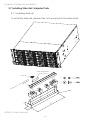
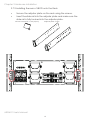
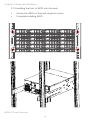
• Slide Rail x 1set
• Adjuster Plate x 1set
If any items are missing, please contact your authorized reseller or sales representative.
J4024-01 User's Manual
1