1
CONTENTS
PREFACE�������������������������������������������������������������������������������������������������������� i
SAFETY INSTRUCTIONS��������������������������������������������������������������������������������� ii
Chapter 1. Prodcut Introduction�������������������������������������������������������������1
1.1 Box Content������������������������������������������������������������������������������������������������������ 1
1.2 Specifications��������������������������������������������������������������������������������������������������� 2
1.3 General Information����������������������������������������������������������������������������������������� 3
1.4 SCSI Enclosure Services - 2 (SES-2)����������������������������������������������������������������� 6
Chapter 2. Hardware Installation������������������������������������������������������������7
2.1 Removing and Installing Top Cover��������������������������������������������������������������� 7
2.2 Removing/Installing a Drive Tray/ Hard Drive/ Drive Slot Map�������������������� 8
2.3 Removing and Installing a PSU Module������������������������������������������������������� 10
2.4 Removing and Installing a Fan Module������������������������������������������������������� 11
2.5 Removing and Installing External Expander Module���������������������������������� 12
2.6 Removing and Installing the HDD backplane Module������������������������������ 13
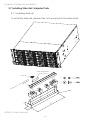
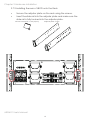
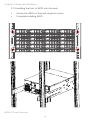
2.7 Installing Slide Rail /Adjuster Plate��������������������������������������������������������������� 14
Chapter 3. Sub-System Configuration Setup���������������������������������������17
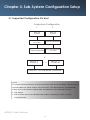
3.1 Supported Configuration On Host����������������������������������������������������������������� 17
3.2 Utility Set up on Host��������������������������������������������������������������������������������������� 18
3.3 Connect Host to JBOD via RS232������������������������������������������������������������������ 21
3.4 Configure command Line Interface Operation������������������������������������������ 22
3.5 Power on/off the enclosure via RS232���������������������������������������������������������� 49
Chapter 4. BMC Configuration and Settings����������������������������������������51
4.1 Sensor’s location for Fan & Temperature����������������������������������������������������� 51
4.2 Utility setup on Host���������������������������������������������������������������������������������������� 52
4.3 Connect Host to BMC by RS232�������������������������������������������������������������������� 52
4.4 BMC LED signal����������������������������������������������������������������������������������������������� 56
4.5 Web UI������������������������������������������������������������������������������������������������������������� 57
4.5.1 Dashboard��������������������������������������������������������������������������������������������������� 57
4.6 Firmware Update�������������������������������������������������������������������������������������������� 76
4.7 Expander firmware update��������������������������������������������������������������������������� 81
4.8 Firmware safety mode����������������������������������������������������������������������������������� 84
Chapter 5. Technical Support���������������������������������������������������������������89
contents