1
Camera Presets
This button allows you to switch between camera
modes without rolling the scroll wheel.
Clicking it once will zoom the camera in completely on
the current focus point, clicking it a second time sets
medium zoom, and clicking it a third time zooms the
camera completely out.
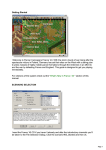
Tactical Map
This button
toggles an
outline
map of your
mission.
The map
displays
all the
towns, quest locations, and visible
units.
Quest List
This button displays the mission list. Here you can
find out about each quest and its status (in progress
/ accomplished / failed).
Quests can be either obligatory or optional. In order
to focus the camera on a quest object click the
magnifying glass icon.
If a quest has a time limit, the number of
turns remaining is also displayed.
The number of turns remaining for each
victory rating (gold / silver / bronze) is
displayed in the top left of the quest list.
The higher the victory rating you achieve,
the bigger the bonus you receive upon
completion of the mission.
Army Management
The “Army Management” button opens
the Army Management screen.
To the left of this button, you can see
the money available for the mission and
the constraints on the number of units.
8