1
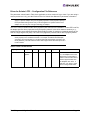
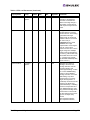
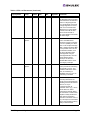
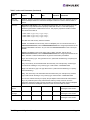
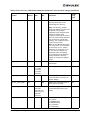
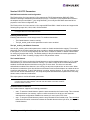
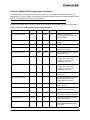
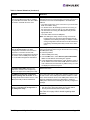
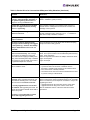
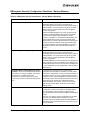
VPorts and the HBAnyware Utility Situations
Situation
Resolution
VPort Creation Failure
If an error occurs during VPort creation, an error message
indicates the failure.
Virtual Ports for Unsupported Adapter or Host
When you select an unsupported adapter port or host that is
running an older version of the HBAnyware utility, “Virtual
Ports not available on this HBA or Host”. appears in the
Virtual Port window.
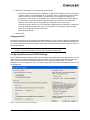
Port Not Ready
The controls in the New Virtual Port box of the Virtual Port
window are replaced by a list of reasons why VPorts cannot
be created. The reasons can be one or more of the following:
Driver NPIV parameter is disabled.
• SLI-3 is not being used by port.
• Adapter port is out of resources for additional virtual ports.
• The port is not connected to a fabric.
• The fabric switch does not support virtual ports.
• The fabric switch is out of resources for additional virtual
ports.
• The port link state is down.
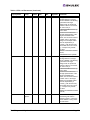
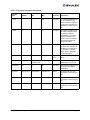
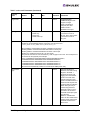
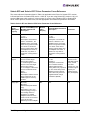
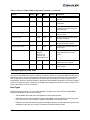
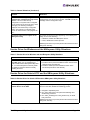
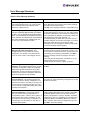
Security Configurator Situations - Access Control Groups (ACG)
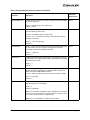
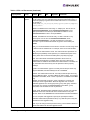
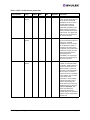
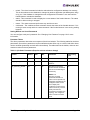
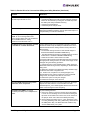
Table 20: Access Control Groups Situations
Situation
Resolution
All servers are not displayed under one of
these two circumstances:
• When I run the Security Configurator on the
MSC, I do not see all of the systems in
available servers or ACG Servers lists.
• When I run the Security Configurator on a
non-MSC, I do not see all of the systems I
should see in the ACG Servers list.
Make sure all of the systems are connected to the FC network
and are online when you start the Configurator. Discovery of
the systems is done only once, at startup. Unlike the
HBAnyware utility, there is no Discovery Refresh button.
Therefore, the Security Configurator must be restarted to
rediscover new systems.
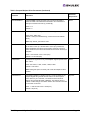
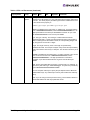
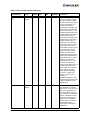
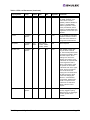
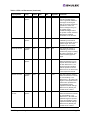
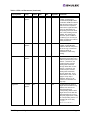
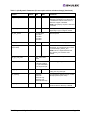
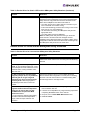
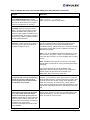
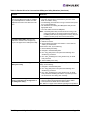
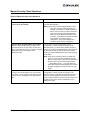
Cannot add or remove a server. The
Security Configurator shows only a list of the
systems in this system's ACG. I cannot add or
remove systems from the ACG.
This is normal. You can modify the ACG for your system only
on the MSC or on a parent client system.
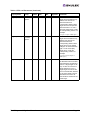
The HBAnyware utility shows non-ACG
Servers. The HBAnyware utility shows
servers that are part of the ACG and that are
not part of the ACG.
The HBAnyware utility discovers unsecured servers as well
as servers that are part of its ACG. The servers you see that
are not part of the ACG are unsecured. They are discovered
by any system running the HBAnyware utility on the same FC
fabric.
The HBAnyware Utility User Manual
Page 194