1
Database Command Line Scanner (v1.2) User Manual
© DbScanLabs, 2012
Basic Usage
3.1 Scanning Parameters
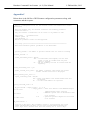
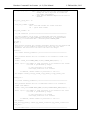
The scanning parameters are specified in the .cfg file. The following are the key
parameters. Please refer to Appendix C for the complete list of configuration
parameters and their syntax.
-
-
-
-
tns_name
o TNS connection to the database (can be in the form of a TNS name or
an Easy Connect String, please see section 3.1.1 Configuring database
connection for more details)
db_user
o Database user under which the scan will be run
o This user will require select privileges on all the tables to be scanned
password
o Password of db user. This will be encrypted automatically in the config
file
schema_list
o List of schemas to be scanned
3.1.1 Configuring database connection
The easiest way to configure a database connection is to use Oracle EZ Connect URL
(//hostname:port/SERVICE_NAME). However, standard canonical TNS names can
be used as well.
It is normally recommended to install the DCL Scanner on a database server to
eliminate network latency. So, if DCL Scanner has read access to the set of *.ora
configuration files on the database server (e.g. in $ORACLE_HOME/network/admin
directory) the scanner can use them via TNS_ADMIN environment variable.
If for any reason the *.ora configuration files are not available to use, an independent
TNS configuration can be created. DCL Scanner has its own set of standard Oracle
configuration files located at
<DCLScanner_Install_Dir>/instantclient_11_2\network\admin directory. These
*.ora files can be used for any custom TNS configuration.
3.2 Running a Scan
To launch a scan run “./dclscanner.sh -c filename.cfg”
A detailed log file that provides an ongoing progress report can be found at
<installation_directory>/logs/dclscanner.log (for example,
dclscanner-1.2/logs/dclscanner.log)