1
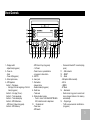
Panel Controls
15
5
1.- Display switch
-.Adjust time(long press)
2.- Power on
- Mute
- Power off(long press)
3.- Enter system menu,
4.- MP3 playback
Button 1: - Play/pause
-Start play from the beginning of the first
track.(long press)
Button 2: - Intro play (10 sec.)
Button 3: - Track repeat play
Button 4: - Track random play
Button 5: - MP3 folder down
- MP3 track -10 down (long press)
Button 6: - MP3 folder up
6
- MP3 track +10 up (long press)
- 1-6 Preset:
- Press to tune in a preset station.
- Long press to store station.
5.- MIC FR
6.- Aux-in jack
7.- Dial number
- Answer phone
- Redial number.(long press)
8.- Radio tune
- Track seek
9.- Rotate to adjust volume
-Push to select VOL/BAS/MID/TRE/BAL/
FAD, rotate the knob to adjust level.
10. - Terminate call
- Preset scan
- MP3 search
-Disconnect Bluetooth® connection(long
press)
11. - USB connector
12. - RESET
13. - Radio
- USB (when USB connected)
- AUX in
- I-MODE
- BT Music
14. - Band select
-Radio mode, long press to search and
store strongest stations in the memory
automatically.
15 - Program type
-Traffic announcements identification.
(long press)
33