1
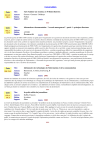
Schematic
Realistic
Pixel
Paint
Retouch
Text
TextEdit
WYSIWYG
2D Vector
Draw
Illustration
3D
CAD
Realistic
frame drawing of 3D scenes, also used by 2D illustration editors such as Adobe Illustrator [2]. Most WYSIWYG text editors also provide a relaxed model where page-level layout is
not displayed to speed up the redisplay and to avoid distracting the typist at column or page boundaries.
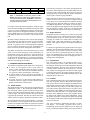
Table 1: Classification of common graphic models.
bold is used when a model can be implemented on a
conventional window system. bold italic is used when
a relaxed version of a model can be implemented on a
conventional window system.
Relaxed models are mainly used for performance reasons. A
realistic 3D scene can be very expensive to compute whereas
a wire-frame view is much cheaper and is sufficient for many
editing operations. Relaxed models are common in interactive graphical applications. For example, an object being interactively dragged is usually displayed with a relaxed model
that only displays its outline. In this case, the relaxed model
is used to reduce the response time and to avoid cluttering.
tion model result in the following situation: either the application is build with a high-level toolkit and its interface makes
a poor use of direct manipulation techniques and hardware
features (input devices and graphics hardware), or the application is build with a low-level toolkit and it is more efficient
and usable but much more expensive to develop and maintain.
2.2
We believe that this situation comes from the fact that highlevel toolkits rely on an output-oriented visualization model,
described in textbooks such as [13], to manage interaction.
Instead, we propose to use several superimposed graphical
layers to separate the entities involved in visualization from
those involved in interaction management and feedback.
For interactive applications, the graphic structure also implements the pick operation which finds the node or set of nodes
that intercept a given position. The position usually comes
from an event sent by a positional input device such as the
mouse. The resulting node or set of nodes can be used as the
target of a structural operation such as changing the color or
starting a direct manipulation.
This Multi-Layer Model was first introduced in [10]. In this
article, we focus on the description of the model and its implementation, and on our experience in using the model to
develop several graphical editors in the TicTacToon system
for Professional 2D Animation [11]. Before presenting the
model itself, we introduce the standard visualization model
and some existing high-level toolkits.
2.3
Virtual Surface
The virtual suface needs to be redisplayed when a previously invisible part becomes visible, and when its contents
has changed. All the high-level toolkits implement a deferred
redisplay mechanism. The area of the virtual surface known
to be out of date is added to the damaged region. At a later
time, usually when the application is idle, the toolkit triggers
a redisplay that traverses the graphic structure and only redraws graphic objects intersecting the damaged region. The
damaged region is then reset.
2 STANDARD VISUALIZATION MODEL
The standard visualization model defines three components:
A Canvas, or virtual graphic surface (virtual surface for
short), is a data structure that stores an image as a 2D array of pixels. It also stores control information about the
size, position, visibility and attributes of the image1 .
A Graphic Model is the set of functions and graphic attributes used to access and modify the contents of the virtual surface.
A Graphic Structure is a data structure that holds the information required to display an image defined with the
graphic model onto the virtual surface.
2.4
Problems
This visualization model works well for applications that display only one graphic structure. But for interactive applications, specific objects need to be displayed in addition to the
main graphic structure in order to support interaction. For example, when selecting an object in a 2D editor, graphic objects called handles appear, that the user can grab to start a
manipulation. These handles do not belong to the main structure and can be described with a very simple graphic model.
Similarly, when dragging an object, most programs display
an outline of the graphic object being manipulated. Again,
this outline object does not belong to the main structure and
can be displayed with a much simpler graphic model than that
of the main structure.
2.1 Graphic Models
The graphic models used by most interactive applications are
summarized in table 1. We distinguish schematic models
(first line) from realistic models (second line) based on the
number of available graphic attributes and the complexity of
a typical image. The colums represent the types of objects
represented by the models. The table also shows that current
window systems are mainly designed for schematic models.
We also introduce the notion of relaxed model: A virtual surface implements a relaxed graphic model when some of the
primitives or attributes of the model are ignored or simplified
during image rendering. A popular relaxed model is the wire1 This
Graphic Structure
The graphic structure is usually a tree or a direct acyclic graph
(DAG) of graphic objects. Drawing the structure consists of
a preorder traversal of the tree where each node is requested
to display its contents on a virtual surface according to the
graphic model. Each node can define its own graphic attributes. Other graphic attributes are maintained during the
traversal.
New types of interactive applications introduce even more
such objects. For example, groupware editors such as
GroupDesign [5] use specific graphic entities to display the
activity of other participants working on the same document.
definition is inspired by Foley et al. [13, page 53]
2