1
Toolkit
Unidraw
Garnet
Graphic
Structure
Tree
Fresco
DAG
OpenInventor
DAG
Graphic
Model
2D structured
resolution
dependent
2D structured
resolution
independent
2D and 3D
Domain
Unidraw, the first step is implemented by a Tool object, which
takes a starting event and returns a Manipulator. This manipulator then grabs all the input events during the direct manipulation and provides graphical feedback. When the manipulation is over, it returns a Command object that is executed. In
OpenInventor, some nodes of the DAG (called Manipulators)
start a manipulation when they receive a specific event. Like
Unidraw, manipulators grab all the events until the end of the
manipulation. The result of the manipulation is a modification of the DAG. The toolkits also manage a Selection, which
is a list of objects associated with some graphical feedback.
2D
schematic
2D
schematic
schematic
and realistic
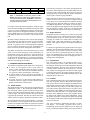
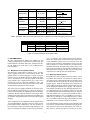
Table 2: Comparison of high-level toolkits
Apart from the main graphic structure, various graphic objects are used to display the selection and the manipulation
feedback. Unidraw hides these objects from the application
programmer whereas OpenInventor inserts them in the main
graphic structure. Fresco Pacers are also nodes of the main
graphic structure. During direct manipulation, either the
main graphic structure is incrementally modified (in OpenInventor and Fresco) or simple objects are directly displayed
with little or no control over their shape and graphic attributes
by the application programmer.
Another example is the ink used in pen-based interface to
display a stroke before it is interpreted by the system. Window systems provide ad-hoc solutions for managing special
graphic entities such as background images and the mouse
cursor. But they are no longer sufficient for sophisticated applications. For example, the visual feedback of a 3D mouse
requires a 3D graphic object that cannot be represented by a
window system cursor; when using multiple positional input
devices (e.g. a mouse and a tablet), the window system can
only display one cursor.
We believe that these mechanisms are inadequate for the following reasons:
selection feedback and manipulation feedback do not belong to the main graphic structure; they need a different
graphic model, usually a relaxed one, and they should not
interfere with structural operations on the main graphic
structure.
Specific graphic entities may need to be managed when
editing a graphic structure. Hidden mechanisms are not
sufficient to manage all the graphic entities that a domain
may require. For example, a graphical editor turned into a
groupware application will require additional graphical objects for awareness of other participants (e.g., telepointers).
Optimizations are difficult to implement; OpenInventor advises the application programmer to use overlay planes
when they exist and Fresco proposes to use Pacers to get
smoother feedback. Such optimizations rely on specific
hardware or characteristics of a typical scene and are difficult to program in a generic, portable way.
3 CURRENT HIGH-LEVEL TOOLKITS
High-level toolkits such as Unidraw, Fresco and OpenInventor are based on the visualization model described above. Table 2 summarizes the graphic models and graphic structures
that they use.
Unidraw [33] requires the application programmer to describe the graphic structure as a tree and offers several mechanisms to edit it. Internally, Unidraw manages several other
graphic structure that are hidden from the application programmer. For example, each view manages a page layer and
a grid layer, but there is no support to change their standard
behavior.
Fresco defines a clean and efficient mechanism to manage a
DAG of graphic objects. In order to optimize redisplay during direct manipulation, the authors of Fresco have proposed
to use special objects called Pacers [31]. Pacers can provide
a smoother feedback by relaxing the quality of their graphic
display during direct manipulation. However, redisplaying
a scene still involves redisplaying all the objects intersecting the damaged region, not only the objects being manipulated. This optimization is therefore insufficient when a scene
is complex.
4
THE MULTI-LAYER MODEL
We have designed the Multi-Layer Model [10] to solve these
problems. This model uses a separate graphic layer for each
specific graphic structure or graphic model involved in the interaction. The layers are stacked (composed one on top of the
other) and the appearance of the stack is maintained by a layer
stack object. Interaction is managed by layer tool objects.
OpenInventor is mainly oriented towards 3D graphics. The
graphic structure is a DAG that ca be edited. Redisplay is
triggered by any modification of the structure. The graphic
model is based on OpenGL, which is designed to take advantage of any available graphic accelerator. However, the redisplay time is still a function of the complexity of a scene.
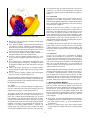
As an example, consider the main window of the graphical
editor in figure 1. We can decompose its contents into six
different layers: the background, the grid, the main graphic
structure, the selection handles, the direct manipulation feedback and the cursor. When interacting with this window, new
graphic entities appear such as a selection rectangle being
dragged. With the multi-layer model, each of these graphic
entities belong to a separate layer. We have found that most
graphical editors can be described with the following layers
(this list is not limitative and is not built into the model):
3.1 Interaction
The above high-level toolkits decompose a direct manipulation in three steps: finding a handler for a starting event,
handling the direct manipulation of graphic objects, and executing a command upon reception of the ending event. In
3