1
 Selection: most 2D editors use one or two colors for selection feedback with simple outlines or rectangles (handles).
Even in 3D, the graphic model used for the selection is usually relaxed (wire-frame).
Direct Manipulation: most 2D editors use a relaxed mode
for the feedback of objects being manipulated. Some editors use the same model as the main layer’s model.
Cursor: the cursor layer usually displays small images using few colors. All window systems can manage one cursor.
5.3
Software Rendering
When no appropriate extension is available to translate a
graphic model, the only solution is to use software rendering.
The graphic primitives and graphic attributes are interpreted
to update a 2D image which is composed onto the stack virtual surface. Performance depends both on the graphic model
and on the mechanism to transfer an image from user memory
to screen memory.
5.4
Implementation of a Graphic Model
By encapsulating the graphic model into an object, each application can specialize a layer’s graphic model according to
several criteria, such as the graphic properties of the layer’s
content, the graphic resources available at run-time, or specific design choices.
We now describe three mechanisms to compose the virtual
surface of the layer onto the virtual surface of the stack:
translation, use of extensions and software rendering. These
mechanisms convert the layer’s graphic model into a model
compatible with the window system’s graphic model.
For example, in the FontStudio vector-based font editor [20],
the main layer displays the character outlines in black. The
selection layer can therefore use any other color (FontStudio
uses pink). In contrast, a paint program such as Adobe PhotoShop [3] cannot ensure that a specific color will always be
distinguishable from the main layer’s contents. Thus, Photoshop displays the selection with animated dashed lines. In a
multi-layer implementation of these editors, the same selection layer could be used for both editors but the stack would
choose a different object for the translation.
5.1 Translation
The graphic model used by a layer can be simpler than or
equivalent to the stack’s graphic model. In this case, the stack
can provide the layer with an object that translates all the
function calls required by the layer’s graphic model into function calls understood by the stack’s graphic model. The most
frequent case of translation is simply the identity, when the
graphic model of the stack is a superset of the layer’s model.
Another frequent case is the translation from a relaxed model
into the stack model. For example, the grid layer, the selection layer, the direct manipulation layer and the lasso layer
only draw thin lines with a single color. It is easy to translate this graphic model into the stack graphic model, since the
only requirement it that the lines should be visible. The translation mechanism can choose any color and drawing mode
that fit this requirement. Often, the color will be black and
the mode will be XOR.
6
OPTIMIZING REDISPLAY
When a region of a layer is damaged, the stack needs to redisplay the correponding region of its virtual surface. The simplest method is to ask each layer, from back to front, to redisplay its content and compose it onto the virtual surface. Several optimizations can be implemented by the stack to avoid
expensive partial redisplays of undamaged layers. These optimizations depend on the nature of each particular layer and
also on the layout of the stack. For example, if a cursor layer
is always on top of the stack, saving the contents of the virtual layer under each cursor enables the stack to quickly erase
cursors when they move (this is how most window systems
implement the cursor).
Translating a graphic model can also be used to relax a
graphic model on the fly. This is the case when a layer’s
model is complex and cannot be translated into the stack’s
model faithfully. The translation is used to simplify or ignore
some graphic attributes, which results in a relaxed graphic
model. This type of translation is also useful to achieve good
performance at the expense of graphic quality when no specialized hardware is available.
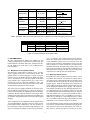
We use two methods to optimize redisplay in a stack:
a set of attributes associated with each layer that describe
the optimizations that are likely to be effective,
the specialization of the stack for each application.
With simple applications, the standard stack can use a reasonably efficient implementation by using the attributes. More
demanding graphical applications require the stack to be specialized. The redisplay attributes that we use include the following:
single color: this attribute informs the stack that only one
color is required by the layer. When the layer is on top (or
the layers above it are empty), the stack can use optimizations such as using an overlay plane if available, or one
plane in the color look-up table, or XOR mode when the
look-up table is correctly set up, etc.
transient: this attribute informs the stack that the contents
of the layer should be updated as fast as possible. It is
used for example for the direct manipulation layer and for
a stroke layer that displays the ink of a pen. When the layer
is on top and a graphic object appears on it, the stack caches
5.2 Use of Extensions
Some window systems have extensions that give access to a
larger range of graphic models. For example, OpenGL and
Display PostScript [4] are available for the X Window System
and can be used on any virtual surface (drawable) managed
by X, in combination with X’s native model. In this case,
a layer’s model can be translated into a graphic model supported by an extension.
However, some extensions cannot use virtual surfaces that are
also used by the native graphic model. For example, some
video boards can only display frames in shared memory. In
such cases, the layer’s image must be generated off-screen
and composed by the stack onto its virtual surface. With this
technique, it is still possible to use different graphic models
in a stack.
5