1
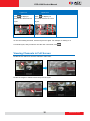
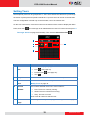
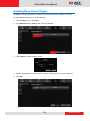
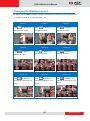
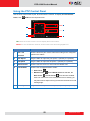
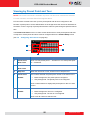
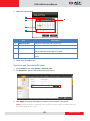
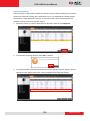
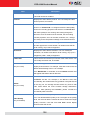
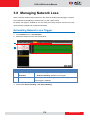
ECD-1000 Product Manual Viewing by Preset Point and Tour NOTE: The Preset Point Panel is available only when PTZ and zoom cameras are selected. For other cameras, the Preset Point Panel appears blank. PTZ and zoom cameras can have up to 32 preset points and 32 tours configured on the Decoder. A preset point is a user-defined area on the image where the camera is directed at or zoomed in. A tour is a group of preset points that the camera cycles through at specific interval time. The Preset Point Panel on the Live View screen allows users to view preset points and start or stop tours. Preset points and tours must be configured first in the Camera Setup screen (see 3.6 Configuring the Cameras on page 99). 4 1 5 2 3 Item 1 2 Description Preset Point Click < to view preset point 1 ~ 16 buttons or > to view preset point Back / Next 17 ~ 32 buttons. Tour Click < to view tour 1 ~ 16 buttons or > to view tour 17 ~ 32 buttons. Back / Next 3 Stop Tour When the camera is on tour, click this icon to stop the tour. 4 Preset Point The numbers indicate the preset point number. If the button has a: Number Black background: The preset point is configured. Gray background: The preset point is not configured. Click a number button to display that preset point on the Live View screen. 5 Tour ID Number The numbers indicate the tour ID. If the button has a: Black background: The tour is configured. Gray background: The tour is not configured. Click a tour ID number to start the tour. 86 www.acti.com