1
Appendix 4 A List of Error Messages
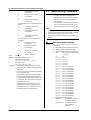
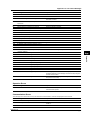
Code
Message
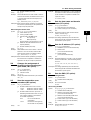
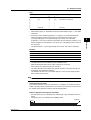
303
Data request command can not be enumerated with –
sub-delimiter.
Explanation/Countermeasures
350
Command is not permitted to the current user level.
–
351
This command cannot be specified in the current
mode.
–
352
The option is not installed.
–
353
This command cannot be specified in the current
setting.
–
354
This command is not available during calculation.
–
390
Command error.
–
391
Delimiter error.
–
392
Parameter error.
–
393
No permission.
–
394
No such connection.
–
395
Use “quit” to close this connection.
Attempted to disconnect its own connection.
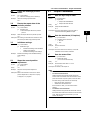
396
Failed to disconnect.
–
397
No TCP control block.
The control block of the specified connection cannot be found.
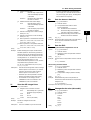
400
Input username.
–
401
Input password.
–
402
Select username from ‘admin’ or ‘user’.
If the recorder is configured not to use the user name and
password, use user names ‘admin’ or ‘user’.
403
Login incorrect, try again!
–
404
No more login at the specified level is acceptable.
–
420
Connection has been lost.
–
421
The number of simultaneous connection has been
exceeded.
–
422
Communication has timed-out.
–
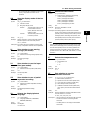
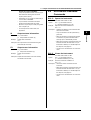
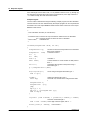
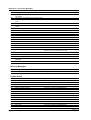
Warning Messages
Code
Message
Explanation/Countermeasures
600
Initialized.
Settings and measured data have been initialized.
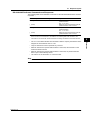
System Errors
Code
Message
Explanation/Countermeasures
902
RAM failure.
Contact your nearest YOKOGAWA dealer.
910
A/D error.
Contact your nearest YOKOGAWA dealer.
921
A/D calibration value error.
Contact your nearest YOKOGAWA dealer.
922
A/D calibration is in the wrong order.
Contact your nearest YOKOGAWA dealer.
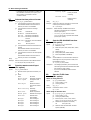
930
Memory acquisition failure.
Contact your nearest YOKOGAWA dealer.
940
The ethernet module is down.
Contact your nearest YOKOGAWA dealer.
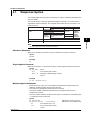
950
A/D number error.
Contact your nearest YOKOGAWA dealer.
951
EEPROM write error.
Contact your nearest YOKOGAWA dealer.
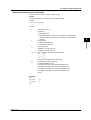
960
Ribbon error
Contact your nearest YOKOGAWA dealer.
961
Printer error
Contact your nearest YOKOGAWA dealer.
962
Plotter error
Contact your nearest YOKOGAWA dealer.
963
Pen 1 error
Contact your nearest YOKOGAWA dealer.
964
Pen 2 error
Contact your nearest YOKOGAWA dealer.
965
Pen 3 error
Contact your nearest YOKOGAWA dealer.
966
Pen 4 error
Contact your nearest YOKOGAWA dealer.
App-8
IM 04P01B01-17E