1
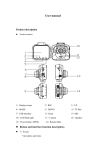
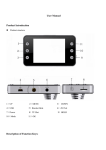
button. 12)Camera 120°wide-angle len; 13)OK button Confirmation button for video recording and taking photo; In recording mode, press this mode to start video recording, re-press to stop; In photo mode , Short press to take photo. In menu mode means Confirmation button. 14)POWER ON/OFF Power switch: continuous press for power on/off, shortly press for flash light on/off. 15)USB data interface Connect PC for Data transfer Connect external power to charge battery or provide working power . 16)AV-OUT TV output, connect TV or video display devices through AV cable 17)Speaker video playback ,voice monitor, operating sound warning 18)Reset slot Use this to restart when crash Special function description G-sensor function When gravitational acceleration reach 6g(1g=9.80m/s), machine will save present video as undeletable files Automatic power on/off function Support recording Start and shutdown synchronization with Auto and save the video files After connect to the car power supply Seamless loop recording, don‟t leak second