1
Table of Contents
Table of Contents .............................................................................................................2
General Information........................................................................................................4
System Requirements ........................................................................................4
Privacy & Mobility.................................................................................................4
Driver Distraction .................................................................................................4
Customer Support................................................................................................5
Copyright Information ........................................................................................5
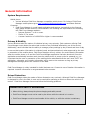
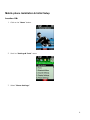
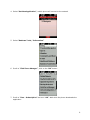
Mobile phone Installation & Initial Setup................................................................6
Launching Field Force Manager on Your Mobile Phone ...................................10
Program Mobile Phone Shortcut Key ......................................................................12
Logging In .............................................................................................................12
Getting started with location-based services ......................................................14
Navigating the application ..............................................................................15
Take a Phone Call...............................................................................................16
Make a Phone call ..............................................................................................16
Field Force Manager Functions..................................................................................17
Field Force Manager Menu..............................................................................17
Jobs..........................................................................................................................17
Job List Screen ........................................................................................................17
Job Summary Screen............................................................................................17
Job Details Screen .................................................................................................18
Job Status Reporting Screen .............................................................................18
Changing Devices Settings.................................................................................19
Locations................................................................................................................20
Driving Directions...............................................................................................22
Basic: Text Driving Directions...........................................................................22
Premium: Audible Driving Directions .............................................................22
Enter Address ..........................................................................................................22
Yellow Pages.............................................................................................................23
Messages ...............................................................................................................24
Message Screen ......................................................................................................24
Message Detail Screen .........................................................................................24
Timesheets............................................................................................................25
Forms ......................................................................................................................26
Picture Capture .......................................................................................................26
Supervisor Timecards .......................................................................................27
End Shift All – This menu will End Shift for all workers that are managed by the
Supervisor whose status is currently On Duty ...................................................28
Glossary .............................................................................................................................29
Application Shortcuts....................................................................................................32
2