1
Introduction
Welcome to the RB Web User Guide for office staff
This guide is for office personnel who are in charge of setting up and maintaining your RB Web online
offices. It contains instructions for configuring and customizing your RB Web for your company. It also
contains instructions for managing and monitoring your RB Web after set-up. Plus it includes information
on basic HTML code you will need for some customization options.
RB Web works with your RB8 office management system, and it is in your RB8 system that you will find
the tools described in this guide.
For information on using RB Web online offices, please refer to the RB Web online office user guides for
attorneys, paralegals and other clients, and the user guides for reporters, sales reps and other resources.
These guides are available as PDF downloads from our website: www.omti.com
Table of contents
Web Site Configurations
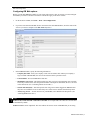
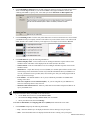
Configuring RB Web options............................................................................................................................ 1
Custom Request Form/Custom Turn-in Form
Customizing online request forms.................................................................................................................... 7
Creating custom lists......................................................................................................................................... 8
E-commerce module
Create Account
Signing up with PayPal..................................................................................................................................... 9
Security
Creating & applying API credentials................................................................................................................ 9
COD Invoices
Publishing COD invoices................................................................................................................................ 11
Accessibility
Controlling online transcript access................................................................................................................ 12
Receivables
Crediting online payments.............................................................................................................................. 12
Full-text search plug-in
Requirements
Is your system ready?...................................................................................................................................... 13
Supported document types
Is your document compatible?........................................................................................................................ 13
Create Full-Text
Building an index............................................................................................................................................ 14
RB Web 8 User Guide | I