1
Effects List
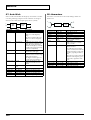
09: Non-Linear
10: Delay
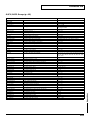
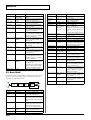
This uses digital processing to create an artificial reverberation that
is quite different than naturally occurring reverberation.
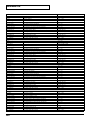
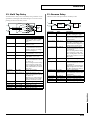
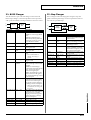
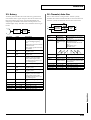
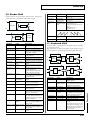
This is a stereo delay. Depending on the length of the delay you set,
you can get long echoes, thick sounds, or spatial sounds.
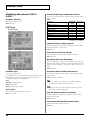
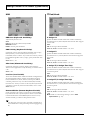
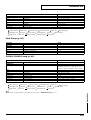
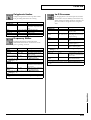
Value
50–4000 Hz
-15– +15 dB
50–20000 Hz
Pre Mid Q
0.5, 0.7, 1.0, 2.0,
4.0, 8.0
Pre Mid Gain
Pre Hi Freq
-15– +15 dB
2000–20000 Hz
Pre Hi Gain
Pre Dly Time
-15– +15 dB
0–200.0 ms
Density
Early Ref Level
0–99
0–99
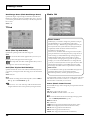
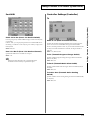
NLR Type
L→R, NORMAL,
L← R
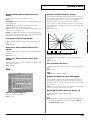
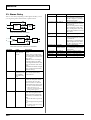
Env Time Ratio
10–120 %
Envelope T1–T4
0.1–1000 ms
Envelope L1–L3
0–100
Description
Frequency of the low range
Gain of the low range
Frequency of the middle
range
Gain of the middle range
Set a higher value for Q to
narrow the range to be affected.
Gain of the middle range
Frequency of the high
range
Gain of the high range
Adjusts the delay time from
the direct sound until the
delay sound is heard.
Density of the reverb
Volume level of the initial
reflected sound
Method of output panning
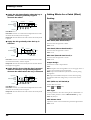
L→R: Pan from the L channel to the R channel
NORMAL: Output without
panning
L←R: Pan from the R channel to the L channel
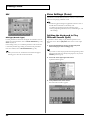
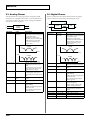
The overall time will be expanded or contracted while
preserving the time ratios
of the various envelope
times.
Time until each point (T1–
T4) is reached
Output level for each point
(L1–L3)
* If the total length of
Envelope times
(T1+T2+T3+T4) exceeds
1000 ms, the sound of the
portion that extends
beyond this will be cut.
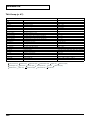
Level
L1
L3
L2
Time
T1
T2
T3
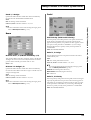
Feedback Time
0.1–1000 ms
Feedback Level
Post HC Freq
0–99 %
160–15000 Hz,
THRU
T4
Delay time for the feedback
sound
Amount of feedback
Frequency at which the
high cut filter will begin to
take effect (THRU: no filter
is used)
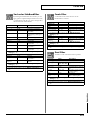
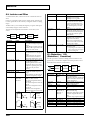
Parameter
Mode
Value
MONO, STEREO, ALTERNATE
Description
Switches stereo, monaural, or alternate.
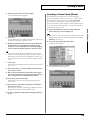
MONO: This is a single-input,
dual-output delay. Stereo sound
(left and right) are mixed before
being input.
STEREO: This is a dual-input,
dual-output delay. The delay
sound output features the same
stereo placement as that of the
input.
ALTERNATE: The left and right
delay sound output alternately.
(Alternate delay)
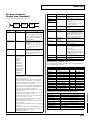
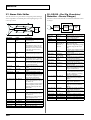
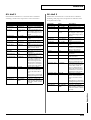
Delay Time
0–1300 ms
Adjusts the delay time from the
(MONO), 0–650 direct sound until the delay
ms (STEREO,
sound is heard.
ALTERNATE),
note
L-R Shift
0–650 ms, note Of the left and right delay
sounds, the delay time will be
increased for only one side.
If the L-R order is L→R, the R
sound will be later. In the case of
R→L, the L sound will be later.
* When the mode is set to
MONO or ALTERNATE, this
setting will be ignored.
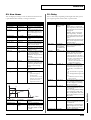
L-R Order
L→R, R→L
In STEREO or ALTERNATE
mode, this setting determines
which of the left or right sides
has the delay sound before the
other
L→R: The left side is expressed
first
R→L: The right side is expressed
first
* In MONO mode, this setting
will be ignored.
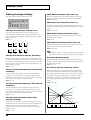
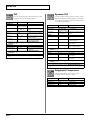
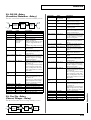
Feedback
-98– +98 %
Adjusts the proportion of the delay sound that is fed back into
the effect. Negative (-) settings
will invert the phase.
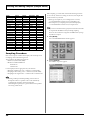
Low Damp Freq 50–4000 Hz
Adjusts the frequency below
which sound fed back to the effect will be cut.
The Low Damp function damps
the low frequency band of the
delay sound quicker than other
bands, which makes for a clearer
delay effect.
Low Damp
-36–0 dB
Degree of Low Damp
Gain
Hi Damp Freq 2000–20000 Hz Adjusts the frequency above
which sound fed back to the effect will be cut.
High Damp, by attenuating the
higher frequencies first, makes
the delay sound more natural.
Hi Damp Gain -36–0 dB
Degree of High Damp
143
Appendices
Parameter
Pre Low Freq
Pre Low Gain
Pre Mid Freq