1
3
FEATURES
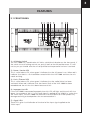
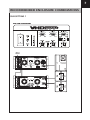
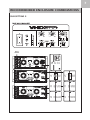
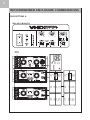
3.1 FRONT PANEL
1
2
3 4
5
12
6
7
11
8
9
10
1) AC Mains Switch
The VHD 2000 has a combination AC Mains switch/circuit breaker on the front panel. If
the switch shuts off during normal use, push it back to the ON position once. If it will
not stay on you should take the unit to qualified service personnel to have it serviced.
2) Power / Service LED
This is a dual colour LED, when green it indicates that the AC power is on. When red it
indicates that there is a fault condition sensed within the VHD 2000 and that the unit
needs servicing.
3) Limit / Thermal LED
This is a dual colour LED, when green it indicates that the audio limiter has been
activated. When red it indicates that the thermal limit of the VHD 2000 has been
exceeded and the unit has shut down because of this.
4) Improper Use LED
If the VHD 2000 is connected improperly then this LED will light and the unit will shut
down. An example of this is if a full range signal is applied to the ‘Mid/Hi In’ rather than
the ‘Main Input’, the VHD 2000 will sense this and shut down to further protect any
damage occurring to loudspeakers that are connected to it.
5) Signal LED’s
These LED’s give visual indication of the level of the input signal applied to the
‘Main Input’.