1
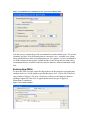
Figure 2. Consolidated Leave Summary for One Type of Leave Report Filter
Note that you see column choices for accumulated leave and available leave. The system
calculates Available Leave differently than Accumulated Leave. Available leave counts
future scheduled leave while accumulated does not. For example, if you are scheduled to
use FMLA tomorrow then today's available balance would be one day less than today's
accumulated balance (Available would account for tomorrow while accumulated would
not).
Entering New FMLA
To enter new FMLA request, right-click the employee in the employee navigation pane
and then click Leave. In the employee profile that opens, click +Family/Med. The leave
entry window in Figure 3 will open. Click Status of Request and change the status to
pending or approved. If the leave is approved then select the type of approval,
intermittent or continuous.
Figure 3. Leave Entry Window