1
Running Reports
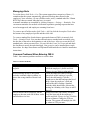
Table 2 lists the FMLA related reports, explains how to open them, and describes their
contents.
Table 2. FMLA Related Reports
Information\Contents
Individual FMLA history
and balance
How to Open Report
Reports > Leave Lists and Calendars > Leave Itemization
and Summary for One Employee
Two Sections: Detail section with columns showing date of leave, type, hours or days
used, hours or days earned, hours or days accumulated, and note from leave entry
window. Summary section showing earned, used, and accumulated totals
Balances for group of
Reports > Leave Summaries > Consolidated Summary for
employees
One Type of Leave
Columns can be added or removed. Typically shows leave balance, dates most recently
used, and total used hours or days (calendar year or rolling)
Balances for several leave
Reports > Leave Summaries > Accumulated Leave
types
Summary (or Available Leave Summary)
Employee Name and a column for each type of leave. Note that the Available Leave
Summary considers future scheduled leave while the accumulated summary does not
List of FMLA leaves taken Reports > Leave Lists and Calendars > Leave Requests
across the company or a
department
Columns can be added or removed. Typically shows employee, department, hours taken,
date range of leave, and status of request.
FMLA case load
Reports > Leave Summaries > Incidents per Month
Total requests, approvals, and denials per month for a year
FMLA hours taken per
Reports > Timecards > Timecard Summary
month
Use filter to select only FMLA. Shows hours taken per month for each employee
Used leave taken for group Reports > Leave Summaries > Used Leave Summary
of employees
Shows employee and one column for each type of leave