1
TrueConf Server
Video Conferencing System
Administrator Guide
© 2010 – 2015 TrueConf. All rights reserved.
www.trueconf.com
TrueConf Server
Administrator Guide
About this document
This document is part of TrueConf Server video conferencing system documentation package and contains
instructions on installation, setting up and use of the system’s server part.
For effective work with the document basic level of IT and network literacy is required.
Contact Information
TrueConf
Tel.: +1 347 8783263
General inquiries: [email protected]
Sales inquiries: [email protected]
Support inquiries: [email protected]
© 2010 – 2015 TrueConf. All rights reserved.
www.trueconf.com
3
TrueConf Server
Administrator Guide
Table of Content
1. General Information
1.1. TrueConf Server Components
1.1.1. Server Side
1.1.2. Client Side
1.2. TrueConf Server Components Description
1.2.1. TrueConf Server
1.2.2. TrueConf Web Manager
1.2.3. TrueConf Client
1.3. Recommended configuration for TrueConf Server system server
1.4. Recommended configuration for TrueConf Server client terminal
1.5. Recommended configuration for the use of HQ mode
2. Server setup and registration
3. Server installation
4. Administering the Server
5. Configuring Server
5.1. "General" Group of Settings
5.1.1. "About" Section
5.1.2. "Settings" Section
5.2. "Network" Group of Settings
5.2.1. "Network settings" Section
5.2.2. "SMTP" Section
5.2.3. "SIP Gateway" Section
5.2.3.1. SIP-terminal calling format from TrueConf Client
5.2.3.2. Invitation of TrueConf customer to the conference that is held on the SIP server
5.2.3.3. Inviting SIP endpoint into a conference in TrueConf Server
5.2.3.4. Connection using CID (Conference ID)
5.2.3.5. Connection to the fixed name groupconf
5.2.3.6. Invitation to the conference from TrueConf Client
5.2.3.7. Connecting to an IP-camera in a video conference
5.2.3.8. Problems and Solutions
5.2.4. "H.323 Gateway" Section
5.3. "Web" Group of Settings
5.3.1. "Settings" Section
5.3.2. "Security" Tab
5.4. "Users" Group of Settings
5.4.1. Tab "User accounts"
5.4.2. Tab "Groups"
5.4.3. Tab "Aliases"
5.4.4. Tab "User storage"
5.4.4.1. Registry Mode
5.4.4.2. LDAP Mode
5.5. "Group Conferences" Group of Section
5.5.1. Symmetric Group conference (Symmetric)
5.5.2. Asymmetric conference (Asymmetric)
5.5.3. Role based conference (Role based)
5.6. "Recordings" Section
© 2010 – 2015 TrueConf. All rights reserved.
www.trueconf.com
4
TrueConf Server
Administrator Guide
5.7. Endpoints Section
5.7.1. Sound capture and playback information
5.7.2. Video capture device information
5.7.3. DirectX information
5.7.4. DirectX features description
5.7.5. Connection information
5.7.6. Network Test information
5.7.7. Last conference information
5.7.8. System information
5.7.9. Events leading to the updating of information about the Endpoint
6. Client Application Connection
6.1. Connection using auto discovering
6.2. Configuring the client application without using auto discovering
7. Set up of the previously installed client application to work with the video conferencing server
7.1. Manual configuration
8. Federation between servers
9. Server Diagnostics
9.1. Server status
9.2. Server's log files
9.3. Change the server language
10. Troubleshooting
10.1. Server does not start
10.2. Information shown in manager program is corrupted or couldn't be saved
© 2010 – 2015 TrueConf. All rights reserved.
www.trueconf.com
5
TrueConf Server
Administrator Guide
1. General Information
1.1. TrueConf Server Components
1.1.1. Server Side
TrueConf Server;
TrueConf Manager.
1.1.2. Client Side
TrueConf Client.
Note: See TrueConf Client application user guide to learn how to install and configure TrueConf
Client application.
1.2. TrueConf Server Components Description
1.2.1. TrueConf Server
This component is a software video server. It gets installed as Windows operating system service and
provides:
Client authentication and authorization;
Client connection, including connection through NAT’s and proxy servers;
Media stream retranslation when direct stream translation is not possible;
Communication between remote servers connected to the option "Federation";
Storing the call history.
1.2.2. TrueConf Web Manager
This component is dedicated to server component configuring.
TrueConf Manager provides:
Server registration, start , stop and state monitoring;
Server log viewing;
Server IP-address and port set-up;
Registration of new users, activation and deactivation;
Revision of support information;
Group conferencing of different modes.
1.2.3. TrueConf Client
This is a client application. It is installed on the users' computers and allows making and receiving of
video calls.
TrueConf Client provides:
User authentication in the TrueConf Server system;
Possibility to make video calls or create and participate in various group video conferences;
Set up of video and audio input and output;
Exchange of text messages;
White board tool for 1- on -1 conferences;
Slide show tool for displaying of graphic images in 1-on-1 and group conferences;
Screen sharing for transmission of your desktop screen to one or more participants;
File transfer in 1-on-1 video calls;
User address book support and management;
© 2010 – 2015 TrueConf. All rights reserved.
www.trueconf.com
6
TrueConf Server
Administrator Guide
Call list management;
Self view display in conferences;
Support of video formats: SD (320×180), HQ (640×360), HD (1280×720). In 1-on-1 video
conferences is supported FHD video format (1920×1080);
Video and/or audio mute feature;
TCP and UDP transport.
Note: You can find information on how to connect client application to server in the "Client Application
Connection" section of this document
1.3. Recommended configuration for TrueConf Server system server
a Dual Core processor;
1GB RAM;
20Gb free hard disk space;
100 Mbit/s Ethernet;
MS Windows Server 2000/2003/2008 operating system.
1.4. Recommended configuration for TrueConf Server client terminal
Intel or AMD Processor with 2 GHz or higher clock speed;
512 MB of RAM and 100 MB free hard disc space;
Windows 2000/XP/Vista/7 operating system;
256 kbps network connection in both directions;
Webcam;
Full-duplex sound card;
Headset (in order to avoid echo).
1.5. Recommended configuration for the use of HQ mode
Windows 2000/XP/Vista/7 operating system;
CPU: Intel Core 2 Duo E6400 / AMD 64 X2 4200+;
1GB RAM;
DirectX 9c compatible video card (at least 256 MB RAM).
Note: To learn more about the use of TrueConf Server client application please refer to the "Client
Application Manual" which is also included into the system documentation package.
© 2010 – 2015 TrueConf. All rights reserved.
www.trueconf.com
7
TrueConf Server
Administrator Guide
2. Server setup and registration
When TrueConf Server software is installed and server computer is connected to the network, then the
rest of server configuration will take about 5 minutes.
Step 1
Install TrueConf Server software.
Step 2
After the installation of your web browser will automatically start server setup interface
Step 3
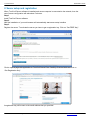
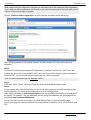
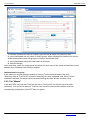
Register the server. To activate the server you have to get a registration key. Click on “Get FREE Key”:
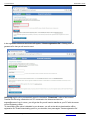
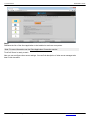
Click to open a page with application to TrueConf Server Free. Carefully fill all the fields and click on
“Get Registration Key”:
A registration key will be sent to the email address that you provided:
© 2010 – 2015 TrueConf. All rights reserved.
www.trueconf.com
8
TrueConf Server
Administrator Guide
Note: The key should be delivered in 15 minutes maximum. If this did not happen, try again, or check
the SPAM folder in your email client.
Return to the page of TrueConf Server settings and enter the registration key you have just received by
e-mail.
Press “Register” to continue:
After the server has been successfully registered, on top of the activation window of web-configurator a
special sign will appear.
If you are installing server behind the firewall, then in order to complete the registration you should open
port 4310 access from inside to internet.
Offline registration
To register offline on a computer without an Internet connection, you will need a device connected to
the Internet to obtain a registration key. On that device, go to https://trueconf.com/server/trial/ and follow
the instruction from the "2.Server setup and registration" section.
Once you receive an e-mail with the test key, enter it in the field "Registration Key" in the Web
manager on the computer with the running server and without an Internet connection, and click on
"Register":
© 2010 – 2015 TrueConf. All rights reserved.
www.trueconf.com
9
TrueConf Server
Administrator Guide
In the registration window a new button will appear, "Create registration file". Clicking on it will
generate a file that you will need to send:
Offlinereg.vrg file will be automatically saved in the default "Downloads" folder of the browser.
Transfer this file using a flashdrive to a PC connected to the Internet and send at
[email protected]. In return, you will get the file you will need to transfer to your PC with the server
you are registering offline.
* If downloading files option is disabled in your browser, you will not be able to download the offline
registration file. Enable downloading option in your browser, then press again "Create registration file".
© 2010 – 2015 TrueConf. All rights reserved.
www.trueconf.com
10
TrueConf Server
Administrator Guide
Note: always wait for a response to a request you have sent and do not restart the offline registration.
If you restart the offline registration, the file sent for the previous request would not work aand you will
have to do the process again to register.
Click on "Continue offline registration" on your computer and select the file offline.reg:
When offline registration is successfully finished, the Web manager will notify that the server is
registered.
Step 4
The server will start using all computer IP addresses on a default TrueConf port - 4307. If you are
installing the server behind the firewall or NAT, and some clients will be using the server outside the
firewall or NAT, you should open and/or forward port from client connections.
Note: For more information see the "Network" section.
Step 5
In left menu select "Users", then select "User Accounts" tab and add the desired users.
Step 6
For the users to start video conferencing, the link to the guest page must be distributed among them.
On this page they can download client application for all operating systems.
Guest page is available at: http://localhost/guest (link may be different ac-cording to the settings of
the server). For example, if the port 8888 was cho-sen during the installation, the guest page will be
available at http://localhost:8888/guest).
You can find the link to the guest page in the Web/Settings Tab on the server settings page.
On the guest page the user can download client applications for Windows, OS X, Linux, Android, and
iOS:
© 2010 – 2015 TrueConf. All rights reserved.
www.trueconf.com
11
TrueConf Server
Administrator Guide
Step 7
Distribute the link of the client application to be installed on end-user com-puters.
Note: For more information see the Client Application Connection section.
TrueConf Server is ready to work.
Now you can configure other server settings. You can find description of other server manager tabs
later in this document.
© 2010 – 2015 TrueConf. All rights reserved.
www.trueconf.com
12
TrueConf Server
Administrator Guide
3. Server installation
To install the server components use your installation package.
You will need a registration key.
Locate and run installation package
Follow the installation prompts
After the installation finishes, in your browser will launched web interface to configure the TrueConf
Server.
© 2010 – 2015 TrueConf. All rights reserved.
www.trueconf.com
13
TrueConf Server
Administrator Guide
4. Administering the Server
Server can be administered from any computer in the same local network where it is installed. The
access is limited to the following ranges of IP addresses: 10.*, 192.168.*, 172.16-172.31, 127.
At this point the installer does not open a port in the firewall for TrueConf Web Manager. If the
administrator wants to administer the server from a remote machine, he/she needs to make sure that
the server firewall allows connecting on the port, on which TrueConf Web Manager is launched.
TrueConf Web Manager port is determined during the server installation. By default, port 80 is selected.
If it is taken, 8888 is selected. If it is also taken, the user selects the port in the installation dialog
window (if the port is not 80, then it is visible in the browser address bar after the colon in the hostname
http://localhost:8080).
To access TrueConf Web Manager from the machine on which the server was installed you will not
need any password (the host in the browser - localhost or 127.0.0.1).
Remote access requires authorization with the accounts of the Windows users from the group
"TrueConf Server Admin". When the server is installed the user account is added to this group.
To give another user access to TrueConf Web Manager, the administrator must add the user account
to the "TrueConf Server Admin" group.
© 2010 – 2015 TrueConf. All rights reserved.
www.trueconf.com
14
TrueConf Server
Administrator Guide
5. Configuring Server
5.1. "General" Group of Settings
5.1.1. "About" Section
This page contains details on the license, registered contact person and available extensions used by
the server. You can re-register your server here or proceed to purchasing new licenses for your server.
In case of troubles with the registration of the server administrator may contact TrueConf technical
support using the contact information that is displayed in case of an error.
If the server is connected to the Internet, administrator will get notifications about server updates.
Notification sign will appear in the left menu in TrueConf Web Manager by the "About" section. On top
of the page a message will be displayed with the link to download new version. After an update the sign
and the notification will disappear.
If connection to the registration server is lost, your sever will be shut down in 12 hours. The scheduled
time of shutdown will be displayed in the tab "About".
5.1.2. "Settings" Section
© 2010 – 2015 TrueConf. All rights reserved.
www.trueconf.com
15
TrueConf Server
Administrator Guide
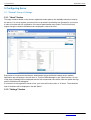
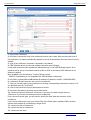
1 - server work directory, logs are saved here.
2 - by checking this field you activate detailed logging.
3 - opens the server log viewer.
4 - allow to view a list of statistical reports for each month. Each report consists of two parts: part 1
- detailed information about each conference, part 2 - information about conferences, grouped by
user.
5 - backs up the server configuration to a file. A backup copy of the TrueConf Server settings
allows you to save the basic settings of your server: users, groups, scheduled conferences,
network settings. This capability is useful when re-configuring the server, e.g. when you have
reinstalled your operating system. Backup copy does not save files from the working directory as
well as recordings.
6 - restores server configuration from the file. When restoring settings from a backup created on
the earlier version of the server, you need to re-launch the installation of the current server version
upon completion of restoring. It is necessary for applying the settings to the new version of the
server.
If server does not run after restoring backup settings, check the network settings: the current IP
addresses of the server might not match with the previous IP addresses of TrueConf Server, and
you will need to configure the IP addresses again.
If you are restoring the settings on an OS other than the OS you ran when you were making
backup of those settings, you will need to re-register the server to start it.
If you are installing a new version of the server over the old one, all settings are retained, you don't
have to apply backup settings after the installation of a new version of the server.
If you are installing the older version over the new one or restoring the settings created on a newer
version of the server, the stable operation of the server is not guaranteed.
7 - the list of client applications, available to use with the server. Every client can be managed
independently. To do this click on the application name and change the needed settings in the
© 2010 – 2015 TrueConf. All rights reserved.
www.trueconf.com
16
TrueConf Server
Administrator Guide
opened tab - "TrueConf Client Settings" or "TrueConf Mac OS X Settings".
8 - the password used to connect guest users from TrueConf web plugin. The availability of this
function will be regulated by the TrueConf Server license.
9 - check the box to the right of the field and move the slider to set the maximum outgoing bitrate
(minimum value - 32kbit / s, maximum value - 4096 kbit/s).
10 - the default value is "Automatically". When clicking on the arrow, a drop-down menu will appear
with values 10, 15 and 30 fps. Select the appropriate version.
11 - the default value is "Automatically". When clicking on the arrow, a drop-down menu will appear
with the value range from 320х186 to 1280х720 px.
12 - displaying statuses during a conference.
13 - save changes client application.
TrueConf Client/TrueConf Mac OS X Settings
1 - the earliest available version of the client. If the current version of the client application is earlier
than the said version, the work of the client application will be stopped and it will be updated in a
mandatory manner.
2 - indicates the current preferred version of the client application. If the application version is less
than the indicated version, the user will be asked to upgrade his client application and given the
link to the appro-priate version.
3 - the version of client application to be downloaded with the update. it is indicated in the process
of updating.
4 - link to download the client application.
5 - link to download the new client application.
6 - to save the changes.
5.2. "Network" Group of Settings
© 2010 – 2015 TrueConf. All rights reserved.
www.trueconf.com
17
TrueConf Server
Administrator Guide
5.2.1. "Network settings" Section
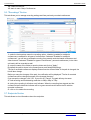
Internal addresses and ports that will be used for clients to contact this server. By default the server
uses all IP addresses of machine on default TrueConf Server port 4307. When default settings are on,
current connections are displayed in this column.
External addresses are the ports and IP addresses or DNS names, which help client applications to
connect to the server. If the server uses NAT or has DNS names, external addresses can differ from the
internal ones.
DNS names can be used for host identification. When using addresses and/or ports translation (NAT),
translated address and port must be en-tered into the relevant fields.
If you plan to transfer server to another IP address, you need to enter the future IP address and relevant port into the right column. This will help users to store the future IP address during the next
session. When the server is switched to the new address, users will switch to it automatically.
1 - to change internal addresses, uncheck “Listen on all IP addresses” checkbox.
2 - to specify non-default external addresses, check “Specify” checkbox.
3 - to add a new internal or external IP address. Use the button "Add" and enter the necessary
data in the "Host and "Port" fileds.
4 - return to previous settings.
5 - to save the changes.
5.2.2. "SMTP" Section
Mail server is used to send notifications to the users about missed calls and to the TrueConf system
administrators about the server operation.
© 2010 – 2015 TrueConf. All rights reserved.
www.trueconf.com
18
TrueConf Server
Administrator Guide
1 - IP address or hostname of the SMTP server used by the TrueConf Server.
2 - allows the server to send notifications by e-mail in case of restart of the service.
3 - authentication type. If you click on the arrow, a drop-down menu will appear with the following
values: no authoriation - mailing through the SMTP server withoutn authorization; simple
password - mailing through the SMTP server with authorization; NTLM - mailing through the
server with NTLM authorization (no password).
Note: When "simple password" authentication type is selected, new fields will appear in
section "Outgoing Mail Server" - "Username" and "Password". Specify your email login and
password. If SMTP is configured in the local network, you don't need to fill in these fields.
You also need to specify the email details in the fields "Host" and "Port". E.g., if you are using a
gmail account, you have to enter "smtp.gmail.com" in the field "Host" and the port value in the
"Port" field.
If the external mail server demands using SSL (a secure authorization protocol) when
authorizing, check the box "Use ssl".
4 - allows the server to send Missed Calls notifications by e-mail.
Note: IP address 127.0.0.1 means that you are using SMTP server on the same computer as
TrueConf Server. In this case you will be prompted to verify SMTP server installation on this
computer.
In case of a missed call to a registered or unregistered user of TrueConf Server this event will be
logged on the server and user will be notified by predefined e-mail.
5 - this button restores the default letter templates.
6 - editable example of subject and body of the letter about the missed call to unregistered users.
7 - editable example of subject and body of the letter about the missed call to registered users.
8 - by placing a checkmark in this box you activate an automatic notifications feature, that will
notify users about taking part in a conference. Each of the chosen participants will receive an
© 2010 – 2015 TrueConf. All rights reserved.
www.trueconf.com
19
TrueConf Server
Administrator Guide
invitation e-mail. If the conference is One-time, the user will receive an invitation immediately, if the
con-ference is Recurrent, the invitation will be sent directly before its start.
9 - template of the invitation to a group conference.
10 - saving the changes made.
Note: Server logs time of the call, name of the caller, username. This information is substituted by the
server in the template using tags:
%recipient_display_name – name;
%caller_display_name - display name of the caller;
%caller_call_id - id of the calle;
%missed_call_time - time of the call.
5.2.3. "SIP Gateway" Section
Components of this tab allow to configure parameters of the SIP gateway.
* The maximum number of SIP connections in the free version of TrueConf Server Free is 1.
VoIP Server is used for making calls to phones (#tel:89261112233);
SIP Proxy by default is used for making calls to Сall_ID of a user (#sip:james78).
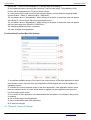
1 - IP-address or host name of the server, which is used for calls in the PSTN.
2 - account of the VoIP Server/SIP Proxy for the gateway.
3 - password to the account of the VoIP server/SIP Proxy, which is used for the gateway in the
system.
4 - registration mode on a third-party SIP server using REGISTER request.
Possible entries:
off - REGISTER request cannot be sent, au-thorisation is performed during a call;
permanent - automatic authorisation on each server's launch, available untill the server
shutdown;
© 2010 – 2015 TrueConf. All rights reserved.
www.trueconf.com
20
TrueConf Server
Administrator Guide
before call - REGISTER request is sent di-rectly before a call and is supported during a call only.
5 - instead of plus "+" symbol enter in the field the international prefix (e.g. prefix for calls from
Russia: 8-10). Thus, when dialing +7(926)123-45-67, it will be automatically substituted with 8-107(926)123-45-67. If you place the mouse cursor over the field, a popup tip will appear.
6 - display of the status of the connection to the SIP server. Possible values: connected connection with the SIP/VoIP server has been established; wrong authorization - authrization error
(wrong login or password); invalid server - incorrectly specified SIP/VoiP server.
7 - saving the changes.
8 - by default, all IP addresses are used. You can un-check the field and add the addresses
manually. To do this, fill the Host and Port fields. Then click on "Add". The table on the left will
display the submitted information. They can also be deleted. To do this, select the one you want to
delete by checking the tick on the left and click on "Remove Selected".
9 - domain name or IP address of the server. Click on "Apply" so that the incoming calls are
displayed as user@domain, where domain is the Outgoing SIP domain. This allows SIP users to
call back the users of the server.
10 - saving the changes made for SIP from Domain.
11 - input field for TrueConf recipient ID. CID of the conference can be used as a call addressee.
Press "Apply" to enable SIP subscriber to define the recipient of the call.
5.2.3.1. SIP-terminal calling format from TrueConf Client
One of the formats given below can be used:
#sip:Call_ID@Server_name, where Call_ID is SIP user, Server_name is a host name or IP-address
of the SIP server;
#sip:Call_ID, call is directed to the Call_ID user on the server, which is indicated in the VoIP
Server/SIP Proxy of the SIP Gateway tab;
#sip:@IP, call to the IP-address of the SIP terminal.
#sip:@hostname, call to the DNS name of the SIP terminal.
Call routing
Value
Via VoIP
Calls are redirected to phone numbers
(#tel:89261112233)
Via SIP Proxy
Calls are redirected to user’s Call_ID (#sip:james78)
5.2.3.2. Invitation of TrueConf customer to the conference that is held on the SIP server.
login to the client application TrueConf Client;
organize conference on the SIP server (MCU), invite terminals to the conference;
add to the conference TrueConf ID you used to login to the client application TrueConf Client, as
TrueConf_ID@IP, where IP – gateway address of the TrueConf Server, which is indicated in the SIP
Gateway tab.
5.2.3.3. Invitation of the SIP-terminal to the conference that is held on the TrueConf Server.
There are two ways ot inviting a SIP endpoint into a video conference - from Address book of TrueConf
Client application or from TrueConf Web Manager.
1. From Address Book in TrueConf Client application. Do the following:
add SIP endpoint to the Address book in the following format: #sip:user@host, where "host" is IPaddress or a domain name;
call it by a double-click on the name of the subscriber.
© 2010 – 2015 TrueConf. All rights reserved.
www.trueconf.com
21
TrueConf Server
Administrator Guide
2. from TrueConf Web Manager. to do this:
create and plan a group video conference, using the tab "Group conferences";
enter SIP endpoint as a participant of the conference. In the indicated day all the participamts will be
invited to the conference.
5.2.3.4. Connection using CID (Conference ID)
If several group conferences are organized on TrueConf Server, you can choose the conference
directly from the SIP-terminal. For that:
Organize a group conference in the Group Conferences tab of TrueConf Server configuration wizard;
Remember the CID (e.g. \c\e22a39ba2a);
In the address bar of the terminal make call on your CID@IP, where IP – address of the TrueConf
gateway. Note: some terminals (for instance, Polycom PVX) de-lete special symbols from the address
bar. In this case for Polycom PVX you will need to enter \\c\\e22a39ba2a@IP.
5.2.3.5. Connection to the fixed name groupconf
Organize a group conference in the Group Conferences tab of TrueConf Server configuration wizard;
Remember the CID (e.g. \c\e22a39ba2a);
In the Application tab of TrueConf Server configuration wizard create property default_mconf_name,
equal to the CID without \c\, for the given example: e22a39ba2a;
Restart TrueConf Server;
Make a call to the name groupconf@IP from the terminal, where IP is address of the TrueConf
Gateway.
5.2.3.6. Invitation to the conference from TrueConf Client
Add to the TrueConf Client address book terminals that you want you want to invite to the TrueConf
conference in the format described in the paragraph 5.2.3.1;
Organize conference in the TrueConf Server configuration wizard or client application TrueConf
Client;
Invite terminals to the conference by a double click on the terminal name in the TrueConf Client
address book.
5.2.3.7. Connecting to an IP-camera in a video conference
You can connect an IP-camera to a conference during a point-to-point call or a group conference, if the
given camera supports RTSP protocol.
Connecting from TrueConf Client application:
For a video call: paste #rtsp_url in the address bar and click on «Call». rtsp_url – is an individual
RTSP address of the camera (it's format depends on the vendor, model and camera's mode). For
example, the cameras by Axis rtsp://IP/axis-media/media.amp. When pasting, replace the IP with the
real IP-address of the camera, and symbols '/' with '%2f'. The final version may look like this:
#rtsp:%2f%2f217.17.220.110%2faxis-media%2fmedia.amp;
Invitation to a group conference: add the IP-address of the camera to the address book beforehand.
Choose the group video conference and invite the participants. If the event is already taking place, go
to the Address book, choose the IP-camera from the contact list and click on "Invite to the
conference".
Connecting from Web-Manager (for the administrator):
ñreate a group conference in the tab "Group conferences";
enter the address of the IP-camera in the field "Add by ID" and click on "Add";
run the video conference:
© 2010 – 2015 TrueConf. All rights reserved.
www.trueconf.com
22
TrueConf Server
Administrator Guide
5.2.3.8. Problems and Solutions
SIP-terminals do not connect with TrueConf Server
Description
SIP-terminals cannot
connect with TrueConf
Server.
Possible reason
Solution of the problem
Invalid IP-address
in the TrueConf
Server
configurations.
Check rightness and correspondence of the data in
the SIP Gateway tab of the configuration wizard:
Address: an IP-address of the network interface
used for TrueConf gateway;
Server: IP of the host interface, which is used for
VoIP/SIP server.
TrueConf Server
is offline or has
intermediate
status.
Run TrueConf Server by clicking System/Start.
Absent or
incorrect
parameters of
TrueConf Sever
on the SIP
terminal.
Indicate valid IP-address and TrueConf Server port in
the parameter window of the SIP-terminal.
No network
© 2010 – 2015 TrueConf. All rights reserved.
Check network connection on the PC with SIPterminal (if SIP-terminal is installed on the PC). To do
www.trueconf.com
23
TrueConf Server
Administrator Guide
Description
connection.
Possible reason
this you can use "ping" command with IP-address of
Solution of the problem
the PC where TrueConf Server is installed.
There is no video and
audio in the conference
between TrueConf
Server and SIPterminal.
Incorrect codecs
negotiation.
Make sure that SIP-terminal supports one of audio
codecs: G.711 (alaw/ ulaw), G.728, G.729a; and
video codecs: H.264, H.263.
5.2.4. "H.323 Gateway" Section
Settings on this page are designed to register the TrueConf Server on the external H.323 gatekeeper.
After registered successfully, TrueConf users are able make calls to terminals registered on this
gatekeeper with the following dialing format: #h323:terminal_id, where “terminal_id” is the terminal
identifier you are calling to. #h323:terminal_idis identical to #h323:h323-id (e.g. #h323:ivan) or
#h323:\e\e164 (e.g. #h323:\e\202).
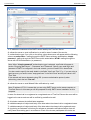
1 - enter the address of the H.323 gatekeeper. You can use either a domain name (e.g.
test.gatekeeper.com) or IP address (e.g. 34.87.12.127).
2 - enter h323-ID (random alphanumeric identifier) under which the TrueConf Server will be
registered on the external gatekeeper. For instance, h323-ID might be this way: #h323:user01.
H.323 terminals can call this number to reach TrueConf Server using gatekeeper.
3 - you need to enter DialedDigits (E.164), under which TrueConf Server will be registered on the
external gatekeeper. DialedDigits (E.164) is an identifier consists of numbers and special
characters, «,#*» (for instance, dial #h323:\e\041412 to call the subscriber 041412). Please note
that the characters \e\ are mandatory when using Dialed Digits (E.164). Thus, if you dial
#h323:041412, H323-ID will be used instead of DialedDigits (E.164) and the call can be addressed
to other subscriber. After registration, other terminals will be able to make calls to the client
application TrueConf using this identifier.
© 2010 – 2015 TrueConf. All rights reserved.
www.trueconf.com
24
TrueConf Server
Administrator Guide
Note: It is not necessary to indicate h323-ID and DialedDigits (E.164) simultaneously. To register
a server on the H.323-gatekeeper you only have to enter one of them.
4 - enter the password received from the administrator to register the TrueConf Server on
gaterkeeper. If you leave this field empty, the registration without a password will be used.
5 - the switch can be used to temporarily disable the server registration on the gatekeeper.
6 - after making changes to "H.323 Gatekeeper" section, click “Save” to commit the changes. It is
necessarily to restart is the server.
7 - this section contains TrueConf Server settings necessary for work in the Gatekeeper mode. In
this mode third-party H.323 endpoints can be registered on the server under the user account of
TrueConf Client application. Thus, a user may log in to a server using either TrueConf Client or
any H.323 endpoint with a support for password-based registration. By default if 'Use all IP
addresses' is selected, TrueConf Server will use all accessible connections by default (server's IP
addresses + port 1719). Do not change this section without necessity. If you need to change IP
addresses or ports to access TrueConf Server (e.g. to deny access from a particular IP, or if port
1719 is blocked by Firewall and you need another port) uncheck 'Use all IP addresses'. In this
case, three buttons will be activated: Add, Reset, and Apply. Using the Add button you can set an
additional access point (you should input an IP address for the access in the drop-down window
(in the Host field), port, and protocall (TCP or UDP)). By clicking any access point in the list, a
similar editing window will open. If you click the Reset button, all changes will be reverted to the
previous saved state.
8 - as explained above, after registered the TrueConf Server on the external gatekeeper, you can
make calls to the server using its registration data (h323-id and/or Dialed Digits (E.164)). This
section is used to determine the recipient of these numbers. Enter the TrueConf ID or Conference
ID (CID) of the recipient in the input field and press “Apply”. If left empty, calls to the client
application of the TrueConf Server will be rejected.
5.3. "Web" Group of Settings
This tab contains settings of external web pages that are available to unregistered users.
5.3.1. "Settings" Section
© 2010 – 2015 TrueConf. All rights reserved.
www.trueconf.com
25
TrueConf Server
Administrator Guide
The "Settings" section includes the following options:
1 - contains the URL of the page with the download links and configuration information for the
client applications for various operating systems. TrueConf Server administrator can distribute the
URL among the users of the server.
2 - TrueConf Server administrator must fill his data in the corresponding fields - Name, Email and
Phone, so that users could contact him. The entered data will be displayed in the guest page. After
making necessary changes, click on "Apply".
3 - URL for direct TrueConf Client download.
4 - URL for direct TrueConf Client for Mac OS X download.
5 - this section allows the administrator to configure the URL of the TrueConf Server external
page. The option can be used to correct the URL formation for all external pages of TrueConf
Server.
6 - uploading your company logo to display on the guest.
7 - by default, TrueConf Server logo is shown.
5.3.2. "Security" Tab
© 2010 – 2015 TrueConf. All rights reserved.
www.trueconf.com
26
TrueConf Server
Administrator Guide
1 - by ckecking this field you limit the access to controlling your server.
2 - by default, the "Subnets" field displays the subnets that can be controlled. If you want to
change the list, make the edits and click "Apply".
3 - to ensure that TrueConf Server works with other products through the Internet in federation, the
network administrator should connect to Directory. To secure the connection he must use secret
security key. After it is generated, click on "Apply".
5.4. "Users" Group of Settings
5.4.1. Tab "User accounts"
* The maximum number of accounts in the free version of TrueConf Server Free is 6.
© 2010 – 2015 TrueConf. All rights reserved.
www.trueconf.com
27
TrueConf Server
Administrator Guide
In User Accounts section you can add and manage users.
1 - adding new user. Clicking on this button will open a form for filling in the information about the
user.
2 - refreshing information about the user.
3 - search to users in Address book. To do this, enter subscriber's data in the filed Search: enter
name or TrueConf ID. When "Online" checkbox is selected, the search will be conducted among
the users who are currently online.
Note: In LDAP mode user edit is not possible, edit users using your LDAP directory tools.
By clicking on any account name or TrueConf ID you will open an editing window:
© 2010 – 2015 TrueConf. All rights reserved.
www.trueconf.com
28
TrueConf Server
Administrator Guide
1 - can be Active or Passive. Passive users cannot connect with the server but their account will
not be deleted.
2 - mandatory field. It is used for authorization and calls. Full TrueConf ID contains this TrueConf
Server registered server name.
3 - user's password to log in to the client application.
4 - e-mail for user notification.
5 - this filed is required. If this field is left blank then it will be filled in automatically by joining the
TrueConf ID.
6 - this fileds are not required. Personal data and. The name of the organization where the user
works.
7 - user may belong to some group.
8 - (Save) - click to save all changes to the user account. (Delete) - click to delete the user
account. (Back) - Return to the previous page.
9 - you can enter user's TrueConf ID in this box on the Server side in order to add him/her to your
Address Book. You can also enter his/her name in the "Display Name" box.
10 - adding a user to the Address Book.
11 - address book for users not included in any group. Read more about elements of this page and
their specifications below.
12 - adding a user to the Address Book.
13 - user search by TrueConf ID in Address book.
5.4.2. Tab "Groups"
© 2010 – 2015 TrueConf. All rights reserved.
www.trueconf.com
29
TrueConf Server
Administrator Guide
In "Groups" tab you can create, edit and delete groups, as well as add and remove users, manage
address books. You can also allow or forbid the following:
Address book editing;
Making Calls;
Using collaboration tools;
Creating group conferences.
Menu "Group Name"
Click on the group name to open the page "User accounts". On this page you can rename a group and
add users to any group:
© 2010 – 2015 TrueConf. All rights reserved.
www.trueconf.com
30
TrueConf Server
Administrator Guide
In the drop-down list "Groups" select the group you want to rename and press the button "Rename". A
window will open:
In the field "Group" enter a new group name and press "Save" (or "Cancel" if want to exit the window).
Menu "Customize" - Address book
Administrator can manage address book by adding and deleting contacts, including subscribers that are
not the users of the server.
When you click on "Settings", you will be directed to the page "Address book settings" of a specific
group. There you can change all the necessary settings:
© 2010 – 2015 TrueConf. All rights reserved.
www.trueconf.com
31
TrueConf Server
Administrator Guide
1 - with this checkbox the users of a certain group will see all users of the server in their.
2 - group participants see only users of certain groups. When choosing this checkbox you need to
select from dropdown menu the groups to include to the address book.
3 - group participants cannot see other users of the server.
4 - save all changes.
At the same time, users of a certain group can search for other users of the server and add them to their
address book (if address book editing is enabled).
Address book for a group
In this menu you can add external contacts by entering TrueConf ID and Name of the user.
"Search by name of TrueConf ID" is used for searching for a user in Address book. When "Online"
checkbox is selected, the search will be conducted among the users who are currently online.
5.4.3. Tab "Aliases"
In this tab PSTN users can dial TrueConf user not by TrueConf ID, but with the help of an alias
(extension). You can set an alias to a TrueConf user, that will be used to dial a person under the
corresponding configuration of the ATE from our system.
© 2010 – 2015 TrueConf. All rights reserved.
www.trueconf.com
32
TrueConf Server
Administrator Guide
1 - alias is entered by a user into the corresponding field. It can contain letters and digits. The Alias
can contain up to 80 symbols. Aliases are updated after server restart.
2 - you can choose a person from a list of users or enter his/her TrueConf ID into the
corresponding field. After the alias is created you can see an alias and TrueConf ID of a user. User
name is not unique: one user can have several aliases.
3 - by clicking this button, the chosen alias will appear in the field "Aliases".
4 - to delete an alias from the list, tick the box on the left of his name and click on "Delete
Selected".
5.4.4. Tab "User storage"
* Unavailable in the free version of TrueConf Server Free
© 2010 – 2015 TrueConf. All rights reserved.
www.trueconf.com
33
TrueConf Server
Administrator Guide
TrueConf Server allows two modes of data storage - Registry and LDAP. Their changeover can be
done at any given moment by pressing the «Switch» button in the «User database» tab.
5.4.4.1. Registry Mode
In this data storage mode the server keeps user information on a local computer. It is possible to add
and delete new users from the configuration table. If the storage mode on the server has been changed
from the Registry Mode to LDAP then the already existing user records won’t be used any more.
User storage tab in the Registry Mode
Element
Description
Switch
Switching of the data storage modes
5.4.4.2. LDAP Mode
In this data storage mode the server takes advantage of the user information from the remote or local
LDAP directory. LDAP settings comply with Microsoft Active Directory by default. You can manage the
user information with the help of LDAP Directory standard management tools. For Active Directory the
user rights can be defined depending on the Active Directory group to which a user belongs.
To activate this mode, put a checkmark in the "Turn LDAP mode on" box and click on the appeared
button "LDAP Setup". LDAP settings form will open in Web Manager tool of the Server.
© 2010 – 2015 TrueConf. All rights reserved.
www.trueconf.com
34
TrueConf Server
Administrator Guide
1 - LDAP Server type.
2 - connection to the LDAP in the safe mode. Only in this case safe transmission of the user
information through the network is ensured.
3 - automatic choice of the LDAP server.
4 - manual choice of the LDAP server.
5 - in the automode the LDAP server can be chosen among the servers by default of the DNS
domain, specified in this field. Default servers are being chosen according to the relevant DNSnotes of SRV type.For Active Directory DNS domain name AD can be indicated here.
6 - LDAP server address and port.
7 - core LDAP context.
8 - TrueConf Server authorization modes on the LDAP server.
9 - authorization parameters on the LDAP server.
10 - after choosing this option the users can automatically get authorized in the system by using
the current Windows user account. The option is available only for the systems working on the
basis of Microsoft Active Directory. For NTLM authentication work it’s necessary that the server on
which TrueConf Server software is installed is located in the same AD domain with the users.
11 - for Active Directory in this field it’s possible to indicate LDAP - group of users, who can get
authorized on the TrueConf Server.
To choose a LDAP-group using the Browse button you need to fill in the spaces for connection to
the LDAP server (Server Settings and Authentication), including Base DN field.
After choosing the group click on "Apply"
12 - saving a changes.
13 - additional LDAP parameters. Allow to adjust the parameters to other types of LDAP-servers.
14 - back on page "User storage".
When changing from LDAP Mode to Registry mode it is possible to import user data. To do this, choose
the "Registry" mode in the "User Storage" tab, tick on "Import User Information" and click on "Switch".
Note: The users' passwords are not imported. After being imported the users’ accounts are marked as
© 2010 – 2015 TrueConf. All rights reserved.
www.trueconf.com
35
TrueConf Server
Administrator Guide
«inactive» (see description in the «User accounts» tab).
Directory of groups and users registered on the video-conferencing server.
This tab allows to create and manage the user’s groups.
User Accounts tabs allows creating groups and managing rights. In the Registry mode a user can
belong to one (or more) of the created group. You can edit his/her attributes in the Edit user information
window. In the LDAP mode this window allows to define rights for several LDAP groups. User attribute
can be defined in the LDAP folder.
Note: On the server the <Not in group> is created by default.
5.5. "Group Conferences" Group of Section
This section allows you to manage group conferences.
* The maximum number of participants in a group conference of any type in the free version of
TrueConf Server Free is 6.
This tab allows administrator to create and manage group conferences.
1 - add group video conference.
2 - delete group video conference.
3 - start group video conference.
4 - edit group video conference.
5.5.1. Symmetric Group conference (Symmetric)
Can have up to 16 participants at the same time in the normal mode and up to 16 users in the UDP
Multicast mode (number of users is limited by the TrueConf Server license;
All users can see and hear each other.
This conference type availability is limited by the TrueConf Server license
5.5.2. Asymmetric conference (Asymmetric)
© 2010 – 2015 TrueConf. All rights reserved.
www.trueconf.com
36
TrueConf Server
Administrator Guide
Can have up to 16 participants at the same time;
One user is chosen to be the Host. He can see and hear everybody;
Other users can see and hear only the Host.
Conference type availability could be limited by TrueConf Server license
5.5.3. Role based conference (Role based)
This conference type availability can be limited by the TrueConf Server license;
No more than 4 users can transmit video and audio to the others. They are called "broadcasters";
Other users can hear and see broadcasters. They can give their opinion. They can become
"broadcasters" if the Host allows them.
This conference type availability can be limited by the TrueConf Server license
Note: When the conference is getting started the administrator chooses the user who will be the Host.
Other roles will be given by users in a conference. Look for more information in the client application
User Manual
Group conference list
Element
Description
Topic
Conference Topic
Owner
TrueConf ID of the conference host
WebRTC
peers
The number of participants, connected to the conference via WebRTC. It is shown in
the conference.
Type
Chosen type of group video conference: symmetric, asymmetric or role-based.
Transport
According to the chosen type of conference may be:
UDP – corresponds to UDP Multicast;
TCP – corresponds to other types.
Status
Status of the conference
Current version supports WebRTC broadcasting in Chrome, Opera and Mozilla Firefox browsers. The
number of concurrent connections is limited by the chosen license capacity.
Create new group conference
© 2010 – 2015 TrueConf. All rights reserved.
www.trueconf.com
37
TrueConf Server
Administrator Guide
1 - topic of the conference.
2 - the filed to choose the Host of the cnference from the list of users. After choosing the Host of
the conference, his name automatically appears in the list of participants. Previous Host will not be
deleted.
3 - type of the conference: symmetric, asymmetric, êole based.
4 - UDP Multicast allows to use local network resources more efficiently.
In this mode video and audio streams are transmitted only in one UDP Multicast domain. Such
domains can be set up in local area network (LAN) or VPN. In the internet UDP Multicast is not
allowed by default.
More availability can be limited by TrueConf Server license.
* WebRTC broadcasting is not compatible with UDP Multicast conferences
5 - the field to indicate Multicast/Broadcast IP address. By default it is 224.0.1.224:4000-6000.
6 - conference ID that users can use to join the conference.
7 - here you can add users to the conference by clicking corresponding usernames in the list. You
can also add users by TrueConf ID.
8 - click to add users int the list of participants on the left.
9 - the button activates by choosing a user from the list.
10 - choose the type of conference: «One-time» if you want to create a single event or
«Recurrent» if you want to schedule recurrent conferences.
If you choose One-time type, you will need to specify the time, date and time zone of the
conference.
If you choose «Recurrent» type, you will see Day of the Week option instead of Date. All other
options are the same as in scheduling a single event.
11 - choose the date of conference.
12 - choose the time of conference.
13 - choose the time zone.
© 2010 – 2015 TrueConf. All rights reserved.
www.trueconf.com
38
TrueConf Server
Administrator Guide
14 - create conference.
15 - back in menu Group Conferences.
5.6. "Recordings" Section
This tab allows you to manage recording settings and lists previously recorded conferences.
1 - select in the dropdown menu the recording option - disabled, enabled for multipoint
conferences or enabled for all types of conferences. If selected "Enabled for multipoint
conferences", you will set up automatic recoding for symmetric and role-based conferences and
video lectures. If selected "Enabled for types of conferences", personal conferences (in the video
call mode) will be recorded as well.
2 - enter the name of the folder to save the video and click on "Apply".
By default the path is shown in the format [server work folder]/Recordings.
The list of recorded conferences displays videos from the chosen folder. If the path is changed, the
list will also change.
Before you save the changes of the path, the notification will be displayed "The list of recorded
conferences will be changed because of the changed directory".
If you accept the changes, click "Ok". If you click on "Cancel", the path will stay the same.
3 - limit recording and broadcasting resolution to 360p, 480p or 720p.
4 - during the recording it will show a red indicator. When the recording has stopped and the
conference has finished the indicator will be a green arrow that will lead to the file with the
recorded conference.
5 - click on it to delete the recording.
5.7. Endpoints Section
This tab allows to view information about the endpoints.
© 2010 – 2015 TrueConf. All rights reserved.
www.trueconf.com
39
TrueConf Server
Administrator Guide
Element
Description
Show
(number)
entries
Select the number of connections displayed in the table.
Search
Input field for connection name.
Endpoint
Name of the Endpoint, registered on the server. Endpoint’s name is unique and
depends on the computer and client software.
Logged User
TrueConf IDs of the users connected to the server at the moment.
Application +
version
Name of the client’s software and version of the software
IP
The user IP-address
5.7.1. Sound capture and playback information
Example of Endpoint’s properties:
Audio Capture:
Microsoft Sound Mapper
Avance AC'97 Audio
Logitech Microphone (Pro 4000)
Audio Render:
Microsoft Sound Mapper
Avance AC'97 Audio
© 2010 – 2015 TrueConf. All rights reserved.
www.trueconf.com
40
TrueConf Server
Administrator Guide
5.7.2. Video capture device information
Example of Endpoint’s properties:
Video Capture:
Logitech QuickCam Pro 4000
NAS Polycom Video Source Filter
vvd.dll
5.7.3. DirectX information
Direct X:
Version: 9.0
Driver:
ati2dvag.dll RADEON 7200 SERIES
Resolution: 1024x768, 32 bit
Video Memory: total - 29679616, free - 29679616
Capabilities: | Bu | Bd | Ou | Od |BFcc|OFcc|YUY2|UYVY| HB |
|1 |1 |1 |1 |1 |1 |1 |1 |1 |
DX INIT OK
5.7.4. DirectX features description
The assumed terms: 1 – is supported, 0 – not supported.
Properties
Description
Version
Version of the installed DirectX
Driver
Name and description of the video card driver
Resolution
Screen resolution and number of colours
Video
Memory
Video memory volume
Capabilities
Current driver capacities
Bu
Upward scaling
Bd
Downward scaling
Ou
Upward scaling using overlay
Od
Downward scaling using overlay
BFcc
Scaling without using RGB video data representation
Ofcc
Scaling using overlay without using RGB video data representation
YUY2
Ability to use video data in the YUY2 format when displaying something on the
screen
© 2010 – 2015 TrueConf. All rights reserved.
www.trueconf.com
41
TrueConf Server
Administrator Guide
Properties
UYVY
Description
Ability to use video data in the UYVY format when displaying something on the
screen
HB
bilinear upward scaling
5.7.5. Connection information
Example of Endpoint’s properties:
Network Info:
Type: I don’t know
Broker: srv1:1
Host: 192.168.61.205
Port: 4307
Protocol: InternetOptions
5.7.6. Network Test information
Network Test:
Parameter
| IN | OUT |
---------------------------------------|
Bitrate, kBit | 10000 | 9983 |
Total, kB
| 7499 | 7499 |
Jitter Max, ms | 20 | 10 |
Jitter Min, ms | 0 |
0 |
Response, ms | 50 |
0 |
---------------------------------------|
Date:
Thu Jan 22 17:08:19 2004
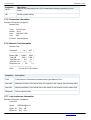
Properties Description
Total
Total amount of information transmitted during the Network Test
Jitter Max
Maximum deviation of the arrival time of the packet in the network from the mean value
Jitter Min
Minimum deviation of the arrival time of the packet in the network from the mean value
Response
Server response time
5.7.7. Last conference information
Example of Endpoint’s properties:
Last Conf:
Name
0000001d@srv1:1
Bytes s/r 73/0 kB
Bitrate s/r 12/0 kbit
© 2010 – 2015 TrueConf. All rights reserved.
www.trueconf.com
42
TrueConf Server
Administrator Guide
Duration 00:00:46
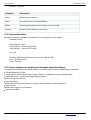
Properties
Description
Name
Name of the conference
Bytes
the number of sent / received KBytes
Bitrate
the average throughput when sending / receiving data
Duration
Duration of the conference (hh:mm:ss)
5.7.8. System information
Example of Endpoint’s properties (It looks like PC is not equipped with a camera):
Hardware Config:
Video Capture: None
Audio Capture: Avance AC'97 Audio
Audio Render: Avance AC'97 Audio
sys_conf:
Windows 2000 Advanced Server Service Pack 2 (Build 2195)
Proc: Type 586 Level 6;
Client: TrueConf
5.7.9. Events leading to the updating of information about the Endpoint
The following information will be updated when a connection with the server is established or resumed:
Current Network Info Type;
Audio Capture, Audio Render, Video Capture, Direct X – updates during client software start;
Hardware Config – updates during application shutdown.
Updates during a conference:
Last Conf Name.
Updates after running of the Network Test (menu Setup/ Network in client application):
Network Test.
Updates when logging in to the server:
System information.
© 2010 – 2015 TrueConf. All rights reserved.
www.trueconf.com
43
TrueConf Server
Administrator Guide
6. Client Application Connection
6.1. Connection using auto discovering
The client software of TrueConf includes a function of automatic search for the local server TrueConf
Server (auto-discover). It is possible to install the client application without any information about your
local TrueConf Server. In this case all information about the server will be detected automatically by
using DNS. To do this you need to specify the address of the server in users primary DNS (primary
DNS suffix).
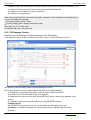
You need to create SRV record in the domain for vcs2.tcp service and specify the TrueConf Server
address and port.
The following example shows how to do this using DNS utility in Microsoft Windows 2000/2003 Server:
Navigate to root of the desired domain
Choose «Other New Records…» in a right-click menu.
Choose type «Service Location».
Set the following parameters
In this example server has address videoserver.your.domain.com and port 4307. Please note that
protocol name (tcp) does not contain underscores.
6.2. Configuring the client application without using auto discovering
Step 1
Open TrueConf Web Manager home page on client computer
Step 2
Download client application for your system
Step 3
Install client application
Step 4
If required, connect client application to server using instructions on TrueConf Web Manager home
page
© 2010 – 2015 TrueConf. All rights reserved.
www.trueconf.com
44
TrueConf Server
Administrator Guide
7. Set up of the previously installed client application to work with the
video conferencing server
7.1. Manual configuration
Go to the application network settings (Setup | Network ...).
Turn off the "Connection default" ("Default server connection"), if it is enabled.
Click "Advanced".
Enter the IP address or DNS name and port of the server in the appropriate fields.
© 2010 – 2015 TrueConf. All rights reserved.
www.trueconf.com
45
TrueConf Server
Administrator Guide
8. Federation between servers
Federation allows subscribers of different TrueConf Servers to make video calls, conduct group
conferences and use collaboration tools. The server which has a "Federation" option enabled provides
media streaming between remote servers that support this feature it too. The number of servers
involved in Federation is unlimited. Group video conferences will be conducted with regard to the
limitations specified in the license of the server, initiating the connection.
Video calls and group conferences during Federation are held on the same principle as within one
TrueConf Server. No additional server adjustments should be done when using Federation feature.
Still, the following conditions are to be observed: you need to have license for TrueConf Server with
Federation feature for all servers that participate in Federation, possibility for all servers and
subscribers to connect to your server during Federation.
The server should be available to other servers by its name, indicated at registration. The server can be
registered on the existing DNS name, as well as be specified by the actual server address with the help
of the SRV records DNS. To read more please see section "Connection using auto discovering".
© 2010 – 2015 TrueConf. All rights reserved.
www.trueconf.com
46
TrueConf Server
Administrator Guide
9. Server Diagnostics
9.1. Server status
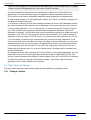
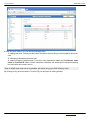
Server status is shown in the "Server Status" field in green (if the server is working) or in red (if it has
stopped) in top right corner of the web management tool window.
9.2. Server's log files
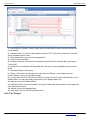
You can access the server by clicking on «See the log» in the «Settings» menu.
9.3. Change the server language
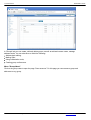
You can change the language of the program directly from the Web management tool. To do this, click
on "System". From the drop-down menu select the appropriate language.
© 2010 – 2015 TrueConf. All rights reserved.
www.trueconf.com
47
TrueConf Server
Administrator Guide
10. Troubleshooting
10.1. Server does not start
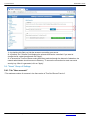
Trouble: Server does not start; the Current State field contains a message "The service is not running"
in red.
Possible reason: You have no license, or the license is expired
Workaround: contact your reseller or distributor.
Possible reason: Some server files are missing or have been damaged.
Workaround: reinstall TrueConf Server.
10.2. Information shown in manager program is corrupted or couldn't be saved
Trouble: Your changes in manager are corrupt or couldn't be saved. After the manager has restarted
some information is missing.
Possible reason: No access to registry or registry is corrupt.
Workaround: Grant read-write access to registry. Open manager as a user with administrator rights if
needed. Reenter the information.
© 2010 – 2015 TrueConf. All rights reserved.
www.trueconf.com
48