1
EXT: eGov API - egovapi
Administration
Administration
This chapter describes how to manage the extension from a superuser point of view.
Installing the extension
There are a few steps necessary to install the eGov API extension. If you have installed other extensions in the past, you will
run into little new here.
Install the extension from Extension Manager
The eGov API extension can ben installed through the typical TYPO3 installation process using the Extension Manager.
During the installation process, you may be invited to install additional suggested extensions that interact with the eGov API
extension. These are alls imply suggestions and can safely be ignored if you choose.
Note: If you plan to use Fluid as template engine, then you must install that system extension before installing the eGov API
extension. The minimum required version of this system extension is 1.3.0 meaning it requires TYPO3 4.5 or above as Fluid
template within the eGov API extension are using the FLUIDTEMPLATE content object which was introduced with TYPO3 4.5.
If you use TYPO3 4.5 or below, you have to create the two proposed caching tables (tx_egovapi_cache and
tx_egovapi_cache_tags). These tables (not needed anymore with TYPO3 4.6 and above) are being used by the TYPO3
caching framework if you choose to use a database backend (see below).
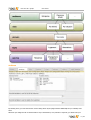
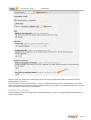
Since version 1.2.0 a selector plugin has been added, allowing you to show a form aimed at dynamically generating
parametrized URIs, for non-TYPO3 websites willing to integrate e-government web service anyway. It has to be activated in
Extension Manager:
Configure data caching
In order to prevent unnecessary traffic with the eGov servers hosting the web service, data caching should be configured.
The extension makes use of TYPO3 caching framework. If you are using TYPO3 prior to 4.6, you have to activate the caching
framework using either the Install Tool or by editing file typo3conf/localconf.php and adding following line:
$TYPO3_CONF_VARS['SYS']['useCachingFramework'] = 1;
Activating caching framework will ensure that the same information is not retrieved twice during a single request. However,
once the request is over, the cache is flushed as it internally uses a TransientMemoryBackend.
In order to cache data for a longer period of time, you should provide a caching configuration for the eGov API extension. A
typical configuration to cache data in the database is:
$TYPO3_CONF_VARS['SYS']['caching']['cacheConfigurations']['egovapi'] = array(
....'frontend' => 't3lib_cache_frontend_VariableFrontend', // Should not be needed for TYPO3 4.5 and
above
'backend' => 't3lib_cache_backend_DbBackend',
'options' => array(
'cacheTable' => 'tx_egovapi_cache',
'tagsTable' => 'tx_egovapi_cache_tags',
)
);
Important note: The “cacheTable” and “tagsTable” parts are not relevant anymore if you use TYPO3 4.6 and above as the
caching framework uses it own table structure (creation of the corresponding tables when installing the eGov API extension is
thus useless as well). See the corresponding task on Forge if you want to learn more.
Beware: In TYPO3 4.6 and above, the “clear all cache” will flush the eGov API cache too, as expected after all. This is a
19 / 34