1
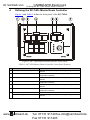
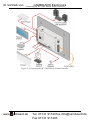
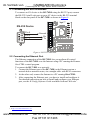
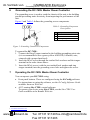
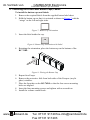
im Vertrieb von 5 CAMBOARD Electronics Connecting the RC-74DL Master Room Controller Connecting the RC-74DL Master Room Controller To connect 1 the RC-74DL, as shown in the example in Figure 3, do the following: 1. Connect the IR outputs as follows: Connect an IR emitter to IR OUTPUT 1 and attach the emitter to the DVD player Connect an IR emitter to IR OUTPUT 2 and attach the emitter to the power amplifier 2. Connect the RS-232 ports (see Section 6) as follows: Connect RS-232 port 1 to the projector Connect RS-232 port 3 to the plasma display 3. Connect the RELAY terminal block connectors as follows: Connect RELAY 1 and 2 to the screen Connect RELAY 3 and 4 to the lighting system 4. Connect the GPI/O 1 port to a motion detector. 5. Connect the Ethernet port to a network (not shown in Figure 3). 6. Connect the K-NET port to any RC device with K-NET (for example, the RC-63DL). 1 Switch off the power on each device before connecting it to your RC-74DL. After connecting your RC-74DL, switch on its power and then switch on the power to each device 6 www.camboard.de Tel. 07131 [email protected] Fax 07131 911203 KRAMER: SIMPLE CREATIVE TECHNOLOGY