1
SAFETY PRECAUTIONS
This manual is meant for personnel involved in wiring,
installation, operation and routine maintenance of the
equipment. All safety related codifications, symbols and
instructions that appear in this operating manual or on the
equipment must be strictly followed to ensure operator and
instrument safety. Any misuse may impair the protection
provided by the equipment.
24V DC / L
LOAD
NO
R
C
For bigger loads use interposing relay/contactor
24V DC / L
N / GND
CAUTION : Risk of electric shock.
PLC
INSTALLATION INSTRUCTIONS
C
PANEL MOUNTING
C
Fig. 1
LOAD
L
To reduce noise:
A) Use of MOV / Snubber circuit across load / Contactors
of the unit and snubber circuits across the load are
recommended.
1. MOV Part no.: AP-MOV-03
2. Snubber Part no.: APRC-01.
MECHANICAL INSTALLATION
ESC
NOTE : Below mentioned diagram is applicable only for
230V Relay Outputs.
F12
HELP
F1
F13
F4
F14
F10
F11
SHIFT
Outline Dimensions
Panel Cutout
(in mm)
(in mm)
0
F7
1
4
7
F2
F5
F8
2
5
8
F3
F6
F9
( Non Isolated )
AC-RS485-RS232-ISO
USB to RS232
AC-USB-RS232-01
USB to RS485 (with wire)
AC-USB-RS485-02
USB to RS485 (with jack)
AC-USB-RS485-03
3
Rubber
Seal
IO610-8DI [ 8 Digital inputs ]
Fig. 2
IO610-4RO [ 4 Relay Outputs ]
9
IO610-4TO [ 4 Transistor Outputs ]
MM3010
IO610-2AI-VI [ 2 Analog inputs (Voltage / Current) ]
ESC
F12
HELP
F1
F13
F4
F14
F10
F11
92
91
104.5
PS-CF-24V-1.1A
Converters
6
Side view
99
AR-04-5A-NO (SPST)
Ordering information for IO610 EXPANSION MODULES
ON MASTER RS485 BUS.
B) Use separate shielded wires for inputs.
SHIFT
0
F7
1
4
7
F2
F5
F8
2
5
8
F3
F6
F9
3
For installing the controller
1. Prepare the panel cutout with proper dimensions as
shown above.
2. Remove the clamp from the PLC.
3. Fix the unit into the cutout. Insert the clamp from both
sides and tighten the screws.
CAUTION
The equipment in its installed state must not come in
close proximity to any heating sources, caustic vapors,
oils, steam, or other unwanted process byproducts.
EMC Guidelines:
1. Use proper input power cables with shortest connections
and twisted type.
2. Layout of connecting cables shall be away from any
internal EMI source.
1. To avoid blockage of ventilation holes, clean the
equipment regularly using a soft cloth.
2. Do not use Isopropyl alcohol or any other organic
Solvents for cleaning.
IO610-2AI-TCR [ 2 Analog inputs (TC/RTD) ]
6
9
IO610-2AO [ 2 Analog Outputs ]
SERVICE DETAILS
92
MAINTENANCE
CAUTION
Power Supply Module
AR-04-5A-NO/NC (SPDT)
( Isolated )
5mm
width
(max.)
MM3010
ELECTRICAL PRECAUTIONS DURING USE
Electrical noise generated by switching of inductive
loads can create momentary disruption, erratic display,
latch up, data loss or permanent damage to the
instrument.
4 Relay module
N
NOTE : Use snubber as shown above to increase life of
internal relay.
9.5
ACD-003
92mm x 92mm
cut out
Snubber
99
ACH-001 (D-Type 9 Pin Cable)
Windows-based software
for ladder programming
RS485 to RS232
C
Front bezel
Communication cable
NO
R
Order Code
(To be ordered separately)
AC-RS485-RS232-01
Contactor
PLC
CAUTION
1. This equipment, being built-in-type, normally becomes
a part of the main control panel and the terminals do
not remain accessible to the user after installation.
2. Conductors must not come in contact with the internal
circuitry of the equipment else it may lead to a safety
hazard that may endanger life or cause electrical shock
to the operator.
3. Circuit breaker or mains switch must be installed
between the power source and supply terminals to
facilitate power 'ON' or ‘OFF' function.
4. The equipment shall not be installed in environmental
conditions other than those specified in this manual.
5. The equipment does not contain a built-in fuse.
Installation of external fuse rated 275V AC/1A is
recommended.
6. Since this equipment forms part of the main control
panel, its output terminals get connected to the host
equipment. Such equipment shall also comply to
EMI/EMC and safety requirements like BS EN 613261
and BSEN 61010.
7. Thermal dissipation of equipment is met through
ventilation holes provided on housing of equipment.
Obstruction of these ventilation holes may lead to a
safety hazard.
8. The output terminals shall be loaded strictly as per the
values/range specified by the manufacturer.
N
Snubber
Accessories
1. To prevent risk of electric shock, power supply to the
equipment must be kept OFF while wiring.
2. Terminals and electrically charged parts must not be
touched when the power is ON.
3. Wiring shall be done strictly according to the terminal
layout provided in the operating manual.
4. To eliminate electromagnetic interference use short wire
with adequate ratings and twists of equal size.
5. The power supply connection cable must have a cross
section of 1sq.mm or greater and insulation capacity of
at least 1.5KV.
PLC
C
ORDERING INFORMATION
CAUTION
N / GND
PLC
L
CAUTION : Read complete instructions prior to
installation and operation of the unit.
WIRING INSTRUCTIONS
TYPICAL CONNECTIONS FOR LOADS :
For load current < 0.5A
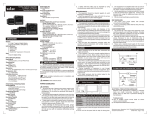
1. Before you begin, note that the mounting panel cannot be
thicker than 5 mm (0.197”).
2. Make a panel cut-out measuring 92mm x 92mm
(3.622” x 3.622”).
3. Slide the controller into the cut-out, ensuring that the
rubber seal is in place.
4. Push the 2 mounting brackets into their slots on the sides
of the controller as shown in Fig. 1.
5. Tighten the bracket screws against the panel. Hold the
bracket securely against the unit while tightening the
screw.
6. When properly mounted, the controller is squarely
situated in the panel cut out as shown in Fig. 2.
This device contains no user serviceable parts and requires
special equipment and specialized engineers for repair.
Please contact service center for repair on the following
numbers:
Toll free : 1800 227353 ( BSNL/MTNL subscribers only )
Others : 91-22-40394200 / 40394202
NO WARRANTY ON UNIT DAMAGED DUE TO WRONG
POWER SUPPLY.
( Specifications are subject to change, since development
is a continuous process )
FUNCTIONAL DETAILS
MM3010 is a PLC with built in HMI. The user can
configure the product using SELPRO software.
SELPRO has two sections:
1. Ladder logic programming section
2. Selec Machine Interface, used for configuration of HMI.
This software is provided with the product. For details of
the software and configuration method, please refer to its
user manual with the product.
Selec Controls Pvt. Ltd.
Tel. No. : +91-22-40394200 / 40394202
Fax No. : +91-22-28471733 I Toll free : 1800 227 353
Website: www.selec.com I Email: [email protected]
Doc. Name : Operating/1107/MM3010A/OP361-V01 (Page 2 of 2)


![[MI 020-495] Intelligent Field Device Configurator (IFDC](http://vs1.manualzilla.com/store/data/005940861_1-a7935b4637e46504f46a4e10b51d80ec-150x150.png)