1
dipole :
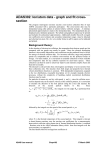
Υij ≈ F3 S ij [ln( 1 + F2 ) + EEI (( 1 + F2 )∆Eij / kTe )]
non − dipole : Υij ≈ F3 + F2 ( ∆Eij / kTe )EEI ( ∆Eij / kTe )
spin change : Υij ≈
F3 ( ∆Eij / kTe )
1 + F2
9.
EE 2(( 1 + F2 )∆Eij / kTe )
9.3
where EEI ( x ) = exp( x ) E1 ( x ) and EE 2( x ) = exp( x ) E 2 ( x ) with E 1 and E 2 the first and
second exponential integrals. A further verification on the quadratures is from the exact integrals for
Ω = constant, Ω = X − 1 and Ω = ( X − 1)2 which are exact for the quadratic fit, linear scale
option.
The program has a capability for comparison and display. In addition to the input ADF04 – type 1 file
for conversion, it can accept a second ADF04 – type 3 file. The temperature set for output is copied
from the latter reference file. Additionally, the collision data for a selected single transition may be
graphed along with the corresponding data from the reference file if it exists. The usual display and
output routing facilities are provided.
Program steps:
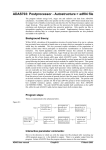
These are summarised in figure 8.9.
Figure 8.9
!
VHOHFW VSHFLILF
LRQ ILOH
HQWHU ILW FKRLFHV
UHDG DQG YHULI\
!
!
VSHFLILF LRQ ILOH
VHOHFW WUDQVLWLRQ
DQG RXWSXW
EHJLQ
WHPSHUDWXUHV
UHSHDW
UHSHDW
FRPSXWH FXELF
!
VSOLQH DQG
!
PLQLPD[ ILW
GLVSOD\ H[FLW
2XWSXW WDEOHV
DQG JUDSKV
HQG
UDWH FRHIIW
JUDSK
Interactive parameter comments:
Remember to ensure you have a defaults directory allocated. This should have the pathway
/..../uid/adas/defaults
where uid is your user identifier. The defaults directory records the parameters you set the last time
you ran each ADAS code. Move to the directory in which you wish any ADAS created files to appear.
These include the output text file produced after executing any ADAS program (paper.txt is the
default) and the graphic file if saved (e.g. graph.ps if a postscript file). Initiate ADAS, move to the
series 2 menu and click on the first button to activate ADAS201.
The file selection window has the appearance shown below
1. Selection of two adf04 files is permitted. The first selected in the upper
sub-window is of adf04 – type1 and is mandatory. The second optional
file, selected in the lower sub-window is of adf04-type3. It provides a
temperature grid for the conversion. Selection of the adf04 files follows
the standard ADAS.
2. Data root shows the full pathway to the appropriate adf04 data
subdirectories. Click the Central Data button to insert the default central
ADAS pathway to the correct data type. Click the User Data button to
insert the pathway to your own data. Note that your data must be held in
a similar file structure to central ADAS, but with your identifier
ADAS User manual
Chap9-09
17 March 2003