1
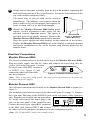
4 Gently remove the panel assembly from the top of the monitor, separating the
hook and loop portions of the velcro fastener. Secure the loop fastener on the
top of the monitor and press firmly.
The panel may be placed back on the monitor
immediately. The adhesive used requires about an
hour to achieve 80% of full strength, and requires 30
hours to reach 100% of its full bond strength.
5 Should the Monitor ZScreen 2000 Series panel
require vertical alignment at this point, use the
provided vertical alignment spacer. The spacer is
provided with velcro already attached. Remove the
Figure 4. Modulator
Panel Mounting
Monitor ZScreen 2000 Series unit from the monitor.
Place the spacer against the hook fastener on the underside of the bracket.
Replace the Monitor ZScreen 2000 panel on the display, securing the bracket
and spacer combination to the velcro fastener strip already applied to the
monitor bezel.
Electrical Connections
Monitor ZScreen 2000i
The electrical connections are located on the top of the Monitor ZScreen 2000i.
Plug the power supply into the AC outlet and connect the barrel plug into the
‘power’ jack on the rear panel. Connect
POWER
CE
the stereo sync cable BNC connector
Other
to INPUT (see figure 5) and
PHASE
INPUT
18VAC 2VA
connect the other end of the cable
Figure 5. Controller Unit Rear Panel
into the computer.
(Note: There is no power on/off switch. The unit is best left powered on. To power off,
disconnect the power supply.)
Monitor Zscreen 2000
Three electrical connections must be made for the Monitor ZScreen 2000 to operate (see
Figure 6).
The modulator panel must be connected as shown in Figure 2 (on page 3). Connect
the 6-pin mini-DIN plug to the SCREEN jack on the rear panel of the controller
unit. Plug the power supply into an appropriate
SCREEN
POWER
AC outlet, and connect the barrel plug to the
jack on the rear panel of the controller unit.
INPUT
18VAC 2VA
Connect the stereo sync signal BNC connector
to the BNC jack labeled INPUT and connect Figure 6. Controller Unit Rear Panel
the other end to the computer (as instructed in the configuration pack).
(Note: The 3.5 mm INPUT jack is not normally used.)
5