1
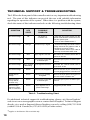
Configuration Pack and Interface Cable The Monitor ZScreen 2000 Series must be connected to a computer or other signal source that is creating an alternating field sequential stereoscopic image. This signal source needs to send a stereo sync signal to the Monitor ZScreen 2000 Series controller electronics via the BNC connector. Below are the stereo Configuration Pack requirements for most computers supported by StereoGraphics Monitor ZScreen 2000 Series. If you are a current CrystalEyes user, a new cable may not be required for the Monitor ZScreen 2000 Series. In most cases a BNC adapter will be required. For complete information on the adapter and/or cable requirements, please visit StereoGraphics’ web site at www.stereographics.com. Configuration Pack Name ALPHA Configuration Pack Configurations Covered All stereo-ready Compaq ALPHA workstations (formerly DEC) SGI Configuration Pack All stereo-ready SGI UNIX Computers Sun Configuration Pack All stereo-ready Sun Microsystems computers IBM Configuration Pack All stereo-ready IBM computers Intergraph Configuration Pack All Intergraph computers equipped with RealiZm, RealiZm II and Intense3Dgraphics cards * HP Visualize 48 Configuration Pack All stereo-ready HP VISUALIZE 48 graphics cards HP Visualize FX Configuration Pack Stereo NT Configuration Pack BNC Configuration Pack All HP VISUALIZE FX graphics cards All PC graphics cards equipped with a VESA-specified 3-pin mini-DIN connector For all platforms supplying sync through a BNC connection Table 1. Configuration Pack Requirements * Intense 3D cards have either a 5-pin or 3-pin mini-DIN stereo connector. The Stereo NT configuration pack is required for the latest cards which have the 3-pin connector (Wildcat 4105 and 4110 and newer). 6