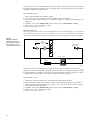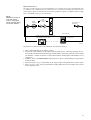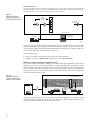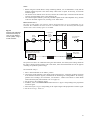
1
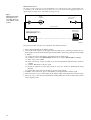
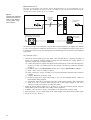
4. Make sure that the impulse response, obtained by feeding the played back signal directly to the
measuring PC, is free from clearly visible noise or spikes (for help, see DIRAC User Manual
BE 1685, Section 4.3: Qualifying the Soundcard). If this is not the case, while the loopback impulse
response is clean, a possible cause might be that the playback speed differs too much from the
recording speed, which is not allowed.
• External MLS or sweep method relies on highly stable and identical recording and playback
speeds. Thus, make sure that this condition is not violated due to temperature changes and ageing
of the sound recorder and/or media, by carrying out the above-mentioned check prior to each
external MLS or sweep measurement session. If necessary, re-record the excitation signal.
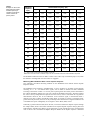
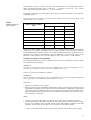
Table3
Output filter versus
speech intelligibility
parameter to be measured
Speech Intelligibility Parameter to be Measured
Output Filter
STI Male or corresponding %ALC value
Male
STI Female or corresponding %ALC value
Female
RASTI or corresponding %ALC value
RASTI
STITEL for male voice or corresponding %ALC value
Male
STITEL for female voice or corresponding %ALC value
Female
Calibration Procedure
Speech level calibration in DIRAC is accomplished as follows to ensure that the test speech level is
equal to the real speech level:
1. If necessary, the sound card output frequency characteristic is equalized, using the Pink+Blue filtered
MLS signal. If a mouth simulator is used, it is included in the signal chain before equalizing.
2. DIRAC generates speech signals in compliance with IEC 60268–16 by filtering the internal MLS
or sweep signal through a Male, Female or RASTI shaping filter.
3. The resulting acoustical or electrical standard speech signal is applied to the system under test.
4. The A-weighted signal level is adjusted so as to match the practical speech level, which depends
on the situation and the measuring point in the total signal chain.
The first and last actions are part of the actual speech level calibration procedure described below.
Follow the procedure based on your application of the input signal:
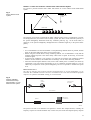
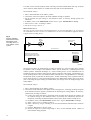
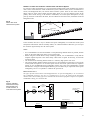
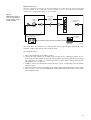
A. If the signal is injected directly into a sound system, set the output level by doing the following:
1. Connect the sound card output to the sound system input.
2. In DIRAC, select File, Measure... or click
in the toolbar. Select Source Signal: Internal MLS
and Source Filter: Male. Choose an MLS Length: exceeding 2 s and switch on the signal by clicking
the Test button.
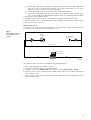
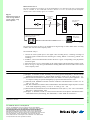
3. If you want to use a digital sound recording device, record at least 15 s of the signal, connect the
digital sound recording device to the sound system input and then play back the signal.
4. Set the system or digital sound recording device output level to get the LAeq,101 value for continuous
speech2.
1. LAeq,10 is the A-weighted equivalent sound pressure level, averaged over 10 seconds.
2. This level could be found by measuring LAeq,10 while playing back real speech without pauses from a tape recorder or having a real
talker speaking without pauses into a microphone, with the system set at a ‘normal’ output level, as judged by the user of the system.
8