1
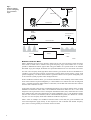
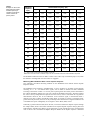
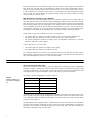
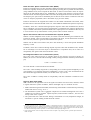
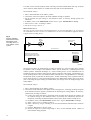
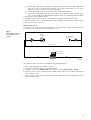
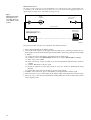
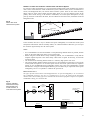
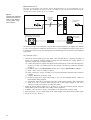
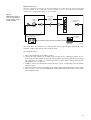
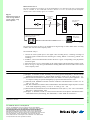
B. If the signal is fed to a mouth-directional sound source, shape the output spectrum and set the output level by doing the following: 1. Connect the sound card output to an octave band equalizer. 2. Connect the equalizer output to the mouth simulator and direct it towards a sound level meter1 at a distance of 1 m or, if the mouth simulator will be used in a sound system, at the normal speaking distance from the sound system microphone. 3. In DIRAC, select File, Measure... or click in the toolbar. Select Source Signal: Internal MLS and Source Filter: Pink+Blue. Choose an MLS Length: exceeding 2 s and switch on the signal by clicking the Test button. 4. Adjust the equalizer gains in such a way that you will obtain the same signal levels (within ± 1 dB) in all frequency bands. 5. Click the Stop button, select Source Filter: Male, and click the Test button. 6. If you want to use a digital sound recording device, record at least 15 s of the signal, connect the digital sound recording device to the mouth simulator and then play back the signal. 7. Set the total output level to 68 dB(A). Notes: • Procedure A presumes the sound card has a frequency response that is flat within ± 1 dB over 88 Hz through 11.3 kHz for the input channel of a calibrated sound card or for the output channel of an uncalibrated sound card. If this is not the case or not assumed to be the case, first equalize the sound card2 output spectrum by doing the following: (a) Connect the sound card output to an octave band equalizer. (b) Connect the equalizer output to an RMS voltage meter. (c) In DIRAC, select the Source Signal: Internal MLS and Source Filter: Pink+Blue. Choose an MLS length: exceeding 2 s and switch on the signal by clicking the Test button. (d) Adjust the equalizer gains in such a way that you will obtain the same signal levels (within ±1 dB) in all frequency bands. • The calibration, which is performed with the Male speech filter, also holds for the Female and RASTI speech filters. Negligibility of Background Noise If the background noise level is negligible or if you want to eliminate its impact by measurement technique, the speech level calibration can be omitted. This also simplifies the measurement in the sense that an equalizer is not needed, and in situations with a sound system, the output level does not have to be calibrated each time a measurement is carried out. Therefore, it is worthwhile to take a closer look at the impact of SNR on speech intelligibility in practical situations, and formulate the exact condition under which speech level calibration is really required. The background noise is assumed to be negligible if its presence results in a STI decrease of less than 5 % of the STI without background noise. To figure out what the consequence is for the allowed SNR, we write the MTF as a product of 2 modulation reduction factors, m0(k,F) due to system properties (reverberation, echoes) and mSNR(k,F) due to background noise: m 0 ( k, F ) MTF ( k, F ) = m 0 ( k, F ) ⋅ m SNR ( k ) = -------------------------------1 + 10 SNR ( k ) – ------------------10 where k is the octave number. By definition, the so-called effective SNR, SNReff(k,F) relates to MTF(k,F) as does SNR to mSNR: MTF ( k, F ) SNReff ( k, F ) = 10 log ------------------------------------ 1 – MTF ( k, F ) 1. A sound level meter with octave band filters is preferred, but a sound lever meter with linear frequency weighting could be used as follows: • Set all equalizer octave band levels at minimum • Measure the level with the 125 Hz slider set at maximum, and put back to minimum • Repeat this for all bands from 250 Hz through 8 kHz • Set the slider of the band with minimum measured level at maximum, and the other sliders such that all levels are equal. The disadvantage of a sound level meter with linear frequency weighting is the large range required for each equalizer frequency band. Using an 11-band equalizer, a slider should be set at least 10 dB above minimum to exceed the noise level of the remaining 10 bands at minimum level. For an additional 10 dB SNR, a total minimum range of 20 dB is required leaving only 4 dB adjustment range for a common ± 12 dB (24 dB range) audio equalizer. Most likely a second or other type of equalizer is then required 2. You can also choose another sound card with the required frequency response specified by the manufacturer. 9