1
DZB200 INVERTER
M&J
S af et y a nd Cau tio ns
P r o du ct I ntr oduc tio n
Mec h an ica l a nd El ectr i cal I ns ta ll ati o n
O per a tio n a n d D is pla y
Func ti o n Pa ra m eter s L is t
P a ram e t e r De scri ptio n
F a ult D ia g no si s a nd C ou ntermea s ure s
Q ua li ty G uara nt ee
Appen di x
DZB Series
Preface
Preface
Thank you for choosing DZB 200M&J Series AC Motor D rives.
This manual will be helpful in the installation, parameter setting, t rou bleshooting, and
daily maintenance of the AC motor drives. To guaran tee safe operation of the equipment,read the
following safety guidelines before connecting power to the AC drives. Keep this operating manual
han dy and distribute to all users for reference.
Attention:
◆ Al ways read this manual thoroughl y before using DZB series A C Motor Drives.
◆ Do not connec t or disconnect wi res and connectors whi le power is applied to the ci rcui t.
◆AC input power must be disconnect ed before any maintenance.
◆The re are hi ghly sensitive components on the printed ci rcui t boards. These components are especially
sensit ive t o ESD (electrostatic discharge). To avoi d damage to th e dr ive ,do not touch component s or the
ci rcuit boards until stat ic control precautions have been ta ken.
◆To avoid personal i njury, do not remove the cover of the AC motor dri ve until al l of the digi tal keypad
"DISPLAY LED" lamps are off. The DC-link capacitor remains charged with a hazardous voltage even
after input power is removed.
◆ Never connect the main circuit output terminals U, V, and W directly to the AC main circuit power suppl y
as this will damage the drive .
◆ Grounding the Inverter by c onn ecting the Earth Ground to the drive ground terminal.
Apply scope of the manual :
This manual is for DZB20 0M &DZB200J Series AC Moto r Drive.
Version:2007.9-V1
Index
Chapter 1 Safety and Cautions
1
Chapter 2 Product Introduction
6
Chapter 3 Mechanical and Electrical Installation
8
Chapter 4 Operation and Display
17
Chapter 5 Function Parameters List
21
Chapter 6 Parameter Description
34
F0 Basic F unctio n Parameters
34
F1 Motor Param eters
42
F2 Input and Output Terminal Function Parameter s
44
F3 Human Machine Interface Parameters
52
F4 Application Function Parameters
55
F5 Protec tion Pa rameters
64
F6 Communication Parameter s
67
Cha pter 7 Fault Diagnosis and Countermeasures
71
Chapter 8 Quality Guarantee
79
Appendix A Standard Specifications
80
Appendix B Dimensions
82
Appendix C Accessories List
84
DZB Series
C hapter 1 Safe ty and Cautions
DZB Series
Chapte r 1 S afety and Cau tions
Chapter 1 Safety and Cautions
Note
Safety Definition
There are two kinds of safety cautions in the manual:
Dan ger
Opera tions which are not performed according to the requirements may cause severe hurt
or eve n death.
Note
Opera tions which are not performed according to re quirements may cause m oderate hurt
or light hur t or equipment damage .
★ Do not connect t he input ter minals with the output terminals (U, V, W), oth erwis e the inverter
may be damaged!
★ Ensure the wiring meet the EMC r equirements and the local safety st andard. The wire size shall
be deter mined according to the manual, otherwis e acc ident may occur!
★ Brake resistor must not be connected between the DC bus terminals (+) and (-), otherwise fi re
may occur!
4. Before Power-on
1.1 Safety Cautions
1.Before Installation
Danger
Danger
Do not us e the inverter that is damaged or has defect, or there will be danger of injury.
★ Please confirm the mains voltage level is consistent with that of the inverter and the input and
output wirings are correct, and check if there is any short circuit in peripheral circuit and if the
wiring is fixed and fast, otherwise th e inverter m ay be damaged!
★ Mount the cover plate properly before p ower-on the inverter, o therwise there will be danger of
electric shock.
2.During Installation
Danger
Note
Mount the inverter on incombustible surface like me tal, and keep away from flammable substances !
Other wise it may cause fire.
Note
★ When m ore than two inverters are to be installed in one cabinet, please pay attention to the
installation locations to ensure the cooling effect (refer to Chapter 3 Mechanical and Electrical
Installation).
★ Do not drop the lead wire stub or screw in the inverter, or the inverter may be damaged.
★ Dielectric strength tes t had been done at factory. Therefore, us er needs not do this test again,
otherwise ac cident may occur!
★ All the peripher al par ts shall be connec ted correctly according to the manual, or accident may
occur!
5.A fter Power-on
Danger
3.Wiring
Danger
★ Only the qualif ied electrical engineer can perform the wiring, other wise there will be danger of
electri c shock.
★ A ci rcuit breaker mus t be installed between the mains and the inverter, otherwis e ther e will be
danger of fir e.
★ Wir ing ca n only be done after the mains input is cut off, otherwise there will be danger of electric
s hock.
★ Please connect the inverter to the ground according to th e standard, otherwise there will be danger
of electric shock.
- 1-
★ Do not open the cover of the inver ter after power-on, otherwise there will be danger of electric
shock!
★ Do not touch the inver ter and its circuit with wet hand, otherwis e the re will be danger o f electric
shock.
★Do not touch the invert er terminals , otherwise there will be danger of electric shock.
★At power-on, the inver ter will perform the security check of the external heavy-c urrent circuit
automat ically, so at this time please do not touch the terminals U, V and W, or the terminals of
motor, otherwise there will be danger of ele ctric shock.
-2 -
DZB Series
DZB Series
Chapter 1 Safe ty and Cautions
Chap ter 1 S afety and Cautions
1.2 Cautions
Note
1. Check the Insulation of t he Motor
★ If parameter identification is required, please pay a ttent ion that the rotating motor ma y injure
peopl e, otherwise accident may occur!
★ Do not change the factory settings, otherwise the inverter may be damaged!
When the motor is used for the fi rst time, or reused after storing for a long time, or in regular checkup,
the user m ust check t he insulati on of the motor t o prevent the poor insulation of t he windings of mot or from
damaging the inverter. The motor connection must be divided from the i nverter during the insulat ion check.
It i s recommended to use a 500V Mega-Ohm-Meter to check and the insulation resi stance shall not be less
than 5M Ω.
6. Running
2. Thermal Prote ction of Motor
If the rated capacity of the motor select ed is not matchi ng that of t he inverter, especially when the rated
Danger
power of the inverter is bigger than that of the motor, make sure t o adjust the parameters for mot or protecti on
★ Do not approach the equi pment when restart function i s enabled, othe rwi se there w ill be danger
of injury.
★ Do not touch t he fan and the discharging resi stor to check the temperature, otherwise burning
may occur!
★Non-professional person shal l not measure the si gnal of a running inverter, ot herwise there will
be danger of i njury or damaging the i nvert er!
insi de the inverter or to i nst all a the rmal rela y to the mot or to guarantee the prot ection to t he motor.
3. Running at Frequency Above Rat ed Frequency
The output frequency of this inve rte r is 0~600Hz. Pl ease consider the capability of t he mechanical
devi ces when the customer needs the inverter to run at the frequency higher than 50Hz.
4. Motor Heat a nd Noise
Si nce the out put voltage of the inve rter is in PWM wave with some harmoni cs, t he temperature may rise,
the noi se and vibration may increase compared with the i nverter running at mai n frequency.
5. P ressure-sensiti ve Devi ce or Capacitor at the Out put Side of t he Inverter
Note
Because the inverter outputs PWM wave, the capacitor used for improvi ng power factor and pressure-
★ Do not let objects fall in a runni ng invert er, otherwise the inve rte r ma y be damage d!
★ Do not st art and stop the i nverter by on/off of t he contactor, otherwise the inverter may be
damaged!
sensit ive re sistor used for lightening-proof shouldn't be install ed at the out put side of the invert er, otherwise
7. Maintenance
start or stop the inverter wi th the contactor. If the user has to use the contactor t o start and stop the inverter,
the invert er may ha ve tra nsi ent over-current and may be damaged.
6. S witches Used at t he Input and O utput termi nal of the Inverter
If the cont actor is required to be i nstalled be tween the i nvert er and t he power supply, it is prohibited to
the interval between the start and st op shall be less than one hour. Frequent charging and dischargi ng ma y
reduce the life of the ca paci tor. If t he switches like contactors are connect ed between the output terminal and
Danger
the motor, make sure to start and stop the inverter w hen the inverter has no output, otherwise the modules in
★ P lease do not repair or maintain the inverter with powe r on, otherwise t here will be danger of
elect ric shock!
★ P lease repair or maintain the invert er after confirming the charge LED turns off, otherwise t here
may be human injury caused by the residual voltage of the capac it or!
★ Only qualified electric al engineer can repair or mai nta in the i nvert er, otherwise t here will be
danger of human injury or damaging the equi pment.
the invert er may be damaged.
7. Usage Outside t he Range of Rated Voltage
The DZB series inve rter shall not be used out of t he specified range of operation voltage , otherwi se the
int erna l component s of the inve rter ma y be damaged. If needed, please use corresponding voltage regul at ion
devi ce to change t he volt age.
8. 3-phase Input Modified Into 2-pha se Input
The modificati on of DZB series inverte r from 3-phase input to 2-phase input is not al lowed, or fault may
occur.
9. Lightni ng Strike Prot ection
There are lightning protecti on devices inside the inve rte r, But t he use r should instal l other lightning
protect ion device at the front end of the inverter if l ight ning stri ke occurs freque ntl y.
10. Altitude and Deration
When the altitude is higher t han 1000m, the cool ing effect of inverter is deteriorated because of t he
rarefac ti on of air, the derati on must be used a nd please consult our company for detailed technical support.
-3-
-4-
DZB Series
Chapter 1 Safe ty and Cautions
DZB Series
Chapter 2 Product Introduction
Chapter 2 Product Introduction
11. Special Usages
T he user can consult our compa ny if he wants to use another method instead of the recommended
connecting method provide d in the manual, such as shared DC bus.
The purpose of this chapter is to provide specific, yet simple information to u np ack , i nstall the AC drive.
12. Cautions for Scr ap of Inverter
This chapter contains information on the fol lowing:
T he electrolytic capaci tors in the main ci rcui ts and PCB may explode when they are bur ned a nd poisonous
2.1 Receiving, Transportation, and Storage
gas may be generated when the plastic parts are bur ned. Please dispose the inverter as industrial rubbish.
2.2 Nameplate In formation
13. About Applicable Motor
1) The standard motor used is the 4-pole squirrel cage asynchronous induction motor. If other kind of
motor is used, pl ease be sure to select the applica ble i nverter acc ording to the rated curr ent of the motor,
and pl ease consult us if the user wants t he inverte r t o drive the permanent magne tic synchronized motor.
2) The cooling fan of non-variable frequency motor is connected to the rotor in the same bearing, so the
cooling effect is weakened if the speed is low, t here fore use the variable-frequency motor or install a
2.1 Receiving, Storage and Transportation
The AC motor dri ve has gone through rigorous qua lity control tests at the factory before shi pment.
After re cei ving the AC drive, c heck for the following.
Receiv ing
cooling fan in the overheat condition the motor.
3) The inverter has already been configured with the standard parameters for applicable motor, please
be sure to modify the default values or perform the motor parameter identification according to the
actual condi tions, other wise the operation effect or prot ection performance may be reduced.
4) Short-circ uit in the cable or motor may ca use the inverter alar m or even damage t he inverter.
1.Check to make sur e t hat t he package includes an AC drive,the User Ma nual,dust covers and
2.Inspect the unit to insure it was not damaged duri ng shi pment.
3.Make sure that the par t numbe r indicat ed on the name plate corresponds wi th the part number of your
T herefor e, please conduct the insulat ion short-circuit test to t he cable and the motor installed for the
order.
first time. The short-circuit test shal l also be car ried out in routine maintenance . Pay attention that the
Storage
inverter shall be separated from the unit during such test.
rubber
bushings.
The AC Dri ve shoul d be kept in the shipping carton before install ation. In order to retain the war rant y
cove rage, the AC drive should be stored properly when it is not to be used for an extended period of time.
Some storage suggestions are:
1.Store in a clean, dry l ocat ion.
2.Store wi thi n an ambient temperature range of -20°C to +65°C.
3.If possible, store in an air-conditioned environment where the relative humidi ty is less than
95%, non-condensi ng.
4.Do not store the AC dri ve i n pl aces where it could be expose d t o corrosive gases.
5.Please store the AC drive on a shel f or on an stable surfa ce.
Transportation
Temperature: -25°C to +70°C; R.H.: 5% to 95%;
Air Pre ssure : 70kPa to 106kPa.
-5-
-6-
DZB Series
C hapter 2 Prod uct Introduction
DZB Series
Chapter 3 M echanic al and Electrical Installation
Chapter 3 Mechanical and Electrical Installation
2.2 Nameplate Information
3.1 Mechanical Installation
Nameplate
1. I nstallation Envi ronment
1) Ambient temperature: Ambient temperature influences the inverter life greatly, s o it should be within
the range of -10℃~50℃ .
2) Mount the inverter in a flame retard ant s urface and the clearance arou nd the inverter shall be enough
because the inverter will generate lots of heat during running, besides moun t the invert er on the base
vertically with screws.
3) Mount in th e location where v ibration is less than 0. 6G; the inverter shall be far away from im pacting
lathe.
4) Please do not install the inver ter in the place with direct sunlight, high humidity and water.
5) Mount the inverter in the location free of corrosive gas, explosive gas or combustible gas.
6) Mount the inverter in the location free of oil dirt, dust, and metal powder.
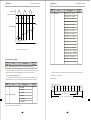
2.Installati on Location
Description ofACMotor Drive Model:
DZB200
M 0 0 15
up
L 2 B
≥ 1 00m m
DZ B
Function lev el code: A -braking unit inside
B -non braking unit
Input voltage:2-220V 4-400V 6-660V
A
DZB
A
ri ght
Freq. Ran ge:L :0-600.0Hz
App licab le mot or capacity:0015为 1.5KW
DZ B
Series:M :Mini Model
≥ 1 00m m
J :Simpl Model
Series name : DZB200 Series
Description of Serial Number:
Note : Ins tall an airflow- guidance
plate for t he up and down ins tallation
of inverters.
N ote: No need to consider the dimensio n
A for inverter of 22k W or belo w.
A sha ll be bigger tha n 50 mm for the
inverter of 22kW or abov e
Install ation of single inverter
0 7 0 1 8 8 88
Up and down installation of inverters
Fig.3-1 DZB Series Inverter Installati on Location
P roduction number
The user s hall focus on the heat dissipation issues when i nstalling the inverter, and pay attention to the
P roduction month
fo llowing points:
P roduction year
1) Install the inverter vertically so that the heat may be expelled from the t op, but do not ins tall the
inve rter upside down. When two Variab le Speed Drives are mounted up an d dow n, an air fl ow
dive rting plate s hould be fixed in between as shown in Fig. 3-1.
2) Installation space is shown in Fig.3-1 so as to ensure the heat diss ipation space, but cons ider the
heat dissipation of other components when p lacing the inverter.
3) The inst allation bracket must be flame retardant .
4) Install the heat sink outside of the cabinet if the inverter is installed in t he area with metal powder.
And in this case, the space inside the se aling cabinet shall be big enough.
- 7-
-8 -
DZB Series
DZB Series
Chapter 3 Mechanical and Ele ctrical Installation
3.2 Electrical Installation
Basic Wiring Diagra m
Inverter wiring secton includes main circuit and control circuit.User can open the cover,
looking at the maincircuit and control circuit terminals.User should be wiring follow the diagram
below.
1) DZB200M series inverter standard wiring diagram.If onl e usi ng th e panel o perate th e inverter,
just wiring th e ma in ci rcuit.
brake resistance(option)
Power source (3PH)
BR+
BR-
R
R
U
S
S
V
T
T
Chapter 3 M echanic al and Electrical Installation
2) DZB 200J seri es in verter sta ndard wi ring diag ram. If onle using th e panel o perate the inv erte r,just wiri ng th e
m ain circui t.
brake resistance(option)
Power source (1PH)
BR+
L
L
N
N
Multi- func tion input 2
S2
Multi- func tion input 3
230V series grounding resistance
should be below 100Ω
400V series grounding resistance
should be below 10Ω
S1
M ul ti-f unc tion input 2
S2
M ul ti-f unc tion input 3
FM
S3
ACM
Analog 0-10V/4~20mA output
(F2 .22)
S4
D igita l s ignal c ommon
A Multi-function indication
output contact
C AC 250V 2A below
DC 30V 2A below
B
(F2.21)
ACM
(F2.01~F2 .04)
FM
S3
auxiliary po wer
ACM
+12V
Analog 0-10V/4~20mA output
M ul ti-f unc tion input 4
S4
M ul ti-f unc tion input 5
(F2.22)
M ul ti-f unc tion input 6
Multi-function PHC output terminal
48V DC 50mA below
(F2.19)
A Multi-function indication
output contact
C AC 250V 2A below
DC 30V 2A below
B (F2.21)
S5
S6
D igita l s ignal common
ACM
(F2. 01~ F2.06)
Multi-function PHC output
terminal
48V DC 50mA below
(F2.19)
10V
3
2
Potentiometer
AI
AVI Analog voltage input
0~10V
ACI Analog current input
4~20mA
1,2,6:GND
CON3
1
10V
2
Potentiometer
AVI
Analog voltage input
0~10V
ACI
Analog current input
4~20mA
AI
6←1
CON3
1
6←1
shows main circuit
shows main circuit
3:SG+
Fig.3-2 200J Basic Wiring Diagram
5:+5V
RS-485 serial interface
shows control circuit
Fig.3-2 Basic Wiring Diagram
-9 -
5:+5V
RS-485 serial interface
1,2,6:GND
4:SG-
ACM
3:SG+
4:SG-
ACM
3
M
230V series grounding resistance
should be below 100Ω
400V series grounding resistance
should be below 10Ω
S1
Multi- func tion input 4
M ul ti-f unc tion input 1
U
V
Multi- func tion input 1
M
BR-
- 1 0-
shows control circuit
DZB Series
Chapter 3 Mechanical and Ele ctrical Installation
Main Circuit Wiring
DZB Series
Chapter 3 M echanic al and Electrical Installation
Danger
INPUT
R( L) S
★ Please confirm the mains vol tage level is same with that of the inverter, ot herwi se the inverter
may be damaged!
★ Make sure the ratings of the driven motor are i n compliance with the inverter, otherwi se the
motor ma y be damaged or the inverter may be in protection status!
★ Do not confuse the input terminals with the output terminals (U, V, W), ot herwise the re will be
danger of damaging the inverter!
★ Brake resistor cannot be c onnected between the DC bus terminals (+) and (-), otherwise fi re
may occ ur!
T(N)
1)Ma i n C i r cu it Te r mi na ls o f I n vert e r
Terminals
Descri ption
R、S、T (L 、N)
AC input line terminals
U、V、W
Motor connect ion
B R + 、B R-
Connection for the braking resistor (opti on)
E
Gr o un d
2)N ot e s o n Wi r i n g
A. Input power supply L and N or R, S and T:
There is no phase-ration requi rement for the input of inverter.
C.Brake resistor term inals of( BR+)、(BR-) :
The brake resist or terminal is effective only for the inve rte r of 15kW or bel ow and has a bui lt-in brake
U
V
W BR+ BR-
unit . Select the recommende d re sistor with the cable length of less than 5m, otherwi se the inverter may
burn or be damaged.
MOTOR
R
Fig.3-4 Terminal Diagram
D. Inverter output U, V and W:
Inverter output terminals cannot connect t o capacit ors or surge snub devices, otherwi se the inverter may
be in protecti ve stat us or damaged.
If the cables between the motor and t he inverter are too long, el ectrical resonance may occ ur due to the
distribut ed capacitance, which may result i n damaging the motor i nsul at ion or big l eakage current, so if
Danger
the cable length is longer t han 100m, AC reactor must be i nstal led.
★ Wiring c an only be done after the mains input is cut off, otherwise there will be danger of electric
shock!
★ Only qualified and trained engi neer can perform the wiring, otherwise there will be danger of
el ectri c shock!
★ Grounding cable must be grounded, otherwise t here will be danger of electric shock or fire!
-11-
-1 2 -
DZB Series
Chapter 3 Mecha nical and Ele ctrical Installation
DZB Series
Cha pter 3 Mechanical and E lectrical Installation
3)No t e s o n C o ntro l Te r mi na l s :
E. Grounding Terminal
:
Grounding Terminal must be connected to earth re liably and the grounding resistance shall be less than
5Ω, othe rwise the equipment may work abnormally or be dama ged. Do not share the PE and neutral line
A) Analog input terminal:
Sinc e the weak analog voltage signal is easily disturbed by external disturbance source, shielded cable
shall be used and the cable shall be a s short as possible and the length shall not exceed 20m, as shown in
of the mains supply.
the figure 3-6:
5. Control Terminals and Wiring
L ess than 20m
1 )Layout of Control Terminals(Fig.3-4,Fig3-5):
200M:
A
B
C
S1
S2
S3
S4
200J:
A
B
C
S1
S2
S3
S4 AC M A C M A I
S5
S6 AC M AI
10 V
F M MO 1 M C M
+10 V
1 0 V F M M O 1 MC M + 1 2V
A n a l o g in p u t se l e ct sw i t c h
DZB
AI
Potentionme ter
ACI
AV I
ACM
2 )Function of Control Terminals:
Terminal
MO 1-MCM Multi-function PHC output 1
A-B
B-C
Multi-function indication output contact Refer toF2.19~F2.21
Multi-function indication output contact
S1-DCM
Multi-function input 1
S2-DCM
Multi-function input 2
S3-DCM
Multi-function input 3
S4-DCM
Multi-function input 4
S5-DCM
Multi-function input 5
S6-DCM
Multi-function input 6
+12V
Auxiliary control power source
AVI-ACM
Function
Refer to F2.01~F2.06
Wind 2 - 3 turns
AI
C
DZB
External analog source
ACM
Ferrite core
0~10 V (Max. output freq.) Input
Analog signal input
0.022 uF、5 0V
4~20mA /0~10V Input
ACI-ACM
FM-ACM
Fig. 3 -6 Analog Input Terminal of DZB Series Inverter
If the analog signal is severely disturbed, filter capacitor or ferrite core shall be ins talledat the analog
signa l source as shown in the Fig. 3-7:
4~20mA /0~10V Output
Refer to F2.22
+10 V (20 mA max. output current)
Analog signal output
10V~ACM Power supply for speed setting
Fig. 3 -7 Analog Input Terminal With Filter devices
B) Digi tal input terminal:
The inverter judges the ON/OFF status of these terminals by receiving the digi tal signal. Hence, all the
external contactors are those with high reliability of weak signal conduct ion.
If th e open collector is employed to provi de ON/OFF signal for the inverter digital input terminal, then
it shall be considered that there is er ror operation caus ed by power supply interfer ence.
It is recommended to use contact control mode.
C) Digi tal Output terminal:
When digital output terminal dri ves a relay, the coil of the relay shall be installed a snubbing diode,
otherwise the DC 24V power supply may be damaged.
- 1 3-
-1 4-
DZB Series
C hapter 3 Mechanical and Electr ical Insta llation
DZB Series
Chapter 3 M echanic al and Electrical Installation
2) Reducing the dis turbance to the in ver ter from othe r equipme nt
Note: Pay attention to the polarity of the dio de as shown in the figur e 3-8. Otherwise if the digital
output terminal has output, the DC24V power supply will be damaged.
The re lay, contactor or ele ctro nic -magnetic br aking device wil l disturb t he inve rter.
Take the following actions to solve this issue:
A) Ins tall surge suppre ssing d evices to the disturbing device
B) Ins tall filter t o the input of the inverter
C) Inverte r's control ca bles shall be shielded a nd t he shielding layer shal l be grounded
DZB300 EV
3) Met hod to reduce the di sturbance from the i nverter to the equipment
Two kinds of noises, one is the ra diation from the inverter it self, and a nother is the radiation from the
Relay
Diode
cable betwee n the in ve rter and the moto r. T hese two k inds of ra diations induce the cables of the
equipm en t and make the equipment work abnormally. Follo wing m ethod can be used:
MO 1
A) If the mea sur ing me ters, radio equipment and sensors and their signal cables are installed in a
cabinet together with the drive, these equip me nt c ables will be eas ily disturbed. Take the actions
below to s olve the problem: The equipment and the signal cables should be as far away from the
inverter as possible; Si gnal cable s and power cabl es shall not be route d in paral lel or boun d together;
MC M
The signal and power c ables should be shie lde d; Install radio noise filter and linear noise filter at
the input and output sides of the inverte r
B) If the externa l equipme nt shar es a same AC supply wi th t he inverte r, and the above cannot eliminate
Fig. 3 -8 Digital Input Ter minal of DZ B Ser ies Inverter
the disturbance, the n the user should install a linear filte r or a radio noise filter.
C) Ground the exter nal equipment an d elimina te the disturbance of the leaka ge cur rent from t he
6. EMC Issues
inverter's grounding cable .
6 . 1 Influence of Harmonics
1) The h igh frequency harmoni cs of m ains supply will influence the rectifying circuit of t he inverter.
The harmonics will heat t he rectifying circuit and even damage the circuit. So, it is recommended to
install the filt ering device in the envi ronment where the power quality i s poor.
2) Since the in verter output has high frequency harmonics, the output cannot be ins talled with
capacitor or surge s uppressing devices because the cap acitor and s urge suppressing device may
resonate the circuit and damage the equipment.
6.3 Leakage current
The inver ter has two ki nds of leakage curre nt, one is the grounding leakage c urrent and anoth er is the
lea kage current between the lines:
1) Grounding leakage curr ent:
The distributed capacitance exist s between the cables an d the ground, and the bigger the capa citance
and the bigger th e leakage current, s o th e motor cables should be as short as possible. B esides , the
bigger the ca rrier frequency is, the bigger the leakage current i s, so the us er can also reduc e the carr ier
6. 2 EMI
1) Two kinds of EM I, one is the EMI around the inverter and distu rbs the inverter. T his kind of E MI is
weak, besides the in verter has been designed with strong immunity. Another i s the E MI from the
inverter that m ay influence the equipment around the inverter. The inve rter its elf is a disturbance
source b ecaus e it outputs PWM wave through high carrier frequency, so solving the EMI issue is
mainly to reduce the EMI of inverter.
wa ve f requency, but the motor noise ma y increase . Installing re actor can also reduc e the leakage current.
The le akage cur rent is increased wit h the incre ase of the circuit curren t, so the l eakage curren t is big if
the motor power is big.
2) Lea kage current between lines:
The distributed capacitance exist s in the inver ter抯 o utput cables, and resonanc e may occur if high
fre quency ha rmonics e xist in the current, thus the lea kage current occurs, which may result in the wrong
M ethods:
A) Inverter an d oth er equipment shall be well grounded and the gr ounding res istance shall be less than
5ohm.
B ) Inverter's power cables shall be vertical instead of parallel with the control cables.
C ) For the app lication with strong dis turbance, the power cables from the motor to the inverter shall b e
action of relay.
The method to solve this issue is to r educe the car rier fre que ncy or install the output reactor. I t is
recommende d to us e inver ter抯 protection fun ction i nst ead of a thermal rela y to protect the motor before
using the inverter.
shielded and the shi elding layer shall be gr ounded.
D) The cables of disturbed equi pment shall be twisted shielded ca bles and the shiel ding layer s hall be
gr ounde d.
-15-
-1 6-
DZB Series
Chapter 4 Op eration and Display
Chapter 4 Digital Keypad Operation
4.1 Description of the Digital Keypad
DZB Series
Chap ter 4 Operation a nd Displa y
Expl anati on of Screen Display
1. Explanation of Displayed Messages on Running status( r efer to F 3.05):
● Digital Keypad Pa rts and Functi ons
This digit al keypad module includes two pa rts: display pa nel an d a keypad. Th e displa y panel
Displayed
Symbol
Displayed Message
Operati on
allo ws th e user to program th e AC d rive, as well as view the d ifferent ope rating p ara me ters. The
keypad is t he user interface to the AC motor drive. Refer to the following f igu re for a de scription
of t he d ifferent parts.
Dig ital Ope rator
8. 8. 8. 8
LED dispaly
Display the current running
status of Inverter:
run、stop 、forward 、reverse
Program key
RU N
STOP
FW D
R EV
PRG M
R ES ET
RU N
F UN C
DAT A
S TOP
Function/Data key
Digital display
Display output frequency、
current、parameter setting
and fault content。
Run/move key
Stop/reset key
Sett ing frequency
QUICK
Press“ FUNC
”key
DATA
JOG
Running freque ncy
QUICK
Press“ FUNC
”key
DATA
JOG
Output current
QUICK ”key
Press“ FUNC
DATA
JOG
Output voltage
QUICK
Press“ FUNC
”key
DATA
JOG
Running speed
QUICK ”key
Press“ FUNC
DATA
JOG
Actual val ue of de la y time
QUICK
Press“ FUNC
”key
DATA
JOG
Sett ing of delay time
QUICK
Press“ FUNC
”key
DATA
JOG
DC bus voltage
QUICK
Press“ FUNC
”key
DATA
JOG
PID setpoint
QUICK
Press“ FUNC
”key
DATA
JOG
PID feedback
QUICK ”key
Press“ FUNC
DATA
JOG
VI value
QUICK
Press“ FUNC
”key
DATA
JOG
CI value
QUICK
Press“ FUNC
”key
DATA
JOG
Current se gment of
mult i- speed control
QUICK
Press“ FUNC
”key
DATA
JOG
Up and down keys
Panel potentiometer
FRE Q.SET
F ig.4-1 Operation Panel Schematic Diagram
Key
PRGM
RESET
Description
Program / Reset
First-stage menu ent ry or exit.
2. Explanation of Displayed M essa ges on Stop status ( refer to F3 .06):
Fu nction / Data
Di splays informati on on the A C dri ve stat us such a s the reference frequency,out put
FUNC
DATA
Displa yed Message
Operation
Sett ing frequency
QUICK ”key
Press“ FUNC
DATA
JOG
DC bus voltage
QUICK ”key
Press“ FUNC
DATA
JOG
Input terminal status
QUICK
Press“ FUNC
”key
DATA
JOG
Output terminal status
QUICK
Press“ FUNC
”key
DATA
JOG
PID setpoint
QUICK ”key
Press“ FUNC
DATA
JOG
PID feedback
QUICK ”key
Press“ FUNC
DATA
JOG
VI value
QUICK ”key
Press“ FUNC
DATA
JOG
Up / Down
CI value
QUICK
Press“ FUNC
”key
DATA
JOG
Press t he "Up" or " Down" but ton to change parameter settings.
Curr ent segment of
multi-speed control
press this key once to display the current parameters.
After changing the parameters, press this key agai n to store the new parameters.
Run
RUN
Displ ayed
Sym bol
fre quency, or output current in the normal mode. Whil e the dri ve is in the Program Mode,
Used t o start t he AC drive operati on.
This key has no effect when t he drive is set to terminal run.
S top
STOP
Used t o stop the AC drive operation.
If t he AC drive has st opped due to a fault, press this button to reset the drive.
These keys may also be used to scroll through diff erent operat ing values or parameters.
- 17-
QUICK ”key
Press“ FUNC
DATA
JOG
-1 8 -
DZB Series
Chapte r 4 O peration and Displ ay
DZB Series
Cha pter 4 Operat ion and Display
In third level menu, if the parameter has no f lash bit, it m eans the function c ode ca nnot b e changed and
4. 2 Modify and Check t he Function Codes
DZB 200 series inverter's operation panel uses 3-level m enu to conduct pa rameter set tings.
the possible reas ons are:
3-level menu: functio n parameter group (firs t level ) →function code (second level)→ settin g of
1) This parameter of this function code cannot be changed, such as the act ually d etected para meter and
running re cord parameter.
fu nction code (third level). Operation procedure is shown in Fig. 4-2.
50.00
PRGM
RESET
2) This function code cannot be changed in oper ating status and can only be changed when the inverter
Digital display
is stopped.
4.3 How to View Statu s Parameters
PRGM
RESET
When DZB Series inverter is in the stop or running statu s, several status parameter of the inverter can be
displayed on the LED nixie tube. Pressing the keyDATA can displa y the stop or running status parameters.
F0
1 s t level men u
PRGM
RESET
There are nine s top status parameters to be displayed in the s top status, Setting frequency,DC bus voltage,
M odify parameter group
Input terminal s tatus,Output terminal status,PID setpoint,PID feedback,VI value,CI value,Current segment
of multi-s peed control .
FUNC
QU
ICK
DATA
JOG
DZBSeries inverter has f ifteen running status parameters to be displayed in the running status, Setting
frequency,Running frequency,Output current,Output voltage,Running speed,Actual v alue of delay time,
2nd level menu
F0.07
Setting of delay time,DC bus voltage,PID setpo int,PID feedback,Input te rminal status,Output term inal status,
M odify funct ion code
VI value, CI value,Current segment of multi-speed control .
PRGM
RESET
If the inverter is powered on again aft er power-off, the paramet ers dis played are defaulted as those
FUNC
QU
ICK
DATA
JOG
sele cted before the power-off.
4.4 Password Setting
3 rd level men u 050.00
M odify value of function code
Fi g. 4-2 Operation Procedures for 3-level Menu
Note: W hen operating 3-level menu, press ing PR G or DATA can return to second level menu. The
difference is: pressing DATA will save the param eters and return to second level m enu and then shift
to the next function code, while pressing PRG will return to second leve l menu without saving the
parameters.
E xample: Change the setting of F1.02 from 10.00Hz t o 15.00Hz. (Bold means flash bit.)
DZ B200 inverte r provides passwor d protecti on for use rs. When F3.00 i s not zero, that is the user password,
and the password protection function is valid once exiti ng t he f unction code editing status. If the user
presses PRG again, the inverter shall display “------ ”, and the user can only e nter the menu after
inputting the user password. Otherwise, the user ca nnot enter.
If t he user want s to cancel the password protec tion func tion, F3.00 should be set 0.
50.00
PRGM
RESET
PRGM
RESET
F0
F1
PRGM
RESET
F1
F1.03
FUNC
QUICK
DATA
JOG
FUNC
QU
ICK
DATA
J OG
F1.00
F1.02
15 .00
FU NC
QU
ICK
DATA
JO G
RUN
10.00
10 .00
Fig. 4-3 Exampl e for P arameter Changing
-19-
-2 0-
DZB Series
DZB Series
Chapter 5 Functio n Parame ters List
Chapter 5 Function Parameters List
Chapter 5 Function parameters list
DZB200series i nvert er funct ion para meters, which are grouped by func ti ons, have F0-F0 total 7 groups.
Function
Code
F0.0 0
Contr ol mode
For the convenience of setting function code by using operation panel, the function group number is
corresponding to Stage 1 menu, the function code is cor responding to Stage 2 menu and the function code
parameter is corresponding to Stage 3 menu.
1:V/F control
Modifi Serial
ca tio n No
1
●
0.
0
●
1.
0
※
2.
0
※
3.
0:Keyb oard
F0.01
Runni ng Co mmand so urce
selecti on
1:Te rmin al
1. The column of function table i s describe d as follows:
2:485 Commu nication
The 1st column “Function Code ” is the functi on parameter group a nd parameter code.
0:Valid, and in verter memorize
when po wer down
The 2nd column “Name” is the complete name of the function parameter.
The 3rd column “Set ting Range” is the effective setting value range of the funct ion parameter,
Default
Value
F0 Basic Function Parameters
Each functi on group includes a numbe r of function codes, which adopt s t hree-stage menu, for i nstance,
“F4.08”means the 8th function code of F4th function.
Settin g Range
Nam e
F0.02
Keyboard and ter mina l
UP/DOWN setting
1:Valid, and in verter does n ot
memorize when power down
shown on the operation panel LCD.
2:Invalid
The 4th “Default” is the ori ginal factory setting value of this funct ion parameter.
0:Keyb oard
The 5th “Modifi cation” is the modification performance of the function parameter (i.e. whether
or not it is permitted to modify and the modification condit ions), explained as follows,
1:Panle poten tiome ter VI
“※ ”: indicates that the setting value of t his paramete r can be modified when t he inverter is
ei ther in stop or operating status;
“● ”: means that the setting value of this parameter cannot be modified when the inverter is in
2:External terminal AI
F0.03
Fr equency command
Selection
3:Reserved
4:Multi-speed
operati ng status;
5:PID control
“**”: means t hat t his parameter is a test value which cannot be modi fied.
“##”:means that thi s parameter only can be modifi ed by manufacturer.
(Inverter ha s done the automatic det ection restriction to the modification performance of each parameter,
6:485 Commu nication
F0.04
Maxim um outpu t freq uency
10.00~600.00Hz
50.00Hz
●
4.
The 6th column “Serial No” is t he number of function code at the storage inside.
F0.05
Upper lim it frequency
F0.06~F0.04
50.00Hz
※
5.
2.“Default” indicates the value of the function code after it is refreshed while doing the mani pulation of
F0.06
Lower lim it frequency
0.0 0 Hz~F0.05
0.00Hz
※
6.
F0.07
Keyboard freq uency setting 0.0 0 Hz~F0.04
50.00Hz
※
7.
F0.08
ACCEL time 1
0.1 ~360.0s
10.0s
※
8.
F0.09
DECEL time 1
0.1 ~360.0s
10.0s
※
9.
2
●
10 .
S et by
model
※
11.
0
●
12 .
1
※
13 .
hel ping user to prevent mis-modification.)
rest oring the fact ory parameters; but the actually detected parameters or record values ca nnot be r efreshed.
3.In order t o e ffectivel y prot ec t the parameters, the inverter provides the crypt oguard for the funct ion code.
After the user's password is set up (i.e. user's passw ord F3.00 parameter is not 0), when the user press PRG
button to enter function code edit status, the system first ent ers the user's password verificati on status,
0:Operating at de fau lt directio n
displaying “-----”, and the operator must input correctly the user's password, otherwise it is impossible to
ent er. At the state that t he cryptoguard is not locked, the user's password can be modified at any time, and t he
F0.10
Operation d irection
selecti on
t he pow er is on, if F3.00 is not 0, parame ters are protected by password.
1:Operating at r everse d irection
2:NO inverse ope rating
one finally input will be t he user's password. If F3.00 is set as 0, t he user's password can be cancell ed; when
F0.11
Carr ie r frequency setting
4. When modify parameter using seri al communicati on, usage of user password al so abide above principle.
1.0 ~15.0kHz
0:NO operation
F0.12
Fun ctiona l parameters
restoration
1:Restore defaul t value
2:Delete fai lure records
0:Invalid
F0.13
AVR selection
1:Valid all the ti me
2:Invalid during deceleration
- 21-
-2 2 -
DZB Series
Function
Code
Name
Settin g Range
Defa ult
Value
Modifi Serial
cation No
0:Direct start
F0.14
Start M ode
1:DC br aking first and then sta rt
F0.15
Start freq uency
0.5~99.99Hz
F0.16
Hold time of start
frequ ency
0.0~50.0s
F0.17
Bra king current
be fore starti ng
F0.18
Bra king time
be fore starti ng
0.0~150.0%
0.0~50.0s
●
14.
F0.20
Beginning Frequency of
braking
1:Free run S top
0.00~99.99Hz
0.0Hz
※
30
※
38 .
0.01~10.00 s
0.50s
※
39 .
F1.1 4
Switching low
point frequency
0.00Hz~F1.1 7
5.0Hz
※
40 .
F1.1 5
Speed loo p proportional
gain 2
0 ~100
25
※
41 .
F1.1 6
Speed loo p integral
time 2
0.01~10.00 s
1.0 0s
※
42 .
F1.1 7
F1.14~99.99Hz
10.0Hz
※
43 .
20.
Switching hi gh
point frequency
F1.1 8
VC slip compensa ting
factor
50 %~200%
100%
※
44 .
F1.1 9
Upper tor que limit setting
0.0~200.0%
(inverter rated curre nt)
160.0%
※
45 .
F1.2 0
V/F curve setting
0
●
46 .
F1.2 1
Torque boost
0.0%:(au to)
F1.2 2
Torque boost cut-o ff
0.0%~50.0% (relative to motor
rated frequency)
F1.2 3
V/F slip comp ensati on limit 0.0 ~200.0%
F1.2 4
Energy Con servation
Selection
17.
18.
19.
Waiting time of b raking
0.0~50.0s
0.0 s
※
21.
DC bra ki ng current
0.0~150.0%
0.0%
※
22.
F0.23
DC bra ki ng time
0.0~50.0s
0.0 s
※
23.
F0.24
Dead time betwee n
forward a nd reverse
0.0~360.0s
0.0 s
※
24.
0
※
25.
0:Te rminal command in valid
when power on
Terminal command
prote ction when
po wer on
F1.00
Rese rved
F1.01
Motor rated po wer
0.4~55.0kW
F1.02
Motor rated frequ ency
0.01Hz ~F0.04
F1.03
Motor rated speed
0~9999r pm
F1.04
Motor rated voltage
0~460V
F1.05
Motor rated curre nt
0.1~100.0A
F1.06
Motor sta tor resistan ce
0.001~9.999Ω
1:Te rminal command valid when
power on
F1 Motor Parameters
F1.08
26.
0.001~99.99Ω
0.1~999.9mH
- 23-
Set by
mode l
●
27.
50 .00Hz
●
28.
Set by
mode l
Set by
mode l
Set by
mode l
Set by
mode l
Set by
m ode l
Set by
m ode l
●
29.
●
30.
●
31.
※
32.
※
※
33.
34.
36 .
37 .
0 :Linear V/F cur ve
F0.25
M otor stator/rotor
in ductan ce
※
0 ~100
F0.22
M otor rotor resistance
0.01~99.99 A
35 .
Speed loo p integral ti me 1
F0.21
F1.07
※
Set by
mode l
F1.1 3
16.
※
Set by
mode l
Speed loo p proportional
gain1
※
0
0.1 ~999.9m H
F1.1 2
0.0 s
※
Modifi Serial
cat ion No
No-l oad current
15.
0.0 s
M utual inductance o f
m otor stator/rotor
De fault
Value
Reserved
※
※
Setting R ange
Name
F1.1 0
0.50Hz
0.0%
Chapter 5 Function Parameters List
F1.11
0:DECEL Stop
Stop M ode
Function
Code
F1.0 9
0
2:Run ning speed pick-u p and
then st art
F0.19
DZB0 Series
Chapter 5 Functio n Parame ters List
1 :square torque V/F curve
0.1%~30.0%
0
※
47 .
20 .0%
●
48 .
100%
※
49 .
0
※
50 .
5
※
51 .
1
●
52 .
2
●
53 .
4
●
54 .
7
●
55 .
0:N o Operation
1:Ene rgy Conservation
F2 Input and Output Terminal Function Parameters
F2.0 0
On-off sig nal filter times
1 ~10
F2.0 1
S1 Termina l Functio n
Selection
0:N o Function
F2.0 2
S2 Termina l Functio n
Selection
F2.0 3
S3 Termina l Functio n
Selection
F2.0 4
S4 Termina l Functio n
Selection
1:Forw ard
2:R everse
3:thre e-wire control
4:Forw ard Jogging
5:R everse Jogging
-2 4 -
DZB Series
Function
Code
F2.05
Name
S5 Termina l Function
Selection
Settin g Range
6:Free run stop
Defa ult
Value
12
Modifi Serial
cation No
●
56.
7:Failure reset
F2.06
DZB Series
Chapter 5 Functio n Parame ters List
S6 Termina l Function
Selection
8:External fa ult input
13
●
Function
Code
14:Multi-Spee d Termina l 3
De fault
Value
Modifi Ser ial
cation No
AI l ower limit
0.0 V ~10.0V
0.0V
※
AI l ower limit
corresponding setting
-100 .0%~100. 0%
0.0 %
※
66.
F2.16
AIupper limit
0.0 V ~10.0V
10.0V
※
67.
F2.17
AI upper li mit
corresponding setting
-100 .0%~100. 0%
10 0.0%
※
68.
F2.18
AI i nput fi ltering time
0.0 s~ 10.0s
0.1s
※
69.
F2.19
Mo1outpu t selection
0:N O outpu t
1
※
70.
F2.20
Reserved
1 :Fre quency reaches
F2.21
Relay output selection
2 :FDT output
3
※
72.
0
※
73.
9:Frequen cy se tting (UP)
13:Multi-Spee d Termina l 2
Settin g R ange
F2.15
10 :Frequency setting(DOWN)
12:Multi-Spee d Termina l 1
Name
F2. 14
57.
11:Freq uency up/down setting
clear
Chapter 5 Function Parameters L ist
65.
71.
3 :Fault o utput
15:ACCEL/DE CEL Time sel ection
4 :Mo tor running f orward
16:PID control pause
5 :Mo tor running reve rse
17:Tra verse pa use at curren t
frequency
6 :Null sp eed operating
18:Tra verse reset
7 :Upper limit frequency reach es
19:ACCEL/DE CEL forbid
8 :Lower limit frequency reach es
20:Reserved
9 ~10:Reserved
21:Exter nal accel ter minal
26:Prog ra mme r unning i nvalid
11:High pressure reaches
detect ion(NC)
12 :Low pressure rea ches
detect ion(NC)
13 :High pressure reache s
detect ion(NO)
14 :Low pressure rea ches
detect ion(NO)
0:two-wi re contro l 1
15 :Sleeping ala rms i nd ication
22:Exter nal decel termin al
23:Del ay time setti ng ( up)
24:Delay time set ting (down)
25:Prog ra mme r unning r eset
F2.07
Terminal con tro l
m ode
16 :No water ala rms i ndica tion
1:two-wi re contro l 2
0
●
58 .
0.50Hz/s
※
59 .
17 :No zero speed
2:three-wi re contro l 1
18 :Running
3:three-wi re contro l 2
0 :Setting freq uen cy
F2.08
UP/DOWN frequen cy
in cremen t varia ble rate
0.0 1~99.99Hz/s
F2.09
VI lower li mi t
0.0 V~10.0V
0.0V
※
60 .
2 :Output current
F2.10
VI lower li mi t
corre sp onding setting
-100 .0%~100.0%
0.0%
※
61 .
3 :Output voltage
F2.11
VI uppe r limit
0.0 V~10.0V
10.0V
※
62 .
F2.12
VI upper limit
corresp onding setting
-100.0%~ 100.0%
100.0%
※
63 .
F2.13
V I input fi lterin g time
0.0s~10.0 s
0.1 s
※
64.
1 :Running fre que ncy
F2.22
FM Analog output
selecti on
4 :Running speed
5 :Output p ower
6 :Output torque
- 25-
7 :VI input value
-2 6 -
DZB Series
Function
Code
DZB Series
Chapter 5 Function Parameters L ist
De fault
Value
Settin g Ran ge
Name
Modifi Serial
cation No
Function
Code
Chapter 5 Function Parameters List
8:AI input value
7:DC bus voltage
128
9~10 :Reserved
8:PID set point
256
9:PID feedbac k
512
F2.23
AO L ower limit
0. 0%~100.0%
0.0%
※
74.
F2.24
Lo wer limit corresponding
AO o utpu t
0. 0V~10.0V
0.0V
※
75.
F2.25
AO Upper limit
0. 0%~100.0%
100.0%
※
76.
F2.26
Upper limit corresponding
AO o utpu t
0. 0V~10.0V
10.0V
※
77.
User password
F3.01
Reserved
F3.02
11:Reserved
12: VI value
0~9999
0
※
F3.06
Reserved
80.
STOP fun ction option
1:Keypad an d termi nal control
vali d
2:Keypad an d commu nication
control val id
0
※
Stop status display
par ameter option
0:external keyboard preferential
ENB
1:Local a nd exter nal keyboard
sim ultaneous display, only
external key-pr ess is valid.
Keypad d isplay option
2:Local p anel an d external
keyboard sim ultaneous disp lay,
only Local key-press is valid.
0
※
82.
3:Local and external keyboard
simultaneous display, and all
key-presses are valid (both are
OR logical relation)
Displayed M essage
F3.05
operat ion status display
parameter option
8192
14: Current segment of
multi-speed control
16384
Setting frequency
1
DC bus volt age
2
Input terminal status
4
Output terminal status
8
PI D setpoint
16
PI D feedback
32
Co de
VI value
64
AI value
128
C urrent segment of
multi-speed control
256
Act ual delay time
512
Sett ing delay t ime
1024
0- 14 (0: in vali d)
F3.08
IGBT mo dule temperatur e
0~100.0℃
F3.09
Software version
F3.10
Accumulative op erating
time
F3.11
The fault before pr evious
fault type
1:IGBT U p hase protecti on(E009)
F3.12
Previous faul t type
2:IGBT V pha se pro tection (E019)
**
90.
F3.13
Current fault type
3:IGBT W ph ase protection(E0 29)
**
91.
0~9999h
2:O utput current
4
3:O utput voltage
8
4:Running speed
16
5:Actual delay t ime
32
5:Deceleration o ve r-curre nt(E005)
6:Set ting delay time
64
6:Constan t speed o ver-current
(E0 06)
83.
0
0
※
85 .
**
86.
**
87.
**
88.
**
89.
0:No fault
1
2
- 27-
84.
operation st atus display
p r eferential option
1:Running f requency
※
※
F3.07
0:Set ting frequency
255
255
81.
3:Al l co ntrol m odes valid
F3.04
4096
13: AI value
78.
79.
0:Keypad control valid
F3.03
Modifi Serial
ca tio n No
10:Reserved
F3 Human Machine Interface Parameter s
F3.00
Default
Value
Setting Range
Name
4:Acce leration over -current(E004)
-2 8 -
DZB Series
Function
Code
DZB Series
Chapter 5 Functio n Parame ters List
Setting Range
Name
Default
Value
Modifi Serial
cation No
Function
Code
Chapter 5 Function Parameters List
F4.0 5
Skip fre quency
0.00~F0.04
0.0 0Hz
※
102.
F4.0 6
Skip fre quency r ange
0.00~99.99 Hz
0.0 0Hz
※
103.
Traver se frequency range
0.0 ~10 0.0%
( relative to set fr equen cy)
0.0%
※
104.
F4.0 8
Kick frequency range
0.0 ~50 .0%( relative to traverse
fr equency r ange)
0.0%
※
105.
F4.0 9
Traverse frequency up
time
0.1~360.0s
5.0 s
※
106.
F4.1 0
Traverse frequen cy down
time
0.1~360.0s
5.0 s
※
107.
F4.11
Fault auto -reset times
0~3
0
※
108.
15 :Diode module ove rheat fault
( E0 0E)
F4.12
Interval ti me setting of
automatic resetting fault
0.1~100.0s
16 :IGBT modul e overheat fault
( E0 1E)
F4.13
FDT l evel detection value
0.00~ F0.04
F4.0 7
11:Motor o verload(E007)
12 :Inverter o verl oad(E008)
13 :Inpu t side phase failure(E012)
14 :Outpu t side phase failure(E013)
FDT d elay detection va lue
0.0~10 0.0%(FD T leve l)
5.0%
※
111.
Frequency reaching
detection ran ge
0.0~10 0.0%(maximum fre quency)
0.0%
※
112.
※
113.
F4.16
F4.17
23 :Br aking uni t error(E01A)
Brake Threshold
Va lue Voltage
Speed display
ratio
24 :Reserved
Operating frequency at
current fault
Setting del ay ti me
**
0.0A
**
93.
0.0V
**
94.
0
※
95.
0
※
96.
0.1~ 360.0s
10.0s
※
97.
DECEL Ti me 2
0.1~ 360.0s
10.0s
※
98.
F4.02
Jogging frequency
0.00 ~F0.04
5.00Hz
※
99.
F4.03
Jogging ACCEL time
0.1~ 360.0s
10.0s
※
100.
F4.04
Jogging DECEL time
0.1~ 360.0s
10.0s
※
101.
F4.00
ACCEL Ti me 2
F4.01
0~3
F4.18
PID setpoint
Sources Option
115.0~140.0%(standard DC bus
voltage) 220V
120.0%
0.1~99 9.9%
Speed=120×running
frequency×F4.17/pole number
100.0%
※
114.
0
●
115.
0.0%
※
116.
0
●
117.
0
●
118.
2:Given by external te rminal AI
3:Given by Remote
Communication
4:Multi-seg setpoint
Preset PID setpoint
0.0%~100.0 %
0 :Reserved
F4 Application Func tion Parameters
- 29-
130.0%
1:Given by panel potentiometer VI
92.
F4.19
Setting uni t of d elay time
115.0~140.0%(standard DC bus
voltage) 380V
0:Given by Keyboard(F4.19)
0.00Hz
0~9999s
F3.18
110.
F4.14
22 :PID fe edback disconne ct err or
( E0 2E)
Bus voltage at current fault
109.
※
F4.15
21 :EEPROM operation e rror
( E0 0F)
F3.17
※
18 :Communi cation fault(E018)
20 :Motor self-l earni ng error (E016)
F3.16
1.0 s
50.00Hz
17 :Externa l fault(E017)
19 :Current detect error(E015)
Output amperage at
current fault
Modifi Serial
ca tio n No
8:D ecelera tion over-voltage (E00A)
10 :Bu s under-voltage fault(E001)
F3.15
Default
Value
7:Accelerati on over-voltage(E002)
9:C onstant speed o ver-voltage
( E003)
F3.14
Setting Range
Name
1 :AI Feedback
F4.20
PID Feedback
Sources Option
F4.21
PID Output Characteristics 0 :positi ve
Option
1 :negative
2 :Reserved
3 :Communication fe edback
-3 0 -
DZB Series
Function
Code
F4.22
DZB Series
Chapter 5 Functio n Parame ters List
Setting Range
Name
Proportional gain (Kp)
F4.23 Integral time (Ti)
Default
Value
Modifi Serial
cation No
0.0 0~99.99
1.00
※
119.
0.0 1~10.00s
0.10s
※
120.
Chapter 5 Function Parameters List
Function
Code
Name
F6.00
Co mmunication Address
Setting Range
1~247,0 is th e broadcast address
1
※
142.
3
※
143.
0
※
144.
0~200 ms
5ms
※
145.
0.0(invalid),0.1~ 100.0s
0.0s
※
146.
1
※
147.
Differential time (Td)
0.0 0~10.00s
0.00s
※
121.
0:120 0BPS
F4.25
Sampling cycle time (T)
0.0 1~99.99s
0.10s
※
122.
1:240 0BPS
0.0 ~100.0%
0.0 %
※
123.
F4.27
Feedback disconnection
detecting value
0.0 ~100.0%
0.0 %
※
124.
F4.28
Feedba ck disconnection
detecting ti me
0.0 ~360.0s
1.0 s
※
125.
F6.01
Baud rate setting
F4.29
Multi -Speed 0
-100.0~1 00.0%
0.0%
※
126.
Multi -Speed 1
-100.0~1 00.0%
0.0%
※
127.
3:960 0BPS
4:192 00BPS
5:384 00BPS
F6.02
F4.31
Multi -Speed 2
-100.0~1 00.0%
0.0%
※
128.
F4.32
Multi -Speed 3
-100.0~1 00.0%
0.0%
※
129.
F4.33
Multi -Speed 4
-100.0~1 00.0%
0.0%
※
130.
F4.34
Multi -Speed 5
-100.0~1 00.0%
0.0%
※
131.
F4.35
Multi -Speed 6
-100.0~1 00.0%
0.0%
※
132.
F4.36
Multi -Speed 7
-100.0~1 00.0%
0.0%
※
133.
Data pattern
3:No check( N,8,2)for RTU
4:Od d check(E,8,2) for RTU
5:Even check(O,8,2) for RTU
6:No check( N,7,1)for ASCII
7:Od d check(E,7,1) for ASCII
8:Even check(O,7,1) for ASCII
9:No check( N,7,2)for ASCII
0:No prote ction
1:Normal motor
10:Odd check(E,7,2) for ASCII
1
●
134.
11:Even check( O,7,2)for ASCII
2:Variable Frequency motor
12:No che ck(N ,8,1) for ASCII
F5.01
Motor Overl oad
P rotection Current
20.0% ~120.0%
(mot or r ated current)
10 0.0%
※
135.
F5.02
P ower- down Fr equency
Drop Point
70.0~110.0%(sta nda rd bus
volta ge)
80.0%
※
136.
F5.03
Instant powe r-do wn
Frequ ency dro p rate
0.0 0Hz~ 99.99Hz
0.0Hz
※
137.
F5.04
Over -voltage
S tall Protection
0
※
138.
F5.05
Over -voltage Stall
P rotection Vo ltage
110~150%(220V)
※
139.
115%
F5.06
Over -cur rent stall setting
100~ 200%
150%
※
140.
F5.07
Over -cur rent gain settin g
to avoi d of stalling
0~100
20
※
141.
13:Odd check(E,8,, 1)for ASCII
14:Even check( O,8,1 )for ASCI I
15:No che ck(N ,8,2) for ASCII
16:Odd check(E,8,2) for ASCII
17:Even check( O,8,2 )for ASCI I
0:prohibit
1:allow
110~150%(380V)
- 31-
1:Odd check( E,8 ,1)fo r RTU
2:Even che ck(O,8,1)fo r RTU
F5 Protection Parameter s
F5.00
2:480 0BPS
0:No ch eck(N,8,1)for RTU
F4.30
Motor Overl oad
P rotection Option
Modifi Serial
ca tio n No
F6 Communication Parameters
F4.24
PID control
F4.26 discrepancy li mit
Default
Value
120%
F6.03
Co mmunication
response delay
F6.0 4
Co mmunication
overtime fault time
0: Alarm and free ru n stop
F6.05
Co mmunication
err or mea sure
1: No al arm an d keep run ning
2: No al arm an d stop accor ding to
stop mode(by communication)
-3 2 -
DZB Series
Cha pter 6 Parameter D es cription
DZB Series
Chapter 6 Parameter Description
Chapter 6 Parameter Description
Function
Cod e
Name
Sett ing Range
D efault
Value
Modifi Seria l
cation N o
3: No alar m an d stop accor ding to
st op mode(by all control mode)
F6.06
Response
measure
Functio n
Cod e
0: Respons e when wr ite
1: No response when write
F0 Basic Function Parame ters
0
※
148.
F0.00
Setting Range
Name
Control mode
1:V/F contr ol
Default
Value
1
V/F Control Mode
V/F c ontrol mode is suitable for the application w hich does not require hi gh control accuracy,
e.g. pump and fans, and al so suitabl e for cases with one i nverter driving multiple motors.
Functio n
Cod e
Setting Range
Name
Default
Value
0:Ke yb oard
F0.0 1
Command source
selecti on
1:Termin al
0
2:485 communication
P ath Sel ection for the i nverter Control Command
0: Keyboard Command Path
The buttons RUN and STOP on the keyboard are for operation control.
1:Terminal Command Path
Multifunction input terminals of forward, reverse, forward j ogging, reverse jogging and so on,
perform the opera tion command control.
2:Communi cation Command Path
Operation command control is performe d t hrough communication pattern by upper level machine.
Functio n
Cod e
Name
Setting Range
Default
Value
0:Ke yb oard and terminal
UP/DOWN setting
F0.02
Keyboard and terminal
UP/DOWN setting
1:Valid, a nd inverter do es n ot
memorize whe n power down
0
2:Invalid
DZB200series inverter can set up the frequency though "∧" a nd " ∨" buttons on t he keyboard and
t erminal UP/ DOWN (Frequency setting increase /Frequency set ti ng decrease), a nd as it has the hi ghest
purview, it can combi ne with any other frequency setting path to mainly accomplishes the fine adjustment
of inverter output fre quency during control system c ommissioning.
- 33-
-3 4 -
DZB Series
Cha pter 6 Parameter D es cription
0: Val id, and the inverter memorizes when power down. Able to set up frequency command, and memorize
thi s set frequency when the invert er is power down. When the power is back,automatically combine it with
DZB Series
Chapter 6 Parameter Description
6:Remote communicati on
The frequency command is given in the communication mode by upper position machine.For det ails,
please refer to “DZB Seri es inverter ModBus Communi cation Protocol”.
current frequency sett ing.
1: Val id, and the inverter does not memori ze when power i s down. Able to set up frequency,but when the
inverte r power is down, thi s frequency setti ng i s not memorized.
2: Invalid. The frequency set through keyboard and terminal UP/DOWN is autom atical ly cleared,and the
Functio n
Cod e
Name
F0.04
Maximum output frequen cy
Setting Range
10 .00~ 600.00H z
Default
Value
50.00Hz
settings through keyboard and terminal UP/DOWN are i nvalid.
Note: After the user restores t he defaul t val ue s of inverter function paramete rs, th e frequency
Function
Code
Name
Setting Range
Default
Value
0: Keyboard
3: Reserved
F0.05
Setting Range
Name
Upper limit frequency
F0.06~F0.04
Default
Value
50.00Hz
output frequency.
2: External terminal AI
Frequency command
Sele cti on
Functio n
Cod e
It is the upper li mit of inverter output frequenc y, w hich should be less t han or equal to the maxi mum
1: Panel pote ntiome ter VI
F0.03
It is used to set up t he maximum out put frequency of inverter. P lease note that, it is the ba sis of frequency
setting and acceleration/de cel eration speed.
val ue, set through keyboard and termi nal UP/DOWN, is automat icall y cl eared.
0
4: Multi-speed
Functio n
Cod e
F0.06
Setting Range
Name
Lower limit frequency
0.00 Hz~F0.05
Default
Value
0.00Hz
5: PID control
6: 48 5 communication
The l ower l imit of inverter output frequency.
If setpoint frequency is lower than lower limit frequency whe n startup, inverter c an not run.operate at
Selecti on of inverter frequency command i nput channels. There are 7 main frequency set ting channel s:
t he lower li mit frequency, stop or be dormant. Therein, Maximum out put frequency≥ upper limit frequenc y
≥lower limit frequency.
0: Keyboard
Ac complish keyboa rd frequency set ting by me ans of modifying t he value of function code F0.07
“Keyboard freque ncy sett ing”.
Functio n
Cod e
F0.07
1: VI
2: External terminal AI
This means that the frequency is set up through analog input terminals. DZB seri es invert er provides 2
analog input channel. AVI is 0-10V voltage input mode , whi le ACI i s 0 (4)-20mA input.
The 100.0% set ting of analog input is corresponding to the maxi mum frequency (Funct ion Code F 0.04),
and -100.0% i s corresponding to maximum reverse fre quency (Function Code F0.04).
3:Reserved
4:Multi-speed operation
The inverter is operated i n t he mode of mult i-speed onc e thi s frequency setting mode is chosen. It is
needed to set up the parameters of F2 Group and F4 Group “ Multi -speed control group” to determine the
coi ncidence relation bet ween given pe rcentage and given frequency.
5: PID control
Selecti on of this parameter means that the operation mode of inverter i s PID control mode.In this case,
it is required to set up F4 Group “PID control group” . The operati on frequency of i nverter is the frequency
Name
Setting Range
Keyboard frequen cy setting 0.00 Hz~F0.04
When Frequency Command is chosen as“ keyboard Setting”, this function code value i s the ini tial
set value of inverter frequency.
Functio n
Cod e
Name
Setting Range
Default
Value
F0.08
ACCEL time 1
0.1~36 0.0s
10.0s
F0.09
DECEL time 1
0.1~36 0.0s
10.0s
Accel erati on t ime means the time t1 required for i nvert er to accelera te t o the maximum output
frequency (F0.04) from 0Hz.
D ecele rat ion ti me is the time t2 requi red for inverte r to decelerate to 0Hz from t he maximum out put
frequency (F0.04).
It is indi cated by following figure
val ue which PID gives. Please refer to the description of F4 Group “PID functi ons” for t he definition of
PID setpoint source, assigned value, fee dback source and so on.
- 35-
Default
Value
50.00Hz
-3 6 -
DZB Series
Cha pter 6 Parameter D es cription
Output frequency f
f m ax
f set
DZB Series
Chapter 6 Parameter Description
Functio n
Cod e
Name
F0.11
Carr ier frequ ency setti ng
Carrier
frequency
a ct ual d ece .
time
t ime
Cacophony,
Leakage current
Heat radiation
large
small
small
small
large
large
Time t
10KHz
se t dec e.time
set a cce.t ime
1.0~15 .0kHz
Electronmagnetic
noise
1KHz
actu al acc e.
Default
Value
Set by
model
Setting Range
15KHz
Fig 6-1 Ac cel erati on a nd Deceleration time diagram
When the set freque ncy is equal to the maximum frequency, t he actual Acceleration/Decelera tion time
Fig 6-2 Rel ationship bet ween environment and Carrier frequency
are equal to the set Accelera ti on/Deceleration time.
When the set freque ncy is less than the maxi mum frequency, the actual Acceleration/Deceleration time
Relationship bet ween Model and Carrier frequency
are less than t he set Accele rat ion/ Deceleration time.
Ac tual Acceleration /De cel era ti on t ime = set Accel eration/Deceleration t ime× (set frequency/max.
freque ncy)
DZB200&300 ser ies inverter has 2 groups of Accel eration/Decelerat ion time.
2nd group: F4.00, F4.01;
The Accel eration /Deceleration time can be chosen through mult ifunction di git al i nput termina l (F2 Group).
Name
Setting Range
Default
Value
0 :Operating at default direction
F0.10
Max carrier
frequency
(KHz)
Min carrier
frequency
(KHz)
Factory
set ting
(KHz)
B:0 . 4 k W~1 1 K W
P:0 . 7 5 kW~1 5 KW
15
1
8
B:1 5 k W~55 K W
P:1 8 . 5 kW~7 5 KW
8
1
4
6
1
2
Model
1st group: F0.08, F0.09;
Function
Code
Carrier frequency
Operation direction
selection
1 :Operating at reverse direction
B:7 5 k W~30 0 K W
P:9 0 k W~31 5 K W
2
2 :NO inv erse operating
This function is mainly used t o i mprove the motor operating noise and invert er int erference to external .
The a dvantages of using high carrier frequency: relatively ideal current wave shape, less harmonic
0: Operating at default direction. When the inverter is power connected, it operates at the actual direction.
1: Operating at reverse di recti on. By means of changing the function code, the motor rota ti ng di rec ti on can
be changed wi thout changing any other parameters, whi ch is equiva lent to change the motor rotat ing
direct ion by exchanging any two of mot or cabl es (U, V, W).
Note: After the parameters are initialized, the mot or operati ng direction can be restored t o be it s
original state. Be caution t o u se it in th e case that chan gin g motor rotating direction i s forbidden after
the system commissioning is completed.
current wave and low motor noise;
The disadvantages of using high carrier frequency: increased switch loss and inverter temperature rises,
affecting invert er output capacit y so that it should be operated at derating under hi gh carri er frequency
conditions; in the me an time, inverter leakage current and it s electromagnetic interference to external are
i ncreased.
The situations of usi ng l ow carrier frequency is on the contrary. Too low carrier frequency can cause
operation unstable, t orque reduced a nd even oscillation at low frequency.
2: Forbid i nverse operating. Forbidding inverter inverse operation is suitable to specific applicat ion that
inverse operat ing is forbidden.
When inverter is fact ory rele ased, its carrier frequenc y has been set properly. Generally the user does
not need to modify t his parameter.
- 37-
-3 8 -
DZB Series
Function
Code
Cha pter 6 Parameter D es cription
Setting Range
Name
Default
Value
0 :NO operation
F0.12
Functi onal parameters
restoration
1 :Restore default value
DZB Series
Chapter 6 Parameter Description
starting frequency, inverter does not ope rat e and is at stand-by st ate. The st art ing frequency value is not
restricted by the lower limit frequency.
During FWD/REV swi tching, the starti ng frequency is inactive.
0
2:Del ete failure records
Functio n
Cod e
Setting Range
Default
Value
F0.17
0.0~15 0.0%
0.0 %
F0.18
Braking time
before starting
0.0~50 .0s
0.0s
1: The inve rter restores all paramet ers to the ir default value.
2: The inve rter dele tes recent failure records.
Name
Braking current
before starting
After t he chosen function operation is completed, this function code i s automat ical ly restored to 0.
When it is being started, t he inverter first performs DC braking according to the set pri or-to-starting
Function
Code
Setting Range
Name
Default
Value
0:Invalid
F0.13
AVR selection
1:Val id all the ti me
DC braking current, and after the set pri or-to-starti ng DC braking time is passed t hen begins to perf orm
acceleration. If the se t DC braking time is 0, DC braki ng is invalid.
The bi gger the DC braking curre nt, the greater the braking force . The prior-to-starting DC braking
1
2:Invalid during deceler ation
current is t he perce ntage of the rated inverter current.
Functio n
Cod e
Name
to the change of i nput volt age (or DC bus voltage); When AVR is val id,output voltage wi ll remai n const ant
Setting Range
Default
Value
0: DECEL Stop
AVR means output vol tage auto regul at ion. When AVR i s invalid, out put voltage will change accordi ng
F0.19
Stop Mode
0
1: Fre e run Stop
wi thi n output capaci ty.
0: Deceleration stop
Function
Code
Setting Range
Name
Default
Value
0 :Direct start
F0.14
Start Mode
1 :DC brakin g first an d then start
After the st op command is enabled, the inverter decreases the output frequency ac cording t o t he
Deceleration mode and t he defi ned Acceleration /Decel era ti on time , and the motor is stopped when the
frequency is 0.
0
2 :Running speed pick-up and
then sta rt
1: Free-run stop
Once the stop command is val id, the inverter immediately ends the output. The l oading i s fre ely
stopped by its mechani cal inerti a.
0: Direct start: start from the starting frequenc y.
Functio n
Cod e
Name
F0.20
Beginning Fr equen cy of
braking
0.0 0~ 99.99Hz
F0.2 1
Waiting time of braking
0.0~50 .0s
0.0s
F0.22
DC braking current
0.0~15 0.0%
0.0 %
F0.2 3
DC braking time
0.0~50 .0s
0.0s
1: DC braking first and then start: First perform DC braking (pay at tention t o set up parameters F 0.17 and
F0.18 ), and then st art a nd run the motor at the start frequency. It is suit able for small inerti a loa ding which
can cause reverse rotation at starting.
2: Running speed pick-up and then st art: the i nvert er fi rst calcul ates mot or rotating speed and directi on,
and then start running to it s set frequency from current spe ed, performing a smoot h no-shock start to
moving motor. This mode i s applicabl e to momentary powe r-down start when the i nert ia loading is big.
Setting Range
Default
Value
0.00Hz
Beginning frequency of DC brake when stopping.During the Decel era ti on stop, when this frequency
Function
Code
Name
F0.15
Start frequency
F0.16
Hold time of start
frequency
Setting Range
0.5~ 99.99Hz
Default
Value
0.50Hz
is reached, the DC brake is started.
Waiting t ime of DC brake when stopping: Prior to the DC brake, the invert er blocks the output, and
after this delay ti me, t he DC braking is st arted. It is used to preve nt over-current fault caused by DC
0.0~ 50.0s
0.0s
braking at hi gh speed.
DC brake current whe n stopping: indicates the applied DC brake energy. The bigger the current, the
Setting proper starting frequency can i ncrease the st art ing torque. Within the hold t ime of the start ing
frequency (F0.16), the inverter output frequency is the start ing frequency, and then,from the starting
frequency, running to the target frequency. If the ta rget frequency (frequency command) is less than the
- 39-
stronger the DC brake energy should be.
DC brake time whe n stopping: the durative time t hat the DC brake energy is appli ed. If the time is 0,
DC brake is i nvalid, and the i nvert er stops the motor based on the set Deceleration time.
-4 0 -
DZB Series
Cha pter 6 Parameter D es cription
DZB Series
Chapter 6 Parameter Description
0: Terminal command inval id when power on. Inverte r will not run i f it detect operating command terminal
O u tp u t F r e q u e n c y f
i s valid. When t he operating command terminal is inval id and enable this ter minal again, inverter wi ll run.
1: Terminal command valid when power on. Inverter will startup aut omatically after initializat ion is
finished if i t det ect operation command terminal is vali d.
Note: Customer shou ld be careful when you select this fu nction, it may cause severe consequence.
T im e t
O u tp u t
V o lt a g e
F1 Motor Parameters
DCBrake
w h en
s ta r t in g
D C B ra k e
w h en
s to p p in g
T im e t
F ig. 6-3 DC Brake Diagram
Function
Code
F0.24
Setting Range
Name
Dead time between
forward and reverse
0.0 ~360.0s
Default
Value
0.0s
It is to set the transient ti me during which the output frequency i s 0 in the FWD/REV transient process
of inverter.
It is shown as following figure:
Output
Fre quency f
F orwar d
Functio n
Cod e
Setting Range
Name
F1.00
Reserved
F1.0 1
Motor rated power
0.4~55 .0kW
F1.02
Motor rated frequency
0.0 1Hz~F0 .04
F1.0 3
Motor rated speed
0~ 9999rpm
F1.04
Motor rated voltage
0~ 460V
Default
Value
Set by
model
50.00Hz
Set by
model
Set by
model
Set by
model
Set by
model
S et by
model
F1.05
Motor rated current
0.1~10 0.0A
F1.06
Motor stator resistance
0.0 01~9.999Ω
F1.07
Motor rotor resistance
0.0 01~99.99Ω
F1.08
Motor stator/rotor
inductance
0.1~99 9.9mH
S et by
model
F1.09
Mutual inductance o f
motor stator/rotor
0.1~99 9.9mH
S et by
model
F1.10
No-l oad current
0.0 1~9 9.99A
S et by
model
0 :NO operation
Time t
F1.11
Self-learning of
motor parameters
Re ver se
Dea d Time
Fig. 6-4 FWD/REV Dead Time Diagram
Function
Code
F0.25
Name
Terminal command
prote ction when
power on
Setting Range
Default
Value
0 :Terminal command invalid
wh en power on
1 :Terminal command valid when
power on
F1.12
Speed loop propor tional
ga in1
0~ 100
F1.1 3
Speed loop integral ti me1
0.0 1~1 0.00s
F1.14
Switching low
po int frequency
0.0 0Hz~F1 .1 7
F1.15
Speed loop propor tional
ga in 2
0~ 100
F1.16
Speed loop integral
time 2
0.0 1~1 0.00s
F1.17
Switching high
po int frequency
F1.14~99.99 Hz
F1.18
VC sl ip compensating
factor
50 %~2 00%
0
If operating command channel is set to terminal control, system wi ll detect t ermi nal status
aut omatica ll y duri ng inverter power on.
- 41-
1 :comp lete tuning Self-learning
0
2 :static tuning Self-learning
-4 2 -
30
0.50s
5.00Hz
25
1.00s
10.00Hz
100%
DZB Series
Cha pter 6 Parameter D es cription
Function
Code
Nam e
F1.19
Up per torque limit setting
DZB Series
Chapter 6 Parameter Description
Output Volta ge (V)
Default
Value
0.0~ 20 0.0%(inverter r ate d c urrent) 150.0%
Setting Range
Vb
The setting 100.0% is c orresponding to the rat ed output current.
Function
Code
Default
Value
Setting Range
Name
0:Linear V/F curve
F1.20
V/F curve setting
1:square torque V/F cur ve
V b o ost
0
f cu t -of f
0: Linear V/F curve. It is applicable to constant torque l oad.
1: 2.0 exponential V/F curve. It is applicable to variable torque l oad, such as blower, pump etc.
Functio n
Cod e
Output Voltage (V)
F1.2 3
Vb
fOutput
b
F requenc y f
Fig. 6-7 Manual torque boost di agram
Setting Range
Name
V/F slip compensation limit 0.0~200.0%
Default
Value
100%
Set ti ng this parameter can compensate t he motor speed change produced because of undert aki ng
Linear V/F curve
l oading whi le on V/F control, to increase the rigi dit y of motor mecha nical performance. This value
should be set as the motor rated slip frequency.
2.0 exponential
V/F c urve
Functio n
Cod e
fb
1/3 fb
Out put Frequency f
F1.24
Setting Range
Name
Energy Conservation
Selection
Default
Value
0:No Operation
0
1:Energy Conservation
Fig. 6-6 V/F curvedi agram
When the mot or is running in no-load or lower-load during,the inverter can adjust output voltage
Function
Code
Nam e
Setting Range
F1.2 1
Torque boost
0.0 %:( auto)
F1.22
Torque boost cut-off
0.0%~50.0% (relative to motor
rated frequency)
0.1%~30.0%
Default
Value
by automatically c urrent kf the load。
Note:This function is especi ally valid for variable torque load (such as fan and pump).
0
20.0%
Torque Boost is mainly applied to less than cut-off frequency (F1.22). The V/F curve after boost i s
F2 Input and Output Terminal Function Paramete rs
shown in following figure . Torque booth can improve the l ow frequency torque performance of V/F control .
Ba sed on the load, a torque should be chosen properly. For heavy load, increase the torque boost , but
the torque boost should not be set too big, which wil l result in the motor operating at overexcitation and
tha t it could be ove rheated, and also t he inverter out put current is big, reduci ng efficiency.
Functio n
Cod e
F2.00
Setting Range
Name
On- off signa l filter times
1 ~10
Default
Value
5
When the torque boost is set as 0.0%, the i nvert er is at automatic torque boost.
Torque boost cut-off f requency: below thi s fre quency, torque boost is valid, and above t his frequency
It sets up S1-S6, VI and CI terminals sampl e filt eri ng t ime. In big inter ference situati on, this parameter
should be inc reased i n orde r to prevent mal operation.
setting, torque boost is invalid.
- 43-
-4 4 -
DZB Series
Functio n
Cod e
DZB Series
Chapter 6 Parameter Description
Setting Range
Name
Default
Value
F2. 01
S1 Terminal Function Se lection
0~25
1
F2.02
S2 Terminal Function Se lection
0~25
2
F2.03
S3 Terminal Function Se lection
0~25
4
9
Frequency
up setting
Cha pter 6 Parameter Descr iption
When the freque ncy is set by external te rmina l, modify the
frequency up and down command. When the frequency
source is set as digital setting, the set frequency can be
regulated up and down.
K1
K2
Frequency
down setting
UP te rminal
DZB200
DOWN
termina l
F2.04
S4 Terminal Function Se lection
0~25
7
F2.05
S5 Terminal Function Se lection
0~25
12
UP/DOWN
cle ar
13
DCM
ter minal
F2.06
S6 Terminal Function Se lection
0~25
These par amete rs are used to set up the corresponding functions of digital multifunction input terminal s.
sett ing
value
0
No Function
1
Forward
2
Reverse
3
t hree-wire operation
control
4
Forward Jogging
5
Reverse Jogging
6
7
8
D esc ription
Function
Free-run stop
Failure reset
Ext ernal faul t input
Even if there is a signal input, the inverter does not run.
Terminals which are not used can be set to be no function in
order to prevent ma lfuncti on
10
11
Frequency
up/down
setting clear
12
Multi-speed term inal 1
13
Multi-speed term inal 2
14
Multi-speed term inal 3
The inverter ’s forward or reverse running can be control by
external terminals.
K3
Using terminal can clear UP/DOWN set frequency so that set
frequency can be restored the frequency setting given by
frequency command channe l.
8 stages speed can be set up via these 3 terminals digital
state combination.
Note : multi-speed 1 is the low position, and multi- speed 3 is
the high p osition.
2 kinds of ACCE /DECE time can be chosen via these two
terminals digital state combination.
ACCE/DECE time
select ion terminal
Terminal ACC/DEC tim e selection
Parameter
By means of this terminal t he inverter’ s operation mode can be
defined to be t hree-wire control mode. For detai ls, please refer
to the funct ion code description of F2.07 three-wire control
mode.
15
At Jogging ope rat ion, the frequency and Jogging
Acceleration/Decelera tion time can be found in detail
descri pti ons of F4.02,F4.03 and F4.04 function codes.
16
PID control pause
PID is temporarily out of work, and the inverter keeps its
current fre quency output.
17
Traverse pause
The inverter pau ses at its current output frequency. After this
function is cancelled, continue to start its traverse o peration at
its current frequency.
18
Traverse re set
The inverter is back to its center frequency output.
19
Acceleration/
Deceleration
forbid
Ensure the inverter is not interfered by external signals
(excluding stop command), maintaining its current output
frequency.
20
Reser ved
Reserved
21
External accel terminal
22
External decel terminal
When the key-press valid,it is automated to t urn to display
motor speed.
Accel/De cel adjust invalid when at stop status.
23
Setting delay tim e(up)
24
Setting delay tim e(down)
The inverter turns off output, and the motor stop pr ocess is not
controlled by the i nvert er. It i s oft en applied when the i nert ia
loading is big and there is no requireme nt on stop time. This
mode has the same definiti on as F0.19 does.
This is external failure reset. It ha s the same function as
STOP button on the keyboard. Using this functi on can
perform long-distance failure reset.
When ext ernal faul t signal is input, the inverter reports it and
stops.
25
Programme running invalid
26
Programme running reset
O FF
ACCE time 1
F0.08、F0.09
ON
ACCE time 2
F4. 00 、F4.01
When the key-press valid,it is automated to t urn to display
time setti ng.
F3.18 sets to 0,terminal adjust invalid.
When the key va lid, we can set programme running mode.
-45-
-4 6-
DZB Series
Function
Code
Cha pter 6 Parameter D es cription
Default
Value
Setting Range
Name
0:two-wire control 1
F2.0 7
Chapter 6 Parameter Description
2: Three- wire control 1, integrate Enable with di rection. At this mode, EN is the Enable terminal with the
direction controlled by the defined FWD. REV defi ne the direction.
1:two-wire control 2
Ter minal control
mode
DZB Series
0
2:three-wire control 1
SW1
Sx(FWD)
3:three-wire control 2
SW2
Sx(EN)
This paramet er defines four di fferent control modes which controls the inverter operat ion through
external terminals.
DZB
Series
K
Sx(REV)
K
Operation
Command
OFF
FWD
ON
R EV
0: Two-wire t ype control, integrat e Enabl e wit h di rection. Thi s mode is the most often used two-wire
control mode. The motor forward and reverse ope rations are determi ned by the defined FWD and REV
t erminal command.
K1
K2
K1
Sx(FWD)
DZB
Series
OFF
K2
OFF
Operation
Comm and
STOP
DCM
Fig. 6-10 Three-wire operation mode 1
K:FWD/REV switch
SW1:RUN butt on
SW2:STOP but ton
EN i s defini ng t he corresponding t erminal function as Funct ion 3 “Three-wire operation cont rol”.
Sx(REV)
DCM
ON
OFF
OFF
ON
REV
ON
ON
STOP
FWD
3: Three-wire control, se parate Enabl e from direction. At this mode EN is the Enable terminal, SW1 or
S W2 define operati ng c ommand and control direct ion at the same time. Stop command is defined by SW2.
SW1
Fig. 6-8 Two-wire operation mode 1
Sx(FWD)
1: Two-wire c ontrol , separate Enable from direction. When this mode i s used, the defined F WD is enable
t erminal. The direction is determined by the defined REV state.
SW2
Sx(EN)
K1
K1
Sx( FWD)
DZB
Series
K2
Sx(REV)
DCM
K2
Operation
Comm and
OFF
OFF
ON
OFF
FWD
OFF
ON
STOP
ON
ON
REV
Fig. 6-9 Two-wire operation mode 2
DZB
Series
SW3
Sx(REV)
STOP
DCM
F ig. 6-11 Three-wire operat ion mode 2
SW1:F WD operati ng but ton
SW2: STOP button
SW3: REV operating but ton
EN i s defining the corresponding terminal function as F unction 3 “Three-wire operat ion cont rol”.
N ote: For two-wire operation mode, when FWD/REV t erminal is enabled and th e stop comman d
produced by other sources stops t he equipment, the inverter does not start to operate after the stop
comman d disappears even if the con trol terminal FWD /REV is still valid. If the i nv erter needs to
operate, it is required to trigger FWD/REV again.
- 47-
-4 8 -
DZB Series
Functio n
Cod e
Name
F2.08
UP/DOWN frequency
increm ent variable rate
Default
Value
Setting Range
0.01~ 99.99Hz/s
0.50Hz/s
Terminal UP/DOWN regul at es t he change rate of frequenc y set ti ng.
Function
Code
DZB Series
Chapter 6 Para meter Description
Sett ing Range
Name
VI lowe r limit
0.0V ~10.0V
0.0V
F2.10
VI lowe r limit
corre sponding setti ng
-100.0%~ 100.0%
0.0%
F2.11
VI upper limi t
0.0V ~10.0V
10.0V
F2.12
VI upper lim it
corre sponding setti ng
-100.0%~ 100.0%
100.0%
F2.13
VI input filtering tim e
0.0s~ 10.0s
Default
Value
CI lower lim it
0.0V~ 10.0V
0.0 V
F2.15
CI lower lim it
corre sponding setting
-100. 0%~100.0%
0.0%
CIu pper limi t
0.0V~ 10.0V
10.0V
F2.17
CI upper limit
corresp onding setting
-100.0%~100.0%
100.0%
F2.18
CI input filter ing time
0.0s~10.0s
0.1s
CIfunction settings are similar to VI setting met hod.
DZB Series i nverter provides 2 paths of analog input port.
DZB Series i nverter standard uni t has two multifunction digi tal output terminal , one (or t wo)
0.1s
Above function code s define the relationship between analog i nput voltage and the setting value that
analog input is corresponding to. When the ana log input voltage exceeds the range of the set maximum or
minimum input, the beyond porti on should be c alculated with maxi mum input or minimum i nput.
When analog input is amperage input, 0mA-20mA is corresponding to 0V-10V.
For different applications, t he corresponding nominal value of analog sett ing 100.0% is different. For
details, please refer t o each application description.
Following figures shows several sett ings. Note: VI lower limit must be less or equal to VI upper limit.
C ORRESPONDING SETTING
f requency setting,torque,PID setting,PID feedback
mult ifunc ti on relay output t ermi nals and one analog output termi nal.
Function
Code
Setting Range
Nam e
F2.19
Mo1output sel ection
F2.20
Reserv ed
F2.21
Re lay output selection
Default
Value
0~10
1
0~10
3
Open c oll ector output functions are indicated as foll owi ng t able:
Setting
Value
Description
Function
0
Zero Output
Output terminal has no function
1
Frequency reaches
please refer to the detail description of function code F4.15
2
FDT reaches
please refer to the detail description of function code F4.13,F4.14
3
Fault output
Once inverter fault happens, output ON signal
4
Inverter is running forward ON signal Indicates the inverter is running forward with output frequency.
10V C I
5
Inverter is running reverse
ON signal Indicates the inverter is running reverse with output frequency.
(20mA)
6
Null speed operation
When the inverter output frequency is less than the starting
frequency, output ON signal
7
Upper limit frequency
reaches
When the operating frequency reaches the upper frequency limit,
output ON signal.
8
Lower limit frequency
reaches
When the operating frequency reaches the lower frequency limit,
output ON signal.
100.0%
0V
Setting Range
Name
F2.14
F2.16
Default
Value
F2.09
(0m A)
Funct ion
Code
Chapter 6 Param eter Descri ption
-100. 0%
F ig. 6-12 Relationship between analog input and setti ng value
9 ~10
Reserved
Reserved
VI input filteri ng t ime determines analog input sensi tiveness. Increasi ng t his parameter, i n order to
11
high pressure reaches
detection(NC)
Pressure reaches at the F7.12 low pressure setting,NC output indication.
12
low pressure reaches
detection(NC)
Pressure reaches at the F7.13 high pressure setting,NC output indication.
13
high pressure reaches
detection(NO)
Pressure reaches at the F7.12 high pressure setting,NO output indication.
prevent malfunct ion caused by interference to the a nalog, can strengthen the anti-interference ability,
but reduce the analog input sensitiveness.
-49-
-5 0-
DZB Series
Cha pter 6 Parameter D es cription
14
low pressure reaches
detection(NO)
Pressure reaches at the F7.13 low pressure setting,NO output indication
signal.
15
sleeping satus indicates
During sleeping status,output ON signal and display "EOPP"
16
no water indicates
No water alarms,output ON signal and display "EOP2"
17
no zero-speed running
18
running
Functio n
Code
F2.22
DZB Series
Chapter 6 Parameter Description
10V(20mA)
When output frequency is bigger than the lowest output frequency,output
ON signal.
When the i nverter has output signal or running order input,
output ON signal.
Setting Range
Name
FM Analog output selection
Default
Value
0 ~10
0
0
100%
output
The sta ndard anal og out put is 0-20mA (or 0-10V). Current or voltage output can be selected
Figure 6-13 The coincidenc e rel ationship between assigned val ue and analog output
by Jumper S2 . Its corresponding value range is shown as following table:
Sett ing Value
Range
Function
0
Setting frequency
0-m aximum ou tput freque ncy
1
Operating frequency
0-m aximum ou tput freque ncy
F3 Human Machine Interfac e Parameters
Functio n
Cod e
Default
Value
2
Output current
0-double rated inverter current
3
Output voltage
0-double rated inverter voltage
4
M otor speed
0-double rated mot or speed
5
Output power
0-double rated pow er
6
Output torque
0-double rated mot or cur rent
nonzero five digit number as password, then press DATA/ENT to confirm, if there is no button operati on
7
Analog VI input
0~10V
in one mi nute, password function becomes effective.
8
Analog CI input
0~10V/0~20mA
Reserved
Reserved
9 ~10
F3.00
Setting R ange
Name
User passwor d
0~9999
0
User password is applied to prevent non-authorized person to look and modify parame ter.Input a
After password becomes effective, customer can not a cce ss paramete r list if password input is
incorrect. Please remember t he passw ord. If it is not necessary to set password, j ust set 0000 to clear
password.
Function
Code
F2.23
Nam e
AO L ower limit
Setting Range
0.0%~100. 0%
Default
Value
0.0%
Lo wer lim it corresponding
AO o utput
0.0V~10.0V
F2.25
AO U pper limit
0.0%~100. 0%
100.0%
F2.26
Upper lim it corresponding
AO o utput
0.0V~10.0V
10 .0V
F2.24
0.0V
Functio n
Cod e
Name
F3.0 1
Re served
F3.02
Re served
Functio n
Cod e
Name
Above funct ion codes define the rel ationship bet ween output val ue and analog output
mini mum output .
When analog output i s current output, 1mA is equival ent t o 0.5V
For different applications, the a nalog output corresponding to 100% output value is
Default
Value
Setting R ange
Default
Value
0:Ke ypad control v alid
corresponding out put value. When the output value exc eeds the maximum output or the
mini mum output range, the beyond portion should be calculate d wit h maximum output or
Setting R ange
F3.0 3
STOP functi on option
1:Ke ypad and terminal control
valid
2:Ke ypad and co mmunication
control valid
3:All control modes valid
different. For details, please refer to the inst ruct ion of each applicat ion.
Follow ing figures explain several set ti ng c ircumst ances:
- 51-
This function code is to define the STOP stop function validity options.
-5 2 -
0
DZB Series
Function
Code
Cha pter 6 Parameter D es cription
Setting Range
Nam e
Default
Value
0 :external keyboar d preferential
ENB
Keypad display option
2 :Local panel and external
keyboard simultaneou s di splay,
only Local key-pre ss is valid.
Chapter 6 Parameter Description
Option: sett ing para meter=the sum total of displ ay code,for exa mple:
require to display at operation st at us:Out put current,Running spe ed,Output power 4+16+32=52, then
setting F3.05to 52,its correspondi ng parameter ca n be viewed at operation through pressing button
"DATA".
1 :Local and external keyboard
simult aneous displa y, on ly
external key-press is valid.
F3.04
DZB Series
This I/O termina l status is displayed in decimal system, S 1 (MO1) corresponding to the lowest digi t.
F or instance, input status displa ys 3 i s i ndicting that terminal S1 and S2 are closed and others a re open.
0
3 :Local and external keyboard
simultaneous display, and all
key-presses are valid (both are
OR logical relation)
This function i s to set up the logical relat ionship bet ween Local and external keyboard key-press.
For details, please see F3.17 and F3.18 description.
Functio n
Cod e
Name
F3.08
I GBT modu le temperature
F3.09
Soft ware version
F3.10
Accumul ative operating
t ime
Setting Range
Default
Value
0~100.0℃
0~9999h
0
Note: No. 3 function should be used cautiou sl y. Maloperation may cause seri ous consequ en ces.
These functi ons only can be viewed but ca n not be modifi ed.
Functio n
Cod e
Sett ing Range
N am e
Default
Value
F3.05
operation stat us display paramet er option
0-32767
255
F3.06
Stop status display parameter option
0-2048
255
F3.07
operation stat us display p r eferential option 0-14(0:invalid)
IGBT module temperature: i ndicates the temperature of t he inverter IGBT module.
Over-temperature protection value of different inverter may be different .
Software version: software version number.
operati on status display
Displ ayed Message
0:Setting f requency
0
Stop status display
Displ ayed Message
Code
1
Setting frequency
Code
2
DC bus voltage
2
2:Output current
4
I nput t ermi nal stat us
4
3:Output voltage
8
Output t erminal stat us
8
4:Running speed
16
PID setpoint
16
5:Act ual delay time
32
PID feedback
32
6:Setting delay time
64
VI value
64
7 :DC b us volt ag e
128
CI value
128
8:PI D setpoint
256
Current segm ent of
m ulti-spe ed co ntrol
256
9:PI D f eedback
512
Actual delay time
512
Setting delay t ime
1024
1024
11:Output terminal status
2048
12:VI value
4096
13:CI value
8192
14:Current segment of
m ulti-speed c ontrol
16384
- 53 -
Function
Code
Setting Range
Name
F3.11
The fault before previous fault type
F3.12
Previous fault type
F3.13
Curr ent fault type
Default
Value
1
1:Running frequency
10:Input term inal stat us
Inverter accumulative operating time: displays current i nverter accumulative ope rat ion ti me.
Record three recent fa ult t ypes: 0 is no fault; 1~22 i s 22 different kinds of fault. For details,please see
fault analysis.
-5 4-
DZB Series
Function
Code
F3.14
F3.15
F3.16
Cha pter 6 Parameter D es cription
D escription
Nam e
DZB Series
Chapter 6 Parameter Description
Default
Value
Functio n
Cod e
0.00Hz
F4.02
Jogging frequency
0.00~F0.04
5.00Hz
F4.0 3
Jogging ACCEL time
0.1~360.0s
10.0s
F4.04
Jogging DECEL time
0.1~360.0s
10.0s
Operating frequen cy at
current fault
The output frequency when current
fault happens
Outp ut amperage at
current fault
The output amperage when current
fault happens
0.0A
Bus voltage at current fault
The bus voltage when current fault
happens
0.0V
Setting Range
Name
Default
Value
It is to define t he inverter set frequenc y and Acceleration/Deceleration time at Jogging operation.
Jogging operation i s performed by direct start mode and deceleration stop mode.
The Jogging Acce leration ti me is the ti me required for invert er to accelerate from 0Hz to the maximum
Function
Code
Setting Range
Nam e
F3.17
Setting delay time(u p)
F3.18
Setting unit of delay time
0~9999
0~3
(0:function of delay time invalid)
Default
Value
output frequency (F0.04).
0.0V
frequency (F0.04) to 0Hz.
0.0V
Functio n
Cod e
We also can use set external terminal fun ction to set delay time of F3.17 .
Setting uni t o f d elay ti me 0 :delay ti me function invalid
1:t he unit of delay tim e is 0. 1s
2:t he unit of delay tim e 1 s
3 :the unit of delay t ime 1min
The Jogging Decelera ti on time i s the t ime re quire d for inverter to decelerate from the ma ximum output
Setting Range
Name
Default
Value
F4.05
Ski p frequency
0.00~F0.04
0.00Hz
F4.06
Ski p frequency r ange
0.00~F0.04
0.00Hz
When the set frequenc y is within t he ski p frequenc y range, the actual operati ng frequency will be
operated near the boundary of skip frequency range.
By means of setti ng skip frequency, the i nverter can keep away from the mechanical resonance point
of the load.
This i nverter has one skip frequency poi nt ava il able. If t hese two skip frequencies are bot h set to 0,
F4 Application Func tion Parameters
t his function will be i nact ive .
Function
Code
Nam e
Setting Range
Default
Value
F4.00
ACCEL Time 2
0.1 ~360.0s
10.0s
F4.0 1
DECEL Time 2
0.1 ~360.0s
10.0s
Sett ing f requency
1 /2 Skip frequency range
Skip frequency
1 /2 Skip frequency range
Ac celerati on/Deceleration time can be chosen to be F0.08, F0.09 or above three time settings. Their
meanings are all t he same; pl ease refer to F0.08 and F0.09 related description.
The Acceleration/Decelerat ion time 0-1 at inverter operation can be chosen t hrough di fferent
combination of multifunction digit al i nput termina ls.
Fig. 6-14 Skip frequency schematic diagram
Functio n
Cod e
Setting Range
Default
Value
Traverse frequen cy range
0.0~100.0%
(relative to se t freq uency)
0.0 %
F4.08
Kick frequency range
0.0~50.0%(r elative to traverse
frequency range)
0.0 %
F4.09
Traverse frequen cy up
time
0.1~360.0s
5.0s
F4.10
Traverse frequen cy down
time
0.1~360.0s
5.0s
F4.07
- 55-
Name
-5 6 -
DZB Series
Cha pter 6 Parameter D es cription
DZB Series
Chapter 6 Parameter Description
Tra verse freque ncy functi on is suitable to industries such a s textile, fi ber and so on, and to applications
which require traversing and w indi ng functions.
Out put fr equen cy
Tra verse freque ncy functi on means that the invert er output frequency i s traversi ng up and down around
FDT delay
the set frequency. The operating frequenc y l ocus with time axi s is shown as fol lowing diagram, in which
the amplitude of t raverse is set by F4.07. When F4.07 is set to be 0, i.e. traverse range i s 0, the traverse
Se tting fr eque ncy
freque ncy function will be inactive.
Opera tio n Freque ncy
Upper Traverse F requency
Ki ck Frequency
Time t
Cent er F requency
Freque ncy detect ion
signal
Lower Traverse F requency
Accelerate on
Accelerati on Ti me
Tra ver se Frequ en cy
Fa ll Time
Tr averse F re que nc y
Rising Tim e
Decelerate on
Deceleration Time
Time t
Time t
Fig. 6-15 Traverse Frequency Ope ration Di agram
Fig.6-16 FDT Level Diagram
Tra verse freque ncy range: trave rse operat ion frequency limits by upper and lower limit frequency.
Tra verse range relative to the cent er frequency: amplitude of tra verse AW = CF × AW range F4.07
Kick frequency = ampl itude of trave rse AW × Kick Freque ncy Range F4.08. I.e. the kick frequency i s
the value relative to ampl itude of traverse at traverse-frequency operat ion.
Functio n
Cod e
F4.15
Tra verse freque ncy rising time: the time required to rise from the lowest traverse frequency to the
highest traverse frequency.
Tra verse freque ncy fall ti me: t he t ime required t o fall from the highest traverse frequency to the lowest
Name
Frequency rea ching
detect ion range
Default
Value
Setting Range
0.0 ~100.0%(maxim um frequency)
0.0 %
When the invert er output frequency reaches the set frequency val ue, this function can regulate i ts
detection range value, as shown by foll owing fi gure:
traverse fre quency.
Function
Code
Setting Range
Nam e
F4.11
Fault auto-reset times
0~3
F4.12
Interval time setting of
automatic rese tting fa ult
0.1~ 100.0s
Default
Value
0
Outpu t fre quency
Detection rang e(F4.15)
Setting fre quen cy
1.0s
Fault auto-reset times: used to set the auto-reset ti mes when inverter chooses fault auto-reset. If this
Time t
val ue is exceeded, inverter will wait for trouble shooting.
Interval t ime setting of fault auto-reset: chose the interval time between faul t occurring and a utomatic
Frequency detection
resetting actuat ed
Function
Code
Nam e
F4.13
FDT l evel de tection value
0.00~ F0.04
F4.14
FDT d ela y detection va lue
0.0~ 100.0%(FDT level)
Setting Range
Default
Value
signal
50.00H z
5.0%
Time t
Set output frequency detection value and the delay value of output action dismi ssed, as shown by
following f igure :
- 57-
Fig.6-17 Frequency Reac hing Detecti on Range Diagram
-5 8 -
DZB Series
Function
Code
F4.16
Cha pter 6 Parameter D es cription
Setting Range
Nam e
Brake Threshold
Va lue Voltage
130.0%
115 .0~140.0%(standard DC bus
voltage) 220 V
120.0%
Chapter 6 Parameter Description
When frequency source is chosen to be PID, i.e. F0.03 is chosen to be 5, these group functions are a ctive.
Default
Value
115 .0~140.0%(standard DC bus
voltage) 380 V
DZB Series
This par ameter is to determine the assi gnment channel of the process PID target value.
The set target value of process PID i s a relative value , and the set 100% i s corresponding to the 100%
fee dback signal of the system being controlled.
The system always pe rforms t he calcul at ion according to relative value (0-100%)
Note: If mult istage input, it can be accomplished by means of setting F4 grou p paramet ers.
This funct ion is to set up the initiat ive bus voltage of dynami c braking, and properly regulat ing this
val ue can result in an effective brake to the load.
Function
Code
F4.17
Setting Range
Default
Value
0.1~ 999.9%
Speed=120 ×running
frequency× F4.17/po le num ber
100.0%
Nam e
Speed display
ratio
Functio n
Cod e
F4.19
Name
Preset PI D set point
Setting Range
0.0%~100.0%
Default
Value
0.0 %
When F4.08=0 is chosen, i .e. t he ta rget source i s the keyboard, it is required to set this parameter.
The reference val ue of this para meter is the system feedback value.
Functio n
Cod e
Name
Speed=120×running frequency×F4.17/pole number
Setting Range
Default
Value
0:Reserved
This funct ion is used to cali brat e speed display error, it has no impact on actual speed.
F4.20
PID c ontrol is one method normally used to process control, holding the cont rol value to the target
PID Feedback
Sources Option
val ue by the negative feedback syst em which regulate s the inverter output frequency by means of
1:AI Feedback
2:Reserved
0
3:Communication feedback
proportion, i ntegrat ion and differential operations on the difference bet ween the cont rol value feedback
signal and the target va lue signa l. It is applicable to the process control s such as flow control, pressure
cont rol and temperature control and so on. The control functi onal block diagram i s shown as fol lows:
The PID feedback channel i s chosen by t his parame ter.
Important: The assignment channel and feedback channel can not be in coinci den ce, otherwise PID i s
unable to control effectively.
Functio n
Cod e
Give n Value
(Percent age)
M
PI D Control
(Percenta ge )
P
F4.2 1
Output F
Filt er
F
Name
Setting Range
0:positi ve
PID Output C haract eristics
Option
1:neg ative
Default
Value
0
PID output i s positive charac teristic: when the feedback signal is bigger than t he PID given signal, it
Fe edba ck Value
i s required for the invert er output frequency to decrease to count erba lance the PID, for i nstance, t he
winding t ension PID control .
PID output i s negati ve chara cteristic: whe n t he feedba ck signal is bigger t han the PID giver signal, it
Fig.6-18 Process PID Functi onal Block Diagram
i s required for the invert er output frequency to increase t o c ounterbalance the PID,for instance, the
Function
Code
Nam e
Setting Range
Default
Value
Functio n
Cod e
0:Given by Keyb oard( F4.19)
F4.18
PID setpoint
Sources Option
unreeling tension PID control.
Name
Setting Range
Default
Value
1:Given by panel po tentiom ete r VI
F4.22
Proport ional gain (Kp)
0.00~99.99
1.00
2:Given external ter mi nal AI
F4.2 3
I ntegral time (Ti)
0.01~10.00 s
0.10s
F4.24
Differential time (Td)
0.00~10.00 s
0.00s
3:Given by Rem ote
Co mmunication
0
4:Mu lti-seg setpoint
- 59-
-6 0 -
DZB Series
Cha pter 6 Parameter D es cription
Proport ional gain (Kp): det ermi nes the adjusting st rength of PID adjust or. The bigger the P, the bigger
the adjusting st rength is. This parameter being 100 means that when the difference between the PID
DZB Series
Functio n
Cod e
Chapter 6 Parameter Description
Name
Default
Value
Setting Range
fee dback value and the assi gned value is 100%, the adj usti ng ra nge of PID adjustor t o the output frequency
F4.25
Sam pling cycle time ( T)
0.01~99.99 s
0.10s
command is the maxi mum frequency (ignore i ntegral acti on and derivative act ion).
F4.26
PID control
discrepancy li mit
0.0 ~100.0%
0.0 %
Integrating ti me (Ti): determi nes t he speed at which PID adjustor performs integral regulat ion to the
discrepancy between the PID fe edback value and t he assigned val ue. The Ti is indicati ng the period of time
tha t integra l controll er (ignore proporti onal action and deri vative acti on), when the discrepancy between
the PID feedback value and the assigned va lue i s 100%, continuously regulates to make the regulating
Sampling time (T): is the time to sample the feedback val ue. In each sampl ing peri od the controller
runs one time. The l onger the sampling t ime, the slower t he responding.
PID control discrepancy limit: t he allowa ble maximum discrepancy of PID system output value relative
amount t o reach the maxi mum frequency (F0.047). The shorter the i ntegrating time, the stronger the
t o the cl osed-loop assigned val ue. As shown in following diagram, within the discrepancy li mit, PID
adj ust ing strength is.
controller stops adjustment. Properly set ting this function code can improve t he accuracy and st ability of
Differenti al time (Td): det ermi nes the control ling st rength a t which PID adjust or performs adjustment
P ID syst em.
to the variance ratio of discrepancy between the PID fee dback value and the assi gned value . The Td is
indicating t he period of time w ithin whi ch if the feedback val ue is changed 100%, t he regul ating amount
of integral controller is the maximum frequency (F 0.04) (i gnore proportional a ction and integral action).
Discre pancy Li mit
Feedback
Assign ed
Value
The longe r the Td, the bigger t he controlling strength is.PID is the most popul arly used cont rol mode in
process control, with each part pl aying different rol e. Following simpl y introduces t he operational
principle and the controlling method:
Proport ion cont rol (P): when there is discrepancy between feedback and the assignment,output t he
regul at ing amount in proporti on t o the discrepancy. If t he discrepancy is const ant,the regulating amount
keeps constant. Proport ion control can response qui ckl y t o the feedback va riati on, but only using
Tim e t
proportion control is unabl e to perform noncorrespondi ng control . The bigger the proportional gain, the
Output f
faster the system regulating speed, but being too bi g ma y cause oscillation. The control met hod is first to
set a long int egrating t ime and a zero differenti al t ime , and then run the system only by using proportion
control. Change the assigned value, and watch the stable di screpancy (stea dy-stat e error) of feedback
signal and assigned value. If the ste ady-sta te error is at the varying directi on of assigne d value (for
instance, increase the assigned value, the feedback va lue after the system i s steady is always less t han the
Tim e t
assigned value), continue to increase the proportional gai n, otherwi se decrease it.Repeat the above until
F ig. 6-19 Coincidence rel ation of discrepancy limit and output frequency
the steady-state error is relatively small (it is very difficult to do no steady-sta te error).
Integral t ime (I): when there is a di screpancy between the feedback and assignment ,conti nuously
accumulate the output regulation amount. If the discrepancy still exists, continue to inc rease t he regulati on
amount until ther e is no di screpancy. Integral cont roller can effectivel y eliminate t he steady-state er ror.
Functio n
Cod e
Setting Range
Default
Value
F4.27
Feedback disconnectio n
detect ing v alue
0.0~100.0%
0.0 %
F4.28
Feedback disconnectio n
detect ing t ime
0.0~360.0s
1.0 s
Int egral controller being too strong can cause repeated overshooti ng, system unst able and up till oscillating.
The characteristi c of oscillation caused by too strong integral action is t hat t he feedback si gnal is swingi ng
Name
up and down around the assigned value, and the amplitude of swing increases gradually til l the oscillation
happens. Normally the int egral time is adjust ed from big t o small, gradually regulate the integral time, and
watch the effec t, until the system stable speed meet s re quirements.
Differenti al time (D): when the di screpancy between feedback and assi gnment varies,output a regulati on
Feedback disconnected detecting val ue: t his detecting value is relati ve to the full range (100%).
The syst em detects the P ID feedback value all the ti me. When the fe edback value is less or equal to the
feedback di sconnect ed detect ing val ue, t he syst em starts to time the dete ction. When the detecti ng time
amount i n proportion to the varianc e rat io of discrepancy. The regul ation amount is related to t he direct ion
exceeds the feedbac k di sconnect ed detect ing time, the system will send an alert of feedba ck disconnecti ng
and magnitude of disc repancy varia ti on, but irrel evant to the direction and value of the discrepancy itsel f.
failur e (E02E) .
The differential contr ol action i s t o perform the control according to the varying trend when the feedback
signal variation happens, and thereby t o restra in the feedback signal variation. It should be cauti on to use
differenti al control ler as the differential control have a trend to magni fy the system i nter ference, especiall y
the high varyi ng frequency interference.
- 61-
-6 2 -
DZB Series
Function
Code
Cha pter 6 Parameter D es cription
F4.29
Multi-Spe ed 0
F4.30
Multi-Spe ed 1
-100.0~100.0%
0.0%
-100.0~100.0%
0.0%
-100.0~100.0%
0.0%
Multi-Speed 3
-100.0~100.0%
0.0%
Multi-Speed 4
-100.0~100.0 %
0.0%
F4.34
Multi-Speed 5
-100.0~100.0 %
0.0%
F4.35
Multi-Speed 6
-100.0~100.0 %
0.0%
-100.0~100.0 %
0.0%
F4.3 1
Multi-Speed 2
F4.32
F4.33
F4.36
Multi-Speed 7
Chapter 6 Parameter Description
Relationship bet ween multi -speed and S 1、S2、 S3terminals
Default
Value
Setting Range
Nam e
DZB Series
S1
OFF
S2
OFF
S3
OFF
ON
OFF
ON
OFF
ON
ON
OFF
OFF
OFF
Multi-Speed 2
OFF
ON
OFF
OFF
OFF
ON
ON
ON
ON
Multi-Speed 5
ON
ON
ON
Multi-Speed 7
Current seg me nt o f mu lti-sp eed con trol
Multi-Speed 0
Multi-Speed 1
Multi-Speed 3
Multi-Speed 4
Multi-Speed 6
Note: The mul ti-speed symbol defines t he operat ion direction. If it is n egative , the operation direction
is reverse. Frequency setting 100.0% is corresponding to maximu m frequency(F0.04).
F5 Protection Parameters
Output
fre quency
Functio n
Cod e
1
0
Default
Value
0:No protection
2
5
F5.00
7
Motor Overl oad
Protection Option
1:normal motor
1
2:Variable Frequency motor
t
0: no protect ion. There is no mot or overloading prot ection characteristic (caution to use),and t hereby the
4
3
Setting Range
Name
6
i nverter has no protection to the overloaded motor.
1: norma l motor (with low speed com pensati on). As general motor has a poor hea t emission at low speed,
ON
ON
ON
ON
t
S1
t he relevant electronic thermal protecti on should be regulat ed properly.The low speed compensat ion
characteristic here mentioned is to sw it ch down t he ove rloa ding protection threshol d for the motor w it h
ON
ON
t
S2
an operation frequency l ower than 30 Hz.
2: Vari able frequenc y motor (without low speed compensation). As the heat emi ssi on of special variable
ON
t
S3
frequency motor is not affect ed by speed, it is not re quired t o regulate the protecti on value for low speed
operation.
ON
t
Operation
comma nd
Fig.6-20 multi-speed l ogic Diagram
- 63-
-6 4 -
DZB Series
Function
Code
F5.0 1
Cha pter 6 Parameter D es cription
Setting Range
Nam e
Motor Ove rload
Pro tection Current
20.0%~120.0%
(mo tor rated cu rren t)
Time
100%
7 0%
Default
Value
100.0%
DZB Series
Functio n
Cod e
Chapter 6 Parameter Description
Setting Range
Name
F5.04
Over -voltage
Stall Protectio n
F5.05
Over -voltage Stall
Protection Vo ltage
Default
Value
0:prohibit
1:allow
0
110~ 150%(3 80V)
12 0%
110~ 150%(2 20V)
115 %
During the inverter decelerat ion, the load inertia may cause the actual motor speed drop rate l ower than
Motor Overload Pro tection Current
t he output frequency drop rate, and thereby the motor generates electricity and feeds it back to the inverter,
causing the i nverter bus voltage going up and even bus over-voltage breakdown which t hen can cause
1 m inute
i nverter tripping if no provision i s made.
Over-voltage stall protection function is to detect t he bus voltage and compare it with the stall overvoltage point defined by F5.05 (relative to t he standa rd bus voltage) . If i t exceeds the over-voltage stall
point, inverter output frequency stop going down, and when the next bus voltage detected is lower than
t he over-vol tage stal l point, t he inverter continues to decelerate,as shown by followi ng figure:
140%
2 00%
Bus vo ltage
Current
St all Ove r-volt ag e poin t
Fig.6-21 Motor Overload Protect ion Current
The val ue can be de termined by fol lowing equat ion:
Tim e t
Motor overl oad protection current = (maximum current/ rat ed current)×100%
Out pu t f r e qu e nc y
It is mai nly applied to the cases that bi g inver ter drives small motor, requiring to correctly set up this
funct ion to protect the mot or.
Function
Code
Nam e
F5.02
Power-down Frequ ency
Drop Point
70.0~ 110.0 %(standard bus
voltage)
80.0%
F5.03
Instant p owe r-down
Frequ ency drop rate
0.00Hz~99.99Hz
0.0 0Hz
Setting Range
Default
Value
Tim e t
Fig.6-22 O ver-voltage Stall Funct ion
Functio n
Cod e
If the inst ant power-down drop rate is set to be 0, the instant power-down restart function is invalid.
F5.06
Over -current stall setting
80~20 0%
F5.07
Over -current ga in settin g
to avoi d of stalling
0~100
Instant power-down frequency drop poi nt: it i s indicting when the bus voltage, after the power net work
is down and drops to the instant power-down frequency drop point, the invert er sta rts to decrease the
Setting Range
Name
Default
Value
15 0%
20
opera ti on frequency based on the insta nt power-down frequency drop rate, enabli ng the mot or to genera te
el ectri city which is fed back t o ke ep the bus voltage, and thus ensuring t he inverter i s operating normall y
till inverter power is on again.
When inverter is runni ng, the actual climbing rate of motor speed is lowe r than cl imbing rate of out put
frequency because load is too big. If you don't ta ke any action, it will cause over current faul t in
Important: Adj usting t he se t wo parameters properly can magnificently achieve the power network
switching instead of causi ng inve rter prot ection and thus causing production shu tdown.
acceleration then inverter will t rip.
Over-current stal l protect ion function is t o de tect output current and compare it wit h the current limit
defined by F5.06. If it exceeds the c urrent limit, output frequency drop down according to F5.07. When it
show tha t output current is lower tha n l imit current, inverter wil l remain normal operation.
- 65-
-6 6 -
DZB Series
Cha pter 6 Parameter D es cription
DZB Series
Functio n
Cod e
Output current
F6.02
Auto limit current level
Chapter 6 Parameter Description
Setting Range
Name
0:N o check(N,8,1 )for RTU
Data pattern
Default
Value
0
1:Odd ch eck (E,8,1)fo r RTU
2:Even check(O,8,1)for RTU
3:No check(N,8 ,2)for RTU
Time t
4:Odd check( E,8,2)for RTU
Output f req uency
5:Even check(O,8,2)for RTU
6:No check(N,7 ,1)for ASCII
7:Odd check( E,7,1)for ASCII
8:Even check(O,7,1)for ASCII
9:No check(N,7 ,2)for ASCII
Limit current fre quenc y
drop rate
10:Odd che ck(E,7,2) for ASCII
Time t
11:Even ch eck(O,7,2)for ASCII
12:No check(N ,8,1)for ASCII
Fig. 6-23 Limit current protect ion
13:Odd che ck( E,8,, 1) fo r ASCII
14:Even check( O,8,1)for ASCII
15:No check(N ,8,2)for ASCII
16:Odd che ck(E,8,2) for ASCII
F6 Communication Parameters
Function
Code
Nam e
F6.00
Communication Address
Setting Range
1~247,0 is th e broadcast address
17:Even check( O,8,2)for ASCII
Default
Value
1
When master machi ne plan t o transmit a frame, slave communication address i s set to be 0, it is also
broadcast address. All slave machine in M ODBUS will receive this frame but not response.
Note: sl ave address is not allowed to set 0.
The data pat tern set by invert er must be t he same as dat a pattern set by master machine .Otherwise,
communi cation can not accomplish.
Local communicati on address is unique for every slave machine wit hin communication network.
This is basis of utilizat ion of point to point communication between mast er machine and inverter.
Function
Code
Setting Range
Nam e
Default
Value
0:1200BPS
F6.0 1
2:4800BPS
3:9600BPS
DATA Frame:8-N-2
Start
Stop Stop
bit0 bit1 bit2 bit3 bit4 bit5 bit6 bit7
bit
bit bit
1:2400BPS
Baud rate setting
11-bits(for RTU)
3
8-data bits
11-bits character frame
4:19200BPS
5:38400BPS
This parameter is used to set transmission rate.
- 67-
-6 8 -
DZB Series
DZB Series
Cha pter 6 Parameter D es cription
Functio n
Cod e
DATA Frame:8-E-1
Start
Even Stop
bit bit0 bit1 bit2 bit3 bit4 bit5 bit6 bit7 bit bit
8-data bits
11-bits character frame
F6.03
Chapter 6 Parameter Description
Name
Co mmun icat io n
r esponse d ela y
Setting Range
0~200ms
Default
Value
5ms
Response delay: means the interval time from the end of data receive to transmitt ing response data to
upper l evel machine. If re sponse delay t ime i s smal le r than system operation ti me, response delay time
should be system operation time. If response del ay ti me is l onger than system operati on time, inverter can
not t ransmit data to upper level machine unt il response delay time reached.
DATA Frame:8-O-1
Start
Odd
bit bit0 bit1 bit2 bit3 bit4 bit5 bit6 bit7 bit
Stop
bit
8-data bits
11-bits character frame
Functio n
Cod e
F6.04
Name
Co mmun icat io n
overtim e fau lt time
Setting Range
0.0(in valid),0.1 ~10 0.0 s
Default
Value
0.0s
When this parameter is set to be 0.0s, thi s function is invalid.
When this functi on is valid, if the interval t ime be tween two communications exceeds communication
overtime time, i t will cause communication fault (E018).
10-bits(for ASCII)
Functio n
Cod e
Name
DATA Frame:7 -N-2
Start
bit bit0 bi t1 bit2
bit3 bit4
bit5 bit6
Stop
bit
Stop
bit
Co mmun icat io n
error measure
Functio n
Cod e
bit3 bit4
2:No alarm and sto p according to
stop mode (by com municati on)
bit5 bit6 Even Stop
bit bit
F6.06
Name
Re sponse
m easur e
Setting Range
1:No response when wri te
Odd
bit
Stop
bit
7 -data b its
10-bits character frame
- 69-
0
When this parameter is set to be 1, No Response when w rit e.This function can improve communiation
speed.
DATA Frame:7-O-1
bit5 bit6
Default
Value
0:Respo nse when write
When this parameter is set to be 0, Response when write.
7 -data b its
10-bits character frame
bit3 bit4
1
3:No alarm and sto p according to
stop mode (by al l control mode)
DATA Frame:7-E-1
Start
bit bit0 bi t1 bit2
Default
Value
1:No alarm and keep run ning
F6.05
7 -data b its
10-bits character frame
Start bit0 bi t1 bit2
bit
Setting Range
0:Alarm an d fre e run sto p
-7 0 -
DZB Series
DZB Series
Chapter 7 Fault Dia gnosis and Countermeasure s
Chapter 7 Fault Diagnosis and Countermeasures
Chapter 7 Fault Diagnosis and Counte rmeasures
1. Under voltage of DC Bus(E001)
DZB200 has 25 pie ces of alarm information and protec ti on func tions in t otal. Once the fault occurs,
Yes
Tran sie nt powe r cu t exists or not
m otor driver inverte r reset
the protecti on functi on starts, the inverter stops inputti ng, t he fault relay contact poi nt is activated, and the
No
faul t code wil l be di splayed on the display panel of the invert er. Before seeking services, the subscri ber
may conduct the self-check according to the prompt gi ven in thi s section, analyze the fault causes, a nd fi nd
out the solutions. If the faul t bel ongs to the causes described in t he broken line box, please seek t he service
by contacting the inverter agent or directly conta cting our corporation.
Check if the in put end vo ltage of
the mot or driver inve rte r is with in the
value req uired by the re gulation
Ad just the power sup ply or
remove the peripheral
p ower- supply loo p fault
No
Yes
Common Faults and the Faul t Diagnosis
The following faults may probabl y occur during t he usi ng of t he inverter, please refer to the methods
Yes
described below to perform the faul t analysis.
1. No Electricity Display
Measure if the DC
bu s voltage is no rma l
No
1) Chec k wit h mult imeter i f the i nput power supply of the inverter is consist ent with its rated vol tage.
If there is somet hing wrong with the power supply, please check and remove it.
2) Chec k i f the three-phase rectifying bridge is intact . If t he rectifying bridge has been exploded,please
Check if the rectifyin g bridge
or th e buffering resis tor is normal
No
Re place the d amage d rect ify ing
bridg e or the b ufferin g resistor
Yes
seek technical service.
3) Chec k i f the CHARGE indicator is on. If the indica tor is off, t he fault will be on the rectifying bridge
Check if t he d ri ve board is n orm al
No
Chang e drive bo ard
or the buffering resistance. If the indicat or is on, then the fault may probably lies in the switch on/off part,
Yes
please seek for help.
2. The air Swit ch Trips off After Power-on
1) Chec k i f the earthing or short circuit occurs bet ween the i nput power suppli es and remove t he problem.
Check if the ma in control
boa rd is no rmal
No
Chang e main control bo ard
2) Chec k i f the rectifying bridge has been broken down. If so, seek for the service.
3. The Mot or Does not Run After the Inverter S tarts to Run
1) Chec k i f there is equa lizing t hree-phase input bet ween U, V and W. If yes, the motor circuit or itsel f
Refere nce for the
m ain tena nce personne l
may be damaged, or the motor stops turning for mechani cal reason. Please remove it .
2)If there is input but the three phases are not equalizing, the i nverter drive board or the output modul e
2. Over voltage during acc el eration(E002)
may be damaged. P lease seek for the service.
3) If there i s no out put volt age, the drive board or output modul e may be damaged. Please seek for the
Yes
T he inp ut voltage is to o high or n ot
service.
4. When the Power-on Inverter Displays Normall y, t he Air Swi tch Trips off After the Operati on.
1) Chec k i f the short circuit occurs between t he output modules. If ye s, please seek t he service.
2) Chec k i f the short circuit or e arthing occurs bet ween the mot or lea d wires. If yes, please remove it .
3) If the tripping occurs only occasi onally and the dist ance between the motor and the inverter is bi g,
the n the adding of a n out put AC reac tor shall be considered.
Ad just the voltage within
the normal range
No
If the re exists th e e xterna l force
driving t he mot or op era tio n durin g
the acceleration pr ocess
Yes C an cel t he ext erna l fo rce
o r insta ll th e bra ke resisto r
No
Th e acceleration time is too sho rt or no t
Yes
I ncrease t he acce lera tion
time
No
No
Is there a ny brake unit
or brake resistor installed
Yes
Seek techn ical supp ort
- 71-
-7 2 -
Insta ll the brake unit a nd
resisto r
DZB Series
Chapter 7 Fault Dia gnosis and Countermeasure s
3. Over vol tage during runni ng(E003)
DZB Series
Chapter 7 Fault Diagnosis and Counte rmeasures
5. Over current during deceleration(E005)
The inp ut volta ge is t oo high or not
Yes
Adjust the voltage within
the normal range
Yes
Ca ncel the ext ern al force or
install t he brake resist or
C he ck if the out put loo p o f the mo tor d river
in verter ha s the ea rthing o r sh ort circuit
V/F mode
No
I s there a ny the exte rnal f orce d riving
t he motor during the op era tion
No
Perform th e mot or paramet er
identificatio n
Yes
Seek technical sup port
Yes
Is t he decele rat ion time too short
Increase the deceleratio n time
No
4. Over current during ac cel eration(E004)
Yes
Is the voltage too low
Check if the ou tput loop of the motor d river
in vert er has th e earth ing or s hort c ircuit
V/F mode
Remove th e peripheral fa ult
No
Whet her t he moto r paramete r
identificatio n has been performed or not
No
Yes
Yes
Re mo ve the p erip he ral
f ault
No
Whether th ere exists a shock loa d during
the de celerat ion pro cess
No
Whether t he moto r paramete r
ident ifica tion has been p erf ormed
No
Perform the motor parameter
identification
Is there the brak e un it or b rake
resistor installe d
Yes
Yes
Cancel the sho ck load
No
Yes
Is the acceleratio n time too sh ort
Ad just the vol tage within the
n orm al rang e
Increase the acceleration time
No
Insta ll th e brake unit and
bra ke r esi stor
Ye s
Re move t he perip heral fa ult .
If t he link is to o long,
install the outpu t react or
No
Perform the motor parameter
identification
Yes
No
Se ek f or the technica l su pport
Wheth er it is proper to ma nually raise
torque or V/ F c urve
No
Adjust the manual raising of
torque or V/F curve
6. Over current during running(E006)
Yes
Yes
The voltage is to o low or not
Ch eck if the ou tput lo op of the
mo tor d river inverter has
t he short circuit or leakage circuit
Adjust t he vo ltage to the
normal range
No
Yes
Start the rotating mot or or no t
Select the rotation speed
tracing before restarting or
restart after the motor stops
No
Is there the shock load
during the acceler ation process
Yes
Cance l sho ck loa d
V/F mode
No
Whet he r the mo tor p ara me ter iden tif ication
has be en perf orm ed or no t
Ye s
I s there the sh oc k load dur ing the ru nning
No
The type of inverter is small
Ye s
C ancel t he shock lo ad
No
Ye s
Wheth er th e m otor driver
in ver ter load can be ab ated
No
Th e type of inve rter
is too small
- 73-
-7 4 -
Abate t he load
DZB Series
Chapter 7 Fault Dia gnosis and Countermeasure s
DZB Series
Chapter 7 Fault Diagnosis and Counte rmeasures
10. Over voltage during deceleration(E00A)
7. Motor Over Load(E007)
No
The moto r prot ection parameter
F5 .01 set ti ng is suitable or not
Correctly set up the parameter
The inpu t vol tage is too high o r not
Reduce the load or
increase the inverter capacity
If there exists external forces driving the
motor operation during the deceleration process
Yes
Adjust the v oltage within
norm al ran ge
Yes
Ca ncel the extern al force o r
install t he brake resist or
Yes
Increase the acceleration time
or install the brake resistor
No
Yes
Yes
The load is too big o r the moto r is blocke d
No
No
The t ype of in verter is s ma ll
The de celerat ion time is t oo sho rt or not
No
8. Inverter Over Load(E008)
No
I s there any bra ke resisto r installed
The load is too big o r the moto r is blocke d
Reduce the load or
increase the inverter capacity
No
Insta ll th e brake resisto r
Ye s
Yes
The t ype of in verter is s ma ll
Seek techn ical supp ort
11. External Fai lure(E00D)
Yes
Press STOP butto n to sto p in the
non keyb oard opera tion mode or not
9. Inverse unit protection(E009、E019、 E029)
Reset run nin g
No
Check if t he output loop of the mot or
driver inverter has th e ea rthing
or short circu it
Yes
Remo ve the periphe ral fa ult
Inp ut peripher al fault sig nal via
mu ltif unctional terminal DI or no t
Install th e reactor or
output w ave-filter
Use ST OP in stall
Yes
Check a nd re move
pe riph era l f ault
No
No
Yes
Whether the link betw ee n the motor
a nd the motor driver inverter is too long
No
Yes
Whether the module is o verhea ted
Check if the wind channel is
blocked or the fan is working
normally and remove the problem
No
Yes
Check if th e internal links of
the moto r driver inverter are lo ose
Plug all the links
Yes
12. Diode Module Over Heat(E00E)
If the en vironment al t emperatu re is too high
Yes
Whether it is normal a fter the
renewa l of the main con trol b oard
Yes
Reduce t he environ ment al
temp era tu re
No
Yes
I f the wind channel is blocked
No
Reset run nin g
Clear the wind ch annel
No
main co ntrol bo ard f ault
If the fa n is da mage d
Yes
Change the fan
Yes
Change th e heatvariable
resistor
Yes
Chan ge the inve rse modul e
No
Yes
Wheth er th e drive bo ard is normal
after renew al
No
drive board fau lt
No
If the modular heat-variable resistor is damaged
No
Yes
Wh ether the inve rse mo dule
is n orm al afte r rene wal
Seek technical sup port
-75-
Inv erse module da ma ge
If the inverse mo du le is da mage d
Se ek for the techn ical su pport
-7 6-
DZB Series
Chapter 7 Fault Dia gnosis and Countermeasure s
13. EEPROM read-write failure(E00F)
DZB Series
Chapter 7 Fault Diagnosis and Counte rmeasures
16. Current Inspection Circuit Failure(E015)
No
Whether it is normal af ter t he
renewal of th e main cont rol board
main co nt rol bo ard f ault
No
Che ck if Hall de vice is normal
Change Hall device
Yes
No
Check if t he d rive boa rd is no rmal
Seek t ec hnical support
14. Input phase failure(E012)
C hange drive board
Seek t echnical support
Check if the three-phase input power is normal
No
Yes
No
C he ck if the drive board is normal
Check and remove the problems in
the peripheral lines,To make the
three-phase power entering the
frequency inverter normal
Chang e drive board
17. Motor self-learning failure(E016)
The moto r paramete rs a re configure d
as per the dat a on the na meplate or not
No
Correctly config ure the
moto r paramete rs
Ye s
Che ck the lead wire fro m
frequ en cy inverter t o moto r
Yes
Yes
Check if The main contro l board is normal
No
C hange main control b oard
Th e paramete rs identificat io n proc ess
is overt ime or not
18. Communication Fail ure(E018)
Seek t ec hnical support
15. Output phase failure(E013)
Master station works o r not
No
Check mast er sta tio n
connection
No
Ch ec k co mmunication
connection
No
Corre ctly set up
baud rate
No
Change communication
parameters
Yes
Check if t he lead wire from fre quen cy
in verter to th e moto r is normal
No
Remove peripheral fault
RS485 co mmunica tion conn ec tion
is normal o r not
Yes
Yes
Check if the thre-e p hase outp ut of
freque ncy invert er is balanced when
running without m ot or
Yes
Check if t he motor thre e phase winding is normal,
If no, re move t he f ault.
No
Yes
Commu nicat ion para me te rs F6.0 2
and F6.03 are correct ly set up or not
No
Check if drive bo ard is normal
Baud rate setup is corre ct or no t
Change drive b oard
Yes
Yes
No
Che ck if the mod ul e is n orm al
Seek techn ical s upport
Change mo dule
Seek technical support
- 77-
-7 8 -
DZB Series
Chapter 8 Quality Guarantee
DZB Series
Appendix A Stan dard Specifications
Appendix A: Standard Specifications
Chapter 8 Quality Guarantee
Quality gua rantees of our produc ts is transacted as the following rules and re gulations:
1.1 Tec hnical Spe cification
8.1 Responsibility of manufacturer:
A: Interior
Series
DZB200
Item
Specification
★ One month goods exchanging ,maintenance, and return after delivery
★ Three months goods e xchanging ,maintenance after delivery
Rated Voltage
1AC220V ±15%, 3AC220V±15%,3AC380V±15%
★ Twelve months goods maintenance after delivery
Frequency Range
47~63Hz
B:Abroad
Output Voltage
Proportional to Input Voltage
★ Three months goods maintenan ce after de livery
Output Frequency
0~600Hz
8.2 Whenever and wherever use our product, users have the rights to take our ser vice
Control mode
V/F control
V/F curve
2 modes: Line, square v/f curve
Command channel
operation panel, control terminal, serial port
with payment.
All distributors, manufacturers and agents in the whole country c an provide the service .
Our company has the right to entrust maintenance to others.
digital frequency reference, analog voltage reference, analog current reference,
Frequency source
8.3 Responsibility immunity:
★ Abuse producing or inducing failure is out of our responsibility
★ The damage or referred,secondary damage caused by the fa ult of the equipmen t will not be
Overload Capacity
Start torque
compensated.
pulse reference, commun ication ports reference.
Thesefrequency sources can be selected through different methods.
B: 150% rated current 60 seconds;180% rated current 10 seconds;
P:120% rated current 60 seconds;150% rated current 10 seconds
1.5Hz/150%(V/F)
Speed control range
1:100(V/F)
8.4 The equipment is guaranteed for twelve months from the date of exporting.
Speed accuracy
±0.5%
8.5 However the remedy of faults caused by the following re asons will be at user's cost,
Carrier frequency
1.0~15.0KHz
frequency resolution
Digital setting: 0.01Hz Analog setting: Maximum frequency×0.1%
★ Improper operation,unauthorized re pair or modification;
Torque boost
0~10.0%
★ Operation be yond the standard specifications;
Accel/decel Mode
Two accel/decel curve,ran ge:0.1-360sec
★ Falling down , barbarous tra nsport;
DC brake
Start DC break,Stop DC b reak
★ Device ageing and failure caused by unsuitable environment;
Jog control
Jog frequency range: 0.00Hz~Maximum output frequency;
Jog Acc/Dec time:0.0~360.0s
★ Damage cause d by earthquake, fire, windstorm, flood, lightning ,abnormal voltage and o ther
Multi-Speed
Function
Internal PLC operation;8-speed Control
Internal PID
Realize product-line automatic control system
Automatic Voltage
Adjustment Function
Keep static output voltage automatically when
mains voltage fluctuating.
Shared DC bus
Several motors can share one DC bus.
e ven though it happe ns during the guarantee period.
natural disaster, or effec t he reof.
Eight digi tal in pu t terminals and one of t hem can input hig h sp ee d pulse.
Input terminal
Two a nalog input terminals, one can be input te d vo lta ge and the othe r can
be inputt ed v olta ge or curr ent.
Output terminal
- 79-
One digital output terminal(Two for 7.5kw below)
Two relay output terminal(One for 7.5kw below)
One analog output termin al
-8 0 -
DZB Series
Appen dix A St andard Sp ecifications
DZB Series
App endix B Dimensions
Appendix B Dimensions
Series
DZB200
Specification
Item
LCD Display
pre-set frequency;operate frequency;output current;motor speed;input voltage;
output voltage;input/output terminals'status;fault informa tion,etc
LED Status indication
Operation/Stop,FWD/REV,Function indication,etc
Exteral meter display
Output frequency,Output current(0~ 10VDC)
Protection function
input/output phase failure prote ction, Over current
protect ion;Over voltage protection;Under voltage
protect ion; Over heat protection ; overload protection,etc
Applicable Situation
Dimensions and Applicable Moter
Model
FL 08
Indoor in which there is no direc t sunlight, dust,
erosive gas,combustible gas, oil smoke, water vapor,
dripping, salt, etc.
FL 22
Altitude
Lower than 1,000 meters
Ambient temperature
-10 ℃~+40℃
Humidity
20%~90%RH, without condensation
1.2 AC220VSeries Rating:
Voltage classification AC220V 0005 0007 0015 0022 0037 0005 0007 0015 0022 0037 0055 0075 0110 0150
motor rati ng(K W)
0.5 0.75 1.5
2.2
3.7
0.5 0.75 1.5
2.2
3.7
5.5
7.5
11
15
Inve rter outpu t(KVA)
0.7
1.0
2.0
3.0
5.0
0.7
1.0
2.0
3.0
5.0
7.5
10
15
20
Out put c urren t(A)
2.5
4.0
7.0
10
17
2.5
4.0
7.0
10
17
25
34
50
68
26
35
51
69
FL 26
AC Drive Model
Applicable
Moter(KW)
D ZB200M0005L2
0.55
D ZB200M0007L2
0.75
D ZB200M0015L2
1.5
D ZB200M0022L2
2.2
D ZB200M0007L4
0.75
D ZB200M0015L4
1.5
D ZB200M0022L4
2.2
85
D ZB200J0005L2
0.55
D ZB200J0007L2
0.75
D ZB200J0015L2
1.5
Adjustable from 0 to input voltage
Out put v oltage(V)
Intp ut current (A)
4.0
Input voltage/frequency
S i n g l e 2 2 0V , 5 0 / 6 0 H z
5.2
10
15
25
3.0
5.0
7.7
11
18
Dimensio ns(mm)
A
100
±1 5 %
Ope rati onal ra nge (Hz)
47 ~6 3H z
W
D
d
75
113
5
141 151 89
117
5
1 30
5
131 142
104 138 149
94
E
CAUT ION :
Hig h vot age i nside .
Don 't in spe ct comp one nt s
unl es s i nsi de "L ED" lamp is
tur ne d o f.
- 81-
H
aperture d
3 p h a s e 2 2 0 V, 5 0 / 6 0 H z
Ope rati onal ra nge (V)
B
-8 2 -
DZB Series
DZB Series
Appendix B Di mensions
Appendix C Access ories List
Appendix C Accessories List
1 . A l l B r a ki n g R e s i s t o r s & B ra k i n g U n i t s U s e i n A C dr i v e s
Product each parts of names
Appli cable Moter
Voltage
1
5
220V
(1PH)
380V
(3PH)
KW(HP)
0.5(0.7)
0.75(1.0)
1.5(2.0)
2.2(3.0)
0.75(1.0)
1.5(2.0)
2.2(3.0)
Braking Unit
Model
70BR
Number
Built in
Built in
Built in
Built in
Built in
Built in
Built in
Braking Resistors Model No.of Units Used
Resistors
Model
Number
80W 120Ω
80W 120Ω
150W 100Ω
200W 68Ω
80W 400Ω
180W 300Ω
250W 250Ω
1
1
1
1
1
1
1
Resisitors Values
Recommended
80W 200Ω
80W 200Ω
150W 100Ω
200W 80Ω
80W 400Ω
12 0W 330Ω
160W 250Ω
Braking
Torque
10%ED
100%
2
Not e :
4
1. P le a s e o nly use t h e r esi st or s an d r e co mme n de d val v es.
2. Ta ke i n to c on si de r atio n th e s a fe t y of th e en v i rom e n t whe n i n s ta l l in g the bra k in g
re si s to rs .
3. If th e mi nimum r e si si t a nc e va lue i s to b e u ti l iz e d, c on s u lt l oc al d ea l ers f o r t he
cal c ul at io n of th e Wat t f ig ur es.
6
3
2 . S t a n d a r d Ex t e n s i o n C a b le
7
1 :Aperture bolt bore
11
FL
IN PU T
2 :Inverter nameplate
R
S
T
3 :Lower cover of inverter output
4 :Digital operate keys
5 :Up cover of power input
W X 01 0 0
M od el
L e ng th
0 10 0
0 15 0
0 20 0
0 25 0
0 30 0
1 .0 M
1 .5 M
2 .0 M
2 .5 M
3 .0 M
n et wor k cab le
6 :Spread heat export
c om pa n y n a m e
7 :Power input terminals
8
8 :Control circuit terminals of
main control board
9 :Braking resistor wiring terminal
10 :Inverter output terminals
U
11:Grounding terminal
10
- 83-
V
MOTO R
W BR+ BR -
R
9
-8 4 -
A card of user's protect to fix card
Model:
Invoice number:
Number:
Buy date of machine :
Manufacturer:
Tel:
User:
Tel:
Address:
Post code:
Maintain Date:
Detailed record:
Note:User writes the card and mails it to the manufacturer
during ten days.
B card for user's file
Model:
Invoice number:
Number:
Buy data of machine:
Honorific cu stome r:
Welcome to use FuLing Inverte r!
1、You hav e the" three guarantees" from the time that you buy the
machine.Because of the quality of th e prod ucts,you have the services as follows:
1)Return the machine in one month.
2)Replacement the m achine in three months.
3)Cost-free sevice in twelve months.
Outside of 12 months,our company will take no rmal m aterial
expenses.
2、 When y ou buy the m anchi ne,please file the B card and ma ils
the A cardback du ring ten day s,or our com pany only se rvice for
costing
3、Please note th e product's number and invoice num ber when
maintain the machine.
4、Because of th e natural and artific ial factor or discorrect dismantleto fix or wrong use to be broken down ,our co mpany only service for cos ting.