1
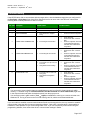
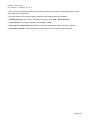
KEYEN – Driver Version 1.1 th Doc. Revision C – September 16 , 2014 General Information This chapter identifies all of the hardware and software components required to implement communication between the KEYEN driver in Studio and a target Keyence device (KV and KV-P Series) over Serial communication. The information is organized into the following sections: Device Specifications Network Specifications Driver Characteristics Conformance Testing Device Specifications To establish communication, your target device must meet the following specifications: Manufacturer: KEYENCE Compatible Equipment: • KV Series • KV-P Series Device Runtime Software: None For a description of the device(s) used to test driver conformance, see ―Conformance Testing‖. Network Specifications To establish communication, your device network must meet the following specifications: Device Communication Port: Communication Port A (Serial) Physical Protocol: RS232 Logic Protocol: Proprietary Device Runtime Software: None Specific PC Board: None Cable: OP-26486 (cable) and OP-26487 (9-Pin Sub D Connector) Driver Characteristics The KEYEN driver package consists of the following files, which are automatically installed in the /DRV subdirectory of Studio: KEYEN.INI: Internal driver file. You must not modify this file. KEYEN.MSG: Internal driver file containing error messages for each error code. You must not modify this file. KEYEN.PDF: This document, which provides detailed information about the KEYEN driver. KEYEN.DLL: Compiled driver. Note: ® You must use Adobe Acrobat Reader™ to view the KEYEN.PDF document. You can install Acrobat Reader from the Studio installation CD, or you can download it from Adobe’s Web site. Page 3/17